- Scripts and Buttons on the Whiteboard
- New Dashboard Widget – Donut chart
- New Video:
- 1 Tasks in Planfix: Optimizing work for both managers and teams
- 2 Chronicle at Planfix: Organizing Corporate Communications
- 3 Planner in Planfix: Organizing Your Workflow
- 4 Data tags in Planfix: Automating Financial Controls
- 5 Planfix for beginners: Reports
- 6 Planfix for Complete Beginners: How to Assign Tasks
- 7 Checklists in Planfix: How to Eliminate Chaos
- 8 Sequential Tasks
- 9 Projects in Planfix: How to Organize Tasks Around a Common Goal
June may be over, but our efforts to improve Planfix are just getting into full swing. Check out our latest updates and improvements to optimize your workflow even more.
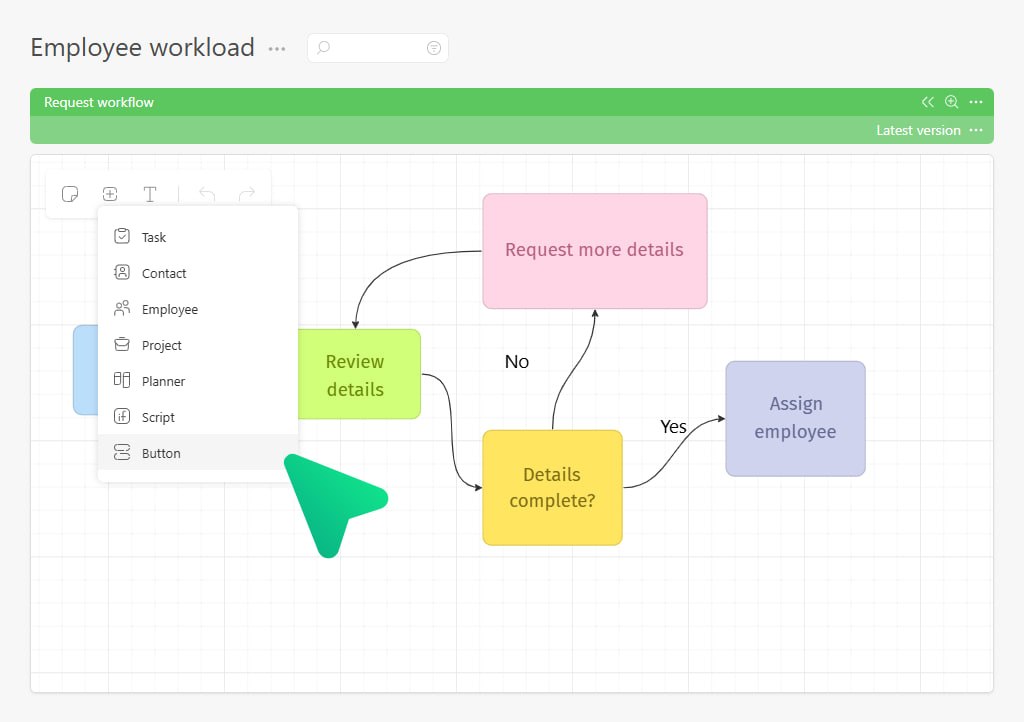
Scripts and Buttons on the Whiteboard
To add them, just open the object-adding menu and pick either “Script” or “Button.” Or, even easier – paste the link to a script or button right into an empty block on the whiteboard, and the right object will appear automatically.
This is perfect when you’re mapping out a business process set up in Planfix.
Now, in addition to the process itself, you can add the logic behind it – basically, what controls it. Use the Whiteboard to detail your complex business processes, making your workflow and future maintenance way simpler.
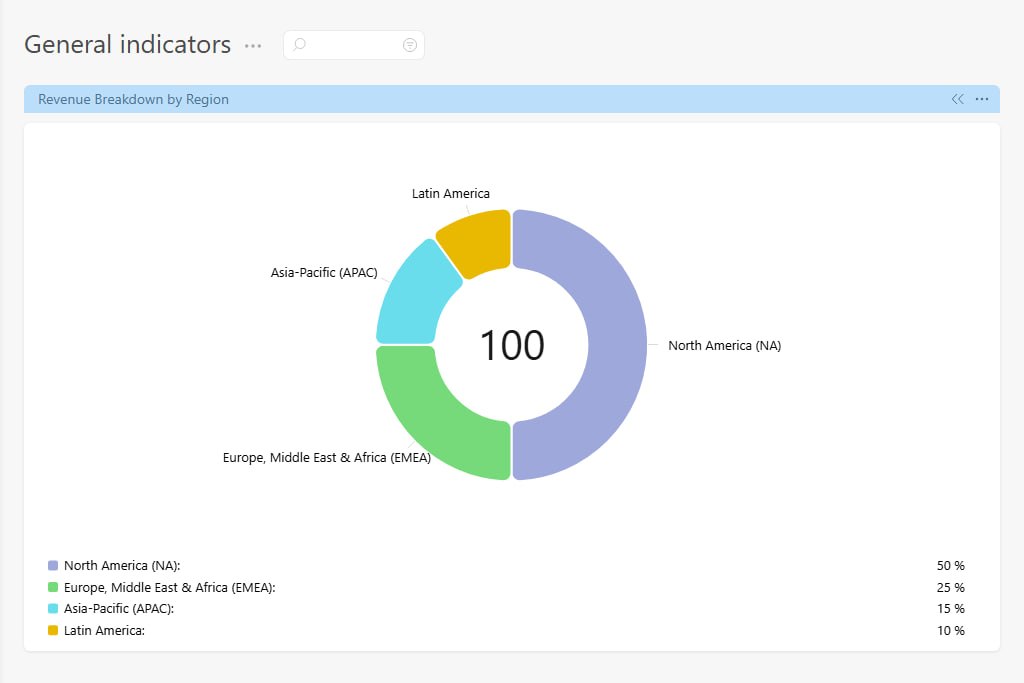
New Dashboard Widget – Donut chart
Unlike the usual pie chart, this one looks like a “donut” with a hollow center. Right in the middle, you can see the total sum of all values at a glance. It’s super handy when you want to quickly grasp both the shares and the overall total at a glance.
Check back in your widget settings from time to time – we’ll be adding more!
New Video:
Tasks in Planfix: Optimizing Work for Both Managers and Teams
Losing tasks and files in work chats on Telegram or WhatsApp? In this video, we’ll look at how a task works in Planfix and why managing projects within a task manager is more effective than using regular messaging apps.
We’ll walk through the anatomy of a task step by step and show how it helps automate business processes, set up employee control, and make teamwork more transparent. You’ll learn how implementing Planfix as a CRM and task tracker helps eliminate communication chaos and optimize work for both managers and teams.
You may also find our article “How to Automate Business Processes in Your Company” useful.
Chronicle at Planfix: Organizing Corporate Communications
Have internal notifications in work chats turned into an endless stream of spam, causing employees to miss important manager requests and lose focus? In this video, we’ll take a detailed look at how Chronicle works in Planfix — the main tool for managing incoming notifications. It replaces chaotic messenger conversations and helps organize company communication.
Planner in Planfix: Organizing Your Workflow
Managers and team leads regularly face uneven task distribution and missed deadlines. In this video, we’ll show how the planner in Planfix helps control employee workload and organize the team’s current work without manually collecting reports.
Data Tags in Planfix: Automating Financial Controls
Tired of collecting financial reports manually from Excel spreadsheets, while employee time tracking turns into chaos? In this video, we’ll show how built-in data tags in Planfix help you flexibly track expenses, working time, and key metrics directly inside your current tasks.
Planfix for Beginners: Reports
Spending hours manually collecting data tags from scattered spreadsheets and worrying about missing budget overruns? In this video, we’ll show how to set up automatic reports in Planfix, so your business can bring order to expense tracking and see the real profitability of projects.
Planfix for Complete Beginners: How to Assign Tasks
Not sure how to distribute responsibilities across your team? Do new assignments get stuck because no one knows who is responsible? In this video, we’ll look at assignees in Planfix – a tool that helps you quickly involve employees in the work process and clearly define areas of responsibility.
Checklists in Planfix: How to Eliminate Chaos
Tired of employees missing important details in complex processes, while tasks only get completed halfway? In this video, we’ll show you how to use checklists in Planfix to eliminate chaos, missed deadlines, and mistakes caused by human error.
Sequential Tasks
Do employees get confused about deadlines, start tasks too early, and create chaos in work chats like Telegram or Viber? In this video, we’ll show you how to build a clear process pipeline and set up Sequential Tasks in Planfix, so each stage of work is passed from one specialist to the next automatically — without manual control.
Projects in Planfix: How to Organize Tasks Around a Common Goal

Are you losing track of development stages, juggling client tasks, and searching through endless Telegram or WhatsApp chats for important documents? In this video, you’ll learn how Projects work in Planfix and why a structured project management system is far more effective than scattered messenger conversations.