How to Automate Media Business Operations
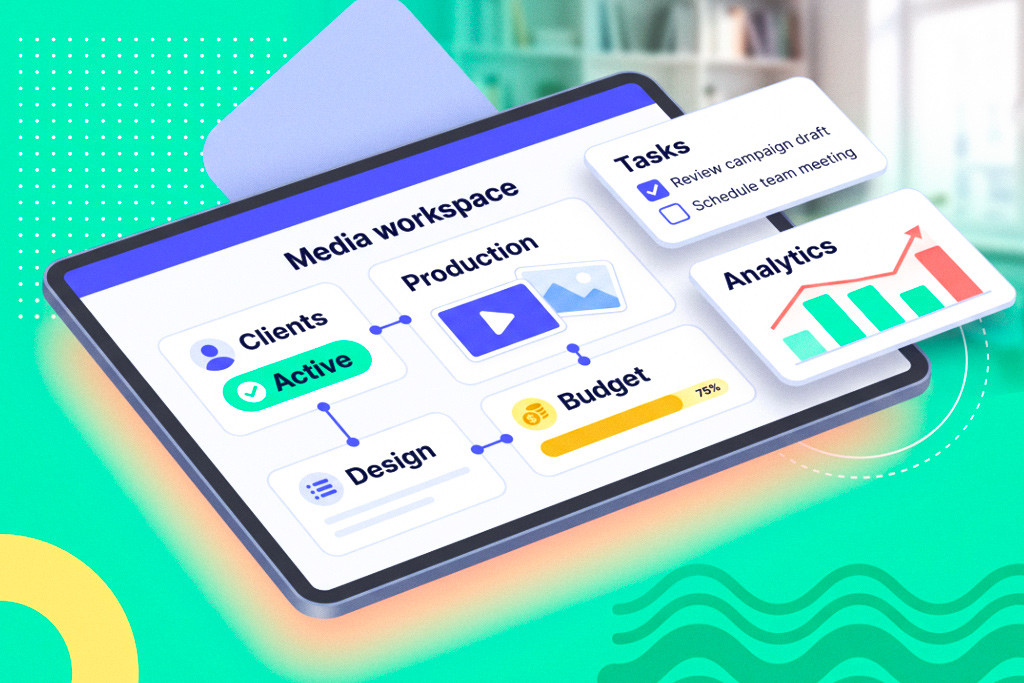
Media business automation means applying digital tools and automated workflows to the unique operations of a media company, whether that’s an agency, a publisher, or a production studio. Instead of relying on manual checklists, spreadsheets, and siloed software, automation connects client management, project planning, finance, and creative work in one system. That might mean using media management software that combines CRM and project management to handle new client intake, assign tasks, generate contracts, and produce reports on its own. Manual processes such as hand-keying data into spreadsheets, chasing approvals by email, or reconciling disparate systems don’t just waste time. They introduce errors and bottlenecks, too. In fact, surveys show knowledge workers spend an average of 4.5 hours per week on repetitive tasks that could be automated.
All those delays and errors hold media businesses back just as client demands and competition speed up. Digital transformation (DT) and automation point the other way, toward better efficiency, scalability, and profitability. Analysts project that global spending on digital transformation will reach about $3.4 trillion by 2026, which shows how central it has become to the way businesses evolve. Meanwhile, about 89% of companies now have or plan a digital-first strategy, and over half of executives link DT investments directly to revenue growth. For media firms, that means faster turnaround on campaigns, better use of resources, and higher margins.
In this guide, you’ll find an actionable framework for automating a media company’s operations. You’ll learn how to audit your current workflows, prioritize the right tools and processes, and implement automation in phases. We cover the core areas, including client onboarding, project management, finance, and team scheduling, and flag the best practices and pitfalls with checklists and examples from real media companies. Whether you run an ad agency, a content studio, or a marketing team, this roadmap will help you drive media workflow optimization and digital transformation step by step, starting small and scaling up as the results come in.
The Current State of Media Business Operations
Despite all the advances in technology, many media businesses still run critical operations by hand. A typical marketing campaign, for instance, gets launched through dozens of emails and spreadsheets passed between account managers, creatives, and finance teams. Tracking budgets or client approvals often means sifting through chat logs or chasing down signatures. These manual handoffs are slow, error-prone, and hard to scale. As a result, your team wastes hours on data entry and meeting coordination instead of creative or strategic work. The internal pressure to fix this keeps building, and in one survey, 91% of companies reported rising demand for automation across departments. Yet only a small fraction have fully automated their workflows.
Common pain points in media operations include:
- Client onboarding: Gathering client information, collecting approvals, and setting up accounts usually happens via email or paper forms. New clients end up waiting, and no two of them get the same experience.
- Project handoffs: When one team finishes, say strategy, and another picks the work up, say creative, essential details slip through the cracks. Without an integrated project management system, teams fall back on memory or fragmented notes, and bottlenecks follow.
- Billing and invoicing: Tracking billable hours or creative expenses by hand leads to errors and late invoices. Late invoices, in turn, hurt both your cash flow and your clients’ trust.
- Resource allocation: Managers overbook or underuse their staff simply because they have no automated view of who’s free. That makes it expensive to scale up for a big project.
Meanwhile, media clients and consumers expect more. Brands now ask for faster campaign turnarounds and omnichannel content, from digital ads and social videos to interactive media. Campaigns are more complex and more data-driven than ever. That raises the stakes for both accuracy and speed. Streaming and social video have trained audiences to expect everything right away, so any lag in your process can cost you business. Competitive pressure is just as intense, and agencies have to stand out through efficiency and creativity, not low prices alone. One industry report notes that companies ahead in digital transformation were 67% more resilient during the COVID-19 crisis, which suggests tech-enabled firms ride out market shifts better.
The point is, manual processes are a liability in modern media. Digital transformation, and automating media operations in particular, is now what it takes just to survive, let alone thrive. Companies that don’t modernize risk falling behind more agile competitors. The sections below look at the core processes where automation helps, and at how media companies can build an automation strategy that brings efficiency, fewer errors, and room to grow.
Core Areas for Media Business Automation
Effective automation in a media business touches several areas at once. Below are the four core ones where media companies should apply automation to simplify workflows and improve results.
Client Lifecycle Automation
Automation can radically simplify the whole client lifecycle, from lead generation through onboarding to ongoing account management. The key processes include:
- Lead capture and qualification: Let CRM forms and marketing automation pull in leads from your website, social ads, or email campaigns. Scoring rules can then qualify each lead by budget, industry, and other criteria, and route it to the right sales rep. That way, no prospect slips through.
- Automated client onboarding workflows: When a new client signs on, a workflow should fire right away. It can send a welcome email with the next steps, generate any forms you need, and create a project workspace. Contact details and contract terms flow straight into your project and finance systems, so nobody enters the same data twice.
- Contract management and e-signatures: Replace paper contracts with digital templates and e-signature platforms. The system fills in the contract fields, sends the document to the client, and files the signed copy centrally once it comes back. This cuts weeks off the approval cycle.
- Client communication and updates: Keep clients in the loop with automated notifications. Your CRM can send status emails or give clients a portal with live project dashboards. That means fewer repetitive update calls, and clients always see the latest progress, feedback, and invoices.
Automating the client lifecycle makes a media firm quicker to respond and more consistent in the way it serves people. A central CRM or platform ties marketing, sales, and account management together, so every stage of the client journey flows into the next.
Project & Campaign Automation
The heart of a media business is delivering creative projects and campaigns. Automation here keeps each phase moving without the usual delays. Consider these workflows:
- Brief creation and approval: Use standardized templates for project briefs and proposals. An automated workflow routes each new brief through the people who need to sign off, including the creative director and the client, with deadline reminders along the way. Once it’s approved, the workflow moves on to the next steps, and approval bottlenecks disappear.
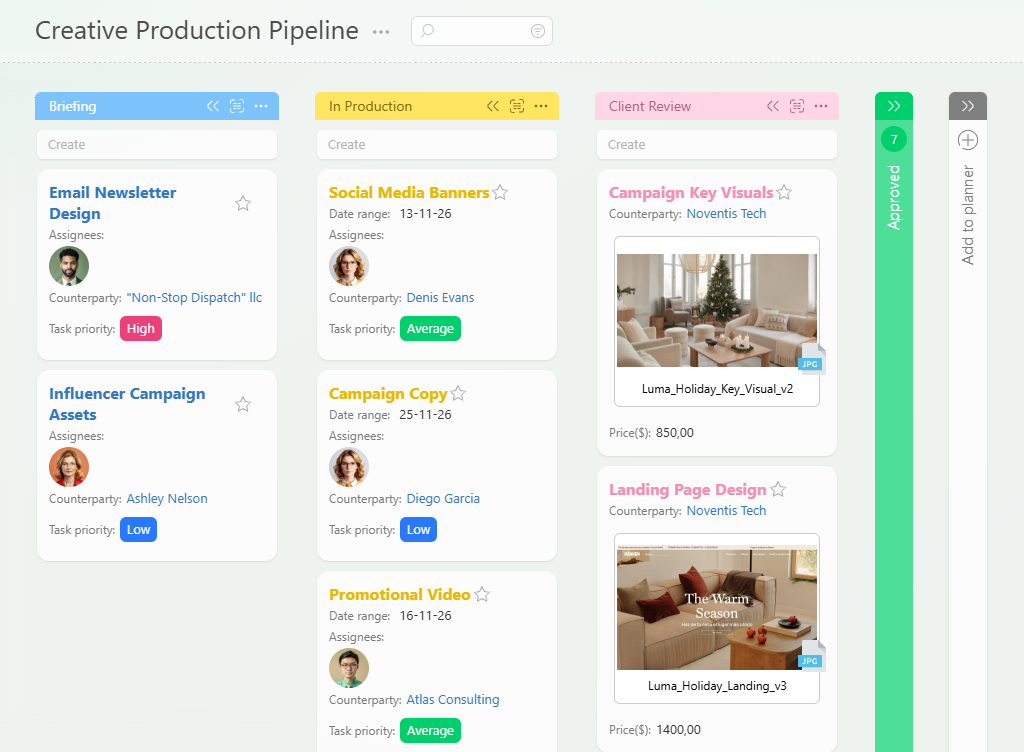
- Automated project setup and resource allocation: When a campaign gets the green light, an automation rule can create the project in your project management system and assign tasks by skill or availability. A “new campaign” trigger, for instance, could generate tasks like “Develop key visual” and “Write copy” and hand them to your design team and copywriters. Budget and timeline data transfer from the proposal to the project files on their own, so no setup step gets forgotten.
- Milestone tracking and progress reporting: Instead of updating spreadsheets by hand, use live dashboards that sync with your project plan. Automation can send weekly or milestone-based reports to stakeholders. As each phase wraps up, whether design, review, or delivery, the system notifies clients and internal teams. This real-time visibility prevents surprises and keeps everyone aligned.
- Quality assurance and approvals: Build QA steps into the workflow itself. Once a creative asset is finished, an automated task can route it to a quality checklist or a client review stage. Only when the checklist is signed off does the task close automatically. That way, standardized QA happens without separate follow-ups.
Project automation means that once a campaign brief is approved, the whole sequence of tasks rolls forward with little manual coordination. Missing approvals, unassigned tasks, and misplaced files stop holding the work up.
Financial Process Automation
Media companies often work on tight margins, so automating financial operations does a lot for profitability and cash flow. The key financial processes include:
- Time tracking and expense capture: Use automated desktop and mobile tools for time tracking and expense receipt capture. When creatives start work on a task, they click “start timer” in their project software, and billable hours log against the project on their own. Expenses such as stock footage purchases can be photographed and indexed automatically. That gives you accurate, real-time data on project costs without manual entry.
- Automated invoicing and payment processing: With time and expenses already captured, invoicing can be largely automatic. Your software generates invoices when milestones are achieved or at set project phases, using the data it already has. Automated payment processing, including card links and online payments, lets clients pay promptly, and the system sends reminders for overdue payments. This clears out the billing delays that come with writing invoices by hand.
- Budget monitoring and alerts: Set up automated budget controls. If project costs, time plus expenses, approach 90% of the approved budget, the system can alert the project manager. Dashboards show spend against budget in real time. Early alerts let managers shift resources or ask for more budget before an overrun happens.
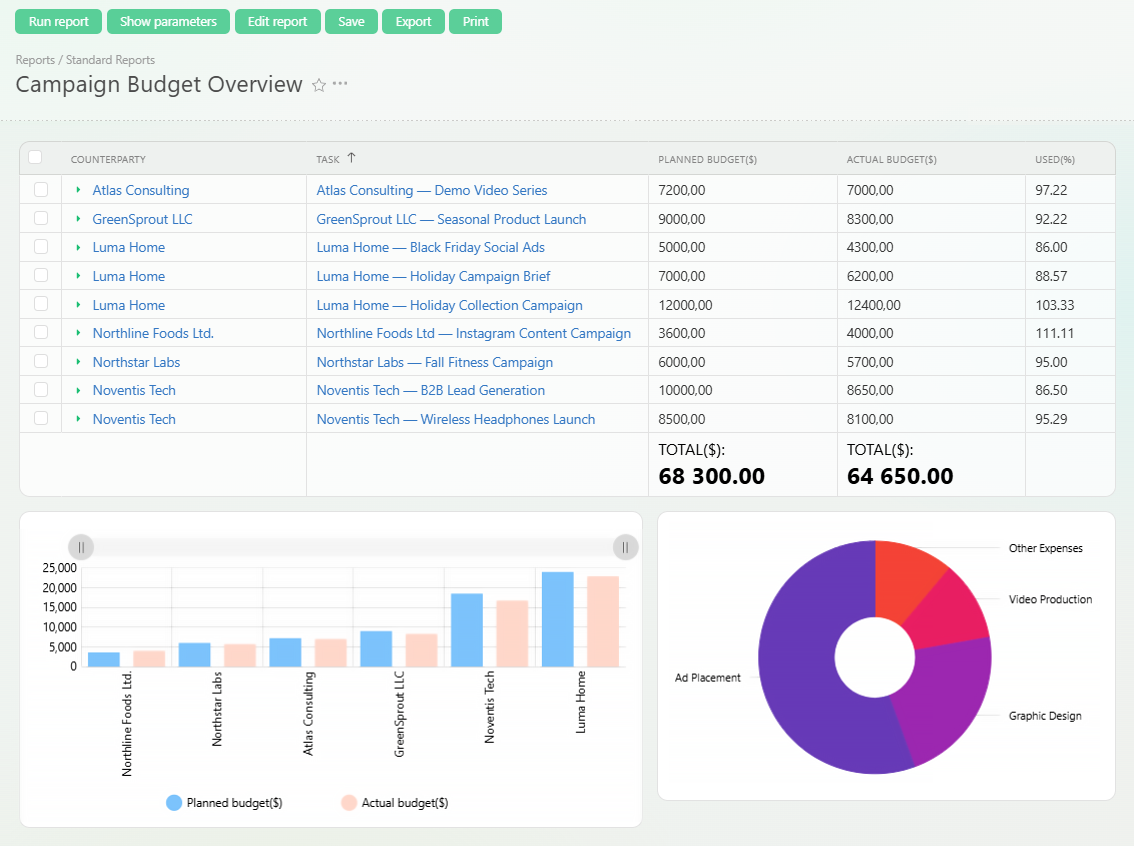
- Profitability analysis and reporting: Pull data from your CRM, projects, and finance into reports. You can generate profitability reports by project or client every month, showing revenue minus costs. Visual dashboards highlight which campaigns and services carry the best margins. From there, you can make data-driven decisions on pricing, client selection, and service mix.
Automating finance workflows means media companies get paid sooner and forecast more accurately. Alerts and dashboards keep profitability in plain sight instead of buried in paperwork.
Team & Resource Automation
In the end, efficient operations come down to managing people well. Automated resource planning and team workflows help here:
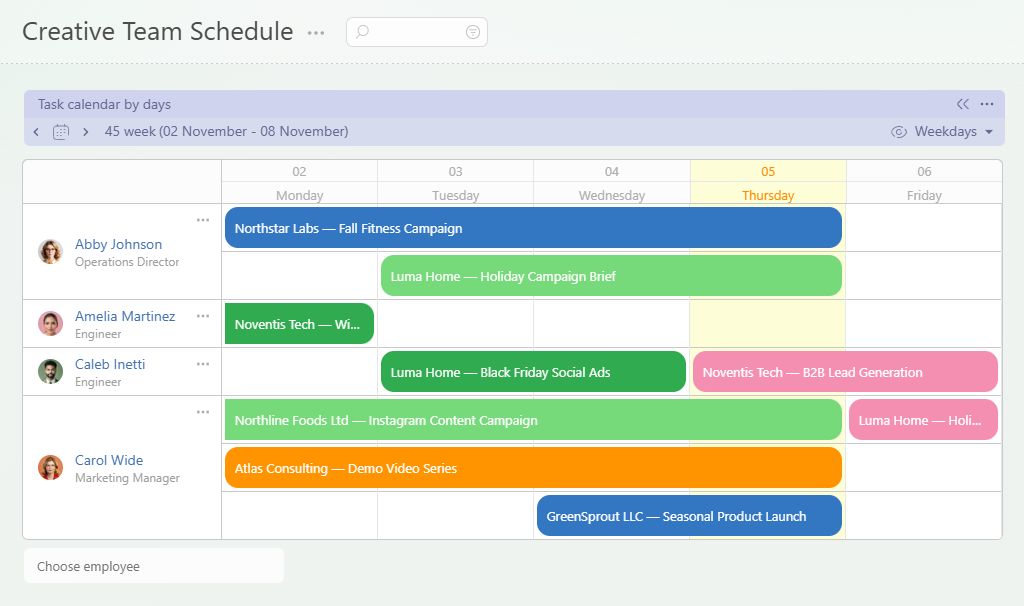
- Staff scheduling and capacity planning: Use resource management software to map skills, availability, and project timelines. Automation can suggest who to assign based on who’s free and qualified. When you add a new project phase, the system can hand it to designers who have bandwidth while keeping the workload even. That’s how you avoid both burnout and idle time.
- Task assignment and progress tracking: Task management systems, whether Kanban boards or checklists, can assign follow-up tasks as soon as the dependencies are done. Once a briefing is approved, the system creates tasks for the designers and notifies them. Your team members see their next steps without a manager pushing work at them.
- Performance monitoring and feedback loops: Automate your regular check-ins and status reviews. Set reminders for managers to review project timelines or employee goals each month. Use automated surveys or pulse checks to collect team feedback. Metrics like tasks completed per week point to training needs and to the people worth recognizing.
- Knowledge management and documentation: Make it easy to capture and reuse what the team learns. When a project closes, an automated process can archive the key documents, including creative briefs and feedback notes, and tag them. A searchable knowledge base can link templates or past project examples for future use. That saves you from recreating documentation and keeps institutional know-how in the company.
Automating team workflows and resource planning puts the right people on the right tasks at the right time, and it keeps hard-won knowledge inside the company.
Building Your Media Automation Strategy
A successful media automation initiative follows a clear structure. Here’s the phased strategy we’d recommend:
Phase 1: Process Audit and Mapping
- Identify current manual processes and bottlenecks: First, run interviews or workshops with your teams to list every key workflow, from client intake and briefing to billing. Note each step that is done by hand or in a disconnected tool.
- Map existing workflows and stakeholders: Then draw flowcharts of each process end to end, marking who is responsible at each step. Mapping it visually exposes duplicate approvals and wasted handoffs.
- Calculate time and cost of manual processes: Estimate how long each step currently takes and what it costs in labor. Tally the hours spent chasing approvals on a single project, for instance. Now your pain points have numbers attached.
- Prioritize automation opportunities by impact: Rank processes by business impact, including time saved, errors avoided, and revenue gained, and by how feasible they are. Go after high-volume repetitive tasks and the processes that cause the longest delays. If manual client onboarding takes a week, automating it could free up many hours.
Phase 2: Technology Assessment
- Evaluate current tool stack and capabilities: Take inventory of the software you already run, including your CRM, project tools, and accounting systems. Work out which functions are automated already and where the gaps remain.
- Identify integration requirements and gaps: Determine how well your systems talk to each other. If your CRM can’t reach your billing system, your automation stays siloed. Note where you’ll need APIs or middleware to link the tools.
- Consider all-in-one platforms vs. specialized tools: Decide whether to run one platform that covers CRM, projects, and finance, or best-of-breed apps wired together. All-in-one solutions cut the integration work, while specialized tools can go deeper in one area. Weigh the trade-off against your size and your needs.
- Plan for scalability and future needs: Choose technologies that can grow with you. Cloud-based platforms with open APIs are the safest bet. Make sure the tools can handle more users, more data, and new modules such as AI features as the company expands.
Phase 3: Implementation Planning
- Start with high-impact, low-complexity automations: Launch the simple quick wins first to build momentum. Automate your most repetitive approval workflow before you take on a complex multi-department project pipeline. Early successes help you gain buy-in for the later stages.
- Design workflows that match business processes: Before you switch any tool on, rework the process itself and remove the unnecessary steps. Then configure the automation to mirror the optimized workflow. Otherwise you simply digitize a flawed process.
- Plan data migration and integration strategies: Identify the data you need to move, including client records and past projects. Define how you’ll migrate or synchronize it so no information is lost. For integrations, spell out which systems will share data and how, whether through APIs, connectors, or file imports.
- Develop training and change management plans: Automation only works if people use it. Prepare documentation, how-to guides, and training sessions for your team. Appoint automation champions who can help colleagues adapt. Communicate early and often about how these changes make work easier.
Phase 4: Rollout and Optimization
- Implement in phases with proper testing: Don’t switch everything over at once. Pilot your automations in one department or on one process. Test thoroughly with real data to catch any issues before the full rollout.
- Monitor adoption and gather feedback: Track usage metrics, such as how many invoices now go out automatically, and ask users about their experience. Analytics dashboards show whether processes really are completing faster. Encourage staff to suggest improvements.
- Continuously optimize workflows and processes: Automation isn’t set and forget. Review each automated process regularly. When new exceptions come up or a process changes, update the workflow logic. Small tweaks now prevent big problems later.
- Scale successful automations across operations: Once a pilot proves its value, expand it. If you automated onboarding for one service line, roll it out to the others. Share the ROI, in hours saved and errors eliminated, to justify the next round of investment.
Working through these phases turns fragmented manual workflows into automated ones, one step at a time. The approach keeps risk low and keeps the technology tied to what the business actually needs.
Essential Automation Workflows for Media Companies
Here are the essential workflows media companies typically automate, and how each core process turns into a digital pipeline:
Client Onboarding Automation
- Automated welcome sequences and document collection: Once a client signs, the system can launch an email or portal sequence with introductions, a project overview, and the forms you need, from questionnaires to NDAs. Clients submit their information online, and it populates your databases on its own.
- Contract generation and e-signature workflows: Use templates to fill client details into contracts automatically. The system then emails the contract for e-signature, through DocuSign or an integrated signing tool. When it’s signed, the PDF lands in the client’s folder without anyone filing it.
- Project setup and team assignment processes: Upon onboarding, an automated rule creates a new project record with standardized tasks such as “Kickoff meeting” and “Strategy session”. It assigns team members by role and availability. Budget codes and timelines from the contract flow into the project plan without manual entry.
- Kickoff meeting scheduling and preparation: Integrate your calendar tools so the project manager gets a prompt to schedule the kickoff. The workflow sends a meeting invite to the client and the team with an agenda generated from the project brief. By the time the first meeting starts, all the setup work is done.
Creative Production Automation
- Brief distribution and approval workflows: When a project brief is finalized, an automated process distributes it to the people who need it, including the creative director and the art team. Approval tasks make sure each person reviews and signs off in sequence. Deadline reminders go out automatically until everyone has approved, so nothing stalls.
- Asset creation and review processes: Creative assets, whether designs, copy, or videos, pass through defined stages. Once a draft is uploaded, the system notifies the reviewers. After feedback, it creates a revision task for the original creator. Version history is tracked without a single email chain.
- Client feedback collection and implementation: Use a client portal or feedback form that feeds straight into your project tool. When a client submits feedback, the system assigns tasks to address those comments. Automated alerts make sure nothing is missed, and it’s all logged against the project.
- Final delivery and approval systems: When assets are ready for delivery, the system can package the deliverables, compressing files and generating links, and send them to the client. It then triggers an approval step so the client can sign off on the final files. That closes the loop, with delivery, feedback, and revisions all captured.
Business Intelligence Automation
- Automated reporting and dashboard updates: Feed data from your CRM, project management, and finance into BI tools that refresh on their own. A dashboard can show live KPIs, from campaign performance and project progress to budget spend, updating in real time without manual data pulls.
- Performance tracking and KPI monitoring: Set up alerts for your key metrics. If a campaign’s click-through rate dips below a threshold, or project tasks fall behind schedule, the system notifies the team immediately. Automated trend charts help teams spot issues early.
- Profitability analysis and budget alerts: Combine revenue and cost data in an automated profit dashboard. The system can flag projects below a profit margin target or alert managers when a project’s costs exceed budget. That removes the manual spreadsheet work and surfaces issues as they happen.
- Client satisfaction and retention metrics: Collect satisfaction data automatically after project milestones, through emailed surveys or embedded forms. The system can calculate a Net Promoter Score (NPS) for each client and trigger retention workflows, like sending thank-you offers to your happiest clients. Dashboards track satisfaction trends over time.
With these automated workflows in place, a media company turns disparate tasks into one interconnected system. Teams spend less time managing the process and more time on creative, strategic work.
Common Automation Mistakes to Avoid
Automation can drive huge gains, but there are pitfalls. Avoid these common mistakes:
- Over-automating processes that need a human touch: Not every task should be on autopilot. Creative idea generation and final creative judgment rely on human insight, and over-automation there can backfire. Work out which tasks genuinely benefit from straight-through automation, such as data entry and notifications, and which need flexible human decision points.
- Implementing technology before optimizing processes: Buying software without fixing the underlying process just digitizes inefficiency. Clean up the workflow first by eliminating unnecessary steps, standardizing handoffs, and training teams on the new way of working. Only then automate. Otherwise you’re automating chaos.
- Ignoring team adoption and change management: New automation tools fail when the staff isn’t on board. People default to old habits if the new system feels cumbersome. Involve users early, provide hands-on training, and show the quick wins. Solicit feedback and adjust. Without adoption, even the best system delivers no value.
- Creating rigid systems that can’t adapt: Business processes change. A setup that’s too rigid grinds to a halt as soon as the rules need altering. Design your workflows to allow exceptions and updates, with manual overrides or alternate paths in the workflow engine. Review the automation rules regularly to be sure they still fit.
- Focusing on tools rather than outcomes: It’s easy to get distracted by tool features. Automation is a means to an end, whether efficiency, accuracy, or client satisfaction, not an end in itself. Set clear goals, like “reduce invoice lag by 50%”, and let the outcomes drive your tool selection and workflow design. Focus on business value instead of bells and whistles.
Steer clear of these traps, and your automation will simplify the work instead of introducing new headaches.
Measuring Automation Success
You need numbers on what your automation actually changed. The key metrics include:
- Time savings and efficiency: Measure how much faster tasks are completed. Track the hours spent on onboarding, reporting, or billing before and after automation. If an automated invoice system cuts processing time from five days to one, that’s a clear win. Monitor process cycle times and throughput, such as the number of projects handled per quarter.
- Error reduction and quality improvements: Track error rates, from billing mistakes to missed deadlines, before and after automation. Fewer manual handoffs should mean fewer data errors and less rework. More accurate reports and invoices are a tangible sign of success.
- Client satisfaction and retention rates: Use surveys or NPS scores to see whether clients notice better service and faster delivery. Automated updates and clear communication usually translate into happier clients and more repeat business. Rising renewal rates and positive feedback tie back to smoother operations.
- Revenue per employee and profitability gains: Compute financial ratios like revenue per staff member or profit margin per project. Automation should let your team handle more work without extra hires, which lifts both numbers. Compare the profitability of automated and non-automated projects to see the financial impact.
- Team satisfaction and engagement: The often-overlooked metric is how your people feel. A recent UiPath study found that 91% of workers feel automation lets them focus on more meaningful tasks, and 85% of leaders say it improves retention. Use internal surveys or interviews to confirm your team feels less burdened by repetitive tasks and more engaged. High adoption rates and positive feedback are strong indicators of success.
Tracking these KPIs lets you build the business case for further automation and keep optimizing what you already run. Use dashboards that update automatically, and you’ll always have current data on your automation ROI.
Future of Media Business Automation
The future of media automation promises even more intelligent and integrated workflows. Over the coming years, AI-powered process optimization will take center stage. Machine learning algorithms will forecast the best resource allocation or predict campaign performance, so teams can automate decision-making and not just tasks. We already see the early signs, as AI tools assist with creative production. “Creative automation is not jargon anymore, it’s a reality,” as one industry analysis put it. AI can help with editing, scriptwriting, and even personalized content delivery, which hints that media companies will soon automate parts of content creation itself.
Predictive analytics will inform resource planning and scheduling. Imagine a system that reads your past project data, forecasts how long a new campaign will take and who will be needed, then schedules the staff and budget for you. Advanced client communication bots could handle routine queries or update requests, which frees account teams for the high-touch conversations.
Emerging media technologies will integrate with operations, too. AR and VR production workflows, or IoT-triggered content distribution, will need new automated pipelines, and future platforms will likely offer these out of the box. Low-code and no-code tools will also make it easier for non-technical staff to build custom automations on the fly, which adds up to a more agile company.
In short, automation in the years ahead will be increasingly smart, predictive, and integrated. The media companies that embrace these trends, using AI agents to analyze media performance or automate routine creative tweaks, will set new benchmarks for efficiency and innovation.
Conclusion
Media business automation is no longer optional. It’s a strategic necessity. In this guide, we’ve walked through a framework for auditing your current processes, mapping workflows, choosing tools, and rolling out automation in phases. We examined the key areas, from client onboarding to BI dashboards, and identified the common pitfalls. Follow this roadmap, and your slow, error-prone workflows become smooth, data-driven operations. The payoff is faster delivery, higher quality, and greater profitability. Meanwhile, your staff spend more time on creative, high-value work instead of busywork, and clients get a smoother experience.
The best approach is to start small. Identify one or two high-impact processes to automate first, such as onboarding or time tracking, and build your success story there. Learn from that pilot, then expand. As the systems prove their worth, roll out additional automations. With each step, monitor the results and iterate.
All-in-one platforms can make this journey easier. A unified business management system like Planfix ties together CRM, project management, and financials in one interface. Planfix advertises the ability to “automate processes, manage tasks and documents, and keep every project on track”, which illustrates how an integrated solution can embody the strategy above. (Planfix is just one example. Many platforms offer similar all-in-one automation capabilities.) Solutions like these let you implement end-to-end media workflow automation without stitching together dozens of point tools.
So take stock of your current operations using the principles here. Create audit checklists for your processes, identify the quick wins, and start building an automation plan today. Media is changing fast, and the companies that automate effectively will be the ones that thrive. The key is to act now: start with a focused pilot, refine your processes, and scale up. Take that methodical approach, and digital transformation turns into day-to-day efficiency and growth for your media business.
FAQ
What is media business automation?
It means running the operations of an agency, publisher, or production studio on digital tools and automated workflows instead of manual checklists and spreadsheets. Client management, project planning, finance, and creative work connect to each other, so data moves between them without anyone re-entering it. That covers everything from lead capture and contracts to invoicing and profitability reports.
Which processes should a media agency automate first?
Start with high-volume, repetitive work that causes the longest delays, such as client onboarding, time tracking, or approval routing. Rank your processes by business impact and feasibility, then pilot one of them. A quick win builds the momentum and the buy-in you need for bigger automations later.
Do you need separate tools for CRM, projects, and finance?
No. You can either run an all-in-one platform that covers CRM, project management, and finance, or integrate best-of-breed apps. All-in-one solutions cut the integration work, while specialized tools can go deeper in a single area. Weigh the trade-off against your team size and the way your data has to move between systems.
How do you measure the results of media automation?
Track the time saved per process, error and rework rates, client satisfaction or NPS, and revenue per employee. Compare the same metrics before and after each automation goes live. Dashboards that refresh automatically keep those numbers current, so you can build the case for the next phase.
