- Planfix’s Vertical Menu Gets a Major Upgrade
- The New Version of the Planfix Mobile app for iOS and Android is here – 0.71
- Create and Edit WABA Templates Directly in Planfix
- Managing Your Account Just Got Easier
- Allow All Employees to Edit Any Files They Can Access
- Whiteboards – A Dedicated Section in the Main Menu
- Now Task Assignees and Participants Are Automatically Added to Google or Microsoft Calendar Events
- New Video:
July’s Planfix update is here, and we’re excited to show you new features that will make your life easier and increase productivity.
Keep reading for more – there’s definitely something for you.
Planfix’s Vertical Menu Gets a Major Upgrade
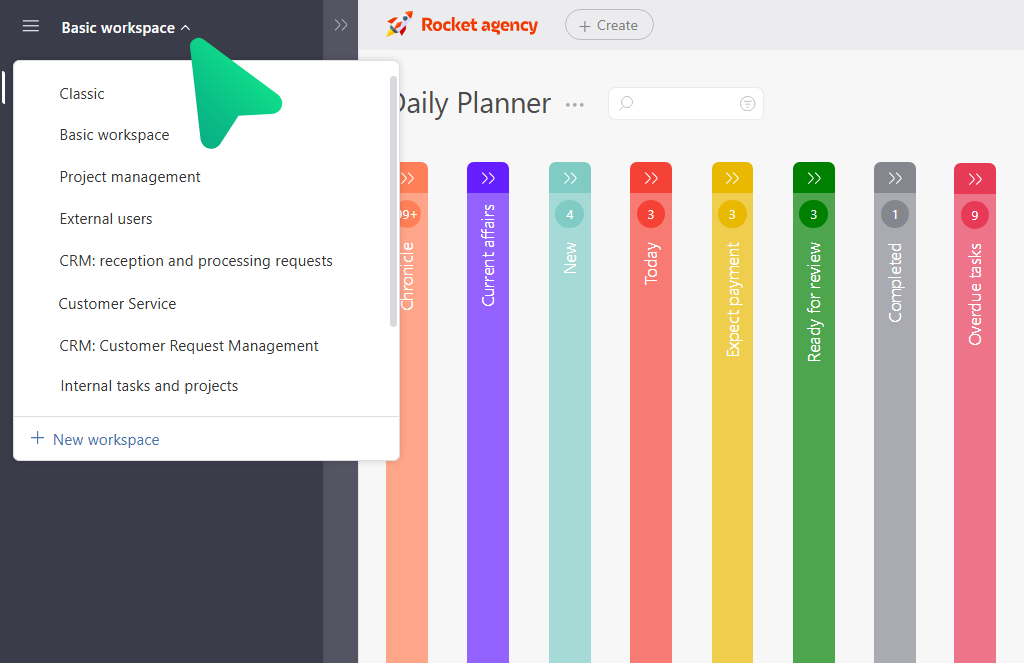
We’ve moved the workspace switcher to the main menu on the left — it just makes more sense there compared to how it was before in the “rocket” layout. Plus, all your workspace settings are now right there too, keeping everything neat and easy to find.
Ready to give the vertical main menu a try?
Just head to your user profile → Settings → Appearance to switch it on.
The New Version of the Planfix Mobile app for iOS and Android is here – 0.71
- What’s new:
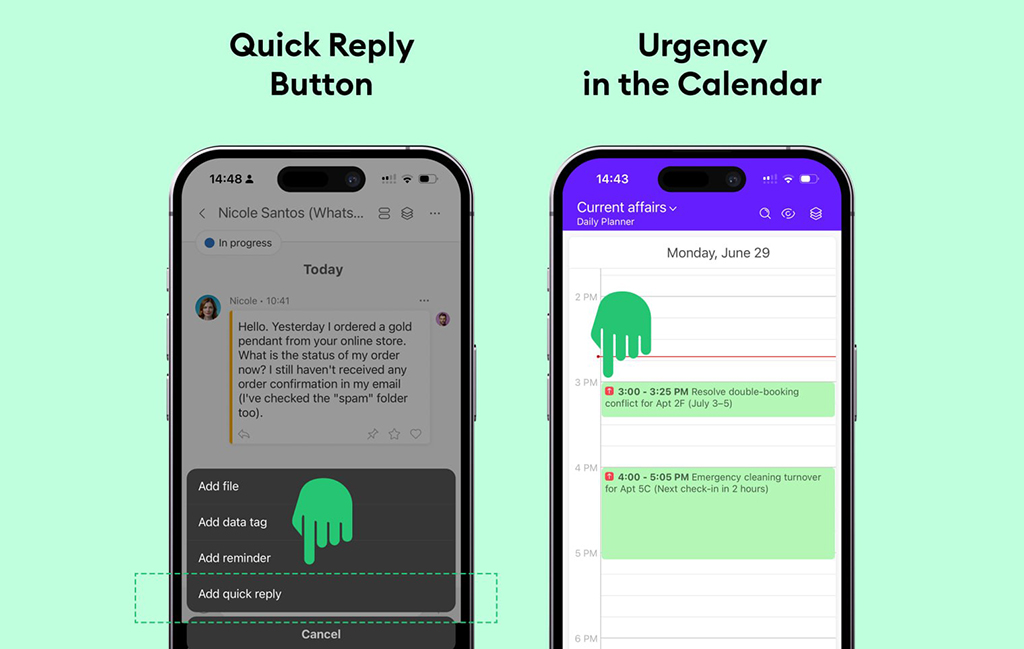
- Quick replies are now available in chats, so you can pick standard responses without using special characters.
- HTML files can now be viewed right in the app – no need to open them in external services.
- Calendars now show task urgency, making it easier to assess workload, spot priority tasks faster, and keep important work in focus.
- You can now jump to an employee’s tasks directly from their profile card, helping you find related work faster and move between tasks more easily.
Update the app and try the new features.
iOS: https://itunes.apple.com/us/app/id1475346366
Android: https://play.google.com/store/apps/details?id=com.planfixng
Create and Edit WABA Templates Directly in Planfix
Head over to your WhatsApp Business integration settings – you’ll find a new Template Manager right there. You can create new templates, add variables, and submit them for approval to Meta without ever leaving Planfix. Plus, you can track the approval status all in one place.
Before, you had to jump into WhatsApp Business Manager and then bounce back to Planfix.
Now, the entire process – from draft to green light – happens in a single window.
And don’t worry, your templates created earlier in Business Manager aren’t going anywhere – they’ll still sync up and work just like before.

Managing Your Account Just Got Easier
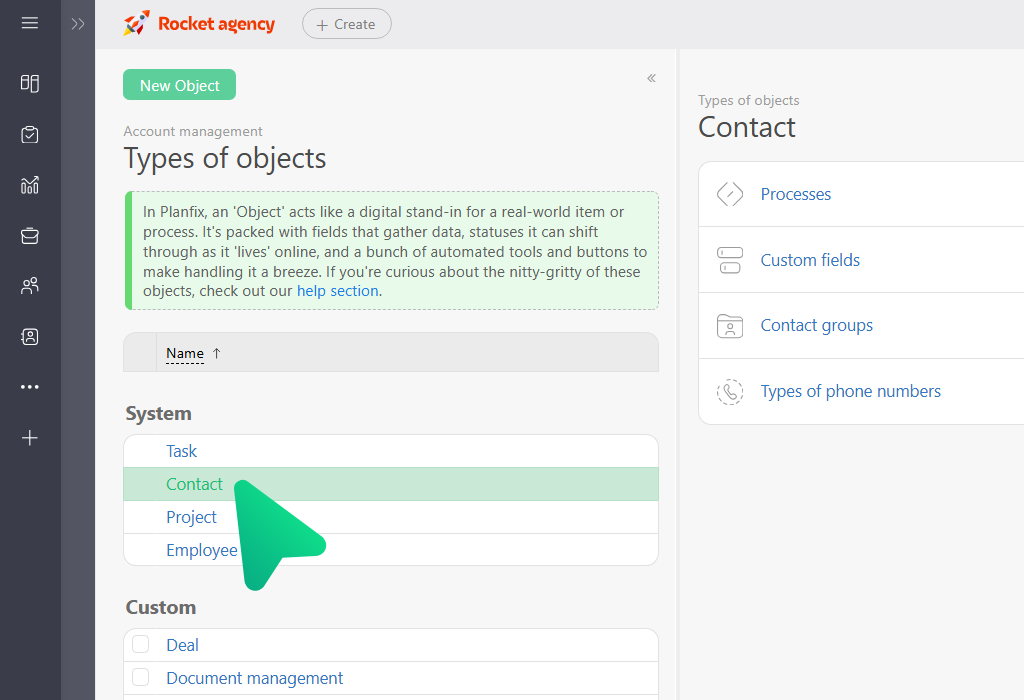
We’ve moved all settings directly to the Objects they belong to. That means no more hunting through different menus to find what you need.
What used to be the “Objects” section is now called “Types of objects” and is roughly split into two categories:
➡️ System objects (like Task, Project, Contact, Employee)
➡️ And custom objects created by you.
All the settings that were scattered across various places are now neatly organized inside their respective objects.
The logic is simple: want to change something about a contact?
Just go to the Contact section and you’ll see everything right there. No more guessing where that setting might be – it’s exactly where you expect it.
And of course, we took the chance to tidy up other sections too.
Allow All Employees to Edit Any Files They Can Access
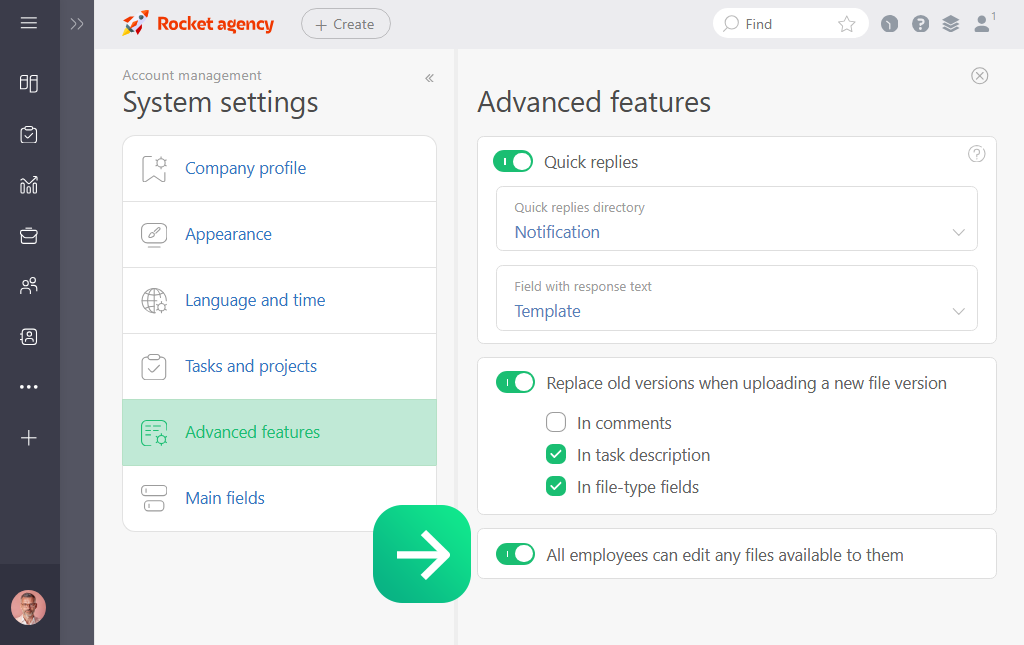
A new checkbox just landed in “Account Management” → “Advanced features”: “All employees can edit any files available to them.”
Turn it on, and the “Edit” button will automatically show up for everyone who can see a file – not just the creator.
Here’s how teamwork used to work: the creator uploaded a file to a task and then manually gave editing access to each teammate. Easy enough with a few files. But when you’re juggling dozens, it quickly turned into extra hassle – and it’s easy to forget who has access.
Now, one simple checkbox at the account level simplifies the whole process. Don’t worry about access boundaries changing: employees can only edit files they’re allowed to see.
If your team needs tighter control over editing rights, just leave this setting off. You can keep managing access the way you always have.
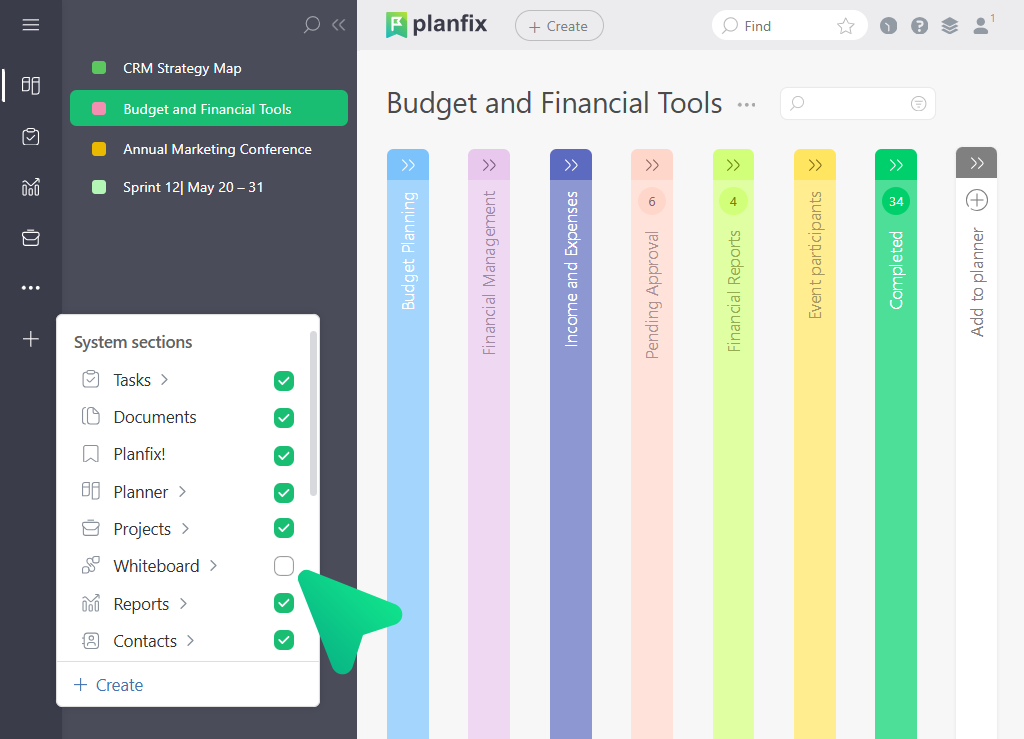
Whiteboards – A Dedicated Section in the Main Menu
Now Task Assignees and Participants Are Automatically Added to Google or Microsoft Calendar Events
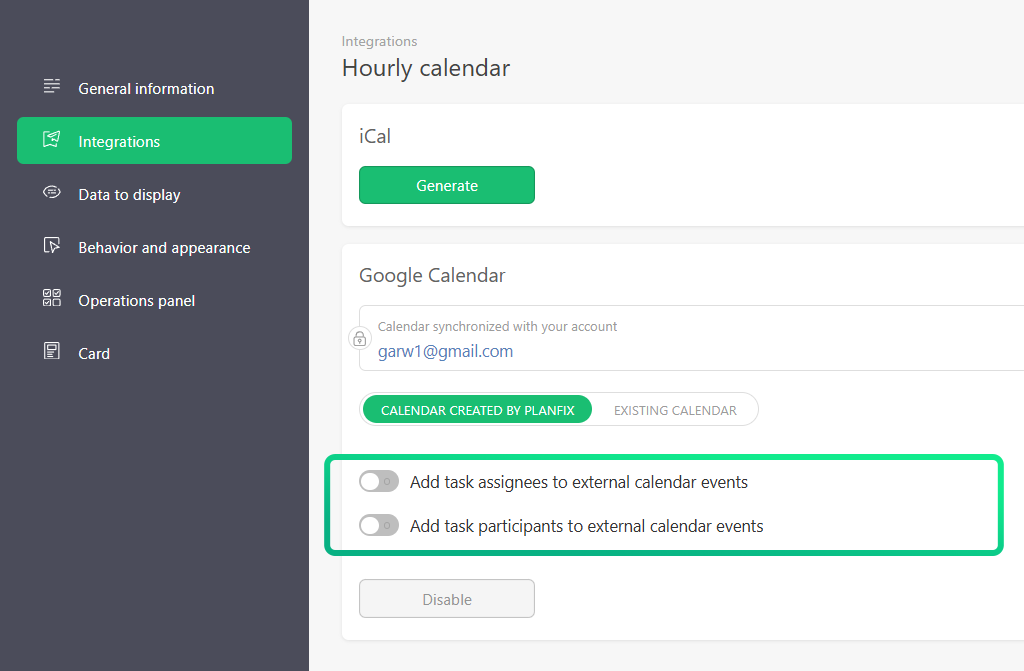
We’ve added two handy new options in the Google and Microsoft Calendar integration settings: you can now toggle on adding task assignees and participants directly as guests in your calendar events. Just flip the switches you want, and whenever you create or update a task, those folks will automatically get added as event attendees.
One thing to keep in mind: participants are added only when you create or update tasks. If someone is removed from the task assignees or participants later, they won’t be automatically removed from the calendar event. You’ll need to remove them manually in Google or Microsoft Calendar.
New Video:
Recurring Tasks: How to Automate Routine Work
Do you forget to send invoices on time, prepare monthly reports, or hold regular team meetings? In this video, we’ll show you how to automate routine work and set up automatic recurring task creation in Planfix, so you can eliminate human error and bring order to regular processes.
We’ll walk through how to set up business process automation using recurrence templates, distribute team workload in the calendar, and reduce the time spent on routine management. You’ll learn how the Planfix task tracker and CRM help managers automate procedures, payroll processing, audits, and meetups, making project management more systematic and predictable.
How Custom Objects and Statuses Work in Planfix
In this video, we’ll show you how custom Objects and Statuses work in Planfix so you can eliminate lost data and bring structure to your business processes.
Step by step, you’ll learn how to create digital versions of your real-world workflows — whether they’re leads, deals, service appointments, or customer requests. We’ll show you how to build custom fields, design the perfect lifecycle for your records, and automate repetitive work. You’ll also discover how Planfix’s flexible permissions and automation rules give managers complete control over every stage of the sales pipeline while reducing manual effort for the team.
Task Search in Planfix: How to Quickly Find Any Task Card
Do important assignments keep getting lost among hundreds of active processes, forcing you to waste valuable time searching for the right task? In this video, we’ll go through all the ways to quickly search for tasks in Planfix, so you can instantly find the information you need and keep your workspace under control.
Effective project management and business automation require the team to navigate the company’s CRM quickly and confidently. This guide explains how to use filtering, sorting, and list customization tools inside a modern work management system.
How to Write Comments in a Task
Information noise and unnecessary notifications slow down team productivity and distract from key priorities.
Managing targeted communication and addressing messages specifically helps organize teamwork across projects. In this video, we demonstrate how to set up notifications in Planfix, mention specific team members using tags, address questions to entire departments, and hide technical notes within your workspace.
Communication in Planfix: How to Move Discussions from Chats to Tasks
Do important decisions get lost in long message threads when you’re working through a complex issue with your team?
Effective team collaboration and project management require a single communication workspace. Planfix helps departments work together and automates the tracking of assigned work.
Automated Scripts in Planfix: How to Reduce Human Error
Tired of manually forwarding emails to customers, updating deal statuses, and monitoring every employee action in Telegram or WhatsApp work chats? In this video, we’ll show you how to configure automated scripts in Planfix to reduce human error, eliminate unnecessary confusion, and automate routine operations.
We’ll walk through the internal triggers and buttons that streamline project management and automate event sequences at every stage of the sales pipeline. You’ll learn how Planfix’s flexible configuration tools let you customize CRM logic, assign routine operations to robots, and free up your team for more important work.
Directories in Planfix: How to Standardize Data Entry
Do you constantly fix employee typos, spend hours entering the same data into spreadsheets, and waste time searching for response templates or instructions in messy Telegram or Skype chats? In this video, we’ll show you how to configure custom Directories in Planfix to standardize data entry, protect your database from errors, and streamline document-related work.
We’ll walk through how to create a centralized corporate knowledge base, connect directory lists to custom task fields, and enable quick replies to speed up communication. You’ll learn how system-wide synchronization and flexible access permissions in Planfix CRM help managers digitize company procedures and prepare clean, structured data for accurate data analysis and reports.
Omnichannel in Planfix: How to Avoid Losing Leads and Conversations
Losing leads because of slow replies? Getting lost between browser tabs and messenger apps? Worried that a former manager could take your entire contact base from Telegram, WhatsApp, or Viber? In this video, we will show how to organize omnichannel client communication in Planfix, consolidate all communication channels into a single window, and turn chaotic messaging into a clear business process.
We will go step by step through automatic client card creation, the distribution of incoming requests among employees, and hidden internal discussions within a work task. You will learn how implementing Planfix as a CRM and task tracker helps protect company data, provides transparent analytics for revenue and expenses, and keeps client communication secure.
Artificial Intelligence in Planfix: Unleashing AI Capabilities for Business
Tired of wasting valuable time on routine workspace setup, manually collecting input from clients, and reading through endless work chats? In this video, we will look at artificial intelligence in Planfix – a powerful set of tools that helps automate business processes, handle incoming
information, and significantly improve team efficiency.
We will explore how AI technologies can be integrated into a modern task management system to digitize business processes from scratch. You will learn how to use smart AI agents to collect data automatically, quickly summarize calls and discussions, and automate communication – all of which is especially useful for CRM implementation, project management optimization, and reducing the workload.