Top 10 Online Software for Accounting
Choosing the right online accounting software is crucial for business success in 2025. With the shift from manual bookkeeping to cloud-based financial management, businesses now have access to powerful platforms that offer real-time insights, automated workflows, and seamless integrations.
The right accounting software eliminates manual data entry errors, streamlines financial reporting, simplifies tax preparation, and provides the visibility needed for informed decision-making. This guide examines the top 10 online accounting platforms available in 2025, helping you find the perfect solution for your business needs and budget.
What to Look for in the Best Accounting Software?
When evaluating accounting software, focus on these essential features that will impact your daily operations and long-term growth:
Cloud-Based Access and Security: Modern accounting software should be accessible anywhere with bank-level encryption, automatic backups, and real-time synchronization across multiple users.
Comprehensive Invoicing and Billing: Look for customizable templates, automated recurring billing, payment reminders, and integration with multiple payment gateways to streamline cash flow.
Banking and CRM Integration: Direct bank feeds eliminate manual data entry, while CRM integration provides complete customer insights, connecting sales activities with financial outcomes.
Advanced Reporting and Analytics: Essential reports include profit and loss, balance sheet, and cash flow statements, plus customizable dashboards that turn financial data into actionable insights.
Automation and AI Features: Intelligent transaction categorization, automated workflows, receipt scanning, and predictive analytics save time and improve accuracy.
Scalability and Customization: Choose platforms that grow with your business, supporting increased transaction volumes, multiple currencies, and custom workflows without requiring system changes.
Top 10 Online Accounting Software Platforms
1. Planfix
Source: https://planfix.com/
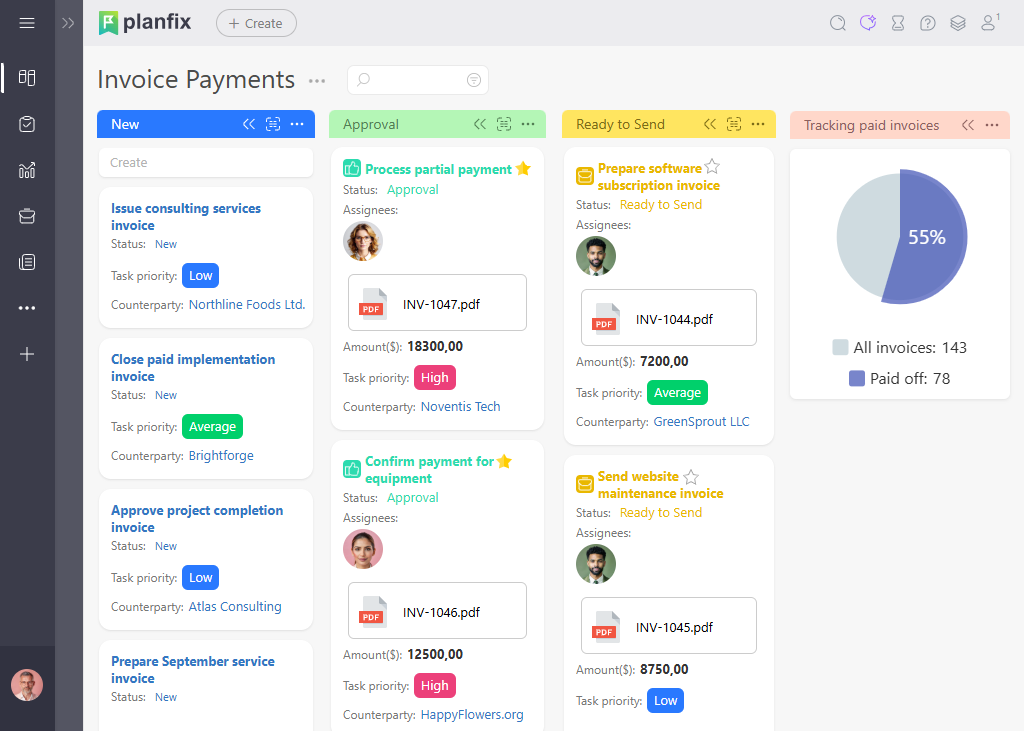
While Planfix has evolved beyond its traditional CRM roots, it now represents a comprehensive approach to business management that integrates dedicated accounting functionality with operational oversight. As a business automation platform with built-in accounting capabilities, Planfix streamlines financial processes while maintaining comprehensive operational control.
Key Features:
- Dedicated accounting pages with full financial management capabilities.
- Customizable CRM pipelines that integrate seamlessly with financial processes.
- Workflow automation that connects sales, operations, and financial activities.
- Comprehensive task management with integrated financial tracking.
- Native accounting tools alongside integration capabilities with external platforms.
- Detailed reporting and analytics across business and financial operations.
- Budget and cost control tools integrated with project management.
- Collaborative features that connect different departments and roles.
Planfix’s unique value proposition lies in its ability to serve as both a complete accounting solution and the operational backbone that connects financial processes with broader business activities. The platform combines traditional accounting functionality with advanced business automation, transforming financial management from an isolated function into an integrated part of comprehensive business operations.
The platform excels at automating workflows that span multiple business functions while maintaining full accounting capabilities. For example, when a sale is completed in your CRM, Planfix can automatically generate invoices within its accounting module, create fulfillment tasks, update inventory levels, schedule follow-up activities, and maintain complete financial records. This integrated approach eliminates manual data transfer and ensures consistency across all business processes.
Pros:
- Complete accounting functionality with dedicated financial management pages.
- Exceptional customization and workflow automation capabilities.
- Integrated approach combining accounting with comprehensive business management.
- Strong ecosystem for connecting with external business tools when needed.
- Collaborative features that improve team coordination and financial oversight.
- Scalable platform that grows with business complexity.
Cons:
- Learning curve for setting up complex automated workflows.
- Implementation complexity increases with customization depth.
- A comprehensive feature set may require time to fully utilize.
- Advanced automation capabilities may exceed simple accounting needs.
Best for: Businesses seeking a unified platform that combines full accounting functionality with comprehensive business management and automation. Particularly valuable for companies with complex operations, multiple departments, or those looking to create seamless workflows between sales, operations, and financial management without managing separate systems.
Pricing Overview: Planfix offers flexible pricing with a free plan available and paid plans scaling up to a maximum of $28/month per user, with costs varying based on users, customization needs, and integration requirements.
2. QuickBooks Online
Source:https://quickbooks.intuit.com/global/
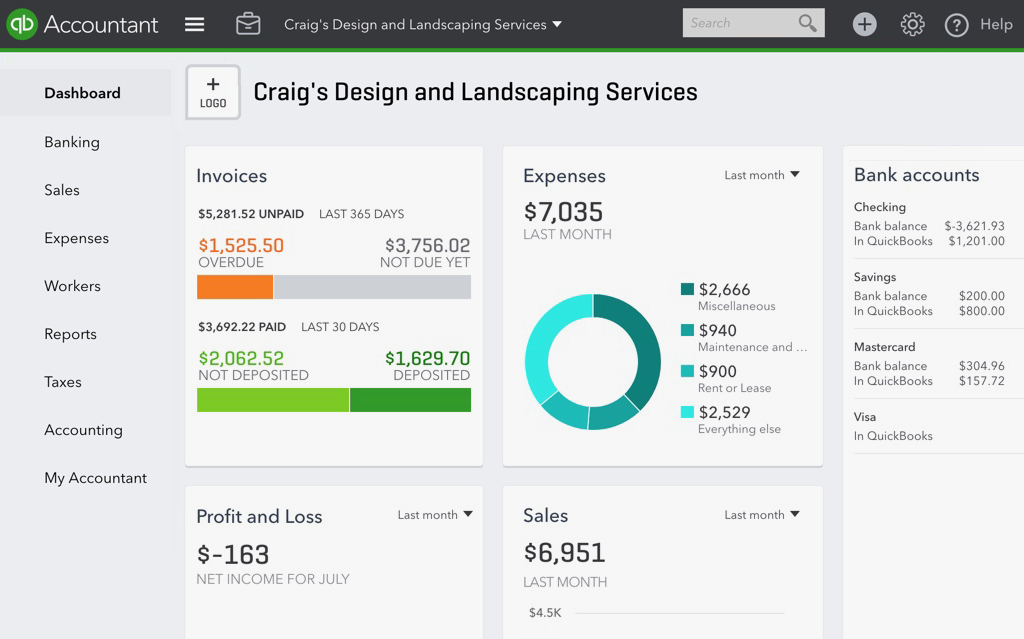
QuickBooks Online has established itself as the industry standard for small to medium-sized businesses, and for good reason. Intuit’s flagship accounting platform combines comprehensive functionality with user-friendly design, making sophisticated financial management accessible to business owners without extensive accounting backgrounds.
Key Features:
- Comprehensive invoicing with customizable templates and automated payment reminders.
- Real-time bank synchronization with intelligent transaction categorization.
- Advanced inventory tracking with automatic stock level updates.
- Integrated payroll processing and employee time tracking.
- Extensive third-party app marketplace with over 750 integrations.
- Mobile app functionality for on-the-go financial management.
- Multi-currency support for international operations.
The platform’s strength lies in its ability to handle complex business scenarios while maintaining simplicity for everyday tasks. Its automated features, such as recurring transaction entry and bank reconciliation suggestions, significantly reduce manual bookkeeping time. The reporting suite includes over 65 customizable reports, from basic financial statements to detailed profitability analyses by customer or product line.
Pros:
- Intuitive interface that requires minimal training.
- Excellent customer support, including live chat and phone assistance.
- Regular feature updates and improvements.
- Strong integration ecosystem with popular business tools.
- Reliable performance with minimal downtime.
Cons:
- It can become expensive as you add users and advanced features.
- Some advanced features require higher-tier plans.
- Occasional synchronization delays with certain banks.
- Limited customization options for reports and workflows.
Best for: Small to medium businesses that need comprehensive accounting functionality without extensive customization requirements. Particularly valuable for companies with inventory, multiple revenue streams, or growing teams that need collaborative financial management.
Pricing Overview: Plans start at $3.50/month for basic features, scaling to $23.50/month for advanced functionality including inventory management, project profitability tracking, and enhanced reporting capabilities.
3. Xero
Source:https://www.xero.com/
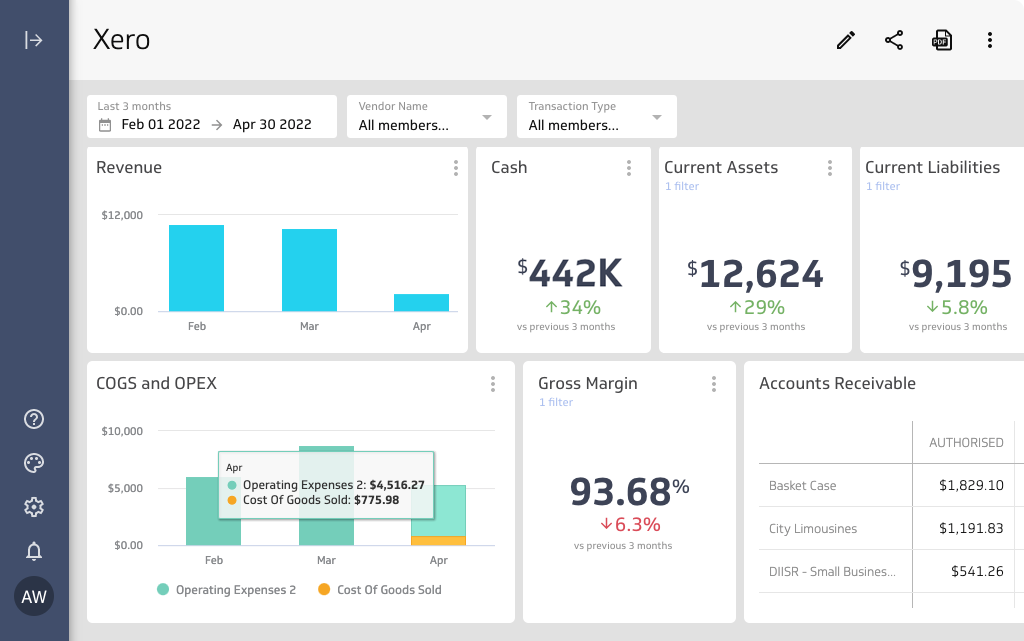
Xero has earned recognition as one of the most innovative accounting platforms, particularly excelling in real-time collaboration and visual financial reporting. The platform’s clean, intuitive design makes complex financial data accessible and actionable for business owners and their teams.
Key Features:
- Beautiful, dashboard-driven interface with real-time financial insights.
- Unlimited users across all pricing plans.
- Advanced bank reconciliation with machine learning-powered suggestions.
- Project tracking and profitability analysis.
- Comprehensive inventory management system.
- Multi-currency capabilities with automatic exchange rate updates.
- Extensive API for custom integrations and third-party connections.
What sets Xero apart is its collaborative approach to accounting. The platform enables seamless cooperation between business owners, bookkeepers, and accountants, with real-time access to the same data and intelligent permission controls. Its visual reporting tools transform financial data into easily understood charts and graphs, making financial analysis accessible to non-accountants.
Pros:
- Exceptional user interface design and user experience.
- Unlimited users make it cost-effective for growing teams.
- Strong focus on automation and workflow optimization.
- Excellent mobile app functionality.
- Robust third-party integration ecosystem.
Cons:
- Payroll functionality requires a separate subscription.
- Limited phone support compared to competitors.
- Some advanced features require add-on purchases.
- Learning curve for users transitioning from traditional accounting software.
Best for: Growing businesses that prioritize collaboration and modern financial management approaches. Ideal for companies with remote teams, multiple locations, or those working closely with external accountants and bookkeepers.
Pricing Overview: Three main plans ranging from $2.90/month for basic accounting to $6.90/month for comprehensive features, including project tracking, expense claims, and multi-currency support.
4. FreshBooks
Source:https://www.freshbooks.com/
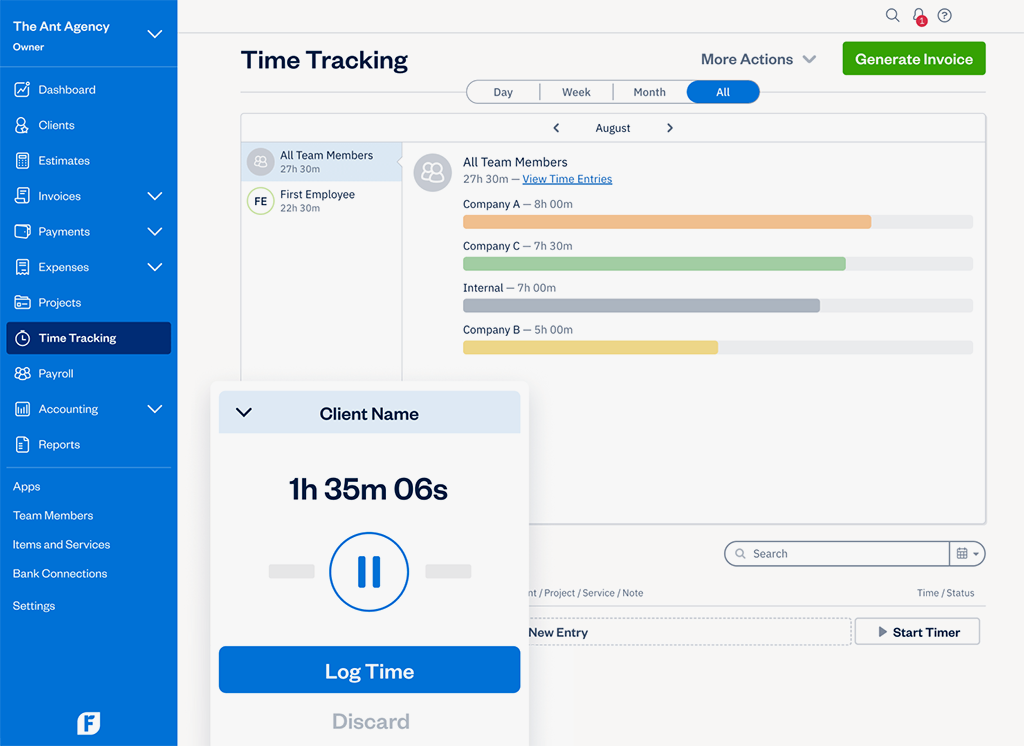
FreshBooks has carved out a unique position in the accounting software market by focusing specifically on the needs of freelancers, consultants, and service-based businesses. The platform excels in time tracking, project management, and client communication, making it an ideal choice for businesses that bill for time and services.
Key Features:
- Intuitive time tracking with automatic project assignment.
- Professional invoicing with online payment processing.
- Project management tools with milestone tracking and team collaboration.
- Expense tracking with receipt capture via mobile app.
- Client portal for transparent project communication.
- Automated late payment reminders and collections.
- Detailed profitability reporting by project and client.
The platform’s strength lies in its ability to seamlessly connect time tracking with billing and project management. Users can track time directly within projects, automatically generate invoices based on tracked hours, and provide clients with detailed project updates through the integrated client portal. This integrated approach eliminates the need for separate time tracking and project management tools.
Pros:
- Excellent time tracking and project management integration.
- User-friendly interface designed for non-accountants.
- Strong customer support, including phone and chat assistance.
- Comprehensive mobile app functionality.
- Built-in client communication tools.
Cons:
- Limited inventory management capabilities.
- Higher per-user costs compared to some competitors.
- Fewer advanced accounting features for complex businesses.
- The integration ecosystem is smaller than major competitors.
Best for: Service-based businesses, freelancers, consultants, and agencies that need to track time, manage projects, and bill clients efficiently. Particularly valuable for businesses where client communication and project transparency are priorities.
Pricing Overview: Plans start at $2.10/month for basic functionality, with advanced plans reaching $6.50/month for unlimited clients, advanced reporting, and team collaboration features.
5. Zoho Books
Source:https://www.zoho.com/books/
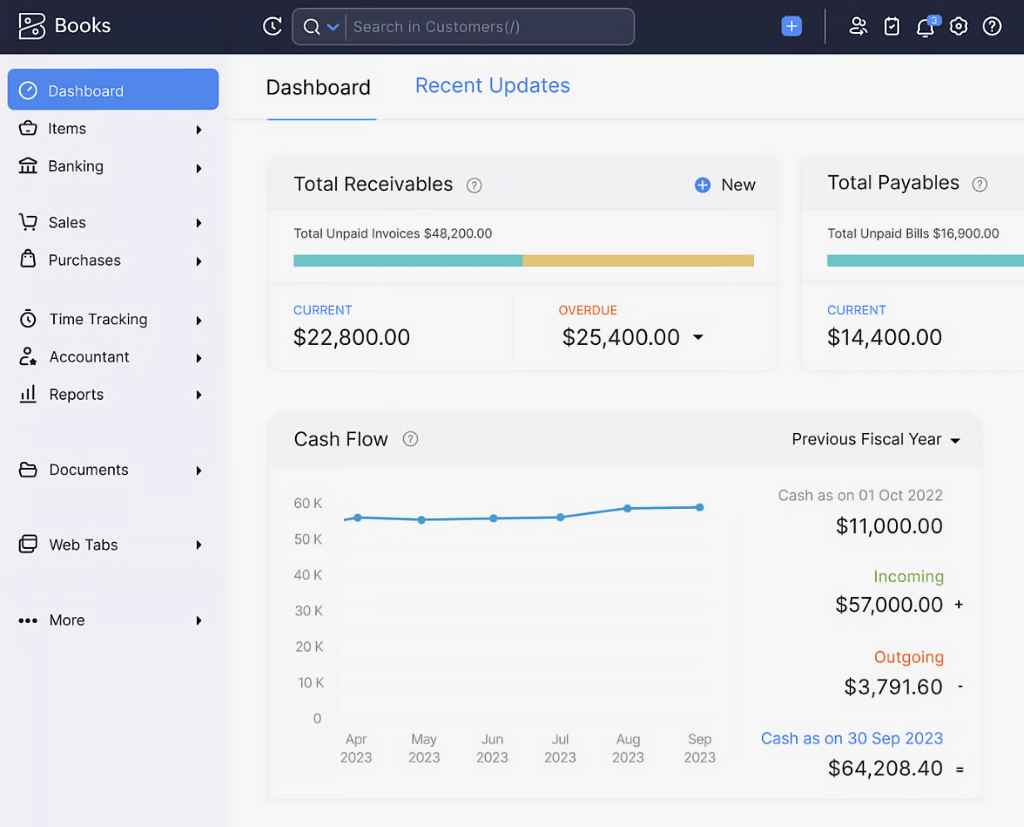
Zoho Books benefits from being part of the comprehensive Zoho business suite, offering seamless integration with CRM, inventory management, project management, and other business applications. This interconnected ecosystem makes it particularly attractive for businesses already using Zoho products or those seeking an integrated business management solution.
Key Features:
- Comprehensive invoicing with multiple templates and automation options.
- Advanced inventory management with multi-warehouse support.
- Integrated project accounting with time tracking and expense allocation.
- Client portal for invoice viewing and payment processing.
- Multi-currency support with automatic exchange rate updates.
- Workflow automation for routine accounting tasks.
- Extensive integration with other Zoho applications.
The platform’s integration capabilities extend beyond the Zoho ecosystem to include popular business tools like PayPal, Stripe, and various banking institutions. Its workflow automation features can handle complex business processes, such as automatically creating purchase orders when inventory levels drop or generating recurring invoices based on project milestones.
Pros:
- Excellent value for money with a comprehensive feature set.
- Seamless integration with the entire Zoho business suite.
- Strong inventory management capabilities.
- Customizable workflows and automation options.
- Multi-language and multi-currency support.
Cons:
- The interface can feel cluttered compared to more streamlined competitors.
- Learning curve for accessing advanced features.
- Customer support quality varies by region.
- Some features require familiarity with the Zoho ecosystem.
Best for: Businesses already using Zoho products or those seeking an integrated business management solution that combines accounting with CRM, inventory, and project management. Particularly valuable for companies with complex inventory needs or international operations.
Pricing Overview: Plans range from free for basic functionality to $35/month for advanced features including workflow automation, custom fields, and enhanced reporting capabilities.
6. Wave
Source:https://www.waveapps.com/
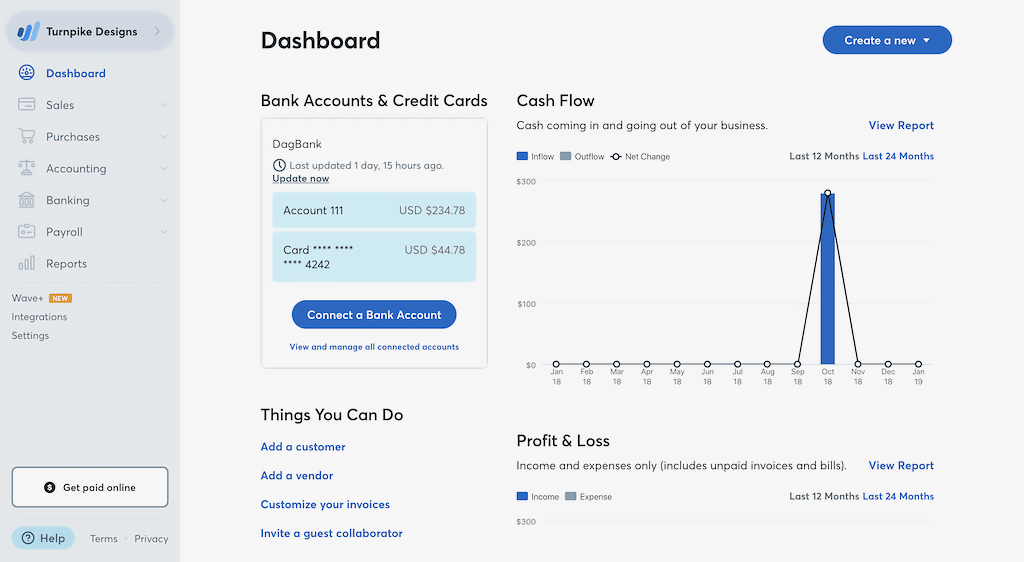
Wave stands out in the accounting software market by offering completely free core accounting functionality, making professional financial management accessible to startups and small businesses with limited budgets. Despite being free, Wave provides surprisingly comprehensive features that compete with paid solutions.
Key Features:
- Complete double-entry accounting system with no transaction limits.
- Professional invoicing with customizable templates.
- Receipt scanning and expense tracking via a mobile app.
- Bank connection and automatic transaction import.
- Financial reporting, including profit and loss, balance sheet, and cash flow statements.
- Multi-user access with role-based permissions.
- Integration with payment processing services.
Wave’s business model relies on optional paid services like payment processing and payroll, rather than charging for basic accounting functionality. This approach allows businesses to access professional accounting tools without monthly subscription costs, paying only for additional services they choose to use.
Pros:
- Completely free core accounting functionality.
- No limits on transactions, invoices, or reports.
- Clean, intuitive interface.
- Excellent customer support through the help center and community forums.
- Reliable performance despite being free.
Cons:
- Limited integration options compared to paid competitors.
- Fewer advanced features for complex business needs.
- Customer support is primarily through self-service resources.
- Some advanced features require paid add-ons.
Best for: Startups, freelancers, and small businesses with straightforward accounting needs and limited budgets. Ideal for companies that need professional financial management without ongoing subscription costs.
Pricing Overview: Core accounting features are completely free. Optional services include payment processing (2.9% + 30¢ per transaction) and payroll starting at $16/month plus $4 per employee.
7. Sage Business Cloud
Source:https://www.sage.com/en-gb/
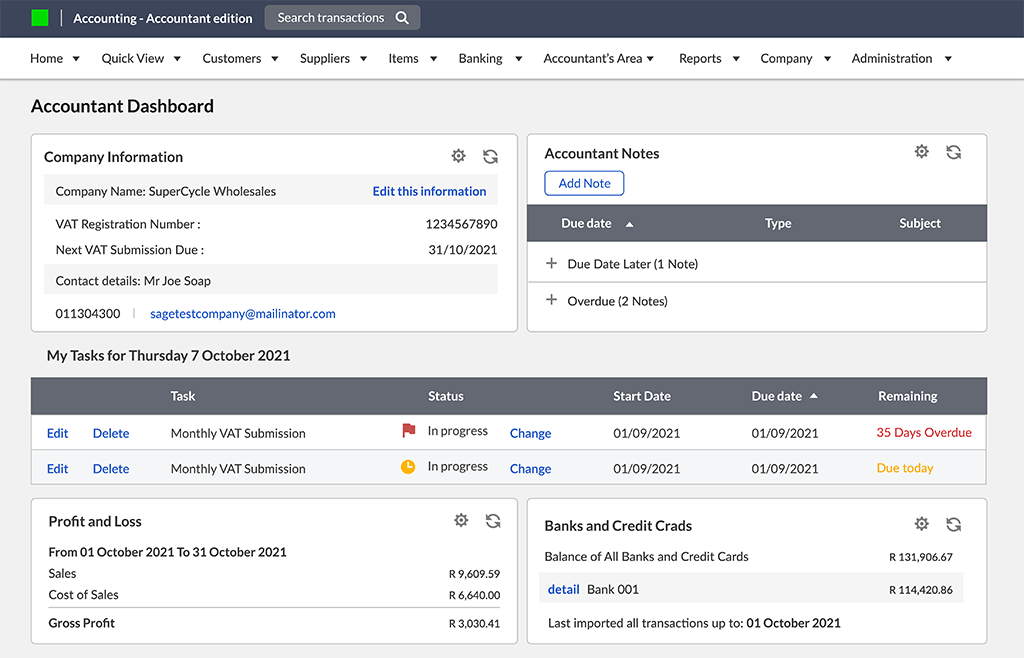
Sage Business Cloud Accounting brings enterprise-level functionality to small and medium businesses, with particular strength in inventory management, tax compliance, and multi-location operations. The platform’s robust feature set makes it suitable for businesses with complex accounting requirements.
Key Features:
- Advanced inventory management with lot tracking and multi-location support.
- Comprehensive tax compliance tools with automatic updates.
- Multi-currency capabilities with real-time exchange rates.
- Project accounting with job costing and profitability analysis.
- Advanced reporting with customizable financial statements.
- Integration with banking and payment processing systems.
- Workflow automation for routine accounting processes.
The platform excels in handling complex business scenarios, such as manufacturing operations with bill-of-materials tracking, service businesses with detailed project accounting, or retail operations with multiple locations and inventory transfers. Its tax compliance features are particularly strong, with automatic updates for changing tax regulations and built-in support for various tax reporting requirements.
Pros:
- Robust inventory and manufacturing features.
- Strong tax compliance and reporting capabilities.
- Excellent multi-currency and international business support.
- Comprehensive project accounting functionality.
- Reliable performance with enterprise-grade security.
Cons:
- Steeper learning curve compared to simpler alternatives.
- Higher pricing for advanced features.
- The interface can feel complex for basic accounting needs.
- Limited mobile app functionality.
Best for: Growing businesses with complex inventory, manufacturing, or project-based operations. Particularly valuable for companies with multiple locations, international operations, or detailed tax compliance requirements.
Pricing Overview: Plans start at $61.92/month for Pro accounting, scaling to $188.67/month for advanced features including inventory management, project tracking, and multi-currency support in the Quantum Accounting package.
8. NetSuite by Oracle
Source:https://www.netsuite.com/portal/home.shtml
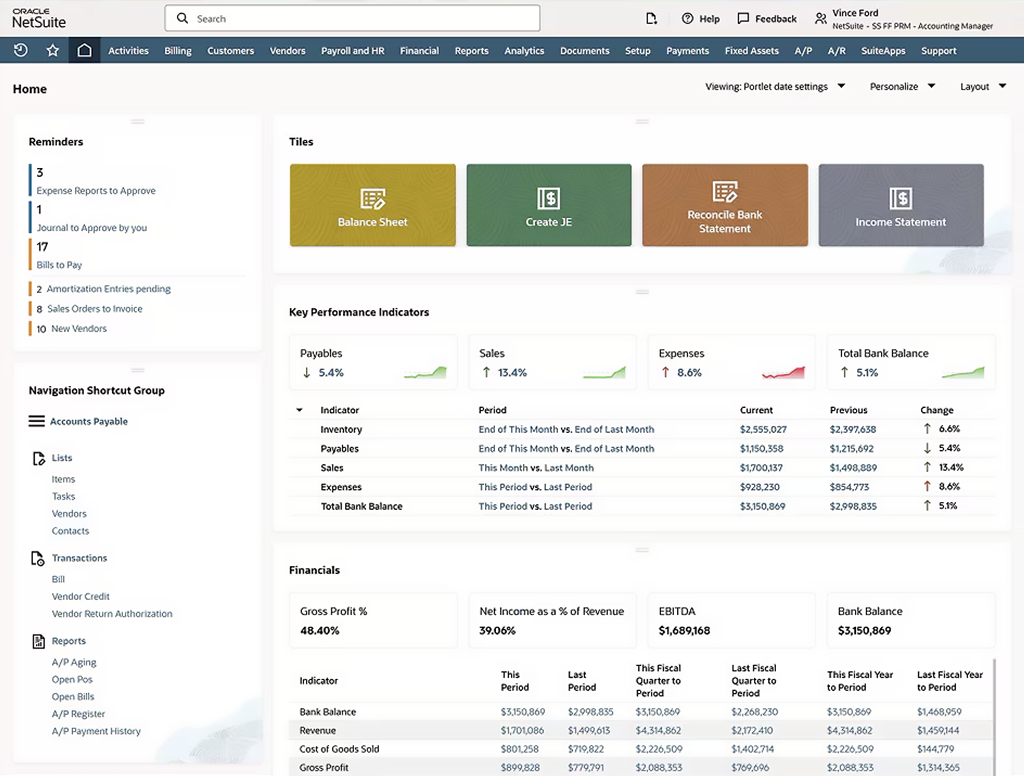
NetSuite represents the pinnacle of cloud-based business management software, offering enterprise-level functionality that extends far beyond traditional accounting. As an integrated ERP solution, NetSuite combines financial management with CRM, e-commerce, inventory management, and business intelligence in a single platform.
Key Features:
- Complete ERP functionality including financials, CRM, and operations management.
- Advanced financial reporting with real-time dashboards and analytics.
- Multi-subsidiary management with consolidated reporting.
- Comprehensive inventory and supply chain management.
- Built-in e-commerce platform with order management.
- Customizable workflows and business process automation.
- Advanced user permissions and role-based access control.
NetSuite’s strength lies in its ability to serve as a complete business management platform rather than just accounting software. Companies can manage their entire operations from customer acquisition through order fulfillment and financial reporting within a single integrated system. This comprehensive approach eliminates data silos and provides unprecedented visibility into business performance.
Pros:
- Complete business management solution beyond accounting.
- Highly customizable to specific business requirements.
- Scalable from small businesses to large enterprises.
- Strong reporting and business intelligence capabilities.
- Comprehensive integration and API capabilities.
Cons:
- Significant implementation complexity and cost.
- Steep learning curve requiring dedicated training.
- Higher total cost of ownership, including implementation and customization.
- May provide more functionality than needed for simpler businesses.
Best for: Mid-size to large businesses that need comprehensive business management functionality beyond basic accounting. Ideal for companies with complex operations, multiple subsidiaries, or those seeking to replace multiple business systems with a single integrated platform.
Pricing Overview: NetSuite uses custom pricing based on specific business requirements, typically starting around $599/month for basic functionality with additional costs for users, modules, and customization.
9. Kashoo
Source:https://kashoo.com/
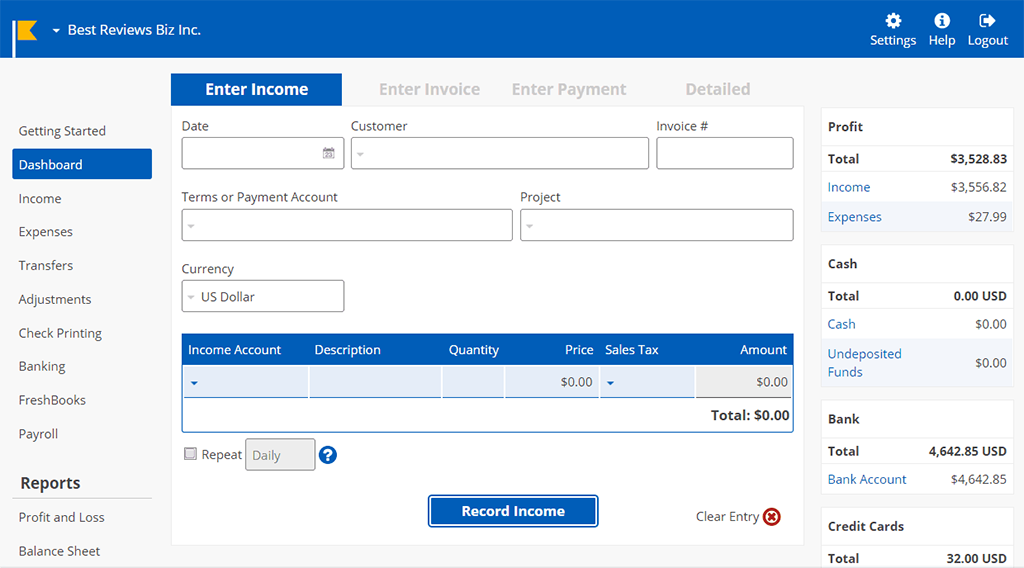
Kashoo focuses on simplicity and ease of use while providing essential accounting functionality for small businesses. The platform’s straightforward approach makes it accessible to business owners who need professional accounting tools without overwhelming complexity.
Key Features:
- Clean, intuitive interface designed for non-accountants.
- Automatic bank synchronization with intelligent categorization.
- Professional invoicing with online payment processing.
- Expense tracking with receipt capture capabilities.
- Essential financial reporting, including profit and loss and balance sheet.
- Multi-user access with role-based permissions.
- Mobile app for basic accounting tasks.
The platform’s philosophy centers on providing necessary accounting functionality without the complexity that can overwhelm small business owners. Kashoo’s automated features handle routine tasks while maintaining transparency in how financial data is processed and categorized.
Pros:
- Very user-friendly interface requiring minimal training.
- Affordable pricing for small businesses.
- Reliable bank synchronization and transaction categorization.
- Good customer support for a smaller platform.
- Focus on essential features without unnecessary complexity.
Cons:
- Limited advanced features compared to major competitors.
- Smaller integration ecosystem.
- Fewer customization options.
- May not scale well for growing businesses with complex needs.
Best for: Small businesses and sole proprietors who need straightforward accounting functionality without complexity. Ideal for service-based businesses with simple financial structures and minimal inventory requirements.
Pricing Overview: Single plan at $324/year includes unlimited transactions, invoices, and reports with support for multiple users and bank connections.
10. OneUp
Source:https://www.oneup.com/
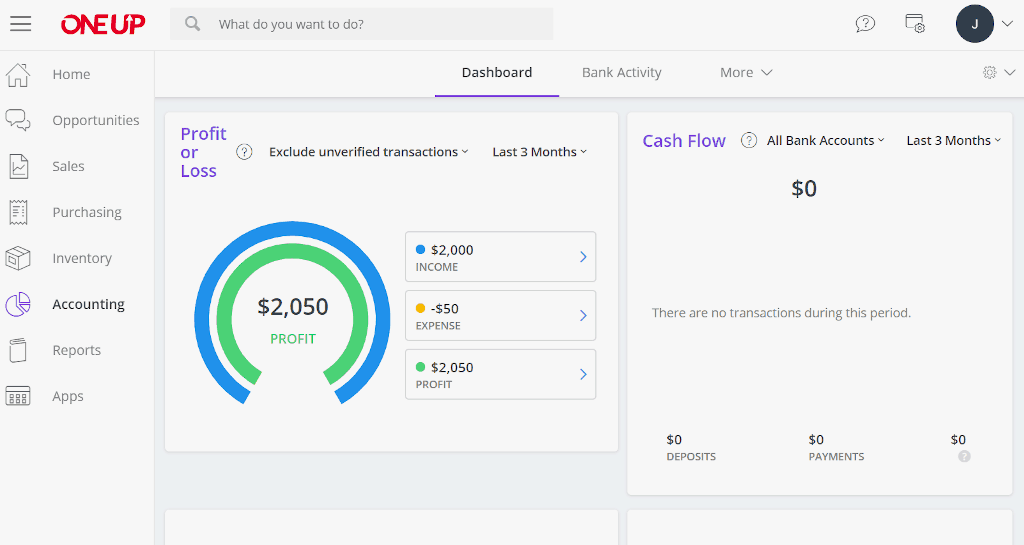
OneUp distinguishes itself through exceptional automation capabilities and seamless bank synchronization, making it particularly attractive to businesses that prioritize efficiency and accuracy in their financial processes. The platform’s intelligent automation reduces manual data entry while maintaining precision in financial records.
Key Features:
- Advanced bank synchronization with real-time transaction import.
- Intelligent automation for recurring transactions and workflows.
- Comprehensive invoicing with automated follow-up sequences.
- Inventory management with automatic reorder points and supplier integration.
- Project tracking with time and expense allocation.
- Multi-currency support with automatic exchange rate updates.
- Customizable reporting with scheduled delivery options.
OneUp’s automation engine learns from user behavior and historical data to make increasingly accurate suggestions for transaction categorization, invoice generation, and workflow optimization. The platform’s bank synchronization capabilities are particularly robust, supporting a wide range of financial institutions with minimal setup requirements.
Pros:
- Exceptional automation capabilities reduce manual work.
- Reliable bank synchronization with broad institutional support.
- Competitive pricing with a comprehensive feature set.
- Intuitive interface that balances simplicity with functionality.
- Good integration options with popular business tools.
Cons:
- Smaller user community compared to major platforms.
- Limited advanced reporting compared to enterprise solutions.
- Customer support is primarily through online channels.
- Fewer industry-specific features.
Best for: Small to medium businesses that prioritize automation and efficiency in their accounting processes. Particularly valuable for companies with high transaction volumes or those seeking to minimize manual bookkeeping tasks.
Pricing Overview: Plans start at $18/month for basic functionality, with advanced plans reaching $300/month for comprehensive features including inventory management, project tracking, and enhanced automation.
Comparison Table
| Software | Pricing | Best For | Key Strengths | Integration Options |
| Planfix | Free – $28/month | SMBs & enterprise | Project & task management + CRM | API; Zapier; common apps (Google, Dropbox, Telegram) |
| Wave | Free – $16/month | Budget-conscious freelancers/small businesses | No cost for core features | Payments, Etsy, Shoeboxed; API |
| Zoho Books | Free – $35/month | Integrated business suite | Deep Zoho suite; API; 3rd-party connectors | |
| OneUp | $18-300/month | Small businesses & accountants | Bank sync, smart automation | Banks, Shopify, Stripe; Zapier; API |
| FreshBooks | $2.10-6.50/month | Freelancers | Time tracking, project management | ~100 direct; Zapier for 3k+ |
| Xero | $2.90-6.90/month | Small to mid-sized businesses | Beautiful interface, unlimited users | 1,000+ apps; open API |
| QuickBooks Online | $3.50- 23.50/month | Small to mid-sized businesses | Comprehensive features, user-friendly | 700+ apps; open API |
| Sage Business Cloud | $61.92-188.67/month | Small to mid-sized businesses | Inventory, tax compliance | Payments, Microsoft 365; API; add-ons |
| NetSuite | ~$599–1,699+/month | Enterprise businesses | Complete ERP solution | 500+ SuiteApps; REST/SOAP APIs; advanced workflows |
| Kashoo | $324/Year | Small business/project-oriented | Easy to use with one flat price | Payments; bank sync; API |
Feature Comparison Matrix
| Platform | ||||||||||
| Feature | Planfix | QuickBooks Online | Xero | FreshBooks | Zoho Books | Wave | Kashoo | OneUp | Sage Business Cloud | NetSuite (Oracle) |
| Inventory Management | Yes | Yes | Yes | No | Yes | No | No | Yes | Yes | Yes |
| Project Tracking | Yes | Yes | Yes | Yes | Yes | No | No | No | Yes | Yes |
| Invoicing | Yes | Yes | Yes | Yes | Yes | Yes | Yes | Yes | Yes | Yes |
| Expense Tracking | Yes | Yes | Yes | Yes | Yes | Yes | Yes | Yes | Yes | Yes |
| Time Tracking | Yes | Yes | Yes | Yes | Yes | No | Yes | No | Yes | Yes |
| Multi-currency | Yes | Yes | Yes | Yes | Yes | No | Yes | Yes | Yes | Yes |
| Payroll | Yes | Yes | Yes | Yes | No | Yes | Yes | Yes | Yes | Yes |
| Banking Integration | Yes | Yes | Yes | Yes | Yes | Yes | Yes | Yes | Yes | Yes |
| Reporting | Yes | Yes | Yes | Yes | Yes | Yes | Yes | Yes | Yes | Yes |
| Mobile App | Yes | Yes | Yes | Yes | Yes | Yes | Yes | Yes | Yes | Yes |
How to Choose the Right Accounting Software for Your Business?
Selecting the optimal accounting software requires evaluating your current needs, growth plans, and operational complexity. Consider these key factors:
Business Size and Complexity: Startups need basic bookkeeping and invoicing (Wave, FreshBooks), while growing businesses require inventory management and multi-user access (QuickBooks, Xero). Large enterprises need advanced features like multi-location support and detailed analytics (NetSuite, Sage).
Integration Requirements: Evaluate how your accounting software will connect with existing tools – CRM systems, e-commerce platforms, payment processors, and project management software. Seamless data flow between systems eliminates manual entry and ensures consistency.
Budget and Total Cost: Consider subscription fees, per-user charges, payment processing costs, and implementation expenses. More expensive platforms may deliver better value if they eliminate the need for multiple separate tools.
Growth and Scalability: Choose platforms that can handle increased transaction volumes, additional users, and expanded functionality without requiring disruptive system changes. Consider geographic expansion needs like multi-currency support and international tax compliance.
Start with essential functionality and expand strategically based on actual business needs rather than implementing complex systems simultaneously.
Making Your Final Decision on Accounting Software
The right online accounting software transforms financial management from a necessary burden into a strategic advantage. Each platform in our top 10 list serves different business needs – from Wave’s free solution for startups to NetSuite’s comprehensive ERP for enterprises.
Key takeaways for your selection process:
- Start with your actual needs: Don’t pay for features you won’t use, but ensure your choice can scale as you grow
- Prioritize integration: The best software connects seamlessly with your existing business tools
- Consider total value: Sometimes, a higher-priced platform delivers better ROI through automation and efficiency gains
- Test before committing: Use free trials to evaluate how well each platform fits your specific workflows
The most successful businesses choose software that not only handles their current financial needs but also supports their growth ambitions. Whether you need basic invoicing or complex multi-location reporting, there’s a solution in 2025 that can help streamline your finances and drive your business forward.
Ready to find your ideal accounting solution? Start with free trials of 2-3 platforms that match your business size and requirements, then choose the one that best balances functionality, usability, and cost for your specific needs.
FAQ
What is online accounting software?
Online accounting software is a cloud-based platform that manages your business finances, including invoicing, expense tracking, bank reconciliation, and financial reporting, accessible from anywhere with an internet connection.
Why should I switch from desktop accounting software to online?
Online accounting software offers real-time access from multiple devices, automatic backups, seamless collaboration with team members and accountants, automatic updates, and better integration with other business tools like payment processors and banks.
How does accounting software help with tax preparation?
Accounting software automatically categorizes transactions, tracks deductible expenses, generates tax reports, and maintains organized financial records throughout the year. Many platforms integrate directly with tax preparation software or provide tax-ready reports for your accountant.
Can accounting software integrate with my bank accounts?
Yes, most modern accounting software connects directly to your bank accounts and credit cards to automatically import transactions. This eliminates manual data entry, reduces errors, and provides real-time financial insights.
Is financial data secure with online accounting software?
Reputable accounting software providers use bank-level encryption, secure data centers, regular security audits, and compliance with industry standards like SOC 2. Your data is typically more secure in the cloud than on local computers or paper records.
Can multiple users access the accounting software simultaneously?
Yes, cloud-based accounting software supports multiple users with different permission levels. Some platforms, like Planfix and Xero, offer unlimited users, while others charge per additional user. Role-based access ensures team members only see relevant information.