Planfix Bulk Employee Registration via Self-Registration Link

Do you remember adding your first employees to Planfix? At the beginning, it probably felt quick and easy. You simply entered their first name, last name, email, and phone number, and you were done.
But where entering one or two employees takes just a few minutes, adding five, ten, or twenty starts to feel like a real time drain.
If your company has hundreds of employees or is growing rapidly? When you are constantly opening new departments, hiring remote staff, or assembling temporary project teams, manual employee registration is no longer a simple administrative task.
It has now become a full-fledged process that consumes valuable time, increases administrator workload, and raises the risk of data entry errors.
Planfix simplifies this with automation and employee self-registration links. Instead of entering them one by one, the administrator generates a registration link, then shares it with the team. From there, employees enter their own information, and the administrator then grants account access to everyone at once.
This effectively transforms onboarding into a self-service process with less copying, fewer mistakes, and far less administrative overhead.
Why Manual Employee Registration Doesn’t Scale
Manually adding employees works well when your company has just a few people. But as your team grows, the process quickly becomes a bottleneck.
Here are some of the primary challenges:
- First, creating an employee account manually requires more time than simply entering a few details. The administrator must complete the form, verify the information, and save the profile before the employee can access the system.
- Second, the risk of mistakes increases. A single typo in an email address, an incorrect phone number, copying the wrong row from a spreadsheet, or forgetting part of the information can all create problems that later need to be found and corrected.
- Third, the administrator becomes a bottleneck. Until every employee has been added, the rest of the team will not be able to gain full access to the system.
- Finally, the process does not scale well. The more employees you need to onboard, the more repetitive manual work is required. As a result, every new hire increases the administrative burden.
These reasons demonstrate why employee onboarding is much more efficient when built around self-registration links rather than manually creating every user account. As part of workforce management software, this approach helps companies reduce administrative work, keep employee data organized, and connect new users to the company’s workflow faster.
How Bulk Employee Onboarding Works in Planfix
In the “Employees” section of Planfix, you’ll find a dedicated “Registration link” button:
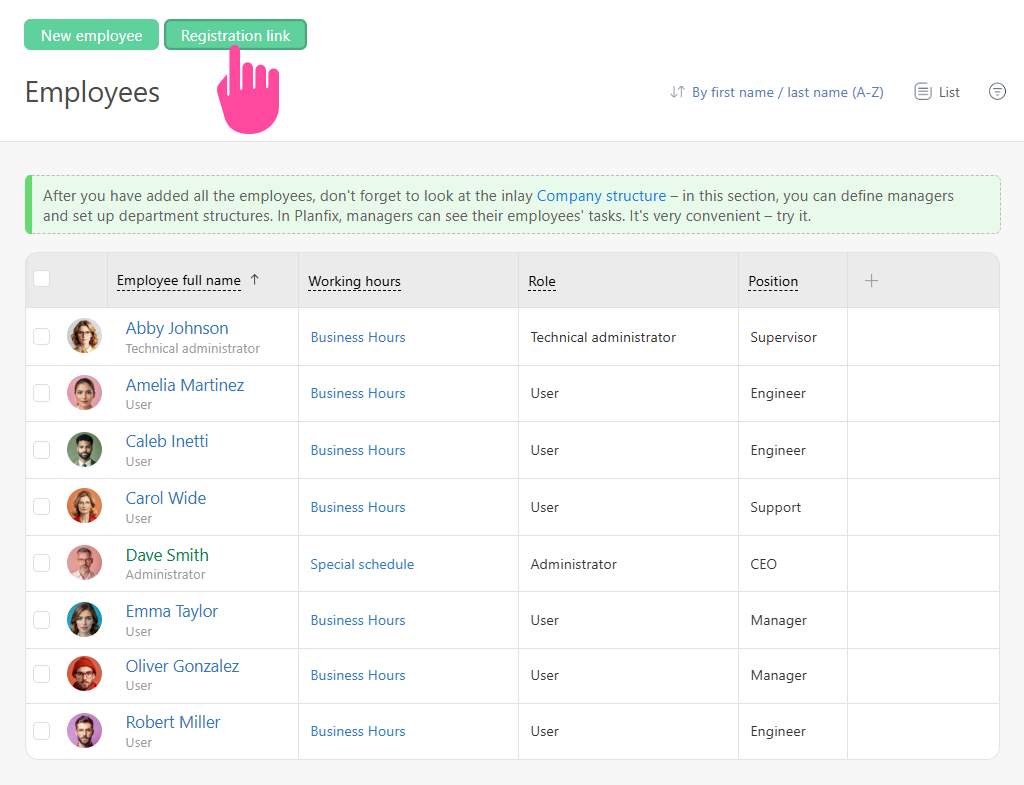
The idea is fairly straightforward. Instead of creating an employee profile for each new team member, the administrator generates a registration link and shares it via the company chat, email, or any other communication channel.
From there, employees simply follow the link and complete the registration form themselves. Once they do, their profiles appear in the Planfix account, and the administrator can see them in the employee list.
It is important to note that simply registering through the link does not automatically grant access to the system. Access remains completely under the administrator’s control. After employees have registered, the administrator reviews the list of new profiles, selects the appropriate users, and grants access to all of them in bulk.
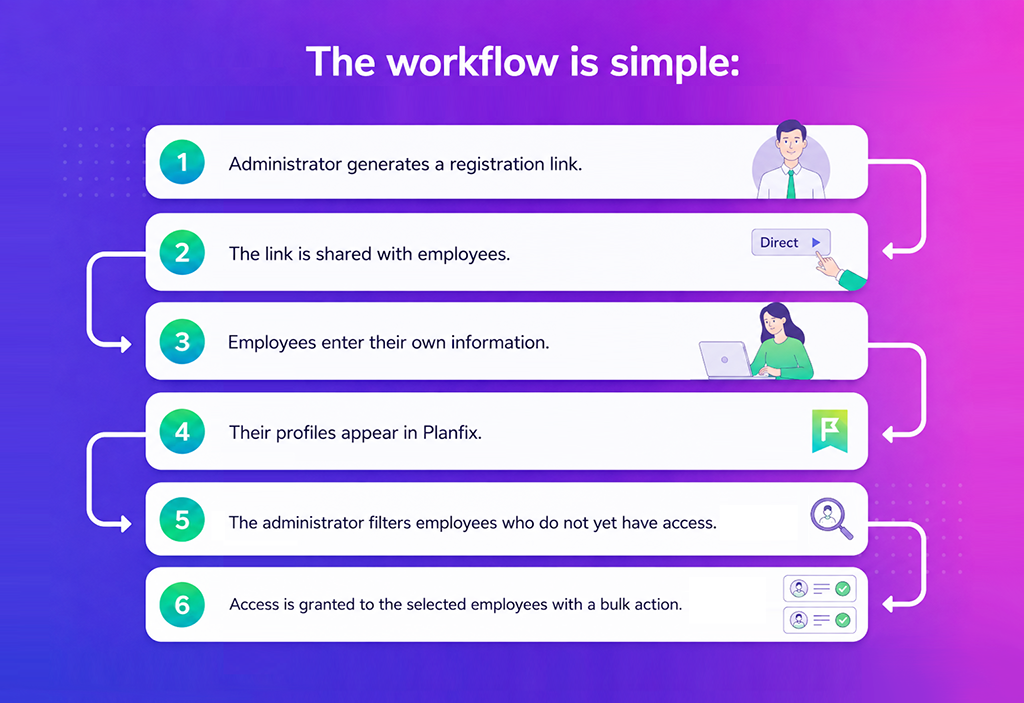
This approach eliminates the need to create employee profiles manually while keeping the administrator in full control.
Step 1. Generate a Registration Link in Planfix
Here’s the simple process that will allow you to leave manual employee registration behind.
Open the “Employees” section in Planfix and click the “Registration link” button.
Planfix immediately generates a registration link for new employees that you can copy.
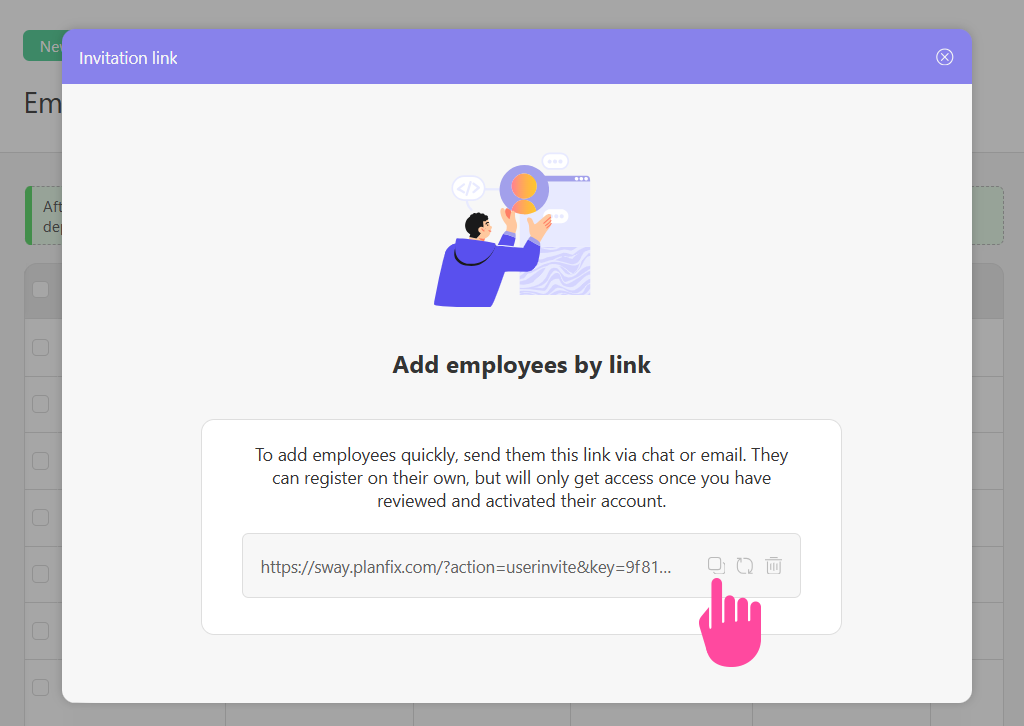
This link becomes the starting point for onboarding an entire team. You can send it to new hires, a specific department, a group of contractors, or any number of employees who need access to the account.
Essentially, this allows you to create a single entry point into the onboarding process, while employees complete their own registration.
Step 2. Share the Link for Employee Self-Registration
The next step is to send the registration link to your employees.
You can share it through your company chat, email, internal portal, onboarding documentation, or any other communication channel your team already uses.
When your employees click the link, they are taken directly to the registration page for your Planfix account. Here, they can enter their own information, which helps maximize accuracy.
The result is less administrative work for HR Management, department managers, and system administrators. Instead of collecting employee information from forms, spreadsheets, chat messages, or emails and creating accounts one by one, they simply distribute the registration link and oversee the process.
Step 3. Employee Data Entry and Account Creation
On the registration page, employees will enter their:
- Full name
- Username
- Password for signing in
- Email address
- Phone number
Once the form is submitted, Planfix automatically creates an employee card using the provided information. No administrator input required for this step.

This is an important advantage. Because employees enter their own details, the risk of data entry errors is significantly reduced. Administrators no longer need to copy email addresses from spreadsheets, phone numbers from chat messages, or double-check how someone’s name should be spelled.
After registration, the employee will appear in the “Employees” list. However, they still don’t have access to the system. This is intentional and allows the administrator to review new users before granting access.
Step 4. Bulk Activation of Users in the System
To allow newly registered employees into the system, you first need to start filtering who does and doesn’t yet have access:
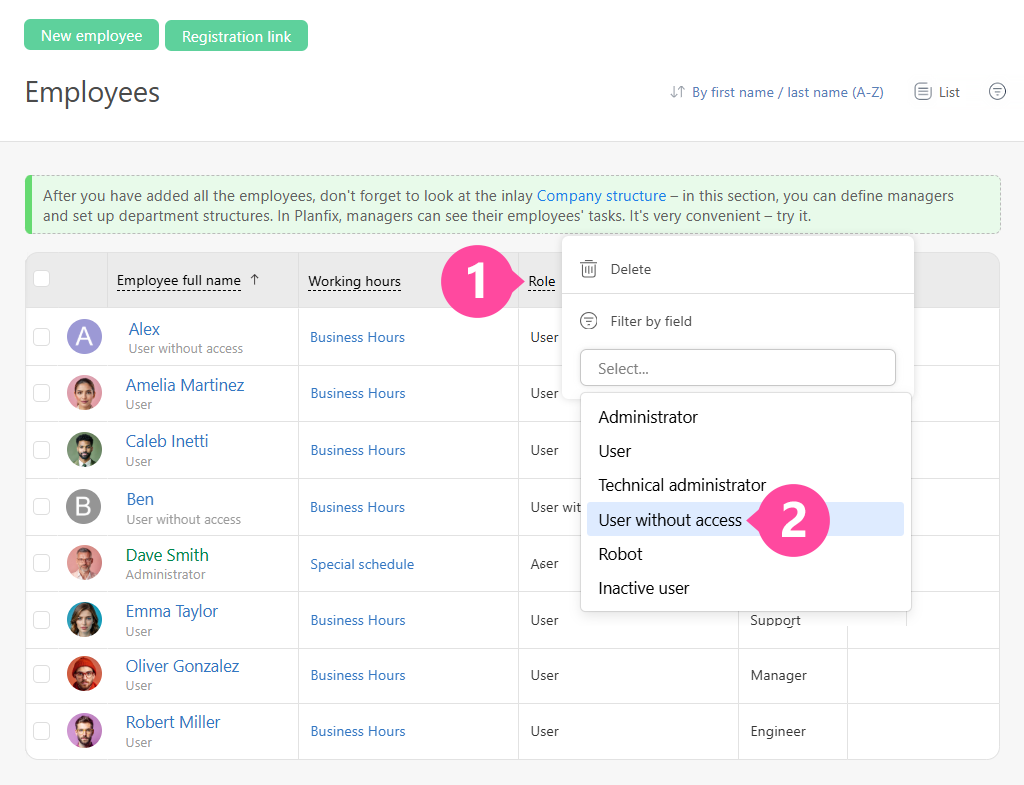
Next, select the required employees and use bulk actions to grant them access to the company account:
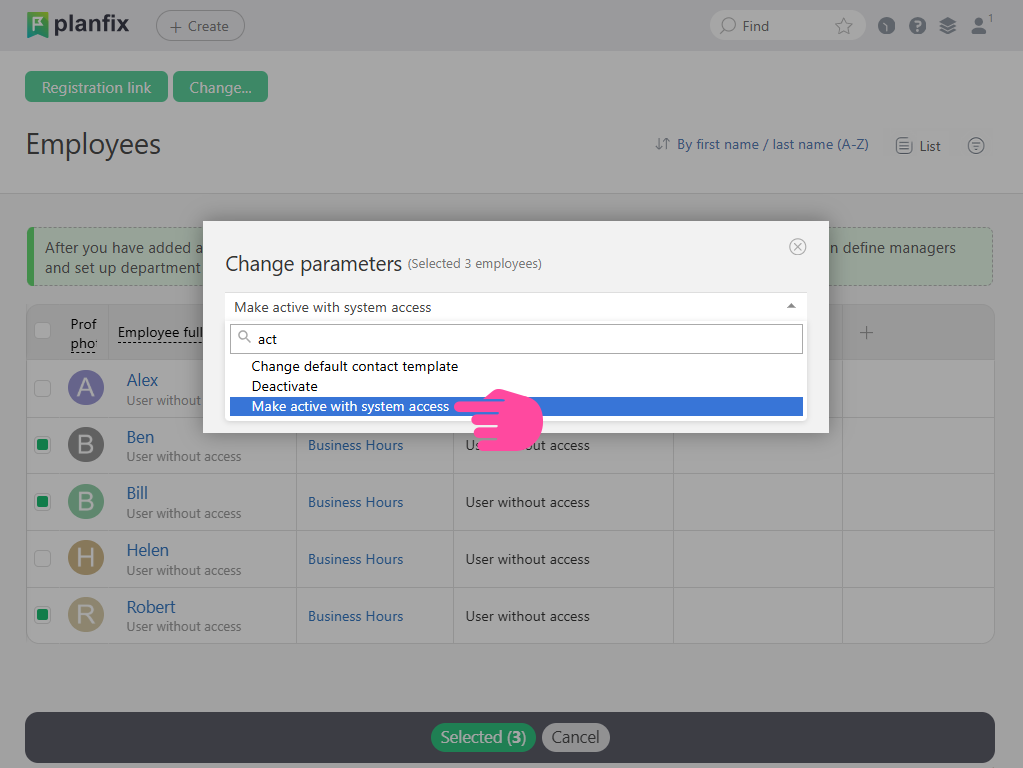
Planfix will automatically send an email to each selected employee at the address they provided during registration containing a link they can use to sign in.
This approach keeps administrators in control. Employees can create their own profiles, but access to the working account is granted only after the administrator reviews and approves them in bulk.
This is especially convenient for large teams. You not only collect all newly registered employees, but activate everyone you need with a single action instead of approving them individually.
Employee Self-Onboarding via Registration Link
Registration links completely transform the onboarding process.
Instead of relying on a model where the administrator handles everything manually, companies can use self-onboarding. Imagine the effect this can have when you need to onboard large numbers of people quickly. This is particularly useful for:
- New employees after hiring
- Members of a newly created department
- Staff joining a branch office
- Remote teams
- Temporary project teams
- Contractors who need access to company workflows
Rather than collecting employee information manually or verifying every line of data, administrators simply need to send the registration link, wait for employees to register, and grant access to those who should be able to work in the system.
The result is a faster, simpler, more accurate onboarding process for everyone involved.
Bulk Onboarding and Mass User Registration
As a team grows, bulk employee registration stops being a convenient extra and becomes a practical standard for account administration.
Imagine that a company needs to add 80 employees to Planfix. A manual approach means creating 80 separate profiles, each of which must be opened, completed, checked, and saved. Even if a single profile takes only a couple of minutes, the total workload quickly adds up.
With registration links, the administrator only needs to generate the link once and share it with all relevant employees. From there, each person enters their own information, after which the administrator reviews the list of registered users and grants access with a bulk action.
This makes bulk onboarding to connect large teams possible without increasing manual work at the same rate.
The more employees you need to add, the greater the time savings. This becomes especially noticeable when teams join in waves: one department today, a branch office tomorrow, new managers next week, and contractors or a temporary project group after that.
Instead of restarting the manual registration process every time, the company can use the same controlled workflow for each new group.
Employee Management Software for Growing Teams
Planfix not only helps companies add employees to the system but also manage teams across shared workspaces.
In the Employees section, administrators can view users, their status, and profile information. They can also easily do the following:
- Organize employees into groups
- Assign them to tasks and planners
- Designate them as supervisors
- Place them within the company structure
- Include them in workflows
- Track their ongoing work
Such capabilities are essential for growing companies. As teams expand, employee management can no longer rely only on spreadsheets, chats, and verbal agreements. Companies need a single workforce management software that clearly shows who has already been added, who has account access, who participates in each process, and how employees are distributed across departments and areas of responsibility.
Registration by link solves the first stage by getting employees into the system quickly, while the Google Calendar integration helps coordinate onboarding meetings, interviews, and training sessions. From there, Planfix helps integrate them into real business processes, including tasks, projects, communication, reports, customer work, and internal procedures. This makes Planfix useful not only for employee onboarding, but also as workforce management software that helps administrators keep user data, access status, and team participation organized in one place.
As a result, onboarding is no longer a separate technical step. It becomes part of the company’s broader management system.
Automated Employee Onboarding Workflow
The complete automated onboarding process in Planfix can be presented as a simple, step-by-step workflow:
- The administrator generates a registration link.
- The link is shared with employees.
- Employees complete the registration form themselves.
- Planfix creates their employee profiles.
- The new employees appear in the shared employee list.
- The administrator filters users who do not yet have access.
- The administrator grants access to select employees using a bulk action.
- Employees receive an email containing a sign-in link.
Instead of entering each employee’s information from scratch, the administrator manages the process during the review and activation stages.
That results in fewer errors, faster team onboarding, and a more predictable process.
It also makes the process easier to explain internally. HR, a department manager, or a system administrator can provide one clear instruction: “Follow the link, complete the form, and access will be granted after your registration is reviewed.”
User Access Management in Planfix
Registration via a link is convenient, but administrators still need to maintain control. Planfix preserves that control throughout the process.
An employee can complete the form and create a profile, but system access is not granted automatically. This means that someone registering through the link does not immediately gain full access to the company account.
The administrator can view employees without access, filter the list, review the new profiles, and only then grant access using a bulk action.
This approach combines speed with security:
- Employees enter their own information. Administrators avoid creating profiles manually
- Access to the system remains controlled
- Only selected users are activated
- Bulk actions make it faster to grant access to large groups
This is especially important for companies with multiple roles, departments, branch offices, or temporary staff and external contacts. Profiles can be collected, reviewed as a group, and activated only after the administrator confirms who should join the working account.
Manual vs Automated Employee Registration
| Process | Manual Registration | Planfix Bulk Onboarding |
| Adding employees | One by one | Via registration link |
| Time required | High | Minimal |
| Error rate | High | Low |
| Scaling | Difficult | Easy |
| Control | Fragmented | Centralized |
With manual registration, the administrator personally handles every step. With automated onboarding, they manage the process instead – generating the link, reviewing the list, and granting access in bulk.
Benefits of Automated Employee Onboarding
Automated employee registration gives companies several clear advantages.
- First, it saves time. Instead of creating dozens or even hundreds of profiles manually, the administrator generates one registration link and shares it with the team.
- Second, it reduces errors. Employees enter their own information, which lowers the risk of mistakes when copying email addresses, phone numbers, or names.
- Third, it makes scaling much easier. Whether you need to add 5, 50, or 150 employees, the process stays the same: share the link, collect registrations, review the list, and activate users in bulk.
- Fourth, administrative control remains in place. Self-registration does not grant access automatically. The administrator still decides who should be activated.
- Fifth, it keeps the process clear for new employees. They receive a link, complete the form, and wait for access to be approved. There is no need to send personal details through chat or figure out who is responsible for creating the account.
As staff management software, Planfix helps companies reduce routine administrative work and keep employee profiles, access rights, and team structure easier to manage.
The result is a simpler onboarding experience for both employees and administrators.
Security and Control of Registration Links
If you need to prevent anyone else from registering through the current link, you can easily refresh or delete it.
To do this, click the Registration Link again and choose the required option.
When you regenerate the link, the old one automatically stops working. This is useful when the original link has already been shared with a large group, but further registration now needs to be restricted for some reason.
If you delete the link, registration via that link will remain disabled until a new one is created.
This keeps the process under the administrator’s control. A registration link can be used for a specific onboarding wave and then replaced or disabled – for example, after a new department has joined, a hiring campaign has ended, or a temporary project team has completed registration.
Conclusion: Simplifying Employee Onboarding in Planfix
Adding employees to Planfix no longer has to be a large, time-consuming administrative task.
Instead of creating profiles manually, you can generate a registration link, share it with the team, and allow employees to enter their own information.
This turns employee registration into a simple, controlled workflow. Teams join the system faster, administrators spend less time on manual data entry, and account access remains secure and manageable.
It is especially useful for growing companies that regularly need to add new hires, departments, branch offices, or temporary teams. Planfix also works as team management software by helping managers connect employees to workflows, departments, tasks, and internal processes faster.
Whether you’re onboarding a handful of employees or an entire department, self-registration makes the process faster, easier to manage, and more scalable.
FAQ
How does employee self-onboarding work in Planfix?
Employee self-onboarding in Planfix starts with a registration link generated by the account administrator. The administrator shares the link with employees, who then complete the registration form themselves. Once their details are submitted, employee profiles appear in the Planfix account. Access is not granted automatically, so the administrator can review new users and activate only those who should join the system.
Can I add hundreds of employees at once?
Yes. A registration link is especially useful when you need to onboard a large team without creating each employee profile manually. You can send the same link to dozens or hundreds of employees, let them enter their own details, and then use filters and bulk actions to grant access. This reduces repetitive administrative work and makes mass user registration much easier to manage.
What happens after employees register via link?
After employees register through the link, Planfix creates their profiles and adds them to the employee list. At this stage, they still do not have access to the system. The account administrator can filter users without access, select the required employees, and activate them in bulk. Planfix then sends each selected employee an email containing a sign-in link.
Can registration links be disabled or changed?
Yes. Registration links remain under the administrator’s control. When the current link is no longer needed, it can be regenerated or deleted. Regenerating it deactivates the old link and creates a new one. Deleting it disables registration until another link is generated.
Is employee data automatically stored in the system?
Yes. When an employee completes the registration form, Planfix automatically saves the submitted information and creates an employee profile. This may include the employee’s full name, username, email address, phone number, and login credentials. Because employees enter their own details, the process reduces manual data entry and lowers the risk of onboarding errors.