AI Knowledge Base in Planfix: Smart Assistant for Customer Answers

Manual libraries of canned responses are officially a thing of the past. With the latest update, the Planfix AI assistant can now work directly with your company’s knowledge base to deliver faster, more intelligent customer communication.
This means managers can get AI-powered response suggestions from the very beginning of a conversation. Instead of searching through internal resources, they receive relevant information instantly, as well as suggested replies that adapt to each customer’s specific question. This is especially valuable for businesses with large product catalogs, internal policies, and complex business rules.
Previously, employees had to open product catalogs, documentation, spreadsheets, price lists, or internal manuals on their own. Only after finding the right information, verifying it, and drafting a response could they reply to the customer. The more complex the question, the longer the process took.
But Planfix AI is different. It automatically analyzes the customer’s request, searches the connected knowledge base, and suggests a relevant response. While employees can edit the proposed text before sending it, the AI handles the time-consuming work of gathering information and preparing the initial draft.
Let’s take a closer look at how it works.
What Is a Knowledge Base, and Why Does It Matter in Customer Support?
A knowledge base is a centralized repository of company information that employees rely on in their daily work. It can include any of the following:
- Product catalogs
- User guides
- Internal policies
- Pricing plans
- SLAs
- Frequently asked questions
- Request handling procedures
- Delivery terms
- Return policies
- Onboarding instructions
- Service documentation
- and more
Having a detailed knowledge base is essential for customer support teams because customers expect fast and accurate answers. However, no employee can realistically remember every product specification, pricing rule, service limitation, or implementation detail.
When information is scattered across multiple documents, finding the right answer becomes a long, manual process. Employees have to open files, search through documentation, verify the details, and then formulate a response while the customer waits. The longer that wait becomes, the greater the chance the customer will turn to a competitor instead.
A centralized knowledge base solves this problem by ensuring all information is organized in one place. This makes it significantly easier to maintain, update, and use. When AI is connected to that knowledge base, it becomes much more than a document repository. Instead, it instantly evolves into an intelligent assistant that ensures employees can find accurate answers in seconds and respond to customers with greater speed and confidence.
How AI-Powered Search Works in Planfix Knowledge Base
AI-powered search in the Planfix knowledge base not only finds relevant information but also turns it into ready-to-use responses.
First, Planfix AI analyzes the customer’s request. While doing so, it looks beyond individual keywords to better understand the actual question. This allows it to better identify what the customer wants to know, what information is relevant, and what context matters for the response.
Next, the AI searches the documents uploaded to the knowledge base. These can include anything from product catalogs and internal policies to service descriptions, operating procedures, and company directories.
The system then selects the most relevant information and prepares a suggested response for the manager. This means that the employee receives more than just a document link or a copied passage. Instead, they get a ready-to-use answer that can be reviewed, edited, and sent to the customer.
This transforms knowledge base search into part of everyday communication. Managers no longer need to manually hunt through multiple files because AI helps them quickly find the right information and turn it into a clear, useful response.
That is the real value of AI knowledge management: company information is no longer confined to unused documents but becomes part of the workflows where employees actually need it.
AI-Generated Responses for Customer Communication
AI-generated responses in Planfix help managers answer customer questions faster and with greater confidence.
Imagine a customer contacts a construction supply store and asks for equipment to prepare an epoxy floor at home. The manager understands the customer’s goal but cannot immediately recall which products are available, which materials are best suited to the job, what is needed for surface preparation, or which related items they should also recommend.
Previously, finding this information meant opening the product directory and searching through countless pages.
But the longer the customer waits, the more likely they are to buy from someone else who responds faster.
Planfix AI streamlines this process. With one click, it can prepare a comprehensive response using information directly from the company’s internal knowledge base.
The answer is generated in just a few seconds, so customers don’t have time to grow impatient or start browsing competitor websites.
Because the feature is AI-powered, Planfix AI does much more than insert a canned phrase from a predefined list. Rather, it analyzes the customer’s message and generates a relevant response based on both the question and the information stored in the knowledge base.
This is especially important for customer support and customer service software, where response speed directly impacts service quality. To ensure quality, the manager receives a solid draft, reviews it, makes any necessary changes, and sends the final reply in their own name.
Manual Support vs AI Knowledge Base
| Process | Manual Knowledge Search | Planfix AI Knowledge Base |
| Finding information | Search manually | AI-powered search |
| Response time | Slow | Instant |
| Consistency | Varies by agent | Standardized |
| Scalability | Limited | High |
| Knowledge updates | Manual | Centralized system |
With manual search, response quality depends heavily on the employee’s experience. Where one may find the right information quickly, another may take much longer, while a third may miss an important detail altogether.
An AI knowledge base helps make support quality more consistent. Not only do employees all work from the same centralized source of information, but Planfix AI helps them find relevant data faster and turn it into clear, fast, accurate answers.
How Planfix AI Knowledge Base Works in Practice
In practice, using the Planfix AI knowledge base is a simple, step-by-step process.
A customer submits a question through a task or support request. The employee opens the Planfix AI menu in the comment field, selects Knowledge Base, and then chooses which section to use for the search.
Planfix AI then analyzes the customer’s request, searches the selected knowledge base, and generates a suggested response. After that, the employee reviews the draft, makes any necessary edits, and sends it to the customer.
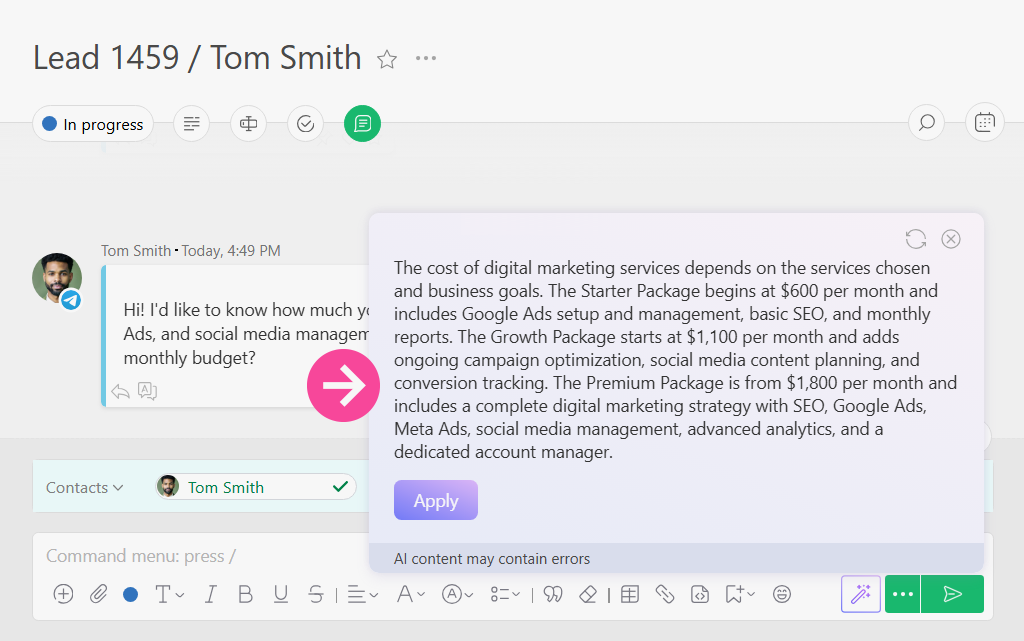
It’s important to note that the message is always sent on the employee’s behalf. Rather than replace their response, AI simply helps the employee prepare a response more quickly, while the final decision always remains with the person. From the customer’s perspective, the conversation remains entirely human.
The feature is powered by large language models (LLMs), so Planfix AI does much more than insert predefined responses. Rather, it carefully analyzes the customer’s message, taking the conversation context into account. From there, it searches the company’s internal knowledge base for relevant information and generates a unique response tailored to the specific question.
Finally, the fact that managers are free to review, expand, or rewrite the draft before sending it preserves a natural, human tone, all while significantly reducing the time needed to prepare the response.
Cases and Use Scenarios of AI Knowledge Base in Planfix
The Planfix AI Knowledge Base is valuable in any customer-facing process where employees need quick access to products, services, policies, or business rules.
Its biggest advantage is that it does more than simply store information. Instead, it helps employees apply company knowledge in real-world situations by quickly locating relevant data, generating useful responses, and reducing the workload for customer-facing teams.
For example, AI-powered knowledge search can be used in:
- Sales
- Customer support
- Technical consulting
- Service departments;
- Employee onboarding and training;
- Pricing plans and SLA guidance;
- Product selection;
- Handling frequently asked customer questions
Ultimately, the more information employees need to consider before answering a customer, the more valuable an AI knowledge base becomes.
AI-Powered Product Search in Complex Catalogs
Complex product catalogs are one of the most practical use cases for Planfix’s AI Knowledge Base.
Many industries have extensive product ranges that are difficult for any consultant to memorize. This is especially true of companies that handle construction equipment, home improvement products, consumer electronics, computer hardware, furniture, home goods, spare parts, and consumables.
Customers usually describe their needs in their own words:
“I need to prepare a floor for an epoxy coating.”
“I’m looking for equipment for a small workshop.”
“I need a complete setup for a home office.”
In each of these cases, the manager must understand the request, identify suitable products, consider specifications and compatibility, account for usage requirements, and recommend related items where appropriate. For product-heavy companies, this can take up a lot of valuable time.
Planfix AI speeds up the process dramatically. It instantly analyzes the customer’s question, searches the knowledge base for relevant information, and suggests an appropriate response. The manager can then review the recommendation, add their own expertise if needed, and provide the customer with a faster, more accurate answer.
AI-Assisted Consulting for IT Services, Pricing, and SLA
IT services often involve a wide range of conditions, such as:
- Pricing plans
- Usage limits
- SLAs
- Response times
- Support tiers
- Additional options
- Restrictions
- Exceptions
- Onboarding requirements
For sales managers and support specialists operating in this industry, accuracy is essential. An incorrect answer about response times, pricing, or support levels can easily lead to customer dissatisfaction and unnecessary internal discussions.
An AI-powered knowledge base makes it much easier to find the latest information. For example, a customer may ask whether a particular service is included in their plan, how long implementation takes, what limitations apply to a package, or which level of support is available.
Planfix AI can instantly search the company’s knowledge base and generate a response based on internal documentation. Instead of browsing through multiple files, the employee receives a ready-to-review suggestion that can be verified and sent to the customer within seconds.
AI Support for Education and Training Programs
Online courses, corporate training, professional development programs, and other educational services often differ when it comes to factors like duration, learning format, skill level, pricing, schedules, certification, and participant requirements.
When an organization offers a range of different programs, it becomes difficult for managers to answer every question quickly without constantly checking internal documentation.
Planfix AI helps teams provide faster and more accurate guidance on educational programs. For instance, it can explain things like:
- Who a course is designed for
- Which topics are covered
- What level of prior knowledge is required
- How long does the training last
- Whether certification is available
- Which learning formats are offered
The key is keeping the knowledge base up to date. As long as the information remains current, managers can ensure customers receive fast, accurate answers about the latest courses and training programs.
Knowledge Base Setup in Planfix AI
Setting up an AI-powered knowledge base in Planfix takes only a few minutes and requires no complex prompts or instructions.
Simply upload the documents that Planfix AI should use to generate response suggestions, such as user guides, product catalogs, internal policies, pricing documents, service descriptions, reference materials, and other company files.
For a more structured approach, read Using the Knowledge Base in Planfix: How to Set It Up with Objects to learn how custom objects can help organize, maintain, and update company information.
It’s important to note that the manner in which the knowledge base is organized directly impacts response quality. If everything is stored in one large, unstructured document, it can be difficult for AI to locate the most relevant information. When documents are grouped by topic and clearly organized, the generated suggestions become significantly more accurate.
For example, if a company sells both construction products and home goods, keeping them in separate knowledge base sections ensures Planfix AI searches the right category. So, when a customer asks about preparing an epoxy floor, the AI searches the construction products section rather than the home goods catalog.
A centralized knowledge base also streamlines collaboration because information is stored in one place, access can be managed for individual employees or teams, and updates can be made systematically rather than distributed across chats or email threads.
Uploading Documents and Preparing Files for Planfix AI Training
Before Planfix AI can generate response suggestions, you need to upload the documents it will use as its knowledge base. To do this, navigate to Account management, open the Planfix AI settings, and select Knowledge base search.
The source materials are uploaded to Planfix as documents. For greater accuracy, we recommend splitting information into separate files and topic-based sections.
For example, you would establish a single file for each of the following:
- Construction product catalog
- Home goods
- Delivery terms
- Pricing plans and SLAs
- Return instructions
- Support procedures
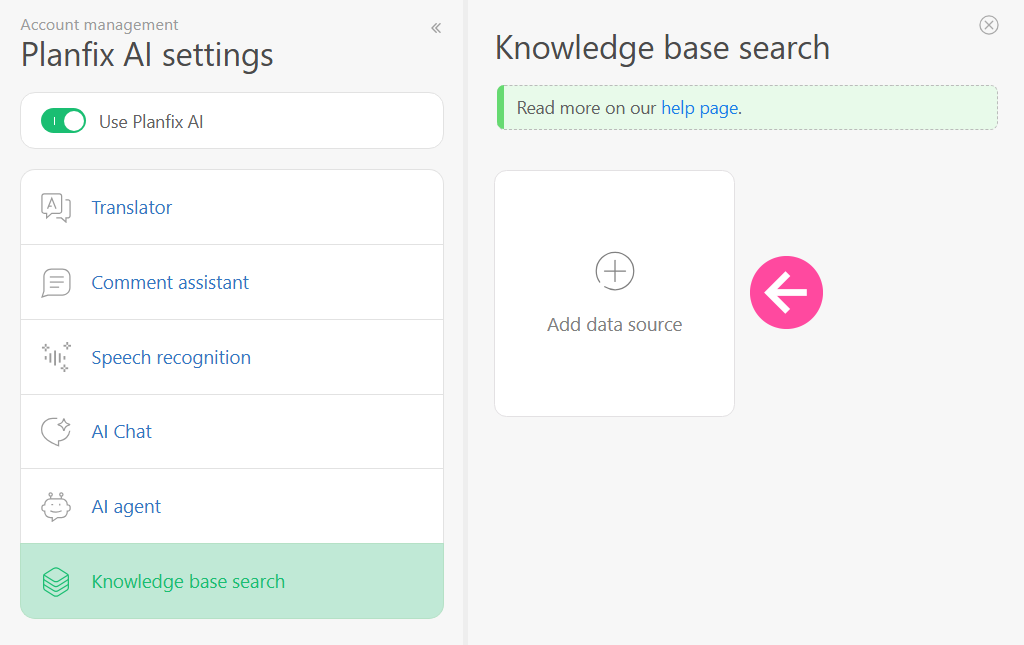
To help the AI generate more relevant suggestions, each product and service description should include more than just technical specifications. For example, it is often useful to add reference information such as:
- Where the product is used
- Which tasks are suitable for it
- Important usage considerations
- Possible limitations
- Alternative products
- Related items worth recommending
- Questions customers ask most often
The rule of thumb here is that the better the knowledge base is prepared, the more useful the AI suggestions will be.
One limitation to keep in mind is that the Knowledge Base is primarily designed to generate suggestions for a customer’s initial request. This means that the relevance of suggestions may decrease during long, multi-stage conversations. AI works best when used selectively, such as for quick guidance on a specific question.
Configuring Employee Access Rights to Sections of the Planfix Knowledge Base
Depending on the company’s needs, Planfix AI suggestions can be enabled for the entire company or restricted to specific teams and individual employees.
Access permissions are configured whenever a new document is added to the knowledge base. However, they can easily be updated later if needed.
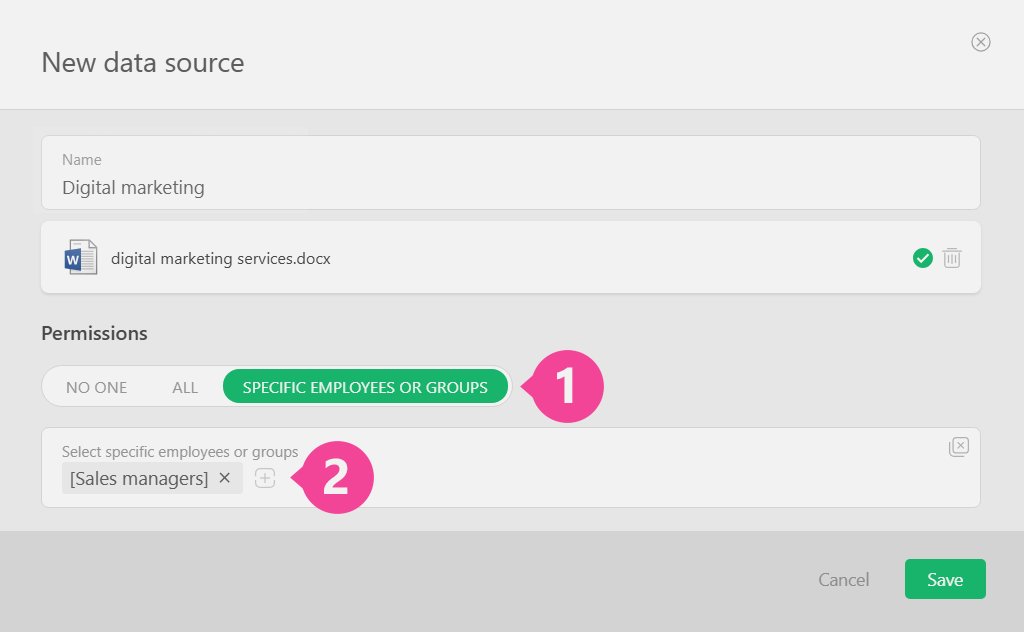
This matters because not all internal information should be available to every employee. For example, the sales team may only need access to product catalogs and sales terms, while support specialists only require access to instructions and service procedures. At the same time, managers may require access to a wide range of internal policies and extended service conditions.
Access settings keep the knowledge base organized and under control, so each employee sees only the sections they need for their work. This helps the company maintain control over sensitive internal information.
Generating Responses to Customers Using Planfix AI Based on a Knowledge Base
Once the setup is complete, the Knowledge Base option will appear in the comment field of the Planfix AI menu.
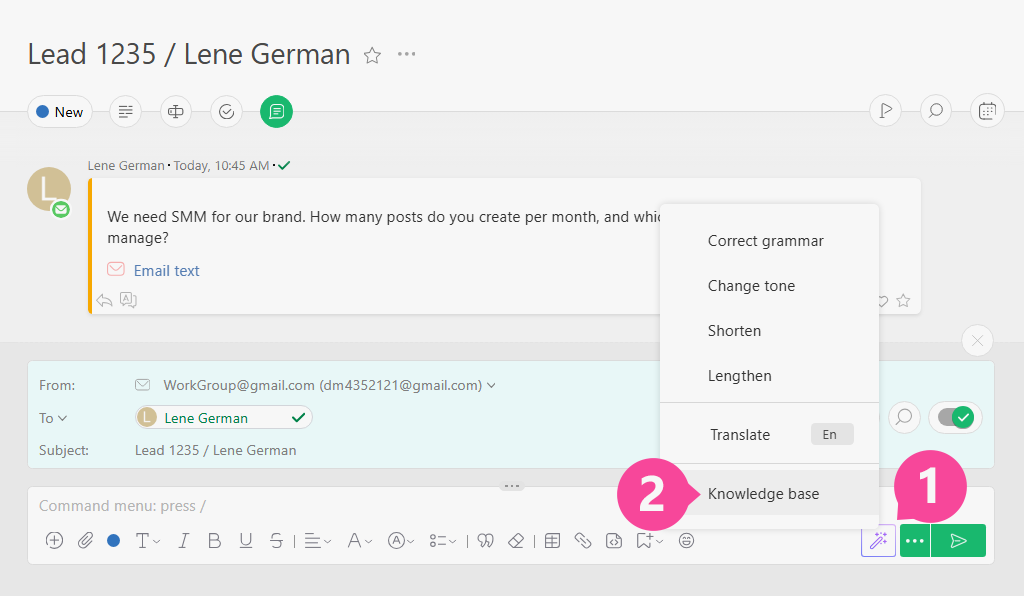
When responding to a customer, the employee can select the knowledge base section where the assistant should search for information.
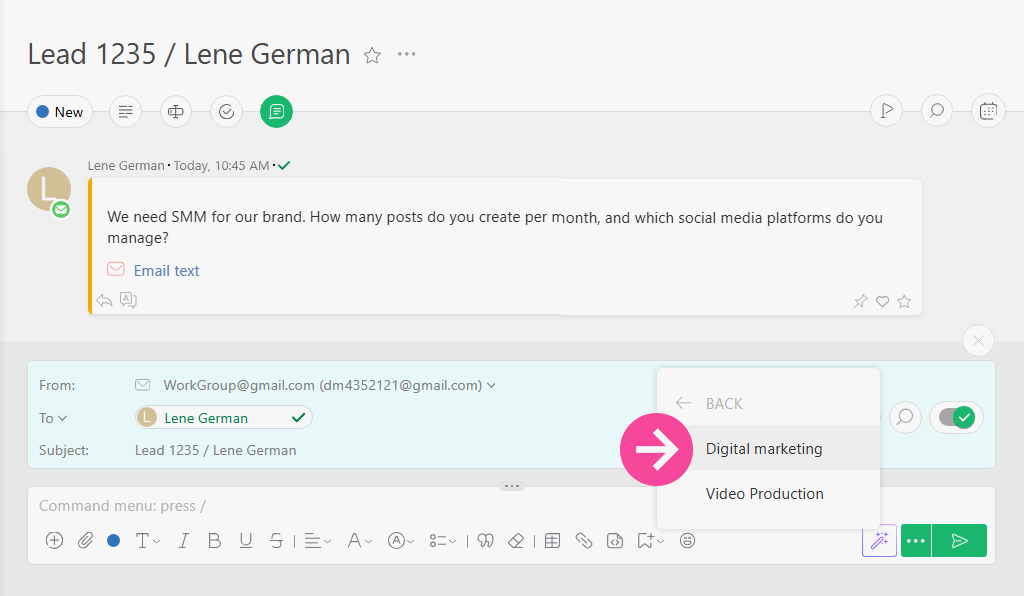
Planfix AI will generate a suggested reply based on the customer’s request and the information stored in the selected knowledge base. The draft can always be reviewed and edited before it is sent.
This is especially useful when a customer’s question requires more than a brief answer. For example, the manager may need to recommend a product, explain a pricing plan, clarify service terms, describe the next steps, or compare several available options.
The goal is for AI to prepare the foundation, while the manager provides the final review and adds a natural, human tone.
AI Knowledge Management for Customer Support Teams
AI knowledge management helps companies organize and apply knowledge across customer support teams.
In a typical support department, expertise is often spread across different team members. One manager might know the pricing plans, while another understands the product range. A third handles return policies, but a completely different person knows the technical details. As long as those employees are available, everything works. But when someone goes on vacation, changes roles, or is simply too busy, the team can quickly lose momentum.
A knowledge base reduces this dependence on individual employees. Not only is all the relevant documentation in one place, but Planfix AI can help the team apply it quickly in real customer conversations.
This is also useful for new employees, because it means they do not need to memorize every detail from day one. Instead, they can rely on the internal knowledge base and receive guidance as they work. That speeds up onboarding and reduces the risk of mistakes during their first customer interactions.
In this way, a knowledge management system becomes more than a document archive. With AI delivering relevant information in real time, employees can focus less on searching and more on helping customers.
Customer Service Automation with AI Knowledge Base
An AI knowledge base is just one part of a broader customer service automation strategy.
It speeds up request handling, helps standardize responses, and reduces the risk of communication errors so that managers spend less time searching for information and can focus sooner on what really matters: solving the customer’s problem.
Rather than replace employees, customer service automation supports them with repetitive tasks such as:
- Finding the right information
- Preparing the foundation of a response
- Reducing customer wait times
- Using consistent wording
- Lowering the workload on first-line support
- Helping new employees become productive faster
This is especially valuable for support teams that handle a high volume of requests. If every question requires a manual search through internal documents, the entire process slows down. With AI able to quickly find relevant information and suggest a response, the team can handle more requests without sacrificing service quality.
Intelligent Knowledge Base for Scalable Customer Support
Access to an intelligent knowledge base helps companies scale customer support without sharply increasing the team’s workload.
Any business owner will tell you that as the customer base grows, so does the number of questions. Many of those questions repeat or require employees to consult the same internal materials, such as service terms, instructions, pricing plans, product catalogs, and internal procedures.
When every manager searches for answers independently, support quality starts to depend too heavily on individual experience and attention to detail. One employee might respond quickly and accurately while another misses an important point and a third spends too long searching for the right document.
A smart knowledge base helps ensure more consistent responses. More importantly, it ensures employees work with a single source of information, while Planfix AI helps them quickly retrieve relevant details.
This approach also has the added benefit of supporting team growth. New employees can start handling customer questions sooner, experienced managers can spend less time answering routine requests, and team leaders gain a more predictable and manageable support process.
A knowledge base for customer support is more than a reference library – it’s a practical and effective tool for scaling service operations.
Knowledge Base Best Practices for AI Support Systems
It’s important to note that the quality of AI-generated responses depends directly on the quality of the knowledge base. If documents are outdated, poorly structured, or contradict one another, the resulting suggestions may also be less accurate.
To improve the performance of an AI knowledge base, follow these guidelines:
- Structure the knowledge base.
Organize information by topic rather than putting everything in a single large document. Having separate files for products, pricing plans, delivery, returns, SLAs, and internal procedures can help the AI identify the correct context more accurately. - Write for the whole team.
Internal documents should not only be useful to subject-matter experts but also to first-line employees. The clearer the explanation, the easier it is to generate a strong customer response. - Add practical examples.
Include more than basic facts. Product descriptions should cover use cases, limitations, compatible items, alternatives, and other details that help employees answer real customer questions. - Keep information up to date.
Review the knowledge base regularly. Any changes to pricing, terms, product availability, or service policies should be reflected in the documents as soon as possible. - Manage access rights.
Not every employee needs access to every section. Only give teams access to the materials they actually use in their work. - Review AI suggestions.
Always check generated responses before sending them. AI speeds up preparation, but the employee remains responsible for the final communication.
These knowledge base best practices can help make a customer service knowledge base more accurate, useful, and secure for everyday work.
Benefits of AI Knowledge Base for Customer Support
The smart knowledge base in Planfix is more than a place to store documents. When you organize a knowledge base in Planfix, it becomes a practical tool employees can use every day when working with customers. It reduces the workload on managers, shortens response times, and helps teams maintain a high standard of consultation—even when questions are complex or unusual.
Other key benefits include:
- Faster access to information
- Ready-to-use response suggestions
- Less manual work
- Fewer errors in customer consultations
- One shared knowledge base for the entire team
- Configurable access to individual sections
- Better support for new employees
- More consistent service quality
- The ability to scale support without creating chaos.
Planfix AI handles much of the routine work involved in searching for information and drafting responses. This way, employees can focus on what matters most: communicating with the customer and solving their problem.
For businesses, this means faster support, less dependence on individual experts, and greater control over how internal knowledge is stored and used.
Like AI help desk software and AI customer support, a customer service knowledge base delivers the greatest value when it is embedded in the team’s actual workflows. That’s why the Planfix AI Knowledge Base is integrated into the same workspace where employees already manage tasks, comments, and customer communication.
FAQ
What is an AI knowledge base?
An AI knowledge base is a centralized collection of company information that artificial intelligence can search and use to support employees and customers. Instead of simply storing documents, it helps generate relevant answers from internal materials such as product catalogs, instructions, policies, pricing rules, and service guidelines. This makes company knowledge easier to access and apply during real customer conversations.
How does AI-powered search work in Planfix?
AI-powered search in Planfix analyzes the customer’s request, searches the documents uploaded to the knowledge base, and identifies information relevant to the question. Planfix AI then generates a suggested response for the employee. The manager can review, edit, and send the reply on their own behalf, keeping communication fast and accurate while retaining full human control.
Can AI generate customer support responses automatically?
Yes. Planfix AI can generate suggested customer support responses using information stored in the company’s knowledge base. It does not simply retrieve a fixed canned reply. Instead, it analyzes the customer’s question and prepares a relevant draft based on the available information. The employee can review and edit the suggestion before sending it, helping preserve both accuracy and control.
What is knowledge base automation?
Knowledge base automation means using technology to organize, search, and apply company knowledge within everyday workflows. In customer support, it helps employees find accurate information and prepare responses without manually searching through multiple documents. With AI, the system can also generate response drafts, making internal knowledge easier to use during real customer interactions.
How does AI improve customer service automation?
AI improves customer service automation by reducing the time employees spend searching for information and writing repetitive responses. It can analyze customer requests, find relevant knowledge base content, and suggest clear answers. This helps support teams respond faster, communicate more consistently, reduce errors, and handle a higher volume of requests without increasing manual work.
Is the internal knowledge base secure and scalable?
An internal knowledge base can be both secure and scalable when access permissions and content structure are managed properly. In Planfix, access to individual knowledge base sections can be configured for specific teams or employees. This allows companies to control who can use certain internal materials while continuing to expand the knowledge base with new documents, teams, and customer support scenarios.

Comments 1
Businesses managing large numbers of prospects can benefit from Automated AI lead follow-up software. Automated sequences can keep conversations active, organize lead interactions, and identify engagement signals, giving sales representatives better context when it is time to step in personally.