Best Inventory Management Software Solutions
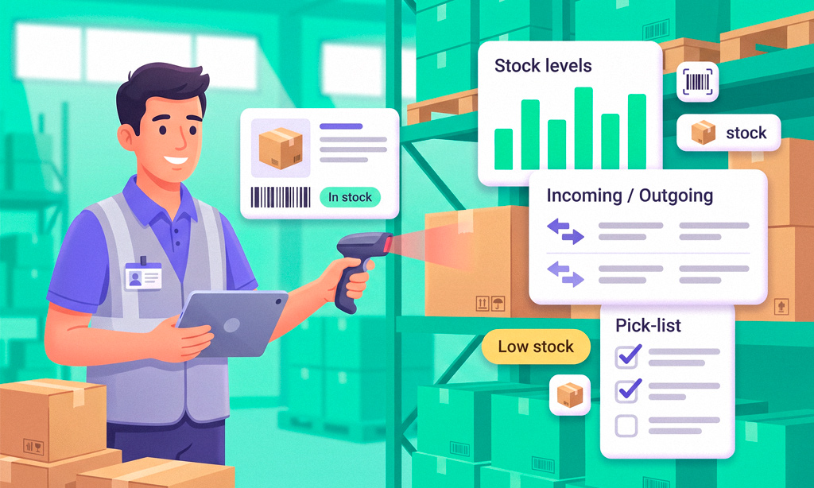
Managing inventory effectively is a cornerstone of success for businesses dealing with physical goods, whether in retail, manufacturing, or ecommerce. From preventing stockouts to keeping supply chains predictable, the right tools can turn chaotic processes into orderly ones.
This guide explores the best inventory management software solutions, with a focus on their features, pricing, and applicability across industries like retail, restaurants, and small businesses. We’ll look at ten top-rated systems, their strengths, their limitations, and how they address diverse business needs.
What Is Inventory Management Software and Why Do You Need It
Inventory management software enables businesses to track stock levels, manage orders, and optimize supply chains with real-time data. It replaces error-prone manual processes and makes sure products are available when customers need them. That matters for retailers, manufacturers, and ecommerce businesses alike. The best inventory management systems integrate with sales channels, accounting tools, and ecommerce platforms, creating a cohesive workflow that saves time and reduces costs.
For example, a small retailer can avoid stockouts, while a manufacturer can simplify production planning. Beyond day-to-day efficiency, these tools provide analytics to forecast demand and make data-driven decisions. That makes them hard to do without in fast-moving markets. By adopting the best inventory software, companies can improve customer satisfaction, minimize overstock, and enhance profitability across industries like retail, hospitality, and manufacturing.
Key Features of Inventory Management Software
Selecting the right inventory management software requires understanding its core functionality. The best systems offer tools to simplify stock tracking, order processing, and reporting for very different kinds of businesses. Below are six essential features to prioritize when evaluating the best inventory management for small business or larger operations.
- Real-Time Stock Tracking: Monitor inventory across multiple locations or sales channels instantly to maintain accurate stock levels.
- Order Management: Automate order creation, tracking, and fulfillment to reduce errors and speed up delivery times.
- Integration Capabilities: Connect with ecommerce platforms, POS systems, and accounting tools so data stays in sync.
- Demand Forecasting: Analyze historical data to predict inventory needs, preventing overstock or shortages.
- Barcode Scanning: Use barcode or QR code scanning to simplify stock updates and improve inventory accuracy.
- Custom Reporting: Generate detailed reports on stock performance, sales trends, and operational metrics for strategic planning.
These features help businesses keep control over inventory, adapt to market demands, and work more efficiently. By prioritizing these capabilities, you can select a system that aligns with your operational goals, whether for retail, manufacturing, or ecommerce.
Top 10 Inventory Management Software Solutions
The following list presents ten leading inventory management solutions for 2026, each offering its own tools to address diverse business needs. From small retailers to large manufacturers, these platforms offer strong features for getting inventory processes under control.
1. Planfix
Planfix is a versatile platform that transcends traditional inventory management by integrating the best inventory management system with CRM, task management, and project management. Designed for businesses across industries like retail, manufacturing, ecommerce, and hospitality, Planfix offers customizable workflows for inventory tracking, order management, and team coordination. Its flexibility makes it ideal for small businesses seeking the best inventory management software for small businesses, as well as larger enterprises needing scalable solutions.
Unlike standard tools, Planfix combines inventory control with client management and project oversight. That gives you one system for running day-to-day operations.
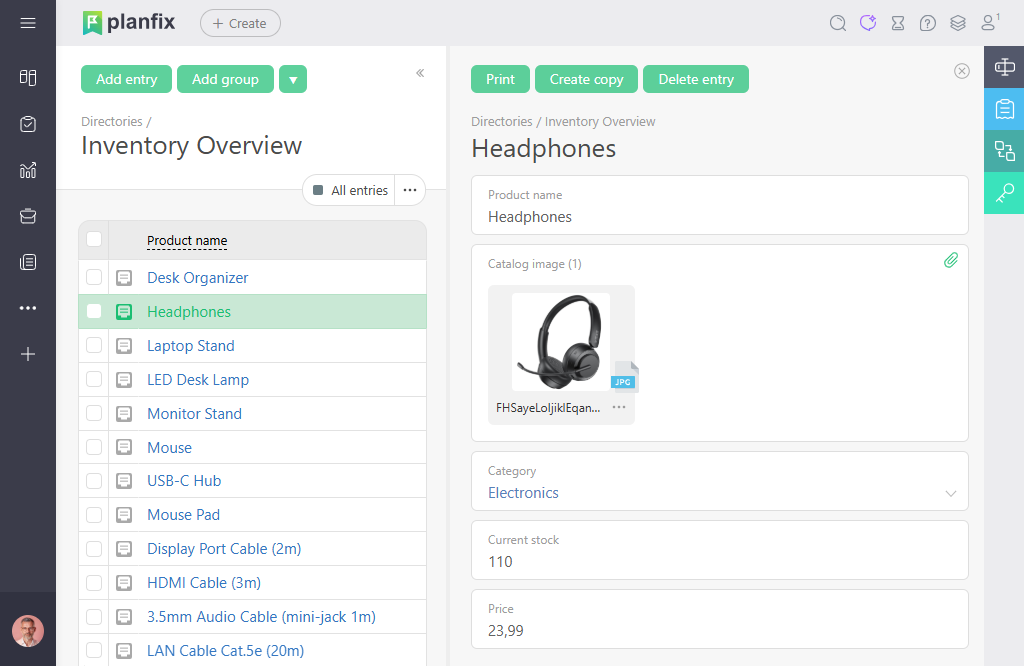
Planfix’s adaptability allows businesses to tailor processes to specific needs, such as managing retail stock, coordinating manufacturing supply chains, or tracking restaurant inventory. For example, a small retailer can use Planfix to monitor stock levels across multiple stores, while a manufacturer can manage raw material orders and production schedules. Its automation features reduce manual work, and its integrations keep data flowing between systems. The mobile app provides real-time access, making Planfix a top choice for dynamic inventory management.
Planfix Overview and Features
Planfix delivers a comprehensive set of tools to manage inventory efficiently, positioning it among the best inventory control software solutions. Its customizable workflows and strong integrations make it adaptable for various industries. Key features include:
- Inventory Tracking: Monitor stock levels in real time across warehouses, stores, or online channels, ensuring accurate data.
- Order Management: Automate order processing, from creation to fulfillment, to simplify sales workflows.
- Task Management: Assign tasks for restocking, supplier coordination, or inventory audits with clear deadlines.
- Workflow Automation: Automate low-stock alerts, order confirmations, and reporting to reduce manual work.
- Analytics and Reporting: Generate insights on inventory turnover, sales performance, and supply chain efficiency.
- Integrations: Use over 400 ready-made integrations, including connectors like Zapier and the Planfix API for building your own modules.
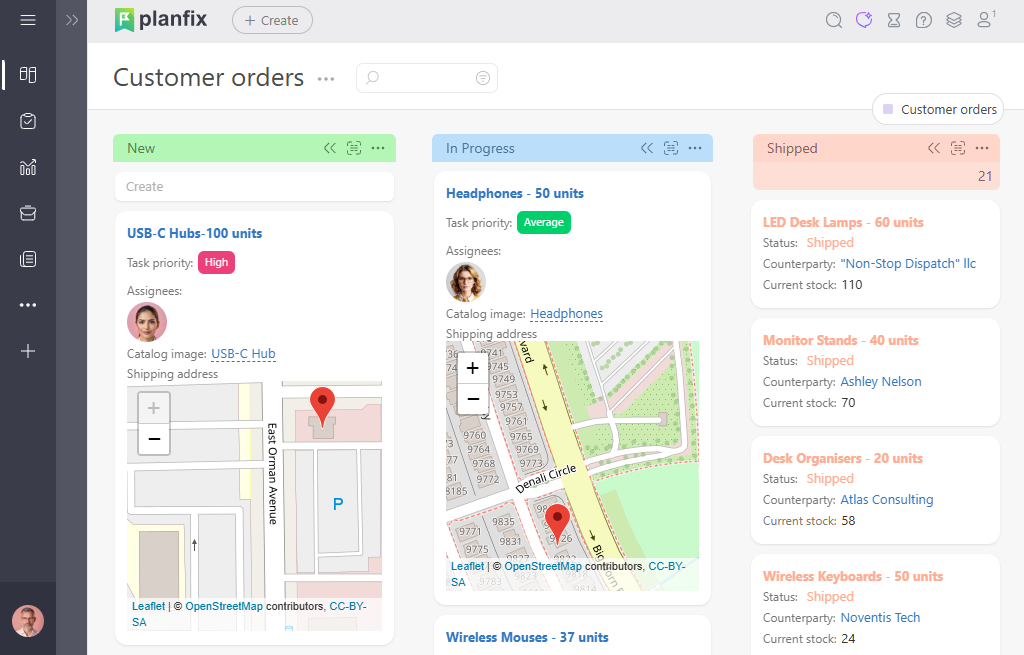
Planfix’s strength lies in its ability to combine inventory management with CRM and project tools. That way, you can manage stock, clients, and operations in one platform. For instance, a restaurant can track perishable goods while coordinating supplier orders, and an e-commerce business can sync inventory across multiple sales channels. The platform’s flexibility supports custom dashboards for specific needs, such as tracking retail stock or managing manufacturing materials. Its mobile app ensures accessibility for on-site inventory checks, and its reporting tools provide actionable insights, making Planfix a standout for the best software for inventory management.
Planfix Pros and Cons
Planfix offers a strong feature set with a few things to keep in mind. Here’s a balanced overview:
Pros:
- Highly customizable workflows for retail, manufacturing, or ecommerce.
- Integrates inventory, CRM, and project management in one platform.
- Strong automation for tasks like restocking and order updates.
- Mobile app provides real-time access for on-the-go management.
- Affordable pricing, including a free plan for small businesses.
- Extensive integrations via API and third-party tools like Zapier.
Cons:
- Initial setup may take time to configure custom workflows.
- Some integrations require technical setup or third-party tools.
- Limited offline functionality for certain features.
- Advanced analytics may require higher-tier plans.
Planfix’s broad toolset makes it a powerful choice for businesses that want one unified system, though setup time may be a consideration for new users.
Planfix Pricing & Free Version
Planfix offers a free plan with basic inventory tracking, task management, and CRM features for up to 5 users, ideal for small businesses or startups. Paid plans start at $8 per user/month (billed annually), including advanced automation, integrations, and analytics. Higher tiers ($18-$28 per user/month) come with additional features like custom reporting and multi-channel support. A 14-day free trial provides full access to premium features, making it easy to test Planfix as the best inventory software for small businesses or larger operations.
2. Zoho Inventory
Source: https://www.zoho.com/inventory/
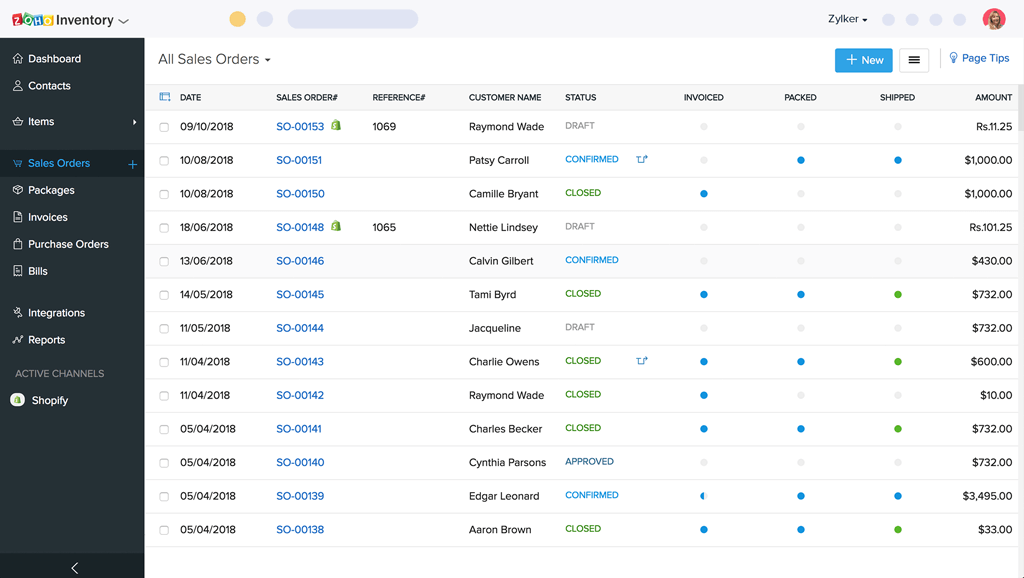
Zoho Inventory is a reliable option for small to mid-sized businesses looking for the best inventory management software for small businesses. It focuses on ecommerce and retail, with tools to manage stock, orders, and sales across platforms like Shopify and Amazon. Its integration with Zoho’s ecosystem makes it a good fit if you already use Zoho CRM or Books, since inventory and accounting then sit in the same place.
Zoho Inventory Overview and Features
Zoho Inventory simplifies inventory management with tools tailored for ecommerce and retail. Its seamless integrations and user-friendly interface make it a strong contender for the best ecommerce inventory management. Key features include:
- Multi-Channel Syncing: Tracks inventory across multiple sales channels like Amazon and Etsy.
- Order Management: Automates order creation and fulfillment processes.
- Accounting Integration: Connects with QuickBooks and Zoho Books for financial tracking.
- Barcode Scanning: Supports barcode scanning for quick stock updates.
- Demand Forecasting: Provides basic tools to predict inventory needs.
- Custom Dashboards: Offers insights into sales and inventory performance.
Zoho Inventory’s strength lies in its affordability and integration with Zoho’s suite, which makes it a good match for small businesses with straightforward needs. It supports multi-channel sales and provides basic analytics, though advanced features are reserved for higher tiers. The mobile app keeps data available on the go, but the platform may lack the depth needed for complex manufacturing workflows.
Zoho Inventory Pros and Cons
Zoho Inventory offers a solid feature set with some limitations. Here’s a balanced overview:
Pros:
- Smooth integration with the Zoho ecosystem.
- Affordable pricing for small businesses.
- User-friendly interface with mobile support.
- Supports multi-channel ecommerce sales.
- Free plan for low-volume businesses.
- Reliable customer support.
Cons:
- Advanced reporting limited to higher tiers.
- Occasional delays in real-time updates.
- Less suitable for manufacturing needs.
- Limited customization options.
- Free plan has low order limits.
- Some features require additional Zoho subscriptions.
Zoho Inventory is a practical choice for small businesses that need affordable, integrated inventory management, though it may not suit complex operations.
Zoho Inventory Pricing & Free Version
Zoho Inventory offers a free plan supporting up to 20 orders/month. Paid plans start at $39/month (Standard, up to 500 orders) and scale to $129/month (Premium, 7,500 orders). A 14-day free trial is available.
3. Sortly
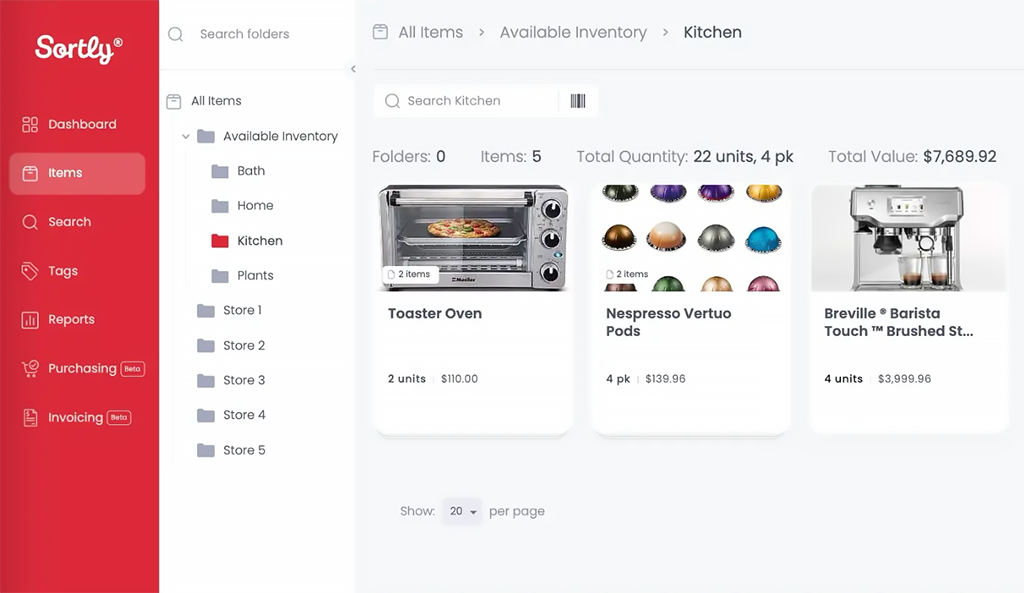
Source: https://www.sortly.com/
Sortly is a user-friendly platform designed for small businesses, service providers, and nonprofits seeking the best inventory tracking software. Its simplicity and mobile-first approach make it ideal for tracking supplies, tools, or retail goods without complex setups.
Sortly Overview and Features
Sortly focuses on ease of use, offering tools to organize and track inventory efficiently. It’s well-suited for the best inventory software small business, particularly for those with straightforward needs. Key features include:
- Barcode Scanning: Uses QR codes and barcodes for quick inventory updates.
- Inventory Organization: Categorizes stock by location or type.
- Custom Fields: Allows item-specific details like serial numbers.
- Low-Stock Alerts: Notifies users for reordering needs.
- Export Options: Supports CSV/PDF exports for basic reporting.
- Cloud Syncing: Syncs data across devices for real-time access.
Sortly’s strength is its intuitive interface, which makes it accessible for non-technical users. It supports mobile scanning and basic reporting. But it lacks advanced features like purchase order management or forecasting. That limits its use for larger or manufacturing-focused businesses.
Sortly Pros and Cons
Sortly provides a straightforward solution with some trade-offs. Here’s a balanced overview:
Pros:
- Easy to use for non-technical users.
- Affordable for small businesses.
- Mobile app supports offline tracking.
- Flexible for various inventory types.
- Free plan available.
- Quick setup process.
Cons:
- No purchase order management.
- Limited integrations with other tools.
- Basic reporting capabilities.
- Not suited for complex manufacturing.
- Free plan restricts user access.
- Lacks advanced forecasting tools.
Sortly is a good fit for small businesses that need simple inventory tracking, but it may fall short for complex needs.
Sortly Pricing & Free Version
Sortly offers a free plan with basic tracking for up to 100 items. Paid plans start at $29/month for unlimited entries and advanced features like custom reports. A 14-day free trial is available.
4. Cin7
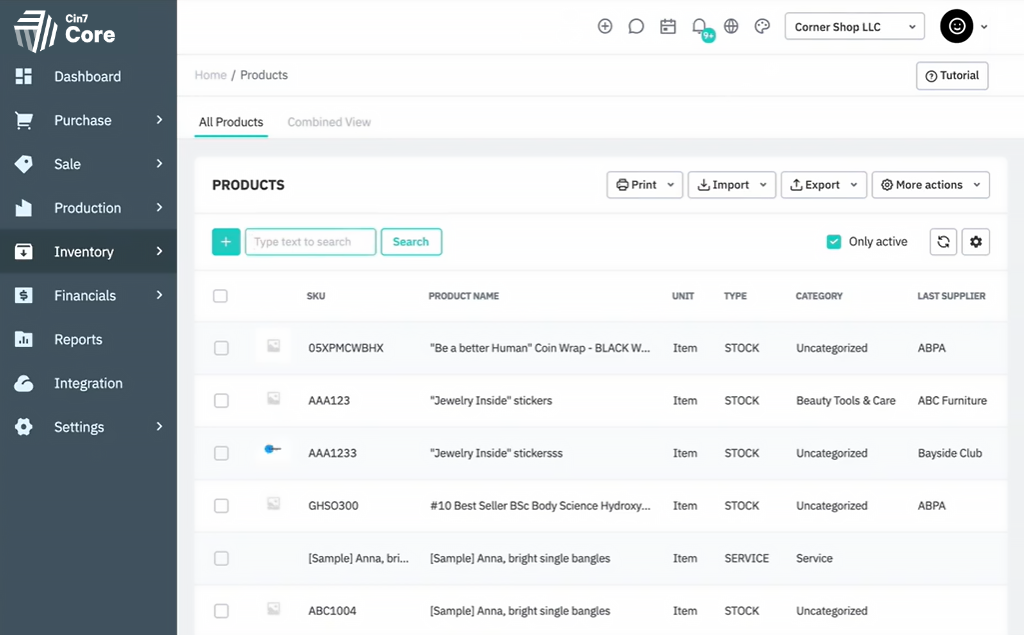
Source: https://www.cin7.com/
Cin7 is a powerful solution for retailers and manufacturers, offering connected inventory management and POS capabilities. It’s a strong contender for the best warehouse inventory management system, supporting multi-channel sales and complex workflows.
Cin7 Overview and Features
Cin7 provides a broad set of tools for ecommerce, retail, and manufacturing, with a focus on multi-warehouse management. Its integration capabilities make it a top choice for the top inventory management system. Key features include:
- Multi-Warehouse Tracking: Manages stock across multiple locations in real time.
- POS Integration: Supports in-store and B2B sales.
- Automated Purchasing: Simplifies purchase orders and reordering.
- Ecommerce Syncing: Connects with Shopify, Amazon, and WooCommerce.
- Advanced Reporting: Tracks KPIs like inventory turnover.
- Barcode Support: Enables scanning and kitting for efficiency.
Cin7 excels in handling multi-channel sales and complex inventory needs, but its higher cost and setup complexity may deter smaller businesses. It’s best suited for growing companies with established workflows.
Cin7 Pros and Cons
Cin7 offers powerful features with some things to consider. Here’s a balanced overview:
Pros:
- Comprehensive for ecommerce and retail.
- Strong integration ecosystem.
- Supports multi-warehouse management.
- Automation reduces manual tasks.
- Scalable for growing businesses.
- API for custom integrations.
Cons:
- Higher starting price ($299/month).
- Complex setup for beginners.
- Limited free trial features.
- Some features exclusive to higher tiers.
- Customer support can be slow.
- Not ideal for microbusinesses.
Cin7 is a strong choice for businesses with complex inventory needs, though its cost may be a barrier for smaller firms.
Cin7 Pricing & Free Version
Cin7 has no free plan. Paid plans start at $299/month, with higher tiers for advanced features. A 14-day free trial is available.
5. Katana
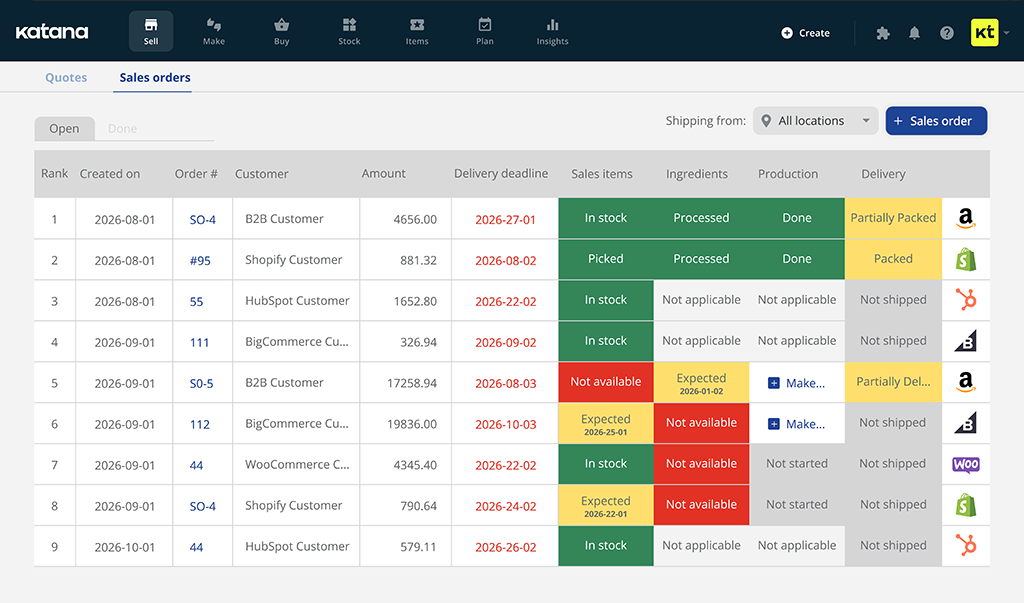
Source: https://katanamrp.com/
Katana is tailored for small to mid-sized manufacturers, offering real-time insights for the best inventory management software for manufacturing. It simplifies production planning and inventory tracking, with a focus on scalability.
Katana Overview and Features
Katana provides tools to manage manufacturing workflows, making it a solid option for the top inventory control software. Its intuitive interface and integrations suit small manufacturers. Key features include:
- Production Tracking: Monitors inventory and production in real time.
- Material Planning: Supports material requirements planning (MRP).
- Ecommerce Integration: Syncs with Shopify, QuickBooks, and Xero.
- Restock Alerts: Automates reordering based on stock levels.
- Visual Dashboards: Provides workflow visibility.
- Multi-Channel Support: Manages sales across platforms.
Katana’s focus on manufacturing makes it less versatile for retail or hospitality, but its simplicity and integrations make it effective for production-focused businesses.
Katana Pros and Cons
Katana offers specialized features with some limitations. Here’s a balanced overview:
Pros:
- Tailored for manufacturing workflows.
- User-friendly interface.
- Strong integration capabilities.
- Real-time data updates.
- Scalable for growing businesses.
- Free trial available.
Cons:
- Limited features for non-manufacturing businesses.
- Higher pricing for advanced plans.
- No free plan.
- Setup can be time-consuming.
- Limited offline capabilities.
- Basic reporting in lower tiers.
Katana is a strong choice for manufacturers, but its niche focus may limit its appeal for other industries.
Katana Pricing & Free Version
Katana has no free plan. Plans start at $99/month for basic manufacturing features, with higher tiers up to $349/month. A 14-day free trial is available.
6. Square
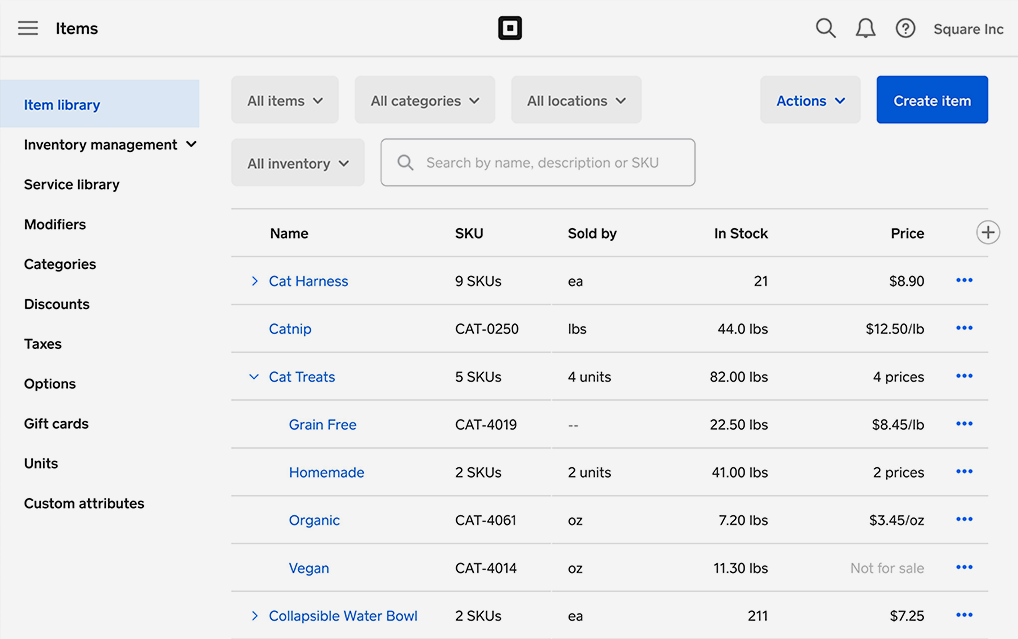
Source: https://squareup.com/us/en/point-of-sale/features/inventory-management
Square is known for its user-friendly POS and inventory management, making it a top pick for the best retail inventory management software. It’s a good fit for small retailers and restaurants, with ecommerce integration built in.
Square Overview and Features
Square offers straightforward tools for inventory and sales, catering to small businesses. Its POS integration and free plan make it a popular choice for the best small business inventory software. Key features include:
- Stock Tracking: Monitors inventory with real-time updates.
- POS Integration: Supports in-store and online sales.
- Ecommerce Syncing: Connects with Square Online for sales in one place.
- Basic Reporting: Tracks sales and inventory trends.
- Barcode Scanning: Simplifies stock updates.
- Multi-Location Support: Manages stock across multiple stores.
Square’s simplicity and free plan are ideal for small businesses, but it lacks advanced features for complex manufacturing or large-scale operations.
Square Pros and Cons
Square provides accessible tools with some trade-offs. Here’s a balanced overview:
Pros:
- Free plan with unlimited items.
- Easy to use for small businesses.
- Strong POS integration.
- Affordable paid plans.
- Mobile-friendly interface.
- Reliable customer support.
Cons:
- Limited advanced features.
- Not suited for complex manufacturing.
- Basic forecasting tools.
- Some integrations require paid plans.
- Reporting lacks depth.
- Less customizable than competitors.
Square is an excellent option for small retailers and restaurants, but it may not meet complex inventory needs.
Square Pricing & Free Version
Square offers a free plan with unlimited items and transactions. Paid plans start at $29/month for advanced retail features. No trial is needed for the free plan.
7. Ordoro
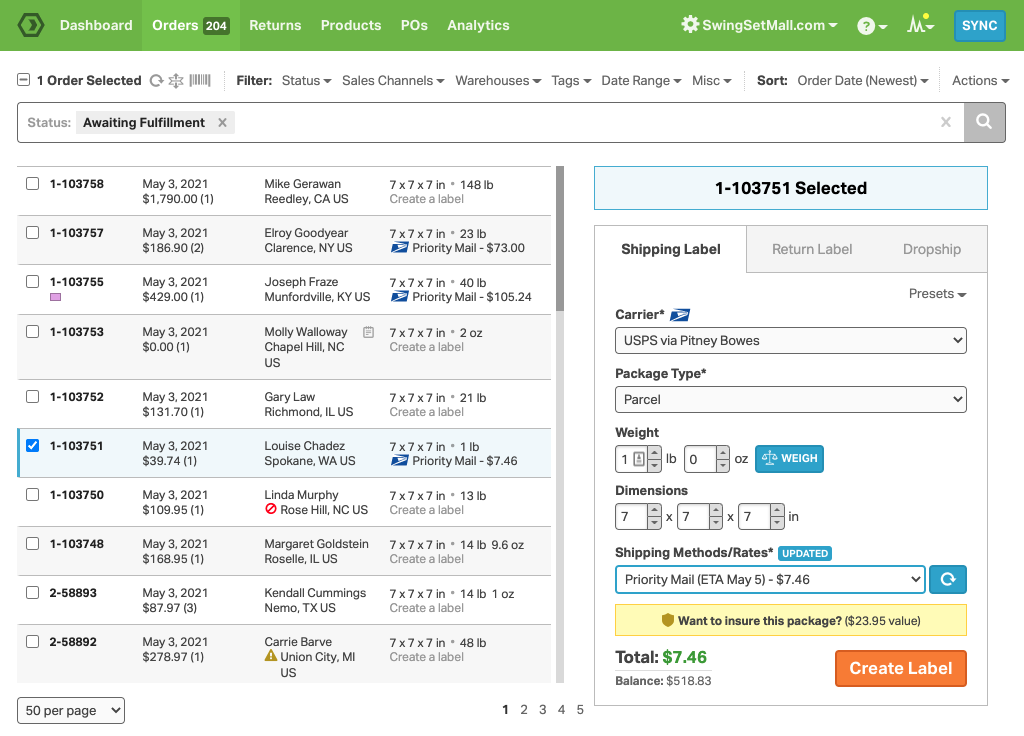
Source: https://www.ordoro.com/features/inventory-management
Ordoro is designed for ecommerce businesses, focusing on inventory, shipping, and dropshipping. It’s a strong contender for the best inventory software for ecommerce, with robust multi-channel support.
Ordoro Overview and Features
Ordoro simplifies ecommerce operations with tools for inventory and order management. Its dropshipping capabilities make it a good fit for online retailers. Key features include:
- Inventory Syncing: Tracks stock across multiple channels in real time.
- Dropshipping Automation: Manages supplier orders and fulfillment.
- Barcode Scanning: Supports SKU management and stock updates.
- Ecommerce Integration: Connects with Amazon, eBay, and Shopify.
- Vendor Portal: Facilitates supplier coordination.
- Basic Analytics: Tracks sales and inventory performance.
Ordoro’s focus on ecommerce and dropshipping is a strength, but it lacks features for manufacturing or complex warehousing. Its pricing may also be high for small businesses.
Ordoro Pros and Cons
Ordoro offers specialized tools with some limitations. Here’s a balanced overview:
Pros:
- Excellent for dropshipping businesses.
- Strong multi-channel integration.
- User-friendly interface.
- Automation for order fulfillment.
- Free trial available.
- Scalable for growing businesses.
Cons:
- No free plan.
- Limited manufacturing features.
- Setup can be complex.
- Higher pricing for advanced features.
- Customer support varies.
- Basic reporting tools.
Ordoro is well-suited for ecommerce businesses, particularly those with dropshipping needs, but it may not fit other industries.
Ordoro Pricing & Free Version
Ordoro has no free plan. Plans start at $59/month, with advanced features at $149/month. A 15-day free trial is available.
8. Fishbowl
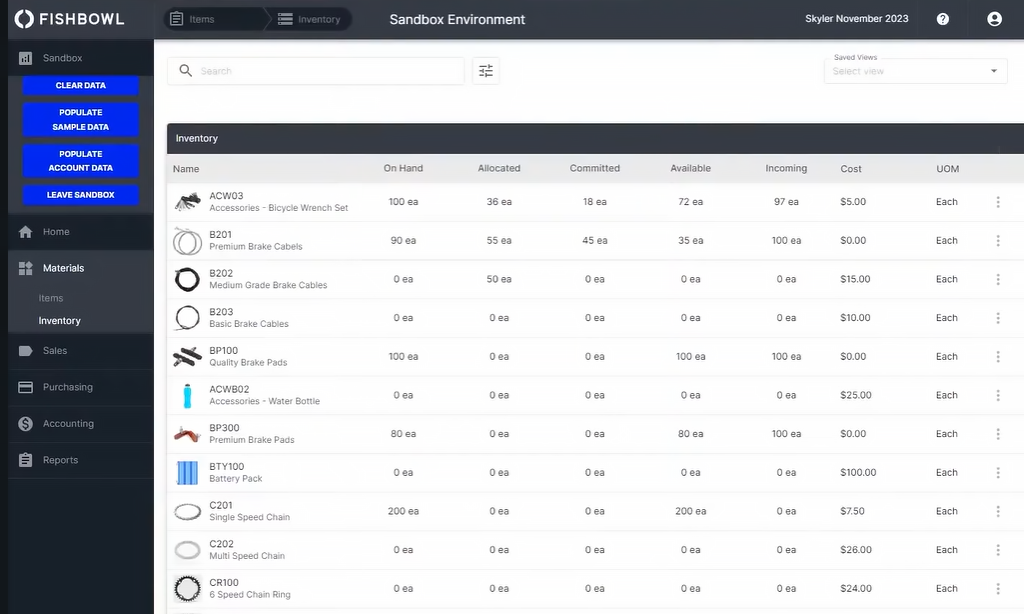
Source: https://www.fishbowlinventory.com/
Fishbowl is a comprehensive solution for manufacturing and warehouse management, offering robust tools for the best warehouse inventory management software. It also integrates with QuickBooks for accounting needs.
Fishbowl Overview and Features
Fishbowl provides advanced tools for inventory and production management, making it suitable for mid-sized businesses. Its manufacturing focus sets it apart as a top inventory management system. Key features include:
- Warehouse Tracking: Manages stock across multiple locations.
- Barcode Scanning: Supports lot tracking and inventory updates.
- Accounting Integration: Syncs with QuickBooks and Shopify.
- Work Order Management: Keeps production processes organized.
- Multi-Location Support: Tracks inventory across sites.
- Custom Reporting: Provides detailed inventory insights.
Fishbowl’s deep feature set suits manufacturers and warehouses, but its high cost and complexity may be barriers for smaller businesses.
Fishbowl Pros and Cons
Fishbowl offers powerful tools with some things to consider. Here’s a balanced overview:
Pros:
- Strong for manufacturing and warehousing.
- Smooth QuickBooks integration.
- Scalable for mid-sized businesses.
- Detailed inventory tracking.
- Free trial available.
- Plenty of support resources.
Cons:
- Higher cost for small businesses.
- Complex setup process.
- No free plan.
- Limited ecommerce features.
- Steep learning curve.
- Some integrations require setup.
Fishbowl is a solid choice for manufacturers and warehouses, but its cost may be prohibitive for smaller firms.
Fishbowl Pricing & Free Version
Fishbowl has no free plan. Pricing starts at $4,395 (one-time license) or subscription-based plans from $149/month. A 14-day free trial is offered.
9. Marketman
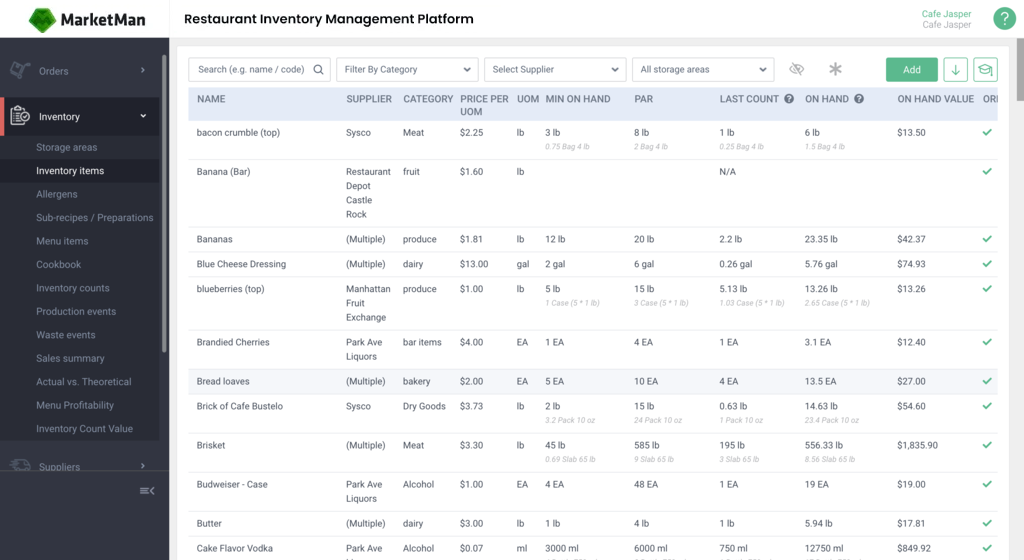
Source: https://www.marketman.com/
Marketman is tailored for the hospitality sector, making it a strong option for the best inventory management software for restaurants. It focuses on perishable inventory and supplier management, which suits food-related businesses.
Marketman Overview and Features
Marketman organizes inventory for restaurants, focusing on perishable goods and cost control. Its niche features make it a top choice for hospitality businesses. Key features include:
- Perishable Tracking: Monitors food inventory in real time.
- Recipe Costing: Tracks costs for menu items and recipes.
- Supplier Management: Manages purchase orders and vendor relations.
- POS Integration: Syncs with restaurant POS systems.
- Cost Analytics: Analyzes food costs and profitability.
- Mobile App: Supports on-site inventory updates.
Marketman’s hospitality focus is a strength, but its limited applicability outside this sector and higher pricing may restrict its appeal.
Marketman Pros and Cons
Marketman provides specialized tools with some limitations. Here’s a balanced overview:
Pros:
- Ideal for restaurants and hospitality.
- Strong supplier management tools.
- User-friendly interface.
- Real-time data updates.
- Free trial available.
- Good for small businesses.
Cons:
- Limited use outside hospitality.
- No free plan.
- Basic ecommerce integration.
- Reporting can be basic.
- Higher costs for advanced features.
- Setup requires training.
Marketman is an excellent fit for restaurants, but its niche focus limits versatility for other industries.
Marketman Pricing & Free Version
Marketman has no free plan. Plans start at $149/month, with higher tiers for advanced features. A 14-day free trial is available.
10. inFlow Inventory
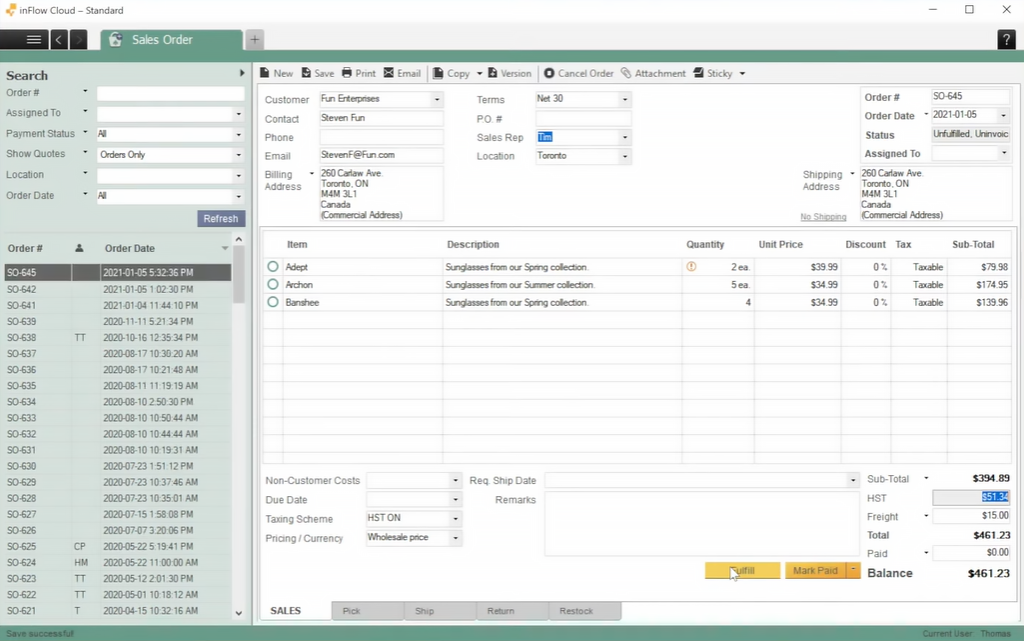
Source: https://www.inflowinventory.com/
inFlow Inventory is designed for small to mid-sized businesses, offering a user-friendly platform for the best inventory software for small business. It supports retail, ecommerce, and wholesale operations with straightforward tools.
inFlow Inventory Overview and Features
inFlow Inventory provides accessible tools for inventory and order management, which makes it a good fit for small businesses. Its simplicity and integrations support retail and ecommerce needs. Key features include:
- Stock Tracking: Monitors inventory with real-time updates.
- Barcode Scanning: Simplifies stock counts and updates.
- Ecommerce Integration: Syncs with Shopify and WooCommerce.
- Order Management: Handles invoicing and fulfillment.
- Custom Reporting: Tracks inventory and sales performance.
- Multi-Warehouse Support: Manages stock across locations.
inFlow’s affordability and ease of use are strengths, but it lacks advanced features for complex manufacturing or large-scale operations.
inFlow Inventory Pros and Cons
inFlow offers practical tools with some trade-offs. Here’s a balanced overview:
Pros:
- Affordable for small businesses.
- Easy to set up and use.
- Strong integration options.
- Free trial available.
- Mobile app support.
- Scalable for growth.
Cons:
- Limited advanced forecasting.
- No free plan.
- Basic manufacturing features.
- Some features require higher tiers.
- Customer support can be slow.
- Less customizable than competitors.
inFlow Inventory is a solid choice for small businesses that need simple inventory management, but it may not suit complex needs.
inFlow Inventory Pricing & Free Version
inFlow Inventory has no free plan. Plans start at $89/month, with advanced features at $219/month. A 14-day free trial is available.
Benefits of Using Inventory Management Software Systems
Inventory management software changes how businesses handle stock, orders, and supply chains. The best inventory control software offers tools that save time, reduce errors, and support growth. Below are six key benefits of adopting these systems.
- Improved Accuracy: Real-time tracking and barcode scanning eliminate manual errors, ensuring precise stock levels.
- Time Savings: Automation of repetitive tasks like order processing and restocking frees up staff for strategic work.
- Cost Reduction: Demand forecasting prevents overstock and stockouts, optimizing inventory costs.
- Enhanced Customer Satisfaction: Accurate stock levels ensure products are available, improving order fulfillment.
- Scalability: The best inventory tracking system grows with your business, supporting multi-location or multi-channel operations.
- Data-Driven Decisions: Custom reports and analytics provide insights into sales trends and inventory performance.
These benefits make inventory management software an important tool for businesses that want to stay competitive, whether in retail, manufacturing, or ecommerce.
Which Inventory Management System Is Right for Your Business
Selecting the best inventory management software depends on your business’s specific needs, whether you’re managing a small retail shop, a manufacturing operation, or an ecommerce platform. The right system keeps stock tracking accurate, automates order processes, and turns analytics into decisions you can act on. That lifts both efficiency and profitability.
Key features like real-time tracking, integrations, and automation are the ones that address challenges such as stockouts, overstock, and manual errors. A versatile platform can support very different industries, from hospitality to retail, by offering customizable workflows and room to scale. Planfix stands out as an all-in-one solution, combining inventory management, CRM, and project tools to meet diverse business demands. Explore Planfix today to discover how it can transform your inventory operations and drive growth.
FAQ
What is inventory management software?
It’s a tool to track stock levels, manage orders, and optimize supply chains, reducing errors and improving efficiency across retail, manufacturing, or ecommerce.
Why do businesses need inventory management software?
It prevents stockouts and overstock, automates processes, and integrates with sales channels, so operations run smoothly and customers stay satisfied.
What features should the best inventory software include?
Look for real-time tracking, order management, integrations, forecasting, and custom reporting to meet diverse business needs.
How does inventory software benefit small businesses?
The best inventory management for small businesses offers affordable tools to streamline stock tracking, reduce costs, and support growth without complexity.
What should businesses consider when choosing inventory software?
Evaluate scalability, ease of use, integration capabilities, pricing, and specific features like forecasting or multi-location support for long-term fit.