CRM Automation for Fast Sales: Planfix for High-Intent Leads

Even a strong sales script needs to adapt to the customer. In fact, studies show that when a company relies on intuition alone and ignores customer segmentation, it can lose 5% to 40% of potential revenue compared with what a more personalized approach can deliver.
Some customers want time to explore their options, compare offers, and gather enough proof before making a decision. Others only care about three things: price, timing, and payment. If the latter group can’t get those answers quickly, they’ll simply move on to a company that responds faster.
That’s where CRM automation can make a significant difference. Instead of simply storing incoming requests, your CRM can adapt the sales process to each customer’s behavior.
For example, when a lead is highly motivated and ready to act, the system can intervene to remove friction. It could do this by identifying the type of inquiry immediately, giving the sales manager a concise response to work with, moving the lead into an express pipeline, and keeping response time under control.
A CRM for fast sales is configured around speed. The first response reaches the customer within 10–15 minutes, while the path from inquiry to payment is reduced to just 3–4 statuses. In Planfix, you can build this kind of business process around four core components:
- AI-based lead qualification
- Ready-to-use response templates
- An express sales pipeline
- SLA-based response time monitoring
In this article, we’ll look at how to configure CRM workflows for the most common customer types and turn Planfix into a more personalized assistant for your sales managers.
We’ll start with the fastest-moving segment: those customers who needed everything “yesterday.”
AI Lead Qualification for Faster Customer Response
Before you build a workflow for a specific customer type, you first need to determine who you’re dealing with.
With Planfix AI, that can take just 10 seconds.
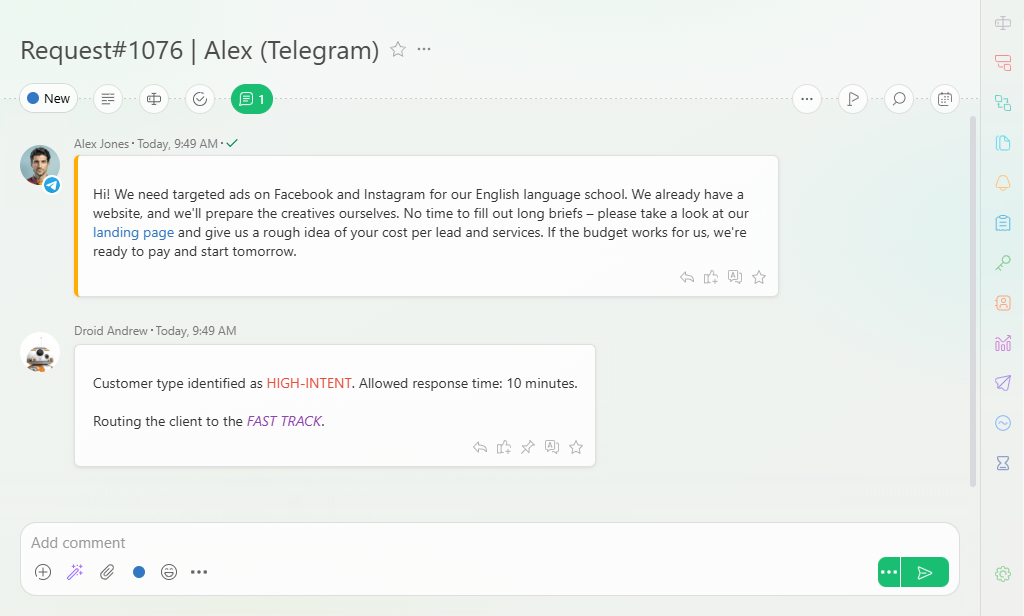
This is because AI lead qualification can analyze the first customer message and immediately determine which handling scenario fits best. That’s especially useful when inquiries are coming in from multiple places, such as website forms, email, messaging apps, comments, and support requests.
Planfix can scan the inquiry for signs of strong buying intent, such as:
- A specific deadline
- A direct price question
- A request for an invoice
- A question about payment
- Comparisons based on delivery or completion speed
- Short, highly focused messages
- Repeated attempts to move the process forward
- A mention that competitors have already been contacted
Once the message is analyzed, Planfix can assign the inquiry to the appropriate category. Examples include High-intent, Analytical, Hesitant, or any other classification that fits your sales process.
Here’s how to set this up:
- Enable Planfix AI in the account system settings.
- Create a classification field. From there, add a dedicated field to the object used for inquiries, leads, or deals.
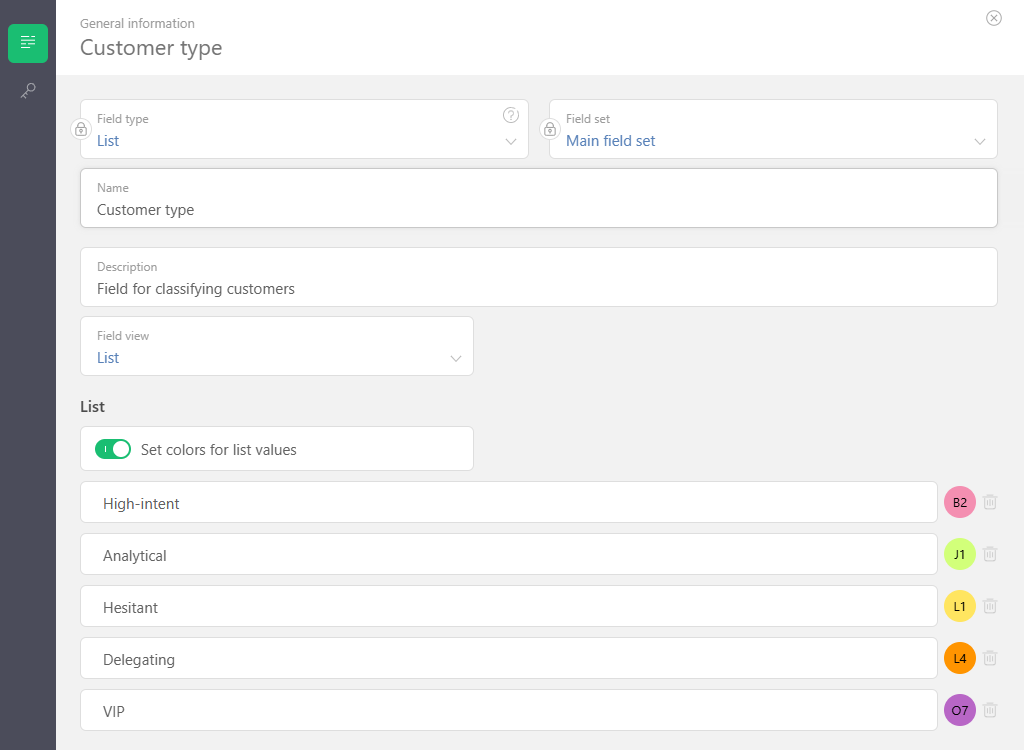
- Configure the automation. In the script, select the AI: Classify request action.
In the action settings:
- Select the data source for analysis. This is usually the task description, where the customer’s message is added automatically.
- Select the classification field you created.
- Add extra instructions for AI if your process requires them.
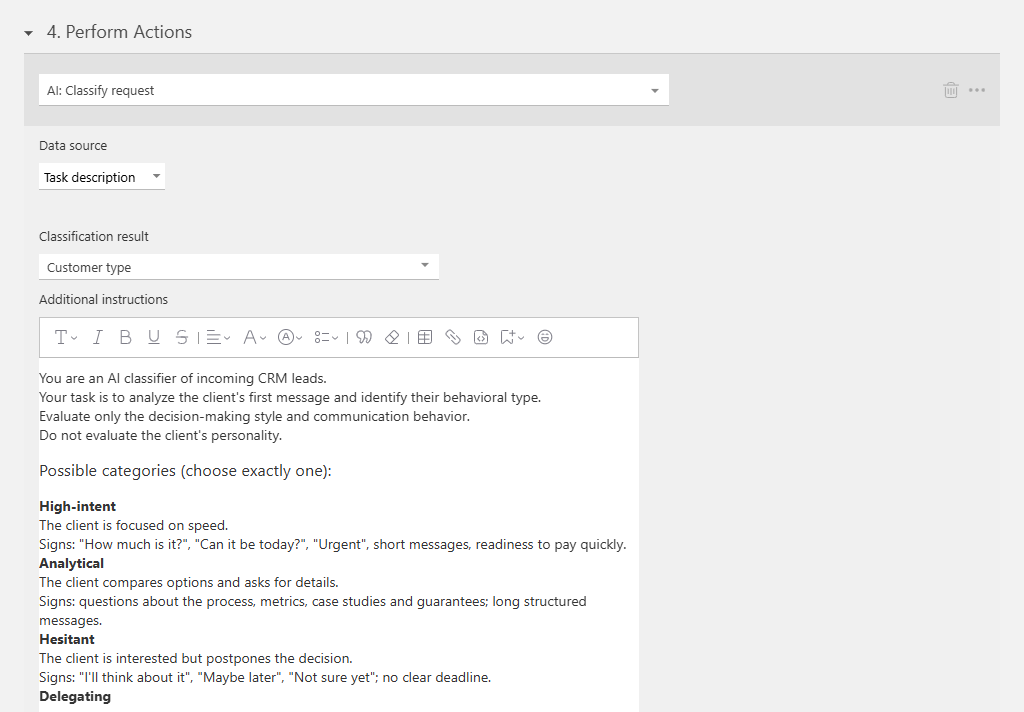
That’s it. Planfix will now automatically analyze incoming inquiries and assign them to the appropriate category. The more specific the customer’s message, the easier it is for AI to accurately recognize their intent.
With AI CRM automation, sales managers can get a better understanding of what kind of lead has arrived, how urgent the request is, and which sales scenario should start next.
How to Identify High-Intent Leads Using AI Customer Segmentation
Planfix AI may be able to handle classification automatically, but your sales managers should still learn to recognize the signals themselves, especially while the system is new and you’re still fine-tuning the AI instructions.
Signs of a Real High-Intent Customer
With a genuinely “hot” lead, customers generally demonstrate urgency rather than emotion. Here, the clearest signals are practical questions and concrete actions.
For example:
- They give a specific deadline. Their message contains clear urgency markers, like “I need it today,” “When can you send the invoice?” or “Can you finish by Friday?” Specificity is important. There’s a real date or deadline, not just a vague “as soon as possible.”
- They ask about price and timing right away. These customers usually skip the “Tell me about your company” stage. They want to know how much it costs, how quickly you can deliver, and how they can pay.
- They keep messages short and direct. With these sorts of leads, you may not get a long greeting or a carefully worded introduction. This isn’t because the customer is rude, but because they’re trying to save time.
- They make decisions quickly. Hot leads don’t disappear for a week to “think about it,” and they usually don’t ask for five different proposal versions. If the terms work, they’re ready to move forward. If they don’t, they’ll say so and move on.
- They push the process forward themselves. These sorts of leads tend to follow up first, asking things like, “Did you send the invoice?” “When will the manager contact me?” and “When can you start?” If your usual process includes “I’ll get back to you tomorrow,” there’s a good chance this customer won’t be waiting.
- They’ve submitted requests to several companies. Some clients will outright say, “You were the first to respond, so let’s work together.” Others may say, “Please reply quickly. I already have an invoice from your competitor.”
The point is, for these leads, speed isn’t a nice extra. It’s part of the buying decision itself.
When Urgency Is Not a Buying Signal
Keep in mind that not every urgent-sounding message signals strong purchase intent. Sometimes the customer isn’t actually in a hurry to buy, but is simply putting pressure on the sales manager.
Here are some ways to tell the difference:
- They’re rude or aggressive from the start. This isn’t so much a customer type as it is a problematic behavior. The urgency is often artificial, such as when someone demands an answer “right now,” then disappears for three days after getting it. You shouldn’t automatically push such customers into a priority express pipeline, as they can pull attention away from genuinely urgent leads.
- They use urgency to negotiate a discount. “Give me 20% off right now or I’m leaving” is not urgency, but bargaining. A genuine high-intent customer usually values speed more than squeezing out the lowest possible price. In many cases, they would rather pay more than wait longer.
- They create pressure without giving details. An email subject line that contains the words “Super urgent!!!” sounds serious until you ask, “What date do you actually need this by?” and get no clear answer. Quite often, “urgent” turns out to mean “sometime this month.”
Simple Test for Managers to Identify High-Intent Leads
There’s an easy way to check whether a customer is genuinely in a hurry. All you need to do is ask one of several practical questions:
- “What date do you need the result by?”
- “When are you planning to make the payment?”
- “If we send the invoice today, can you move forward immediately?”
- “What is the latest acceptable start date for you?”
A real high-intent customer will usually answer these questions quickly and specifically. Everyone else will either disappear or start giving vague, noncommittal answers.
As confusing as this can be, the good news is that AI customer segmentation can automate much of this logic. Planfix picks up on signs of urgency, readiness to buy, and clear intent, so the manager can review the classification and decide how best to move the conversation forward.
Configuring CRM Automation for High-Intent Leads
For a customer in a hurry, every minute of waiting can feel like a lifetime. If you don’t respond within the first 15 minutes, they may already have submitted requests to five other companies.
The goal is to catch their attention while the buying impulse is still strong and avoid forcing them through a long, standard sales process.
With Planfix, you can easily build a dedicated CRM automation setup for exactly these kinds of leads. It works like this:
- AI identifies the type of inquiry.
- The sales manager receives ready-to-use suggestions.
- The deal enters a shorter sales pipeline.
- Unnecessary fields are removed.
- SLA rules monitor response time.
- Escalation starts automatically if the deadline is missed.
This brings your CRM tools together into a coordinated workflow, with each tool supporting the next step in the sales process.
Instant Customer Responses with AI Sales Assistant
When a customer is ready to buy, a sales manager shouldn’t have to spend five minutes hunting down current prices, internal policies, or product details.
To make sure they don’t, you can hand part of the response preparation over to Planfix.
Knowledge Base + Planfix AI
All you need to do is upload your knowledge base to Planfix and connect it to the AI assistant. With a single action, the manager can generate a concise response based on internal materials like price lists, policies, instructions, catalogs, or service terms.
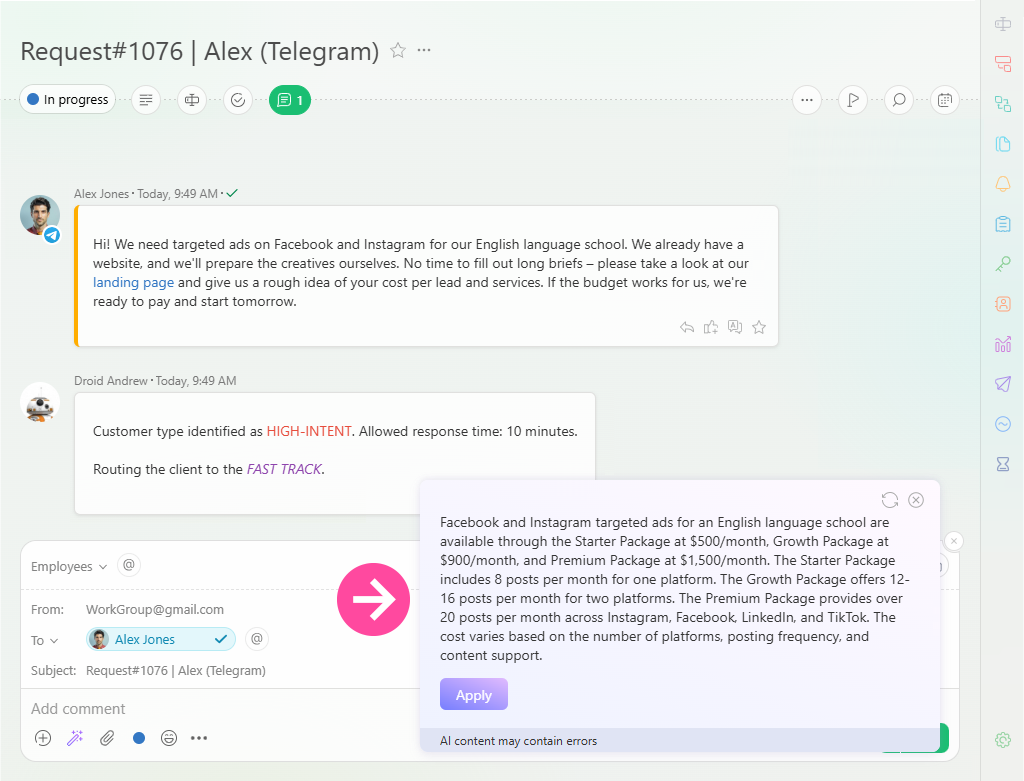
For example, let’s assume a customer writes the following:
“Need this today. How much does it cost, and when can you start?”
The AI assistant can quickly prepare a list of core information for the response, including:
- Estimated price
- Possible start date
- Information required from the customer
- Next step
- Payment link or an offer to issue an invoice
The AI sales assistant lets the manager quickly review the suggestion, adjust any details, and send it. That’s a lot faster than searching for the information manually and safer than relying on memory.
Quick Reply Buttons
Planfix also lets you add buttons with ready-made message or document templates directly to the task.
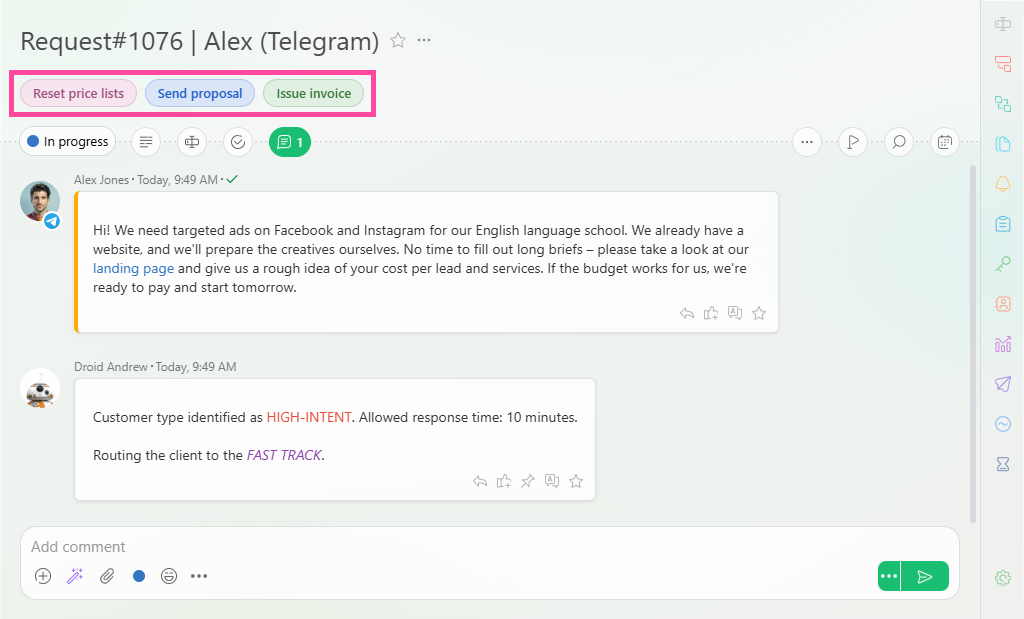
For example, you might create the following:
- “Request missing information”
- “Send invoice”
- “Confirm timeline”
- “Assign to manager”
- “Send start conditions”
- “Send short proposal”
One useful rule for high-intent customers? Keep templates short.
This is not the moment for a long company presentation. Start with what the customer actually asked for: price, timing, and the next action.
For example, a strong first response might look like this:
“Yes, we can start today. To calculate the exact price, we need two details: scope and required deadline. If everything works for you, we’ll prepare the invoice right away.”
This is how an AI sales assistant and ready-made templates help teams respond faster without sacrificing consistency in customer communication.
Sales Workflow Automation for Fast Sales Pipelines
You never want to force an impulsive customer through every stage of your standard sales process. They’ll lose patience quickly and may drop out halfway through.
For these inquiries, it’s better to build an express pipeline. Instead of 6–8 stages, keep it to 3–4 statuses.
For example:
Confirmation → Invoice/Offer → Payment/Launch
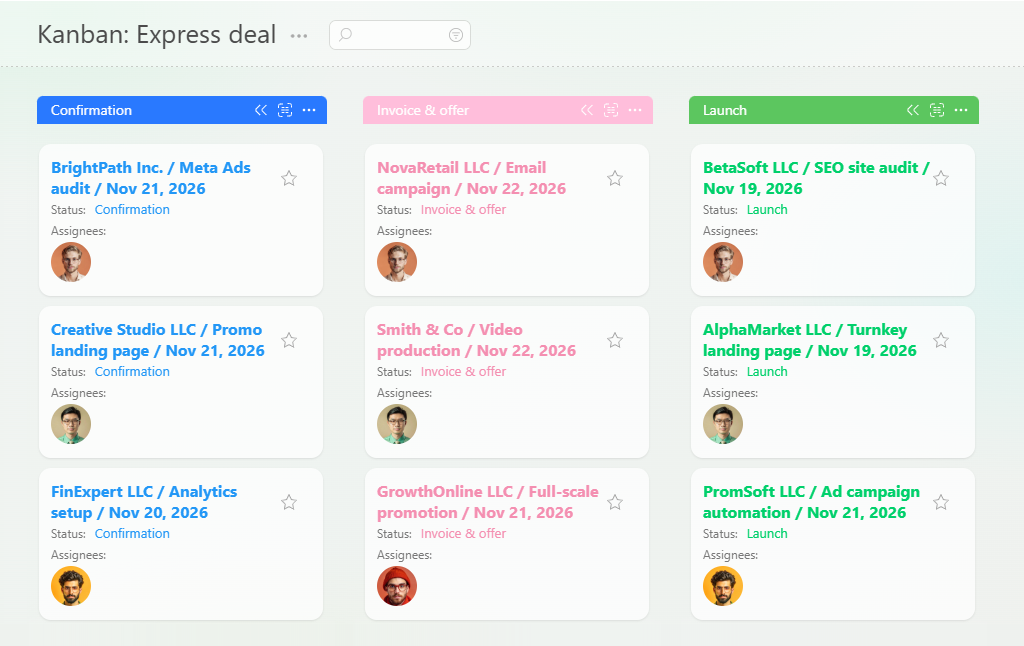
The logic is simple:
- At the Confirmation stage, the manager quickly collects the minimum information needed.
- At the Invoice/Offer stage, the customer receives clear terms and a straightforward way to pay.
- At the Payment/Launch stage, the team records the payment or moves the work into execution.
The fewer unnecessary transitions there are, the lower the risk of losing the customer. Every additional status should answer the question, “Does this actually help close a fast deal?” If not, remove it.
Speaking of removing things, here are a few items you definitely want to cut from an express pipeline:
- Long questionnaires
- Optional fields
- Approvals added “just in case”
- Duplicate statuses
- Manual checks that can be automated
- Intermediate stages that require no action from the customer
Here are the things you want to keep:
- Inquiry source
- Customer type
- Urgency
- Price or price range
- Customer deadline
- Next step
- Responsible manager
- Payment or launch status
Sales workflow automation does more than shorten the pipeline. It also removes manual work between stages.
For example, when a deal changes status, Planfix can automatically assign the responsible employee, create a task to prepare the invoice, notify the sales manager, or send the customer the next message template.
This is how sales pipeline automation shortens the path from inquiry to payment while reducing the amount of process management the sales rep has to keep in their head.
Lead Response Time and SLA Management
An impulsive customer can lose interest quickly. A sales manager can step out for coffee and come back to find the buyer gone.
That’s where SLA monitoring comes in.
For high-intent leads, a reasonable first-response threshold is around 10–15 minutes. If no one replies within that window, there’s a good chance the customer has already contacted a competitor and moved on.
A practical Planfix task script might look like this:
If an inquiry remains in the “New” status for more than 10 minutes and the customer type is “Urgent,” notify the Head of Sales and add another assignee to the request.
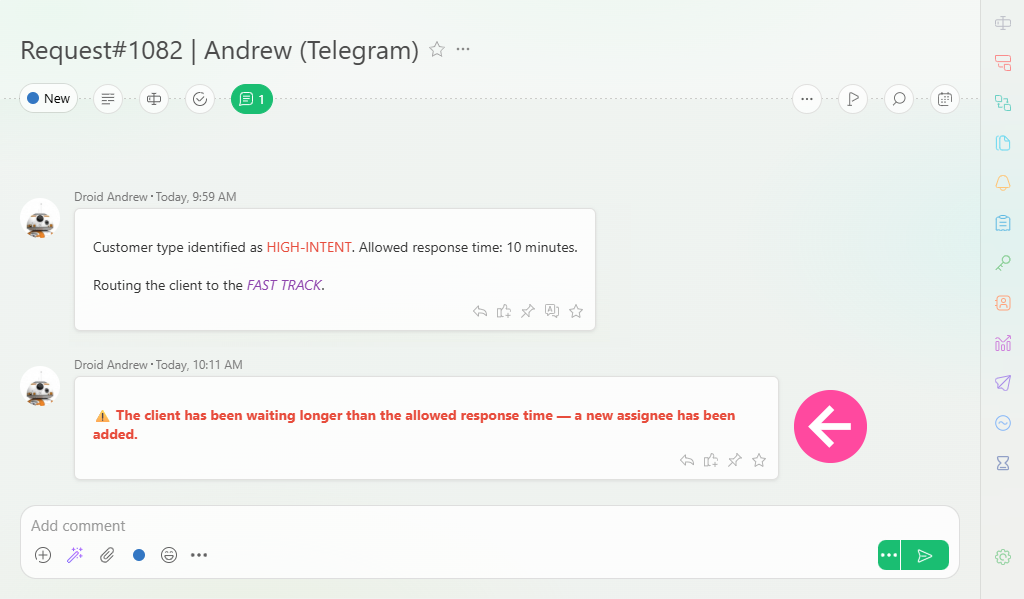
This solves two problems at once:
- The lead is less likely to go cold.
- The manager can immediately see where the process broke down.
You can also configure several different escalation levels:
- After 5 minutes, remind the responsible sales manager.
- After 10 minutes, notify the team lead.
- After 15 minutes, add another assignee.
- After 20 minutes, increase the priority or add a separate flag for review.
One useful tip is not to calculate SLA only based on the “New” status. You want to tie it to the customer type as well. A regular inquiry may be able to wait, but a high-intent lead should move through a faster route.
Another useful option is a lead response time report. It can show a variety of important information, such as:
- How many urgent inquiries came in
- How many were handled on time
- Who misses SLA most often
- Which hours generate the most delays
- Which sources produce the highest-intent leads
- Where the team may need more coverage
As you can see, SLA management turns response speed from a good intention into a measurable, controlled part of the sales process.
How CRM Automation Speeds Up Fast Sales
| Challenge | CRM Automation Solution | Business Benefit |
| Slow response time | AI lead qualification and instant replies | Faster customer response |
| Long sales process | Express sales pipeline | Shorter sales cycle |
| Missed deadlines | SLA automation | Higher lead conversion |
| Manual follow-ups | Workflow automation | Less routine work |
AI Sales Automation for Sales Teams
AI sales automation helps managers focus on selling instead of spending their time processing every incoming request manually.
In fast-moving sales environments, the problem is rarely that managers don’t know how to sell. Rather, it’s that too much time disappears into preparation-related tasks like opening the inquiry, figuring out what the customer wants, finding the right price, checking timelines, choosing a template, confirming terms, creating a task, and remembering to follow up.
AI sales tools can shorten that entire chain by carrying information from one step to the next.
For sales teams, this creates several practical use cases:
- Faster incoming lead analysis. AI analyzes the first message and helps determine who you’re dealing with: a high-intent lead, a standard inquiry, a support request, a returning customer, or an irrelevant contact.
- Response preparation. An AI sales assistant can prepare a draft response based on the customer’s request and your internal materials. This means the manager no longer has to start from a blank page.
- Data extraction. AI can pull key details from a message, be it deadlines, budget, product, city, quantity, contact information, or other parameters. It can then save them directly to the appropriate fields.
- Lead routing. Once the inquiry is classified, it can automatically be sent to the right manager, sales pipeline, or workflow stage.
- Follow-ups that don’t fall through the cracks. If the customer stops responding or an invoice remains unpaid, the system can remind the manager or automatically trigger the next follow-up script.
All of this is especially critical for sales teams handling a high volume of inbound leads. When the queue gets busy, response times often suffer. This isn’t because managers are slow or unmotivated, but because dozens of small manual actions are piled up around every request.
AI removes many of those micro-delays, which helps the team keep the queue moving and gives managers more time to speak with customers.
Why CRM Automation Improves Fast Sales
Response speed is one of the most important factors in fast sales. But speed needs to be built into the process, not left to chance.
Simply telling managers to “reply faster” rarely changes much. The CRM itself needs to make faster responses easier. The best ways to do this are by:
- Identifying the type of inquiry automatically
- Suggesting the right sales scenario
- Providing ready-made templates
- Shortening the sales pipeline
- Monitoring SLA deadlines
- Reminding managers about follow-ups
- Showing managers where the process is slowing down
CRM automation shortens the sales cycle by removing unnecessary steps between the first customer message and payment. The customer doesn’t have to wait while a manager searches for information, gets approval for the next step, or remembers that an inquiry still needs attention.
Imagine a customer writes the following in the morning:
“Need this service by Friday. How much does it cost, and how do I pay?”
Without automation, the inquiry may stall. The manager might open it too late, ask the wrong follow-up question, or forget to send the invoice. Any one of these can result in them losing the lead.
With automation, the path is much shorter. AI identifies the urgency, the inquiry receives the right label, and the manager sees the priority immediately and sends the terms. All the while, the system keeps track of payment or the next follow-up.
This is how sales process optimization and sales funnel optimization help teams handle more inquiries without increasing the workload.
Of course, the biggest benefit of an AI-powered CRM in fast sales is fewer lost leads. This isn’t because AI “sells instead of people,” but because the system gets the right information to the manager faster and prevents a high-intent inquiry from disappearing somewhere in the queue.
Summary: How to Configure Planfix for Fast Sales
The good news is that you don’t need to rebuild your entire CRM to make Planfix work for fast sales. It’s enough to create a separate workflow in dedicated workspaces for high-intent leads and remove anything that slows them down.
A simple setup looks like this:
- Create a field for customer type or intent.
- Configure AI lead qualification for incoming inquiries.
- Define the signals of an “urgent” customer in the AI instructions.
- Prepare a knowledge base with pricing, timelines, and service terms.
- Add quick-response buttons.
- Build a short express sales pipeline.
- Remove unnecessary required fields.
- Set an SLA for the first response.
- Add automatic escalation.
- Create a report for response time and conversion.
When you follow this template, Planfix does more than store leads. It helps manage the speed of the entire sales process.
As a result, the customer gets an answer while their interest is still high, the sales manager follows a clear workflow, and the team lead can see where inquiries are handled on time and where the process needs improvement, ensuring better alignment between sales and marketing.
FAQ
What is CRM automation?
CRM automation is the use of workflows, rules, AI sales tools, and predefined actions to reduce manual work in sales and customer management. In fast sales, it helps classify incoming requests, assign managers, prepare quick replies, track lead response time, and move deals through a shorter pipeline. The goal is to respond faster while keeping the process controlled and consistent.
How does AI lead qualification work?
AI lead qualification analyzes the customer’s first message and detects signals such as urgency, buying intent, budget, deadline, product interest, and readiness to pay. In Planfix, AI can assign a category to the request, such as a high-intent lead, and help route it to the right workflow, manager, or sales scenario for faster processing.
How can AI sales assistants speed up customer communication?
AI sales assistants help managers prepare replies faster by analyzing the request and using approved company information from templates or a knowledge base. Instead of searching for prices, terms, or standard answers manually, the manager gets a ready draft, checks it, and sends it. This is especially useful when a customer expects a response within 10–15 minutes.
What is sales workflow automation?
Sales workflow automation means configuring CRM stages and actions so deals move forward with less manual effort. For high-intent leads, this can include a short express pipeline such as Confirmation → Invoice/Offer → Payment/Launch. Status changes can automatically create tasks, notify managers, trigger follow-ups, or escalate the request if the response deadline is missed.
How does CRM automation shorten the sales cycle?
CRM workflow automation shortens the sales cycle by removing delays between the customer’s request and the team’s response. AI lead qualification identifies urgent leads, templates speed up replies, express pipelines reduce unnecessary stages, and SLA rules prevent hot leads from being ignored. These capabilities are especially valuable for enterprise sales, where multiple stakeholders and complex approval processes can slow down decisions. As a result, the customer moves from first contact to payment or launch with fewer pauses.