Fast Contract Automation in Planfix CRM

When it’s time to prepare a contract, teams often spend way too much time on repetitive manual work. This can include everything from opening an old file, copying customer details, and updating terms to checking dates, document numbers, or the final file format.
If you only create a handful of contracts, this workflow may seem manageable. But as the volume of documents grows, manual preparation quickly becomes a bottleneck. Employees are left to constantly switch between tasks, the CRM, spreadsheets, and documents. In many cases, they will copy information by hand, inevitably risking critical mistakes.
Planfix allows you to fully automate the creation of contracts and other business documents. The system uses document templates and variables, which act as special placeholders that automatically insert data from Planfix into a ready-made document.
For example, you can set a contract to automatically include:
- Customer name;
- Company name;
- Document number;
- Date;
- Assigned manager’s information;
- Deal terms;
- Amounts;
- Company details;
- Data from tasks, contacts, or data tags.
Instead of starting with a blank file every time, your team receives a completed document generated from a standardized template. This speeds up contract preparation, minimizes errors, and keeps document workflows consistent and under control.
If you’d rather watch than read, our “Quick Document Creation” video tutorial walks you through the process step by step. Otherwise, let’s dive in.
Here’s an overview of the process:
- Create a document template.
- Add variables.
- Upload the template to Planfix.
- Configure the document settings.
- Generate a contract in a single click.
The same workflow can also be applied to invoices, proposals, certificates, and other documents your team prepares regularly. Once configured, the template can be reused whenever a new document is needed.
What is Document Automation and Why Businesses Need It
Document automation is the process of generating documents from preconfigured templates. Instead of manually filling out every contract, invoice, acceptance certificate, or commercial proposal, you create a template once. From then on, the system automatically inserts the required information whenever a new document is generated.
In a traditional manual workflow, an employee copies an old document, replaces customer information, updates dates, edits amounts, and saves the file under a new name. Every one of those steps creates an opportunity for mistakes, such as leaving the previous customer’s name in the document, forgetting to update the contract number, or attaching an outdated file.
Document automation eliminates this repetitive work. After all, the necessary information already exists in your CRM, tasks, customer records, and related business processes. Instead of copying it manually, you simply define which fields should populate the document, and Planfix fills everything in automatically.
For businesses, this delivers several key benefits.
- First, documents are created much faster. Managers no longer have to search through conversations or gather information from multiple systems because the required data is pulled in automatically.
- Second, it significantly reduces errors. As long as the customer card contains accurate information, the document will reflect that data without any manual input.
- Third, documents remain consistent across the organization. Everyone works from the same approved template rather than maintaining different versions of files on local computers.
- Finally, automation makes the entire process scalable. As the number of contracts grows, your team doesn’t have to spend a disproportionate amount of time preparing them. Once you configure templates and workflows, the system handles the repetitive work for you.
How to Create a Contract Template for Automated Document Generation
Let’s start by preparing the contract template.
The easiest method is to take an existing contract and turn it into a reusable template. You’ll keep the overall structure unchanged, including headings, legal wording, tables, signature blocks, company details, and terms. The only elements that need to change are the customer-specific details, which should be replaced with variables.
This approach helps standardize documents across the entire company. Because the contract structure is approved in advance, employees no longer need to edit every new version manually. Instead, they work with a single template in which only data related to the customer, deal, or task changes.
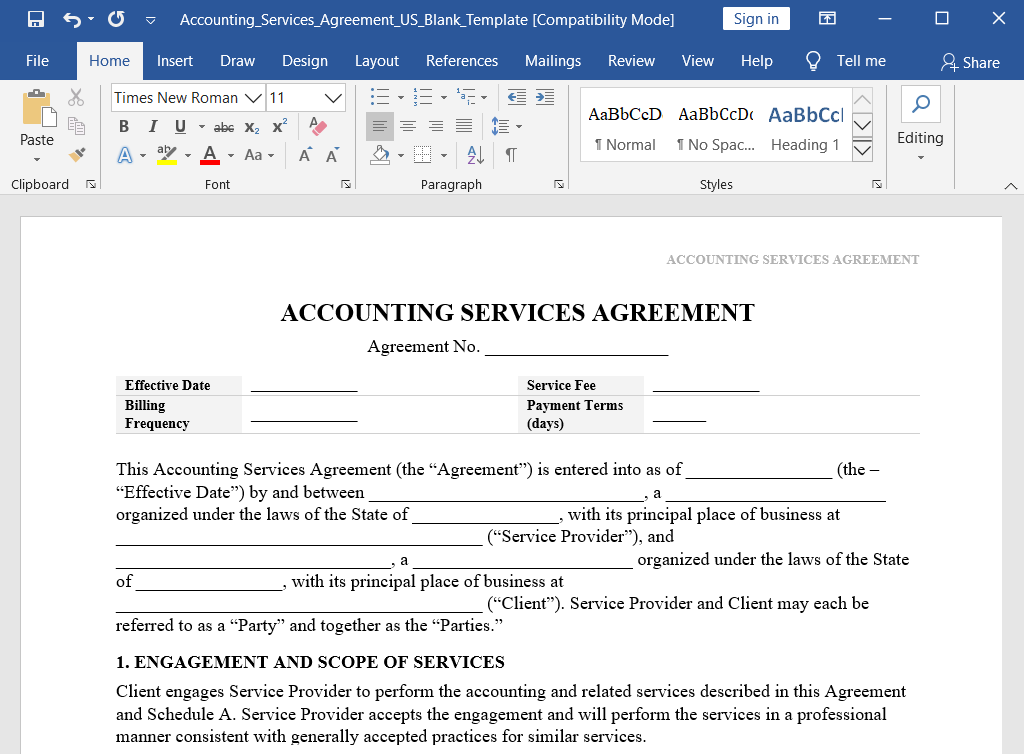
This is especially useful for heavily standardized documents, such as:
- Service agreements;
- Supply contracts;
- Invoices;
- Completion certificates;
- Commercial proposals;
- Specifications;
- Application forms;
- Warranty certificates;
- Internal reports.
Add Variables for Dynamic Document Generation
To automatically fill in customer information, you need to add variables to the template.
Variables are special placeholders that Planfix replaces with actual data when the document is generated. For example, a customer name variable will be replaced with the customer’s real name, a date variable with the required date, and so on.
You can select the required variables by going to “Documents” – “Document Templates” and clicking the link.
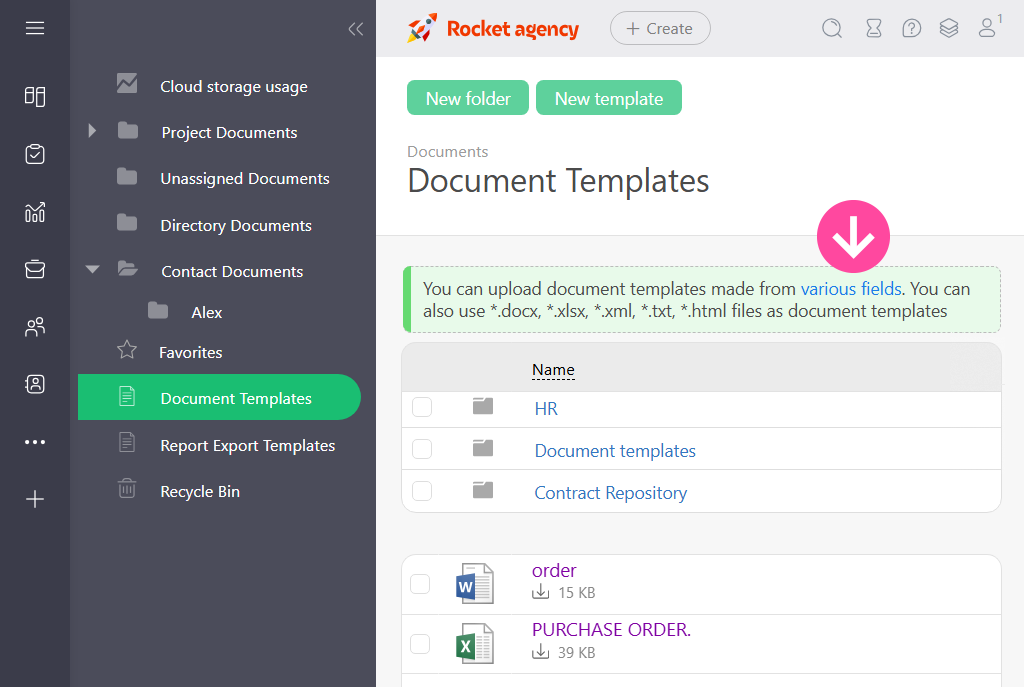
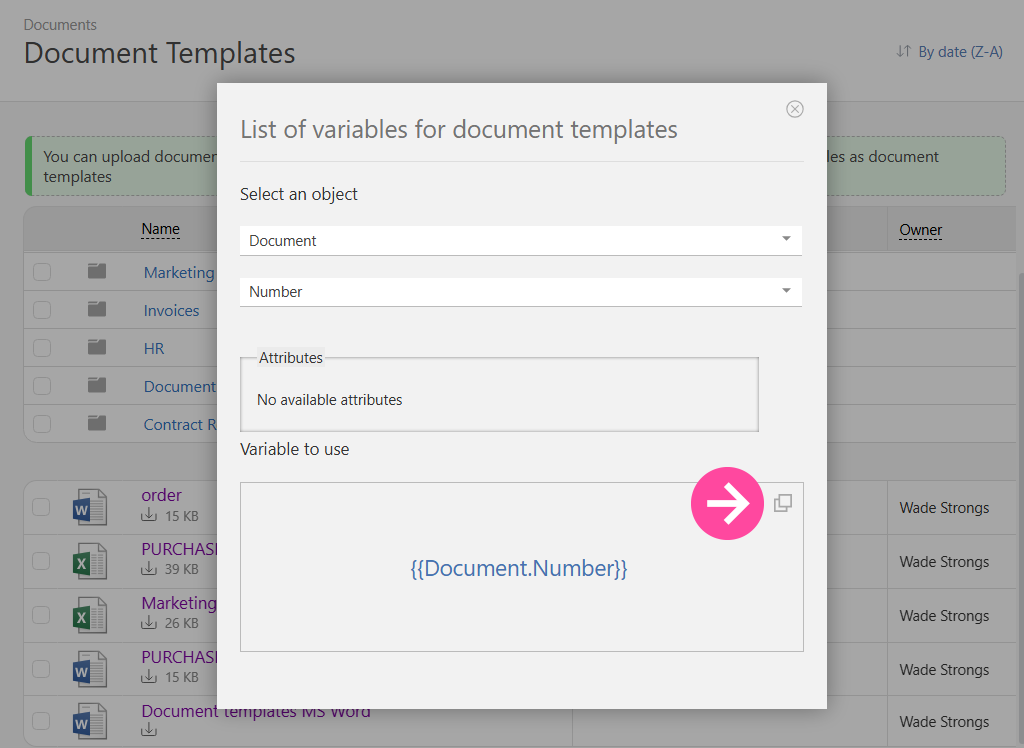
First, select the “Object” that contains the data you need. For example, for the “Document” object, you might need its number. You can pull the counterparty’s name from the task where all customer communication is managed:
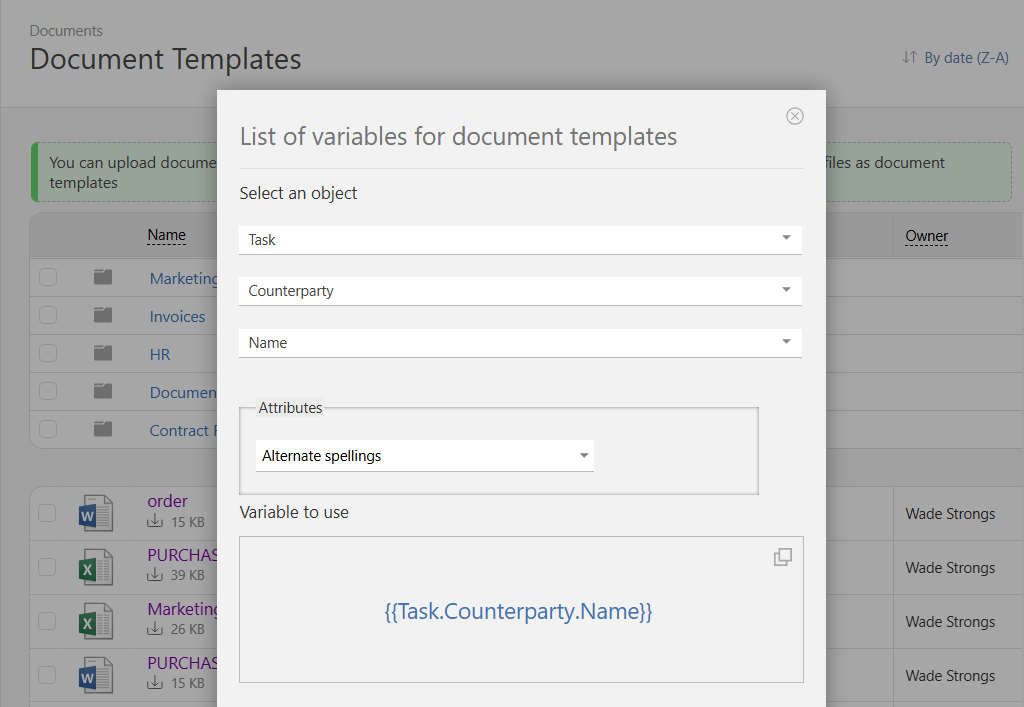
You can copy a variable like this:
Then add the variables to the document:
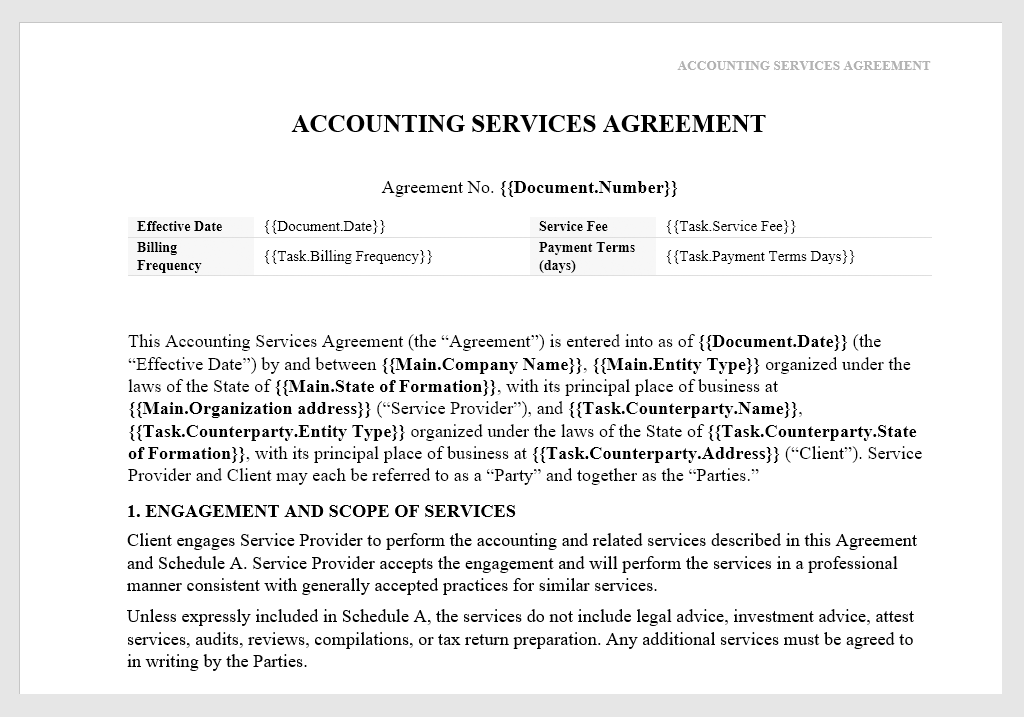
Once you’ve inserted everything you need, save the file.
With variables, you insert a wide range of information automatically, such as:
- Customer’s full name;
- Company name;
- Contract number;
- Document creation date;
- Deal amount;
- Responsible employee;
- Data from custom fields;
- Table rows;
- Information from data tags.
With dynamic document generation, the template remains unchanged, while Planfix automatically fills it with data from the relevant task, customer card, or business process. This dramatically reduces manual data entry and helps prevent the errors that often occur when information is copied from one file to another.
Why Use CRM Data for Automatic Contract Creation?
The key advantage of this approach is that the team can create contracts directly from the data already stored in the CRM, rather than as a separate document outside the system.
So if a manager is handling a deal or customer request in a Planfix task, that task may already contain the counterparty, deal amount, date range, responsible employee, comments, files, approvals, and other relevant information. Instead of manually copying these details into the contract, the system can use them to populate the template automatically.
This automation turns document creation into part of the workflow rather than a separate manual step.
It is especially helpful for sales, customer service, project management, and service processes. The flow is very simple:
- A manager moves the deal to the “Contract Preparation” stage.
- The task already contains the customer details and agreed terms.
- Planfix generates the contract from the template.
- The completed file is attached to the task.
- The team sees the document in the same place where the customer discussion takes place.
- The contract can then be reviewed, sent, updated, or used in the next stage of the process.
This workflow connects documents, tasks, and customer data within a single system. This means that employees no longer need to search through folders, messengers, or email threads for the latest version of a contract. It all remains attached to the process where the work is actually happening.
Upload and Configure Document Templates in Planfix
Once the template is ready, upload it to Planfix.
To do this, you start by creating a new document template:
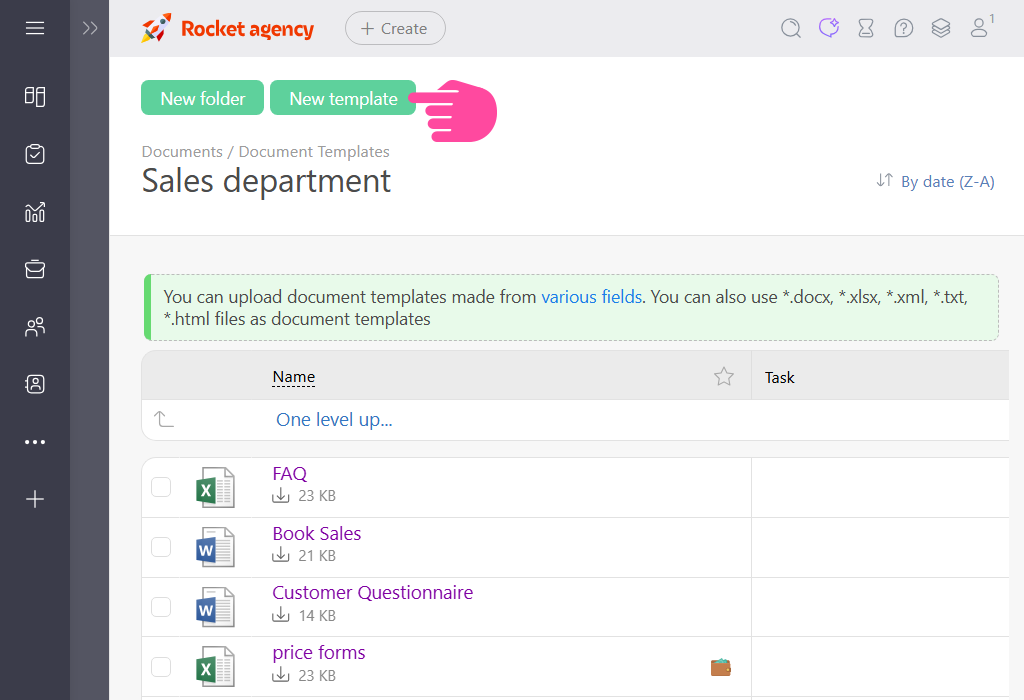
Then configure the following settings:
- Name the document template.
Choose a name that will be clear to the entire team. For example: “Service Agreement”, “Commercial Proposal”, “Customer Invoice”, or “Completion Certificate.”
- Add the initial document number.
Planfix can assign a unique number to each generated document. This is useful when contracts, invoices, or completion certificates need to follow a sequential numbering system.
- Choose a naming template for the generated files.
You can also use variables in file names. For example, you can include the counterparty’s full name, contract number, or date. Instead of receiving a file with a vague name like “document_final_2.docx”, the team gets a clear, descriptive title tied to a specific customer, deal, or project.
- Set the default document format.
To add a variable to the file name template, click the green question mark icon on the right of the file name template field.
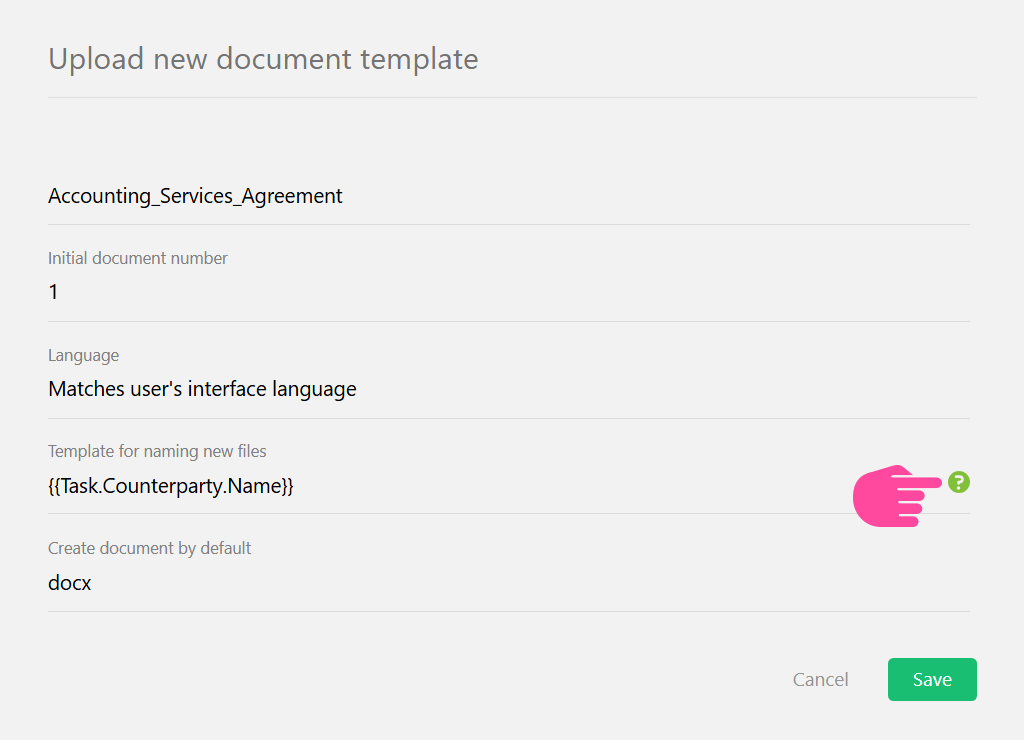
Choose the format in which the document will be generated, such as DOCX or PDF.
After the template has been uploaded and configured, it becomes available for document generation. From this point on, the team can automatically create contracts using data already stored in Planfix, rather than having to prepare them manually.
Automated Contract Generation in One Click
Once your template is ready, you can generate contracts with a single click. From this point on, employees no longer need to open old files, search for customer information, copy company details, or check every line manually.
The workflow looks like this:
- A task or customer process is open in Planfix.
- The required information is already stored in the task.
- The employee selects a document template.
- Planfix automatically inserts the data into the appropriate fields.
- The completed contract is generated in the selected format.
- The file is attached to the task or used in the next step of the workflow.
Automated contract generation not only saves time, but dramatically reduces the risk of errors. The benefits become especially noticeable when your team regularly prepares similar documents, such as contracts, invoices, completion certificates, specifications, commercial proposals, or application forms.
Once the template is configured, what used to take up minutes – or even hours in some cases – can be accomplished in just a few seconds.
More importantly, you can rest assured that everyone is following the same standardized process.
Document Workflow Automation for Client Processes
Document automation becomes even more valuable when it’s integrated directly into your customer workflows.
For example, let’s say your company receives a customer request. Planfix creates a task, at which point the manager gathers the necessary details, approves the terms, adds the required information, and moves the task to the next stage. Once this is complete, they can automatically generate a contract, invoice, or commercial proposal from a predefined template.
The document doesn’t exist as a separate file. Rather, it stays connected to the task, the customer, and the entire history of the process.
This approach offers several advantages:
- All customer information is stored in one place.
- The team can instantly see the document’s current status.
- It’s easy to track who prepared the document.
- Different document versions can be stored within the task.
- Document generation can be integrated into internal workflows and approval policies.
- Follow-up actions can be triggered automatically after the document is created.
Once a contract has been generated, the system can add a comment, notify the responsible employee, attach the file to the task, or send the document to the next approval stage.
This transforms the template into an integral part of your workflow instead of just another file that needs to be filled out manually.
Benefits of Contract Management Automation
Contract and document automation gives businesses several important advantages.
- First, it saves time. Employees spend less time copying data and more time working with customers, deals, and tasks.
- Second, it reduces errors. When documents are prepared manually, it is easy to forget to update the date, contract number, customer name, or amount. Automatic data insertion significantly lowers that risk.
- Third, it speeds up document processing. A contract, invoice, or commercial proposal can be generated directly within the workflow without switching between different files and applications.
- Fourth, it helps standardize operations. Because everyone uses the same approved template, documents follow a consistent format and structure across the company.
- Fifth, automation makes it easier to scale and streamline SMB operations. As document volume grows, the amount of manual work does not have to grow at the same pace. Once configured, templates can continue serving new customers, tasks, and business processes.
Manual Document Creation vs Planfix Automation
| Process | Manual Workflow | Planfix Automation |
| Contract creation | Manual editing | Automated generation |
| Client data entry | Manual copy-paste | CRM auto-fill |
| Error risk | High | Reduced |
| Document preparation time | Long | Fast |
| Workflow scalability | Limited | Automated |
The impact of automation is most noticeable for teams that create documents every day. With a manual workflow, every new contract is a separate task. With automation, the contract becomes the outcome of a predefined process: the data is already in the system, the template is ready, and the variables are already in place.
CRM Workflow Automation for Document Processing
Planfix brings documents, tasks, and customer data together in a single workspace, making teamwork management more transparent, productive, and connected.
This matters because documents rarely exist in isolation. Instead, they are tied to a specific business process, such as a sale, delivery, service request, project, application, approval, or report.
When a document is created outside the CRM, employees have to manually transfer data, track multiple versions, and manage next steps separately. But when documents are generated within the CRM workflow, the entire process becomes more transparent.
For example, a task can contain customer correspondence, files, agreed terms, data tags, assigned employees, and documents generated from templates. The team not only sees the file itself but also the full context, including who the customer is, what was discussed, which terms were approved, and what needs to happen next.
This approach is particularly useful for processes where speed and accuracy matter, such as:
- Preparing contracts;
- Issuing invoices;
- Generating completion certificates;
- Creating commercial proposals;
- Preparing application forms;
- Generating internal documents;
- Creating customer or project reports.
In the end, automating document workflows inside the CRM removes unnecessary manual steps and makes employees’ day-to-day work easier to manage.
Proposal and Business Document Automation in Planfix
Automation in Planfix is not limited to contracts.
Document templates work well for a wide range of business scenarios where the file structure stays the same, but the data changes from one customer to another.
For example, templates can be used to easily automate commercial proposals. In this case, a manager enters information about the customer, products, services, or agreed terms, and Planfix generates a complete document in the required format. The template can include customer details, line items, amounts, deadlines, images, company information, and any other relevant data.
The same approach can be used for invoices, completion certificates, applications, specifications, internal reports, warranty documents, and other files that companies create regularly.
This is particularly useful for sales teams, service departments, agencies, manufacturing companies, logistics teams, accounting departments, and other units where documents support almost every stage of the workflow:
- The sales team generates a commercial proposal after clarifying the customer’s needs.
- Accounting prepares an invoice using deal data.
- The project team creates a completion certificate after finishing each project stage.
- The service department generates a request or a completed work report.
- An account manager prepares a contract using an approved template.
In every case, the principle is the same. Because the data is already stored in Planfix and the template is already configured, the document can be created faster and with far more accuracy.
Conclusion: Take Control of Your Document Workflow
Manual document creation may feel familiar, but familiar routines are often where the most time gets lost. Employees can spend hours copying data, checking old files, renaming documents, correcting mistakes, and making sure nothing has been overlooked.
Planfix turns this work into a fully automated workflow. You simply create a template once, add variables, upload the file to the system, and configure the document settings. From then on, you can generate contracts, invoices, commercial proposals, and other documents faster, more accurately, and with far less effort.
As a result, the team spends less time on repetitive tasks, documents follow a consistent standard, and CRM data can be used without unnecessary manual entry.
But automation doesn’t have to stop there. Planfix also allows you to configure automatic data entry for new customers, connect documents to tasks, use templates within business processes, and gradually automate the entire journey, from the initial request to the completed contract.
It’s time to take routine document work under control. Happy automating!
FAQ
What is document automation in CRM?
Document automation in CRM is the process of generating documents using information already stored in customer records, tasks, deals, and workflows. Instead of manually copying customer names, dates, document numbers, prices, or legal details, the system automatically inserts the required data into a prepared template. This helps teams create contracts, proposals, invoices, and reports faster, more accurately, and with less repetitive work.
How does automated contract generation work?
Automated contract generation starts with a reusable template containing fixed legal text and variables for data that changes from one contract to another. When a manager generates a contract from a task or customer record, the system replaces those variables with actual CRM data. Variables can include names, company details, dates, amounts, document numbers, and other field values. The result is a ready-to-use contract created much faster than with manual editing.
Can Planfix automatically fill contract templates?
Yes. Planfix can automatically complete contract templates using variables added to the document file. These variables can retrieve information from tasks, contacts, data tags, documents, and other system entities. For example, Planfix can insert a customer name, company details, document number, date, or responsible employee into the finished contract. This reduces manual copy-and-paste work and helps prevent common document errors.
How do variables work in document templates?
Variables act as placeholders inside a document template. Each variable refers to a specific piece of data stored inside Planfix, such as a task field, contact field, document number, date, or data tag value. When the document is generated, Planfix replaces each placeholder with actual information from the related object. This makes it possible to create personalized documents for a specific customer, task, or workflow.
What documents can be automated in Planfix?
Planfix can automate many types of recurring business documents, not just contracts. Teams can create templates for invoices, proposals, completion certificates, specifications, applications, reports, warranty documents, and other files with a repeatable structure. This is useful for sales, accounting, service teams, project management, and any process in which employees regularly prepare similar documents for different customers or tasks.
Can I automatically generate PDF and DOCX documents?
Yes. When configuring a document template in Planfix, you can select the default output format, including DOCX or PDF. DOCX works well when a document may still need editing, while PDF is more convenient for finalized versions sent to customers or partners. This helps standardize document preparation and ensures that each workflow uses the most appropriate file format.