Best Event Management Software

Organizing events, whether corporate conferences, nonprofit fundraisers, or small community gatherings, requires meticulous planning and coordination. The best event management software streamlines tasks like guest registration, task assignment, and budget tracking, ensuring seamless execution. From solo planners to large teams, these platforms help manage every detail, from scheduling to attendee engagement. This guide explores the top event management software options, highlighting their features, pricing, and benefits to help you choose the right tool for your events.
What Is the Best Event Management Software and Why Do You Need It
Event management software is a specialized tool designed to simplify the planning, execution, and follow-up of events by centralizing tasks, attendee data, and logistics. It combines features like task management, CRM, ticketing, and analytics to support organizers in delivering successful events. Unlike generic project management tools, these platforms are tailored for event-specific needs, such as managing guest lists or coordinating vendors, making them essential for the best event management platforms.
The need for such software arises from the complexity of event planning. Coordinating schedules, tracking budgets, and engaging attendees manually can lead to errors and inefficiencies. Event management software automates repetitive tasks, provides real-time updates, and ensures all stakeholders stay aligned. For those seeking the best software for event planning, these tools save time, reduce stress, and enhance attendee experiences, whether for small workshops or large-scale festivals.
Benefits of Using Event Management Software
Event management software offers tools to streamline planning and execution, ensuring events run smoothly. These platforms are crucial for organizers seeking the best event management tools to manage complex logistics efficiently. Below are key benefits of using such software.
- Centralized Task Management: Assign and track tasks for team members, vendors, and volunteers in one platform, ensuring clear accountability.
- Attendee Management: Store guest information, track RSVPs, and manage registrations to streamline communication and engagement.
- Budget Tracking: Monitor expenses, vendor payments, and ticket revenue to stay within budget and avoid overspending.
- Marketing Automation: Create and send targeted email campaigns or social media promotions to boost attendance and engagement.
- Event Scheduling: Plan timelines, sessions, and speaker schedules with automated reminders to keep everything on track.
- Analytics and Reporting: Generate reports on attendance, revenue, and feedback to evaluate success and improve future events.
By leveraging these benefits, organizers can focus on creating memorable experiences while the software handles operational details. The best event management apps ensure efficiency and scalability for events of any size.
Top 10 Event Management Software Solutions
Below is a detailed overview of 10 of the best event management platforms, starting with Planfix, a versatile all-in-one solution.
1. Planfix
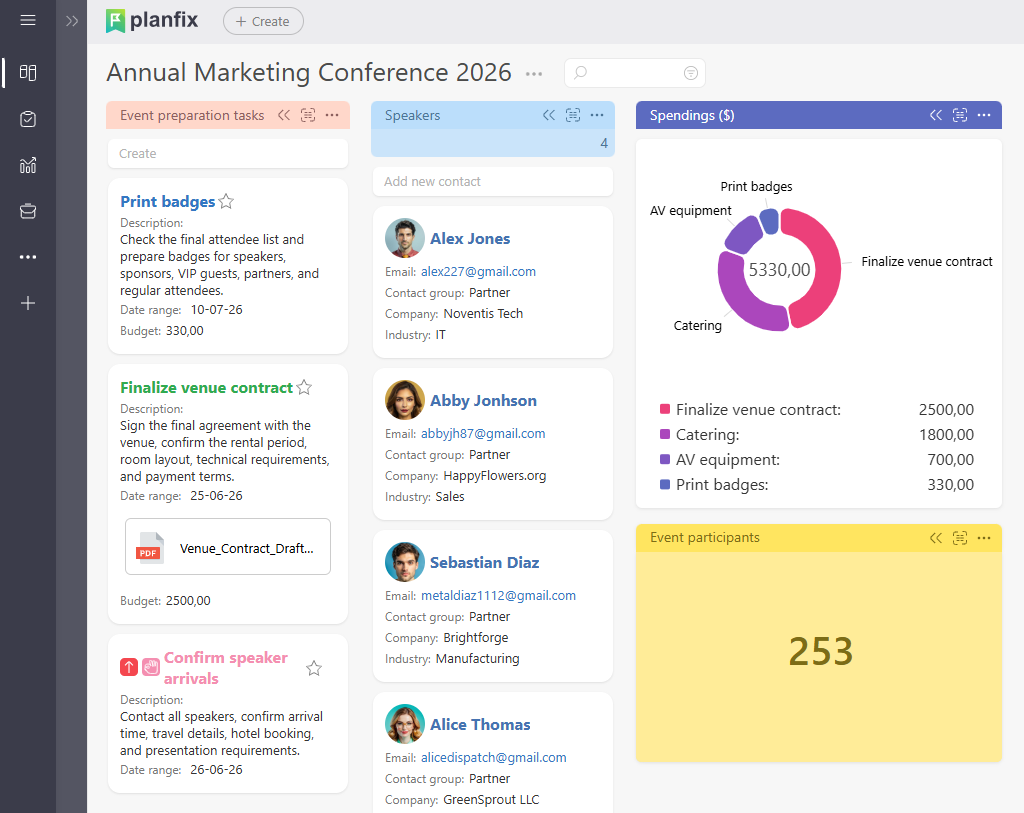
Planfix is a comprehensive platform that transcends traditional event management by integrating best project management software for event planning, CRM, task management, and project management into a single, customizable system. Designed for event organizers, from small businesses to large enterprises, Planfix streamlines every aspect of event planning, including attendee management, task coordination, and financial tracking. Its flexibility makes it ideal for those seeking the best event management software for small business, as it adapts to unique workflows. Unlike standard tools, Planfix combines the best CRM for event management with project management, making it a holistic solution for events of all scales.
Source: https://planfix.com/
Planfix Overview and Features
Planfix offers a robust suite of tools to manage events efficiently, positioning it among the best event management systems. Its customizable workflows and integrations make it adaptable for diverse event needs. Key features include:
- Task Management: Assign tasks for event setup, vendor coordination, or marketing with deadlines and progress tracking.
- Attendee Management: Store guest profiles, track RSVPs, and manage communications for personalized engagement.
- Budget Tracking: Monitor expenses, vendor payments, and ticket revenue with integrated financial tools.
- Workflow Automation: Automate reminders, email campaigns, and task updates to save time and reduce manual work.
- Analytics and Reporting: Generate reports on attendance, budget performance, and feedback to optimize future events.
- Mobile Access: Access all features via a mobile app, ensuring flexibility during on-site event management.
Planfix’s strength lies in its adaptability, allowing organizers to tailor dashboards and workflows to specific event requirements. For example, a nonprofit can use Planfix to manage a fundraiser’s budget and guest list, while a corporate planner can coordinate a multi-session conference. Its financial tools reduce reliance on separate best crm software for event management, and its automation features streamline repetitive tasks like sending invitations. The mobile app ensures real-time oversight, making Planfix a versatile choice for dynamic event planning.
Planfix Pros and Cons
Planfix provides a powerful feature set with some considerations. Here’s a balanced overview:
- Pros
- Highly customizable for unique event workflows.
- Combines CRM, task, and project management in one platform.
- Strong automation for emails, reminders, reports and task updates.
- Mobile app ensures on-site accessibility.
- Affordable pricing for small teams and nonprofits.
- Integrates with third-party tools via API or Zapier.
- Cons
- Initial setup may require time to configure.
- Learning curve for users new to advanced features.
- Some integrations may need technical expertise.
Overall, Planfix’s comprehensive tools and affordability make it a strong choice for event organizers, though new users may need time to master its customization options.
Pricing & Free Version
Planfix offers a free plan with basic CRM, task management, and budget tracking, ideal for small events or nonprofits. Paid plans start at $4 per user/month (billed annually), including advanced automation, integrations, and analytics. A 30-day free trial is available for all paid plans.
2. Eventbrite
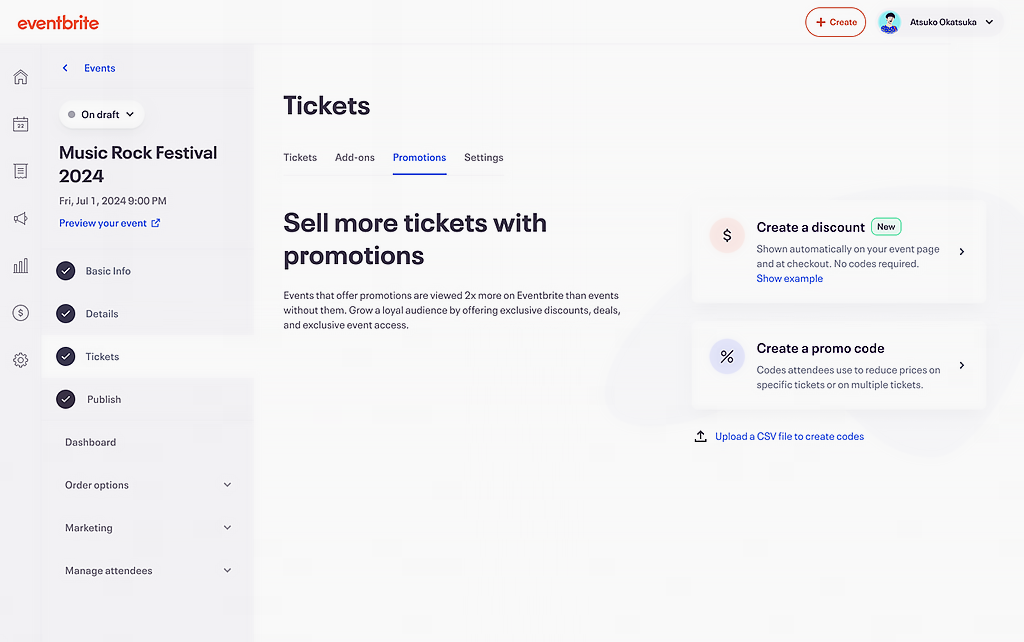
Eventbrite is a widely used platform for event management, focusing on ticketing and attendee management. It’s suitable for organizers seeking the best event management app for events of various sizes, from workshops to festivals.
Source: https://www.eventbrite.com/
Eventbrite Overview and Features
Eventbrite provides tools to streamline event planning and promotion, making it a solid choice among best event management apps. Its intuitive interface supports organizers with straightforward needs. Key features include:
- Ticketing: Create and sell tickets with customizable pricing and seating options.
- Attendee Management: Track RSVPs and manage guest lists with ease.
- Marketing Tools: Promote events via email campaigns and social media integrations.
- Analytics: Monitor ticket sales and attendee data for insights.
- Mobile App: Manage events and check in attendees on-site.
- Integrations: Connect with tools like Mailchimp and Salesforce.
Eventbrite’s strength lies in its ticketing and marketing capabilities, making it accessible for small to medium-sized events. Its mobile app simplifies on-site management.
Eventbrite Pros and Cons
Eventbrite offers a focused feature set with some limitations. Here’s a balanced overview:
- Pros
- Easy-to-use ticketing system.
- Strong marketing and promotion tools.
- Mobile app for on-site management.
- Free for free events.
- Integrates with popular marketing platforms.
- Cons
- Limited features for complex event logistics.
- Fees apply for paid ticket sales.
- Less robust for large-scale events.
Eventbrite’s simplicity makes it a reliable choice for ticketing-focused events, though it may lack depth for complex planning needs.
Eventbrite Pricing & Free Version
Eventbrite is free for free events, with basic ticketing and attendee management. Paid plans start at $9.99/month for additional features, with ticket fees of 2.5% + $0.99 per ticket.
3. Cvent
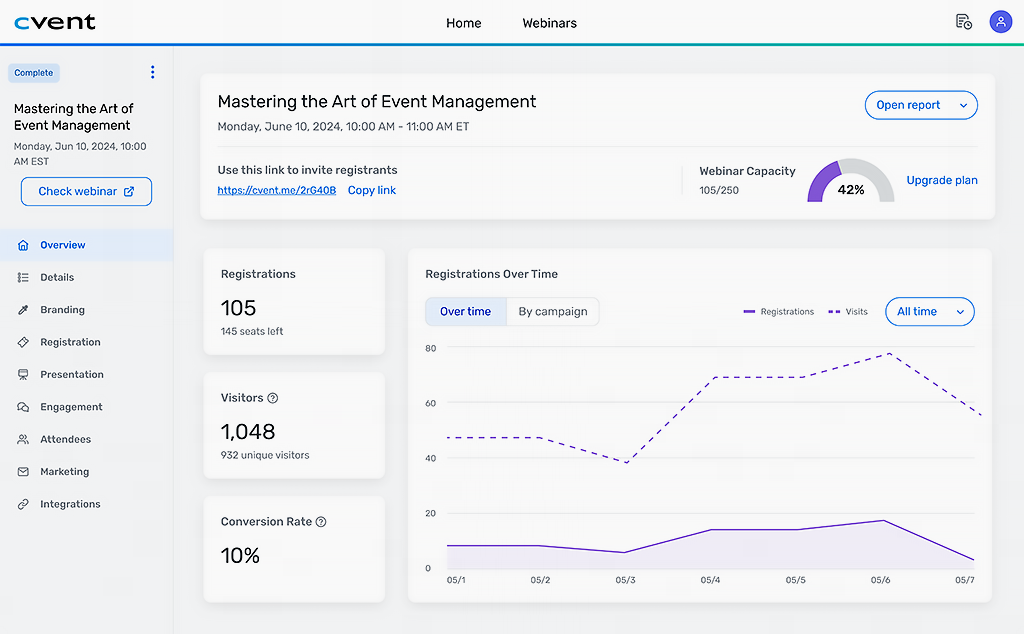
Cvent is a comprehensive platform for managing corporate and large-scale events, offering tools for registration, venue management, and analytics. It’s a strong option for the best event management platform.
Source: https://www.cvent.com/
Cvent Overview and Features
Cvent provides a robust set of tools for event planning, positioning it among top event management platforms. Its features cater to complex event needs. Key features include:
- Registration Management: Create custom registration forms and track attendees.
- Venue Management: Source and manage venues with integrated tools.
- Marketing Automation: Send targeted email campaigns to boost attendance.
- Analytics: Generate reports on registration and attendee engagement.
- Mobile App: Manage events and check-ins on-site.
- Integrations: Connect with CRM and marketing tools.
Cvent’s focus on corporate events makes it suitable for conferences and trade shows, with strong analytics for performance tracking.
Cvent Pros and Cons
Cvent offers a comprehensive feature set with some considerations. Here’s a balanced overview:
- Pros
- Robust tools for large-scale events.
- Strong registration and venue management.
- Detailed analytics for event insights.
- Mobile app for on-site coordination.
- Integrates with CRM platforms.
- Cons
- Higher cost for small events.
- Complex interface for beginners.
- No free plan available.
Cvent’s capabilities suit large events, though its cost and complexity may be considerations for smaller organizers.
Cvent Pricing & Free Version
Cvent offers no free plan, but a demo is available. Pricing is customized, typically starting around $200/month, including registration and analytics features.
4. Whova
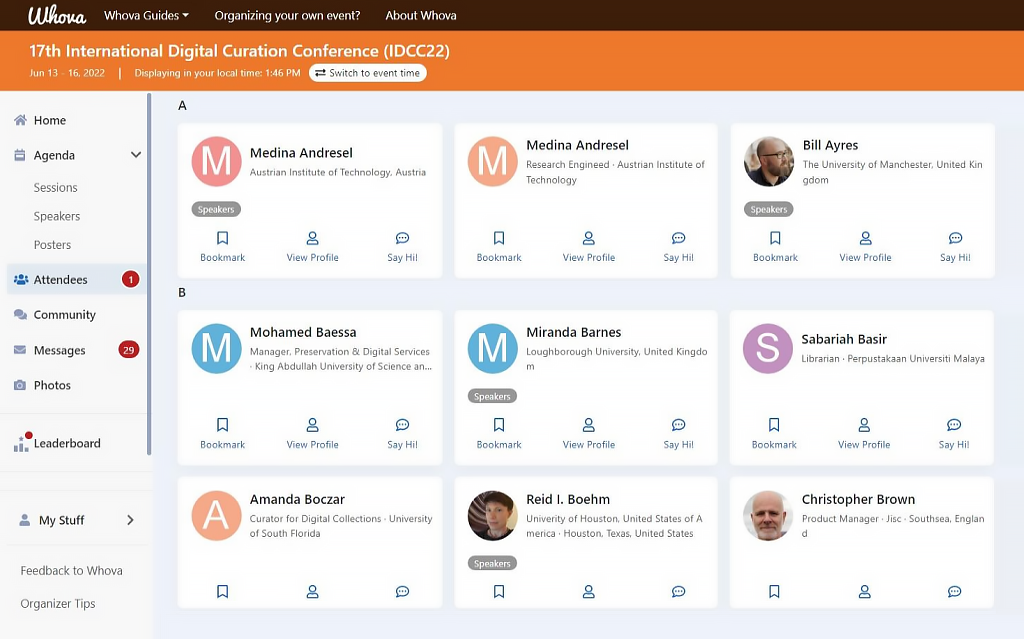
Whova is an event management platform focused on attendee engagement and networking, suitable for conferences and community events. It’s a contender for the best online event management software.
Source: https://whova.com/
Whova Overview and Features
Whova offers tools to enhance attendee experiences, making it a notable option among best event management solutions. Its mobile-first approach supports virtual and in-person events. Key features include:
- Attendee Engagement: Facilitate networking with chat and virtual meetups.
- Event Agenda: Create and share schedules with session details.
- Ticketing: Manage registrations and ticket sales.
- Analytics: Track attendance and engagement metrics.
- Mobile App: Provide attendees with event details and networking tools.
- Integrations: Connect with Zoom and CRM systems.
Whova’s focus on engagement makes it ideal for interactive events, with a strong mobile app for attendees and organizers.
Whova Pros and Cons
Whova provides a solid feature set with some limitations. Here’s a balanced overview:
- Pros
- Strong attendee engagement tools.
- User-friendly mobile app for attendees.
- Supports virtual and in-person events.
- Detailed analytics for engagement.
- Easy-to-use interface.
- Cons
- Limited features for complex logistics.
- Pricing can be high for small events.
- No free plan available.
Whova’s engagement tools make it a reliable choice for interactive events, though its cost may be a factor for smaller budgets.
Whova Pricing & Free Version
Whova offers no free plan, but a demo is available. Pricing is customized, typically starting at $199 per event, including engagement and analytics features.
5. Bizzabo
Bizzabo is an event management platform designed for professional events, offering tools for registration, marketing, and analytics. It’s suitable for those seeking the best event management website.
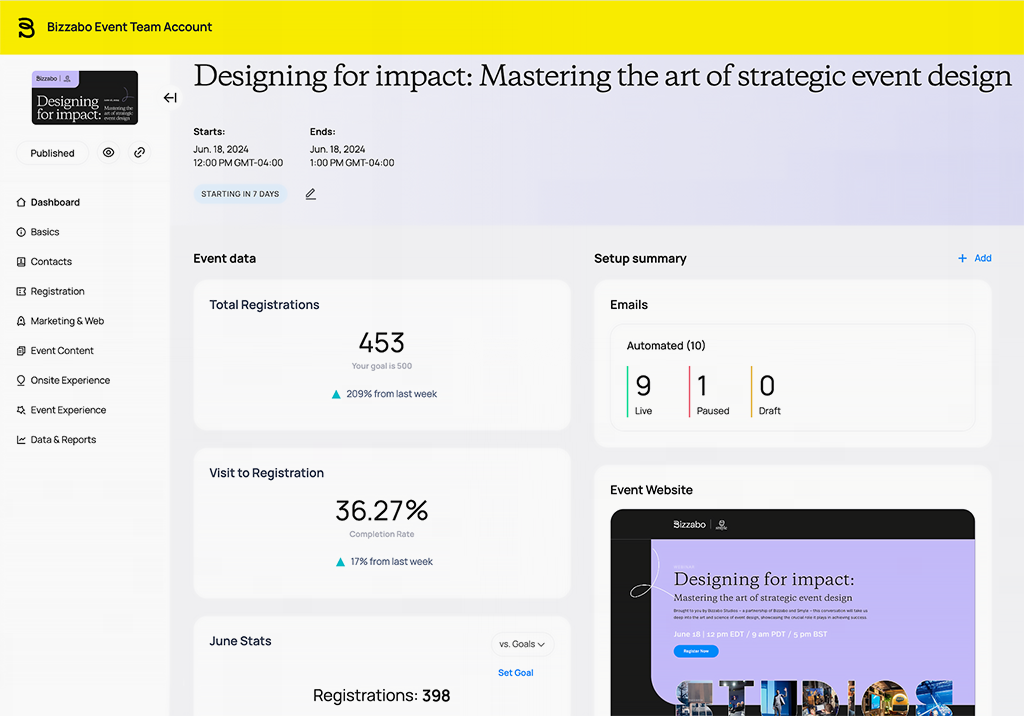
Source: https://www.bizzabo.com/event-management-software
Bizzabo Overview and Features
Bizzabo provides a comprehensive set of tools, positioning it among best event management websites. Its features support both virtual and in-person events. Key features include:
- Registration Management: Create custom forms and track registrations.
- Marketing Tools: Launch email and social media campaigns.
- Analytics: Monitor ticket sales and attendee engagement.
- Event Website Builder: Create branded event pages.
- Mobile App: Manage events and engage attendees on-site.
- Integrations: Connect with CRM and marketing platforms.
Bizzabo’s strength lies in its marketing and website-building tools, making it suitable for professional conferences.
Bizzabo Pros and Cons
Bizzabo offers a robust feature set with some considerations. Here’s a balanced overview:
- Pros
- Strong marketing and website tools.
- Supports virtual and hybrid events.
- Detailed analytics for event insights.
- Mobile app for attendee engagement.
- Integrates with popular platforms.
- Cons
- Higher cost for small events.
- Complex setup for beginners.
- No free plan available.
Bizzabo’s features suit professional events, though its cost and complexity may be considerations for smaller organizers.
Bizzabo Pricing & Free Version
Bizzabo offers no free plan, but a demo is available. Pricing is customized, typically starting at $499 per event, including registration and marketing tools.
6. Trello
Trello is a project management tool often used for event planning, offering task management and collaboration features. It’s a versatile option for the best project management software for events.
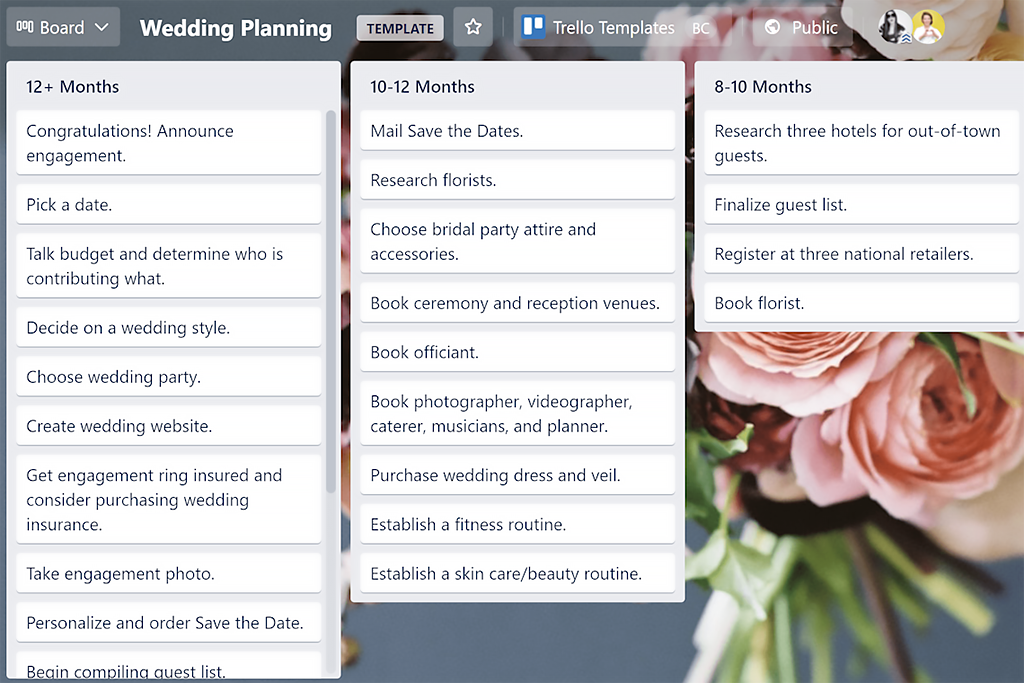
Source: https://trello.com/
Trello Overview and Features
Trello provides a flexible platform for event planning, making it a contender among best event management tools. Its board-based system simplifies task organization. Key features include:
- Task Management: Organize tasks on boards with due dates and assignees.
- Collaboration: Share boards with team members and vendors.
- Checklists: Break tasks into subtasks for detailed planning.
- Attachments: Add documents, images, or schedules to tasks.
- Mobile App: Manage tasks on the go.
- Integrations: Connect with tools like Slack and Google Drive.
Trello’s simplicity makes it suitable for small events or teams needing basic planning tools.
Trello Pros and Cons
Trello offers a straightforward feature set with some limitations. Here’s a balanced overview:
- Pros
- Free plan with core features.
- Intuitive board-based interface.
- Supports team collaboration.
- Mobile app for easy access.
- Integrates with popular tools.
- Cons
- Limited event-specific features.
- Not ideal for complex events.
- Advanced features require paid plans.
Trello’s simplicity makes it a reliable choice for small events, though it may lack depth for larger, complex gatherings.
Trello Pricing & Free Version
Trello offers a free plan with unlimited cards and up to 10 boards. Paid plans start at $5 per user/month (billed annually), adding advanced features like automation.
7. Monday.com
Monday.com is a project management platform used for event planning, offering task management and collaboration tools. It’s suitable for the best project management software for event planning.
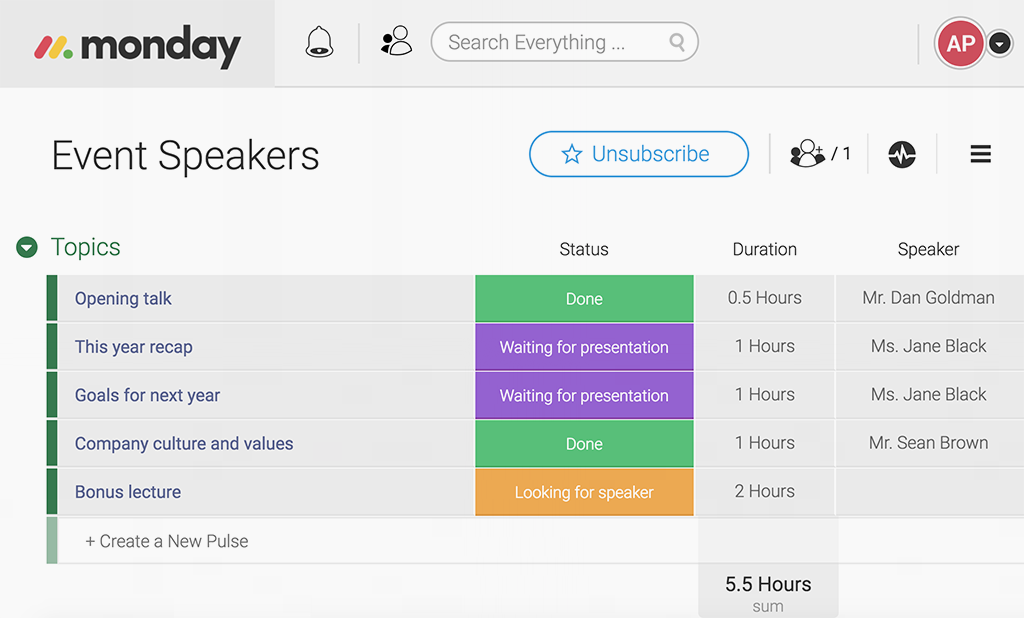
Source: https://monday.com/
Monday.com Overview and Features
Monday.com provides a flexible platform for event coordination, positioning it among top event management software. Its customizable workflows support diverse event needs. Key features include:
- Task Management: Assign tasks with timelines and status updates.
- Collaboration: Share dashboards with team members and vendors.
- Timeline Views: Visualize event schedules and deadlines.
- Automation: Automate task reminders and updates.
- Analytics: Track task progress and team performance.
- Integrations: Connect with tools like Zoom and Slack.
Monday.com’s customizable boards make it adaptable for events of varying complexity, from small gatherings to large conferences.
Monday.com Pros and Cons
Monday.com offers a versatile feature set with some considerations. Here’s a balanced overview:
- Pros
- Highly customizable workflows.
- Strong collaboration tools.
- Supports automation for tasks.
- Integrates with popular platforms.
- Mobile app for on-the-go management.
- Cons
- Limited event-specific features.
- Higher cost for small teams.
- No free plan for advanced features.
Monday.com’s flexibility makes it a solid choice for event planning, though its cost may be a factor for smaller organizers.
Monday.com Pricing & Free Version
Monday.com offers a free plan for basic task management. Paid plans start at $8 per user/month (billed annually), including automation and advanced views.
8. Asana
Asana is a project management tool used for event planning, offering task management and collaboration features. It’s a viable option for the best online event management tools.
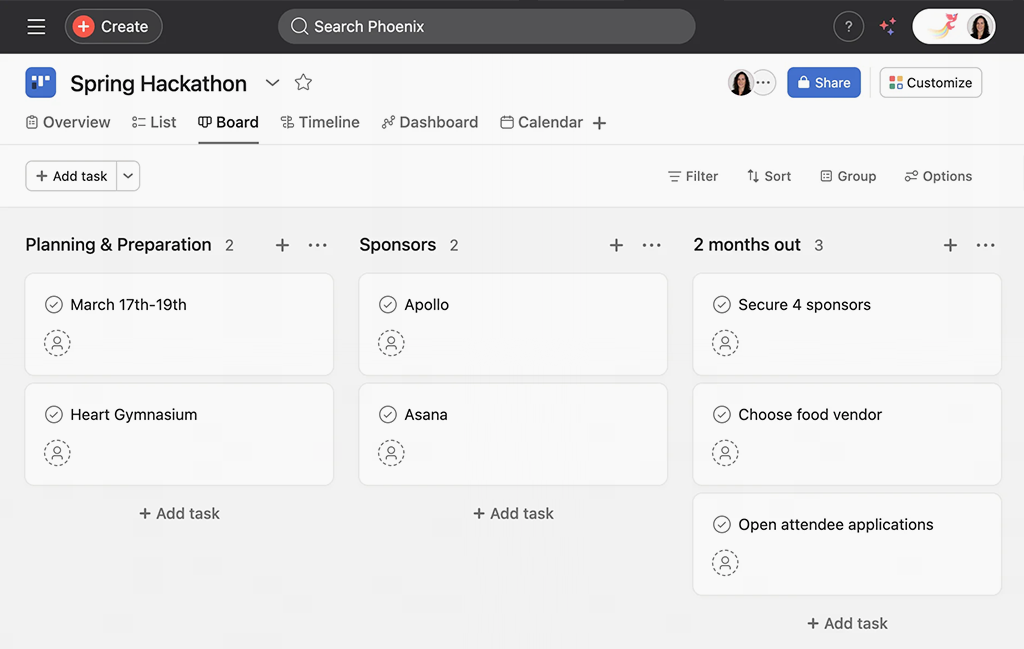
Source: https://asana.com/
Asana Overview and Features
Asana provides a structured platform for event coordination, making it a contender among best event management solutions. Its task-focused design supports efficient planning. Key features include:
- Task Management: Assign tasks with due dates and dependencies.
- Collaboration: Share projects with team members and vendors.
- Timeline Views: Plan event schedules with Gantt charts.
- Automation: Automate task assignments and reminders.
- Mobile App: Manage tasks on-site or remotely.
- Integrations: Connect with tools like Google Calendar and Slack.
Asana’s task-driven approach makes it suitable for small to medium-sized events requiring clear organization.
Asana Pros and Cons
Asana offers a reliable feature set with some limitations. Here’s a balanced overview:
- Pros
- Free plan with core features.
- Intuitive task management interface.
- Supports team collaboration.
- Mobile app for easy access.
- Integrates with popular tools.
- Cons
- Limited event-specific functionality.
- Advanced features require paid plans.
- Not ideal for large-scale events.
Asana’s simplicity makes it a reliable choice for smaller events, though it may lack depth for complex logistics.
Asana Pricing & Free Version
Asana offers a free plan with basic task management for up to 15 users. Paid plans start at $10.99 per user/month (billed annually), adding automation and timelines.
9. Wrike
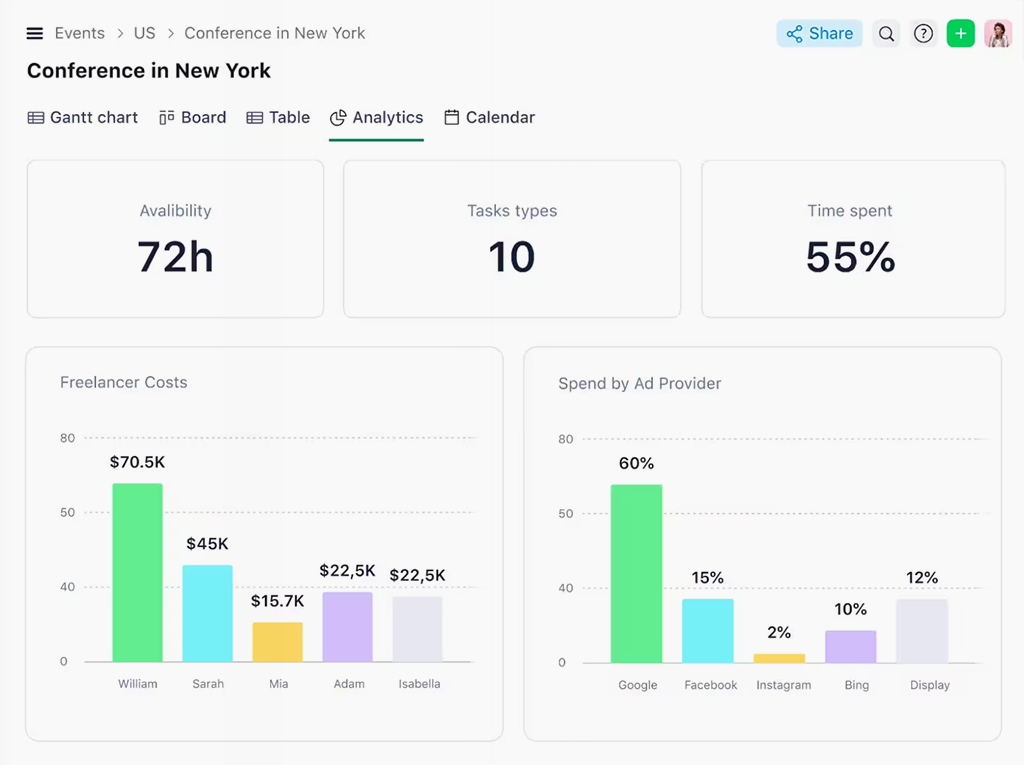
Wrike is a project management platform used for event planning, offering robust task management and collaboration tools. It’s suitable for the best event management software.
Source: https://www.wrike.com/
Wrike Overview and Features
Wrike provides a flexible platform for event coordination, positioning it among best event management systems. Its customizable features support complex event needs. Key features include:
- Task Management: Assign tasks with deadlines and priorities.
- Collaboration: Share dashboards with team members and vendors.
- Time Tracking: Monitor hours spent on event tasks.
- Automation: Automate task updates and notifications.
- Analytics: Track project progress and team performance.
- Integrations: Connect with tools like Salesforce and Google Drive.
Wrike’s robust features make it adaptable for events requiring detailed planning and team coordination.
Wrike Pros and Cons
Wrike offers a comprehensive feature set with some considerations. Here’s a balanced overview:
- Pros
- Free plan for basic task management.
- Customizable for complex events.
- Strong collaboration and automation tools.
- Integrates with popular platforms.
- Mobile app for on-site management.
- Cons
- Complex interface for beginners.
- Advanced features require paid plans.
- Less tailored for event-specific needs.
Wrike’s versatility makes it a solid choice for event planning, though its complexity may require a learning curve.
Wrike Pricing & Free Version
Wrike offers a free plan for basic task management. Paid plans start at $9.80 per user/month (billed annually), including automation and advanced analytics.
10. Airtable
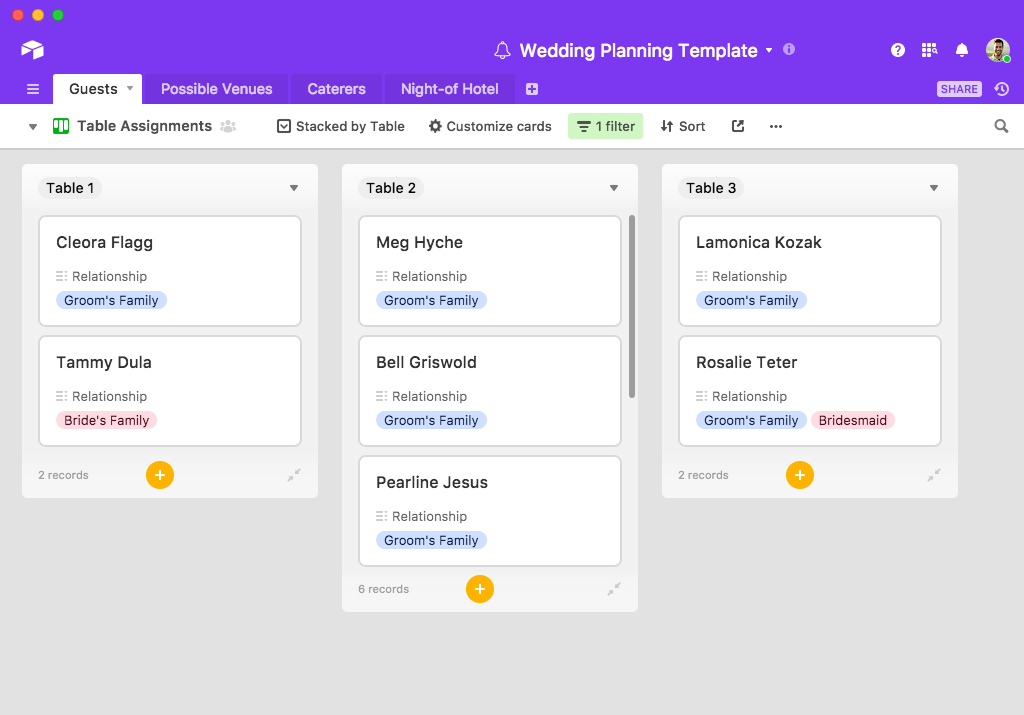
Airtable is a flexible platform used for event planning, combining spreadsheet functionality with project management features. It’s a contender for the best event management software for nonprofits.
Source: https://www.airtable.com/
Airtable Overview and Features
Airtable offers a customizable platform for event coordination, making it a notable option among best online event management software. Its spreadsheet-like interface supports diverse event needs. Key features include:
- Task Management: Organize tasks in customizable tables with due dates.
- Collaboration: Share tables with team members and vendors.
- Event Planning Templates: Use pre-built templates for schedules and budgets.
- Attachments: Add documents, images, or guest lists to tasks.
- Mobile App: Manage events on the go.
- Integrations: Connect with tools like Slack and Zapier.
Airtable’s flexibility makes it suitable for small events or nonprofit organizers needing customizable workflows.
Airtable Pros and Cons
Airtable offers a versatile feature set with some limitations. Here’s a balanced overview:
- Pros
- Free plan with core features.
- Highly customizable interface.
- Supports team collaboration.
- Mobile app for easy access.
- Integrates with popular tools.
- Cons
- Limited event-specific functionality.
- Advanced features require paid plans.
- Not ideal for large-scale events.
Airtable’s flexibility makes it a reliable choice for small or nonprofit events, though it may lack depth for complex logistics.
Airtable Pricing & Free Version
Airtable offers a free plan with basic task management and unlimited bases. Paid plans start at $10 per user/month (billed annually), adding advanced features like automation.
Common Use Cases for Event Management Software
Event management software supports a variety of tasks, from planning logistics to engaging attendees. These platforms are essential for organizers seeking the best event management sites to streamline their workflows. Below are common use cases for these tools.
- Event Planning and Scheduling: Create timelines, assign tasks, and manage session schedules to ensure smooth execution.
- Attendee Management: Track RSVPs, manage registrations, and communicate with guests for personalized experiences.
- Budget Management: Monitor expenses, vendor payments, and ticket revenue to stay within budget.
- Marketing and Promotion: Launch email or social media campaigns to boost attendance and engagement.
- Vendor Coordination: Manage contracts, schedules, and communications with vendors and suppliers.
- Post-Event Analysis: Analyze attendance, feedback, and financial data to improve future events.
These use cases highlight how event management software simplifies complex tasks and enhances attendee experiences. The best websites for event management provide tools to manage every stage of an event, from planning to follow-up.
Which Event Management System Is Right For You?
Choosing the best event management system depends on your event’s scale, budget, and specific needs. Planfix stands out as a versatile, all-in-one solution, combining task management, CRM, and financial tools to streamline every aspect of event planning. Its flexibility makes it suitable for small workshops or large conferences, offering customization and affordability. Whether you’re a nonprofit or a corporate planner, Planfix’s comprehensive features ensure efficient coordination and enhanced attendee experiences. Try Planfix’s free plan or 30-day trial to discover how it can elevate your next event.
FAQ
What is event management software?
Event management software is a platform that centralizes tasks like task assignment, attendee management, and budget tracking for planning and executing events. It streamlines logistics, automates repetitive tasks, and provides analytics to ensure events run smoothly and meet objectives.
What features should I look for in event management software?
Key features include task management, attendee tracking, budget tools, marketing automation, and analytics. Look for platforms with mobile access and integrations with tools like CRM or email systems to support seamless event planning.
How does event management software improve marketing?
It enables targeted email and social media campaigns to promote events and boost attendance. Automation features streamline campaign scheduling, ensuring consistent communication with potential attendees.
How do I choose the best event management software?
Evaluate your event size, budget, and needs, prioritizing features like scalability and ease of use. Test free trials or demos to ensure the platform aligns with your planning requirements.
