Internal RPA/automation in SMB - Integration Task Pipeline Planfix CRM and Project Management System

Internal RPA/automation in SMB - Integration Task Pipeline

Planfix captures incoming events, classifies them with AI, routes them to the right team, and keeps the flow visible and auditable.

Why You Need This — Internal RPA/automation in SMB - Integration Task Pipeline

Why You Need This

You want every lead, order, call, form, marketplace update or webhook to land in one governed place. You want it enriched, routed, and ready to work. You also want to see what failed.
What Happens First — Internal RPA/automation in SMB - Integration Task Pipeline

What Happens First

Start with intake. Configure email to ticket or channel to task and attach a task template. Every external system can drop work into Planfix. Operators see it in Planner right away.

Capture And Route

Automate Enrichment

Run And Monitor

Capture And Route — Internal RPA/automation in SMB - Integration Task Pipeline

Capture And Route

Capture events from email, marketplaces, telephony, forms, and webhooks.
Map incoming fields to task fields and directories.
Send tasks to conditional lists in Planner automatically.
Email to task
Automate Enrichment — Internal RPA/automation in SMB - Integration Task Pipeline

Automate Enrichment

Add AI Dataminer to extract values from messy messages.
Turn text into fields and tags with automation actions.
Auto tag tasks with source and error type.
AI Agents
Run And Monitor — Internal RPA/automation in SMB - Integration Task Pipeline

Run And Monitor

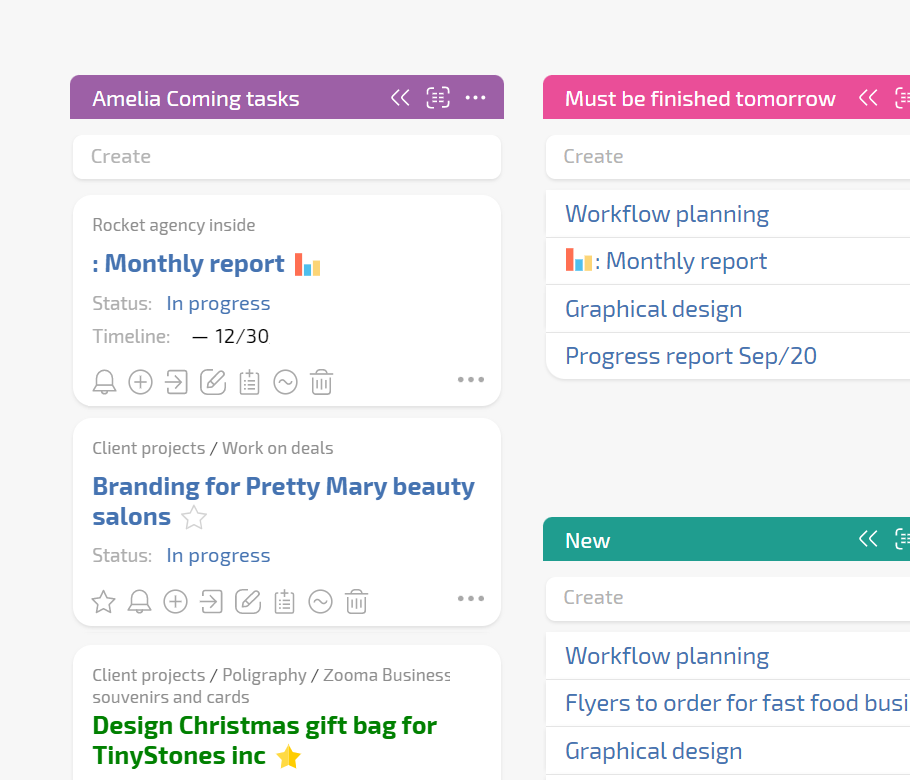
Pin the Planner board to the team workspace.
See new, in progress, waiting, and error tasks.
Use custom buttons to rerun automation on problem tasks.
Custom buttons

Intake That Never Loses Events

Every incoming signal becomes a task you can track and report on.

Transparent Routing

Moving a task to another list updates fields using the list rules.

Transparent Routing — Internal RPA/automation in SMB - Integration Task Pipeline

Visible Exceptions

Errors go to a dedicated list with raw data attached for triage.

Visible Exceptions — Internal RPA/automation in SMB - Integration Task Pipeline

Instant Reporting

Data tags and project totals show volume, sources, and overdue items.

If This Sounds Familiar

If This Sounds Familiar — Internal RPA/automation in SMB - Integration Task Pipeline
Too Many Systems
Teams retype data from several sources and waste time on manual fixes.
If This Sounds Familiar — Internal RPA/automation in SMB - Integration Task Pipeline
Missed Leads
You get complaints that a lead or order did not reach the right manager.
If This Sounds Familiar — Internal RPA/automation in SMB - Integration Task Pipeline
No Load Visibility
Work is happening but you cannot see current load or bottlenecks.
Capture And Route All Work — Internal RPA/automation in SMB - Integration Task Pipeline

Capture And Route All Work

Configure intake from email, marketplaces, telephony, forms, and webhooks. Map incoming fields to Planfix fields and directories. Apply conditional lists in Planner so tasks reach the right team without manual sorting.

AI Dataminer

Extracts values from messages and writes them to mapped task fields.

LLM In Scripts

Use Send request to Planfix AI to turn text into structured data.

Status Sets

Operators see allowed next steps so the process stays predictable.

The State You Reach — Internal RPA/automation in SMB - Integration Task Pipeline

The State You Reach

All external systems send work to Planfix
Tasks are clean
Routing is automatic
Exceptions are separated
Teams work from one board
Managers have dashboards.
New sources are added by reusing templates and directories.
Handling Real Obstacles — Internal RPA/automation in SMB - Integration Task Pipeline

Handling Real Obstacles

Different sources send data in different formats. Planfix removes this with AI Agents and mapped custom fields. Teams get conditional boards that look familiar. Managers see volume and time with data tags, reports, and Project Totals.

Shared Inboxes

Messages become structured tasks with automation and audit trail in Planfix.

Standalone Checks

Planfix shows the human work side and stores the full process history.

Spreadsheets

Boards, reports, and directories stay current without manual updates.

FAQ

Use all of Planfix's features for 14 days, completely free of charge

Start now