Data Annotation / AI Labeling Studios - Tasks, Quality, Reporting Planfix CRM and Project Management System

Data Annotation / AI Labeling Studios - Tasks, Quality, Reporting

Run every labeling project from one governed workspace so you keep tasks flowing, hit quality targets, and prove value with reporting.

Start Labeling In Planfix No credit card needed • Unlimited time on Free plan
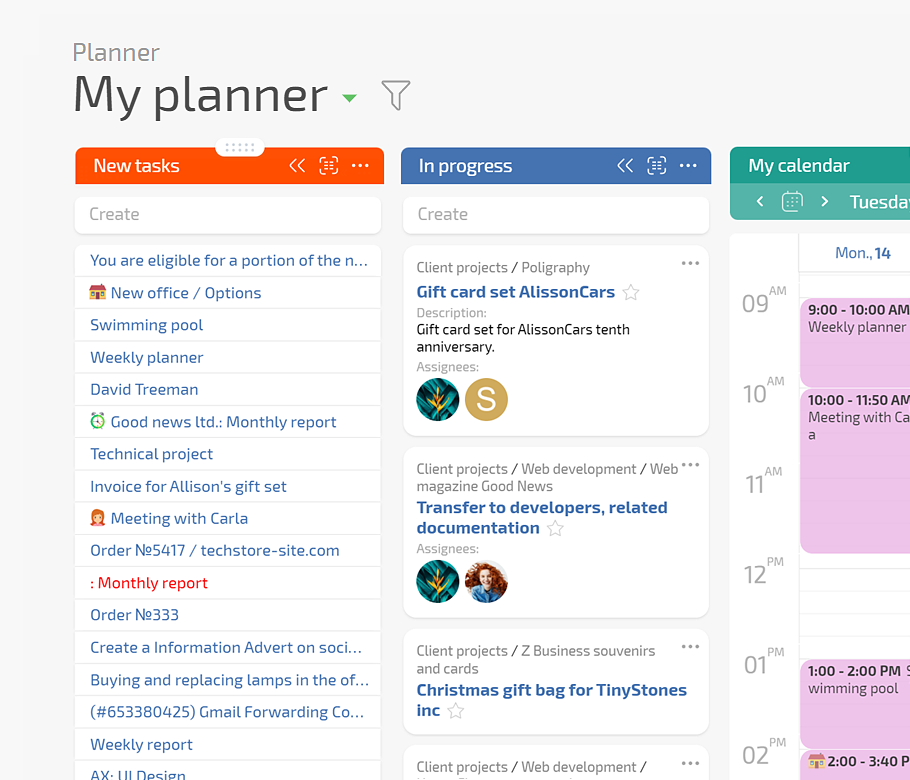
Run All Labeling Work In One Governed Pipeline — Data Annotation / AI Labeling Studios - Tasks, Quality, Reporting

Run All Labeling Work In One Governed Pipeline

Planfix centralizes intake, annotation, QA, and rework in one governed pipeline. Planner boards with conditional lists show every task in its real stage, while Project Totals and data tags keep volume, time, and cost visible without extra spreadsheets.

One Governed Pipeline

Turn scattered briefs and tools into a single, governed labeling pipeline across clients and datasets.

Single Flow For QA

Keep annotation, QA, adjudication, and rework in one traceable flow instead of jumping between portals.

Live Numbers

See throughput, quality, and margin in real time with Project Totals fields and data tags.

Start With One Live Project — Data Annotation / AI Labeling Studios - Tasks, Quality, Reporting

Start With One Live Project

Begin by centralizing tasks and QA for one active project without changing your labeling stack. Forward client emails and bug tickets into tasks, use a ready Planner board, and log time and cost with data tags and a simple dashboard.

Make The Change Visible — Data Annotation / AI Labeling Studios - Tasks, Quality, Reporting

Make The Change Visible

Drag one card from Annotation to QA and watch assignees, statuses, and due dates update automatically from list rules. Share a free Client Dashboard so customers track batches and reports on their own instead of waiting for status emails.

Governed Intake

Replace scattered intake messages with one governed task flow for every client and dataset.

Stable Production Queue

Keep annotators and reviewers in a steady, traceable queue instead of juggling side lists and chats.

Traceable Quality

Track error types, rework, and agreement with data tags so quality patterns become reportable.

Prove Margins

Roll up volume, time, and costs with Project Totals fields to show margin clearly per project.

If This Sounds Familiar — Data Annotation / AI Labeling Studios - Tasks, Quality, Reporting

If This Sounds Familiar

Your studio runs strong projects but only through heroic effort. You chase answers across spreadsheets, chat, and a labeling portal, then still scramble to respond to clients. Tasks slip between tools, and quality issues surface late when rework is expensive.

Keep Every Labeling Project Under Control

Protect Quality Without Manual Overload

See Throughput, Quality, And Margin In One Place

Keep Every Labeling Project Under Control — Data Annotation / AI Labeling Studios - Tasks, Quality, Reporting

Keep Every Labeling Project Under Control

Turn each client brief into a governed project with tasks for data prep, annotation, QA, and delivery.
Configure custom objects and status sets so every labeling job follows clear transitions instead of ad hoc steps.
Use the Planner board with conditional lists so drag and drop rewrites assignees, statuses, and priorities automatically.
Sketch flows on Whiteboard and convert blocks into real tasks and relations without retyping your process.
Project Structure In Planfix
Protect Quality Without Manual Overload — Data Annotation / AI Labeling Studios - Tasks, Quality, Reporting

Protect Quality Without Manual Overload

Add structured QA tasks, error fields, and checklists so defects are logged consistently, not buried in chat.
Use AI Agent Dataminer to extract issue types and edge cases from comments into searchable, reportable fields.
Use AI Agent Summarizer to keep a live summary of decisions, clarifications, and rulings per project.
Route rework tasks automatically by error type, label, or client priority to keep loops short and focused.
Robots And AI Agents
See Throughput, Quality, And Margin In One Place — Data Annotation / AI Labeling Studios - Tasks, Quality, Reporting

See Throughput, Quality, And Margin In One Place

Use data tags for time and finance logs on each task and batch to measure effort by client and label set.
Configure Project Totals fields for hours, costs, rework counts, and overdue tasks that update as work is done.
Build dashboards that combine planners, reports, and charts so leads see health by client, project, and stream.
Share selected reports inside Client Dashboards to give customers transparent numbers instead of manual slide decks.
Report Designer
Your New Normal With Planfix — Data Annotation / AI Labeling Studios - Tasks, Quality, Reporting

Your New Normal With Planfix

You wake up knowing every project sits in one governed workspace. Volume, backlog, quality, and margin are visible at a glance, and client questions are answered with live dashboards instead of last-minute data pulls.

How Work Will Feel

How Work Will Feel — Data Annotation / AI Labeling Studios - Tasks, Quality, Reporting

Confident Control

Know every batch and exception lives in one governed system instead of scattered chats and spreadsheets.
How Work Will Feel — Data Annotation / AI Labeling Studios - Tasks, Quality, Reporting

Calm Reviews

Walk into client reviews with numbers that match your story, not fragile ad hoc reports.
How Work Will Feel — Data Annotation / AI Labeling Studios - Tasks, Quality, Reporting

Focused Team

Let annotators and leads spend time labeling, reviewing, and improving, not chasing tasks and updates.

Auditable Workflows

Organize complex, multistage projects into clean workflows where every decision and handoff is traceable for audits.

Stable Quality Metrics

Deliver stable quality that meets or beats agreed metrics using structured QA tasks and consistent data tags.

Clear Project Financials

See time, costs, and margin by project and client using Project Totals fields and reporting.

Low-Risk Start

Begin with one project and one Planner board while your current tools keep running alongside.

Role-Based Workspaces

Give each role a focused workspace with only the boards, dashboards, and reports they actually need.

Flexible For Edge Cases

Use custom objects, fields, and status sets to mirror even unusual flows without code or plugins.

Spreadsheets And Chat

Replace fragile spreadsheet trackers and chat threads with governed tasks, planners, and dashboards that stay linked.

Labeling Portals Only

Wrap your labeling portal with projects, QA, reporting, and client portals across the full life cycle.

Generic Project Tools

Go beyond basic project boards with data tags, Project Totals, and AI Agents in the same workspace.

Connect Planfix To Your Labeling Stack

Integrate messengers, storage, telephony, and automation platforms so intake, files, and updates flow into one workspace.

See all integrations

Make Labeling Operations Predictable With Planfix

Start now
No credit card needed • Unlimited time on Free plan
FAQ

Use all of Planfix's features for 14 days, completely free of charge

Start now