Supplementary Education Centers - Inquiries & Schedules Planfix CRM and Project Management System

Supplementary Education Centers - Inquiries & Schedules

Turn every inquiry into a confirmed slot in one system. Capture messages from every channel, match them to real availability, and keep admins, teachers, and parents in sync.

Accept and Qualify Faster — Supplementary Education Centers - Inquiries & Schedules

Accept and Qualify Faster

Every parent message becomes a task. AI Agents fill in age, program, and preferred time. You stay in one thread from first contact to confirmed lesson, without copying data between tools.
Work from One Live Schedule — Supplementary Education Centers - Inquiries & Schedules

Work from One Live Schedule

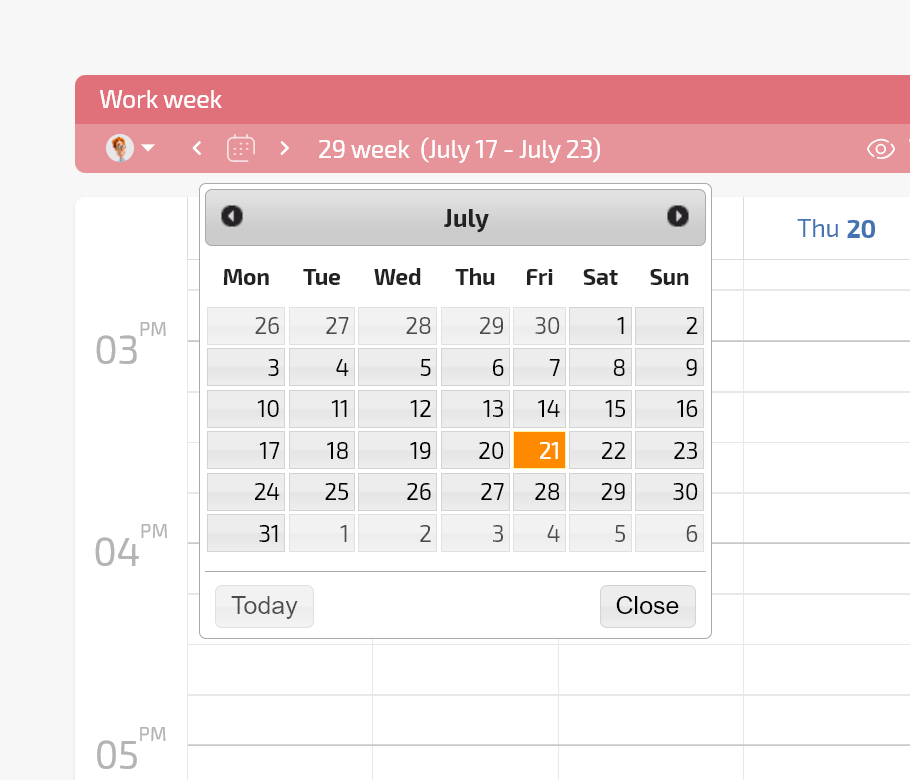
Planner and calendars show real teachers, rooms, groups, and capacity. You confirm only real slots, stop double booking, and let everyone work from the same source of truth.

Channel to Task

Turn email, Facebook, website, and messengers into tasks with source and responsible saved.

Channel to Task — Supplementary Education Centers - Inquiries & Schedules

Stages in Planner

See New inquiries, Need details, Offer sent, Scheduled as conditional lists.

AI Agents

Dataminer and Interviewer ask for missing data and write it into fields.

Client Dashboard

Parents see and confirm on the same record without extra chats or calls.

Client Dashboard — Supplementary Education Centers - Inquiries & Schedules

1. Capture the Inquiry

2. Clarify the Request

3. Match to Availability

4. Confirm and Notify

5. Create Recurring Lessons

1. Capture the Inquiry — Supplementary Education Centers - Inquiries & Schedules

1. Capture the Inquiry

Parent writes in any channel.
Planfix creates a task and stores source.
Responsible is assigned, nothing is lost.
Capture tasks
2. Clarify the Request — Supplementary Education Centers - Inquiries & Schedules

2. Clarify the Request

AI asks for age, subject, time.
Fields are filled for the admin.
You see what to offer.
Use AI data
3. Match to Availability — Supplementary Education Centers - Inquiries & Schedules

3. Match to Availability

See teacher and room calendars.
See group capacity before confirming.
Offer only real times.
Show calendars
4. Confirm and Notify — Supplementary Education Centers - Inquiries & Schedules

4. Confirm and Notify

Status switches to Scheduled.
Parent receives confirmation.
Teacher gets task or notification.
Notifications
5. Create Recurring Lessons — Supplementary Education Centers - Inquiries & Schedules

5. Create Recurring Lessons

Recurring tasks appear on calendar.
Attendance and finance tags start.
You can report right away.
Recurring lessons
Why This Matters — Supplementary Education Centers - Inquiries & Schedules

Why This Matters

You stop losing leads from Facebook and the website. You answer faster because you see real availability. You schedule without clashes because everyone uses the shared calendar. You can report how many inquiries became scheduled lessons and from which channel.

If This Sounds Familiar

If This Sounds Familiar — Supplementary Education Centers - Inquiries & Schedules
Parents in messengers
Admins forget to enter data and enrollment is delayed.
If This Sounds Familiar — Supplementary Education Centers - Inquiries & Schedules
Schedule in Excel
You cannot trust it and teachers change time too late.
If This Sounds Familiar — Supplementary Education Centers - Inquiries & Schedules
No channel analytics
You do not see which source gives paying students.
What the Finished Process Looks Like — Supplementary Education Centers - Inquiries & Schedules

What the Finished Process Looks Like

Every inquiry is visible, dated, and assigned. You can tell how long it took to schedule. Teachers see who is coming and when. Parents receive confirmation from one channel. The schedule lives in Planfix, not in several files.

Existing Forms and Lead Ads

We connect website and Facebook forms and create tasks with fields filled.

Schedule Changes Often

We store schedule items in Planner and calendars so updates are visible.

Distributed Staff

Admins, teachers, and managers get dashboards to see the same task thread.

Spreadsheets

Planner with conditional lists and calendars shows stages and slots live.

Messenger-only Process

Channel to task and AI extraction create structured records to report on.

CRM without Scheduling

Planfix has calendars, recurring tasks, Planned Work Time, and reports tied to lessons.

Schedule every lesson from one system

Start now
No credit card needed • Unlimited time on Free plan
FAQ

Use all of Planfix's features for 14 days, completely free of charge

Start now