Residential Renovation - Requests, Estimates & Phases Planfix CRM and Project Management System

Residential Renovation - Requests, Estimates & Phases

Run every renovation request, estimate, and phase in one workspace. Planfix captures the inquiry, structures the scope, and keeps crews and clients aligned.

Renovation Made Predictable — Residential Renovation - Requests, Estimates & Phases

Renovation Made Predictable

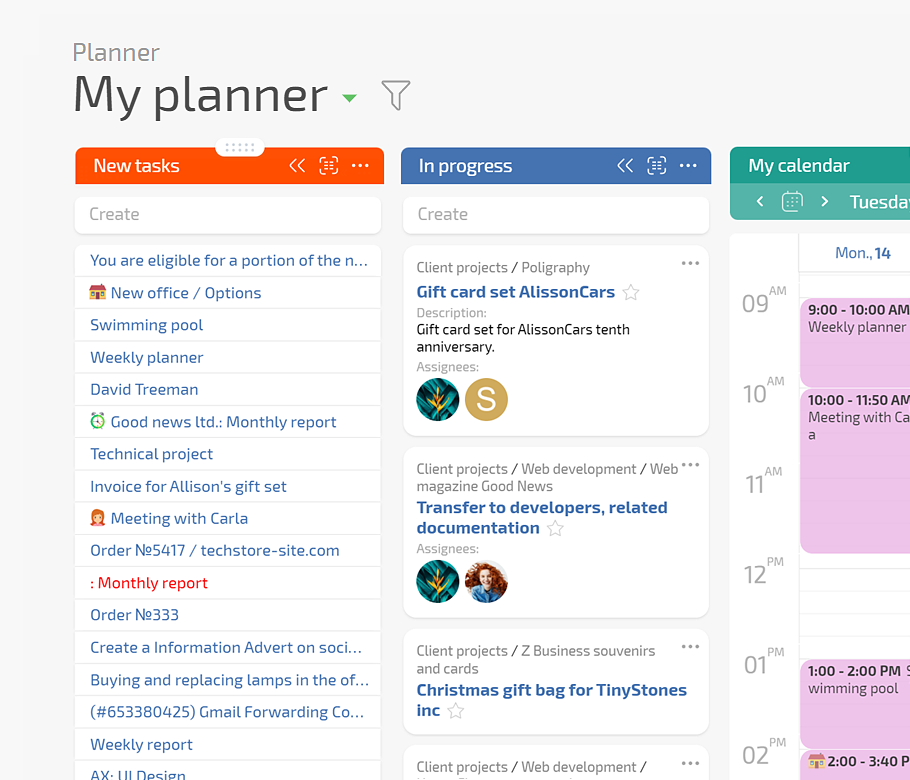
You want intake to land in the right flow the first time, estimates to match reality, and phases to appear on calendars. Planfix gives you conditional Planner boards, client dashboards, AI agents, and status sets that keep work from skipping steps.

Start with Clean Intake

Turn calls, chats, and forms into tasks with contact, address, and object fields linked.

Show How Work Moves

Planner lists route tasks by rules. Homeowners see estimates in the same thread.

What You Get

Logged requests, linked estimates, visible phases, and approved changes that stay billable.

How the Flow Works in Planfix — Residential Renovation - Requests, Estimates & Phases

How the Flow Works in Planfix

Capture the request, collect site data, assemble and version the estimate, approve work, and run phases. Materials, subcontractors, and client communication sit in the same renovation project.

Capture and Qualify

Estimate and Approve

Phase and Schedule

Track and Reconcile

Capture and Qualify — Residential Renovation - Requests, Estimates & Phases

Capture and Qualify

Turn every inbound message into a structured renovation task.
Link the homeowner, address, and object details immediately.
Let AI agents extract room data or deadlines from chat.
Omnichannel intake
Estimate and Approve — Residential Renovation - Requests, Estimates & Phases

Estimate and Approve

Assemble and version estimates inside the same renovation case.
Offer options without losing track of what was chosen.
Share through Client Dashboard so approval stays in thread.
Estimate templates
Phase and Schedule — Residential Renovation - Requests, Estimates & Phases

Phase and Schedule

Create phases as tasks with dates and responsible crews.
Use status sets and transitions to block early starts.
See work on calendars, planners, and Gantt views.
Status rules
Track and Reconcile — Residential Renovation - Requests, Estimates & Phases

Track and Reconcile

Log extras and changes so they stay billable.
Use Project Totals to see actuals and overruns.
Repeat the same flow on the next renovation.
Reporting
Planner, Dashboard, AI, Status Rules — Residential Renovation - Requests, Estimates & Phases

Planner, Dashboard, AI, Status Rules

Planner shows request, estimate, scheduled, in progress, and completed as conditional lists. Client Dashboard exposes only what the homeowner should see. AI agents write data into fields. Status sets keep crews from skipping rough work.

If This Sounds Familiar

If This Sounds Familiar — Residential Renovation - Requests, Estimates & Phases
Details get lost
Homeowners write to different managers and scope is retyped from messengers.
If This Sounds Familiar — Residential Renovation - Requests, Estimates & Phases
Work starts too early
Status sets and approvals keep crews from starting before scope is confirmed.
If This Sounds Familiar — Residential Renovation - Requests, Estimates & Phases
You need proof
Time, approvals, and changes stay under the renovation task and are reportable.

Turn Channels into Tasks

Email, messengers, and web forms create tasks and link the client card automatically.

Keep Files Together

Store estimates, photos, and layouts under the same renovation case for the whole team.

Work with Externals

Give subcontractors restricted UI access and keep logs and approvals in Planfix.

Target State for Renovation Teams — Residential Renovation - Requests, Estimates & Phases

Target State for Renovation Teams

Every renovation request arrives in Planfix and is qualified. The chosen estimate is approved and linked. Phases sit on the calendar with responsible crews. Managers see totals, overruns, and profitability.

Run Your Renovations in Planfix

Start now
No credit card needed • Unlimited time on Free plan

Connect Planfix to Your Renovation Stack

Centralize intake, storage, calendars, and notifications with ready-to-use integrations.

See all integrations
FAQ

Use all of Planfix's features for 14 days, completely free of charge

Start now