Learn how to set up sequential tasks in Planfix: chain subtasks, keep future stages in drafts and pass each step to the next assignee automatically.

Task checklists in Planfix split complex work into steps, give each item an owner and show progress on Planner cards. See how in this two-minute video.
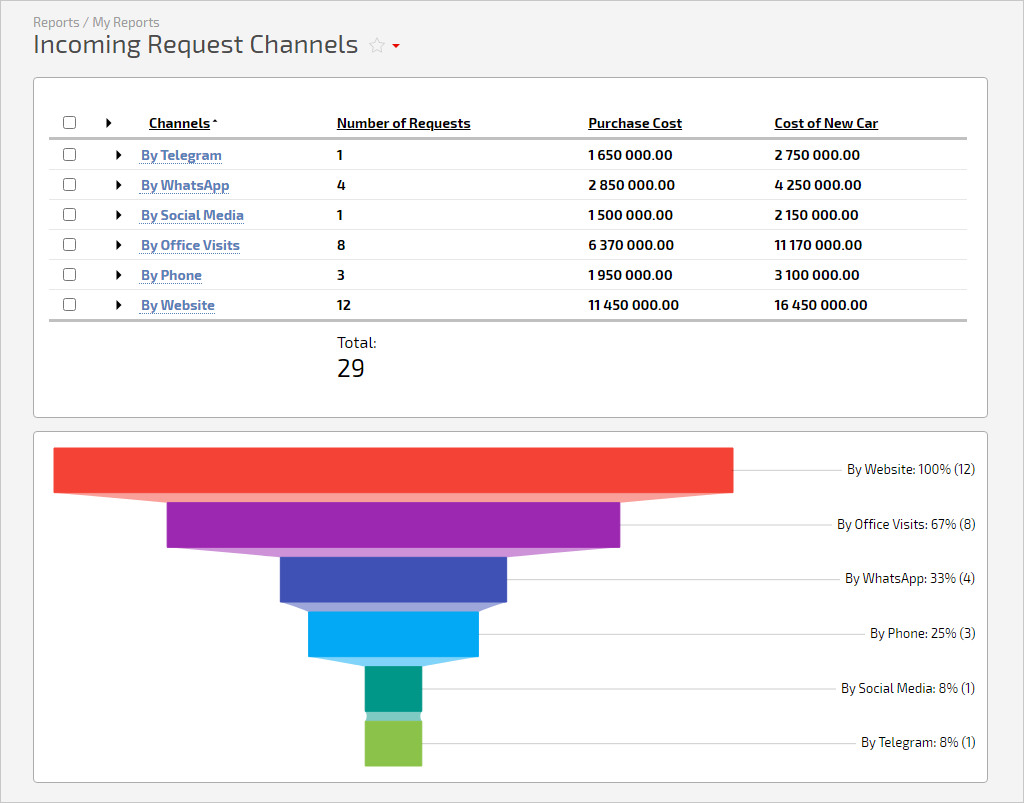
Charts make any Planfix report more transparent, so we've improved the "Funnel" chart. Now you can't only group values by a single column of the report but also sort…

The task details window in Planfix has been updated to remain open when switching to another task. This is a valuable feature for managers who need to view additional…
In Planfix, any task can have subtasks with unlimited nesting, each with its own assignee, deadline and discussion. For several assignees, Planfix can create a subtask for each, and a summary task calculates its deadline from its subtasks. These articles show how a task works, how to chain subtasks into handoffs and when a checklist item is enough.