
Happiest Users Award 2023
Planfix was awarded the "Happiest Users Award 2023" by Crozdesk for high customer satisfaction. Planfix provides all-in-one software solutions for enterprises…

How to Add Events to a Planfix Calendar in Seconds
1.5-minute video + steps: add events to a calendar in Planfix, set up a compact event form in an hourly Planner list and sync it with Google Calendar.

Integration with Microsoft 365
The Planfix team is committed to offering convenient services to our customers, many of whom are entrepreneurs passionate about what they do. Given the importance of…

Scheduled Reports: Efficiently Manage Task Completion
Today, we're pleased to introduce a long-awaited update: the automatic creation of custom reports on a schedule, which can be emailed to the desired recipients. If…

What’s New in Planfix: August
— You can now jump to an employee or contact card from all types of system and user fields in a task.— We've changed the method for switching planners. When you click on…

Email Tracking in Planfix
Some features of Planfix have been improved based on requests and feedback from our users to the Support Service. This was the case with enhancing the email tracking…

New Action in Automated Contact Scripts: Create a Project from a Template
Project templates are specific Planfix objects that simplify and accelerate the workflow within any company. The new feature will be a great advantage for anyone working…

Summer 2023 Top Performer
Planfix delivers customized software solutions for enterprises, nonprofits, startups, and freelancers. Our ultimate goal is to increase operational efficiency and drive…

What’s New in Planfix: July
— Switch between sections of a task card by swiping left or right.— Edit fields in an employee card.— Add recurring reminders.— View attached files in a task.— Save a…

How to Add Charts to a Planfix Report and Group Data
3-minute video + steps: add charts to a Planfix report, pick the chart type and data, and change the grouping to see numbers by project or employee.

Planfix Planner for Beginners: How Task Lists Work
4-minute video + steps: the Planfix Planner for beginners — build lists from selection parameters, create tasks inside them and drag a task to reassign it.
What’s New in Planfix: June
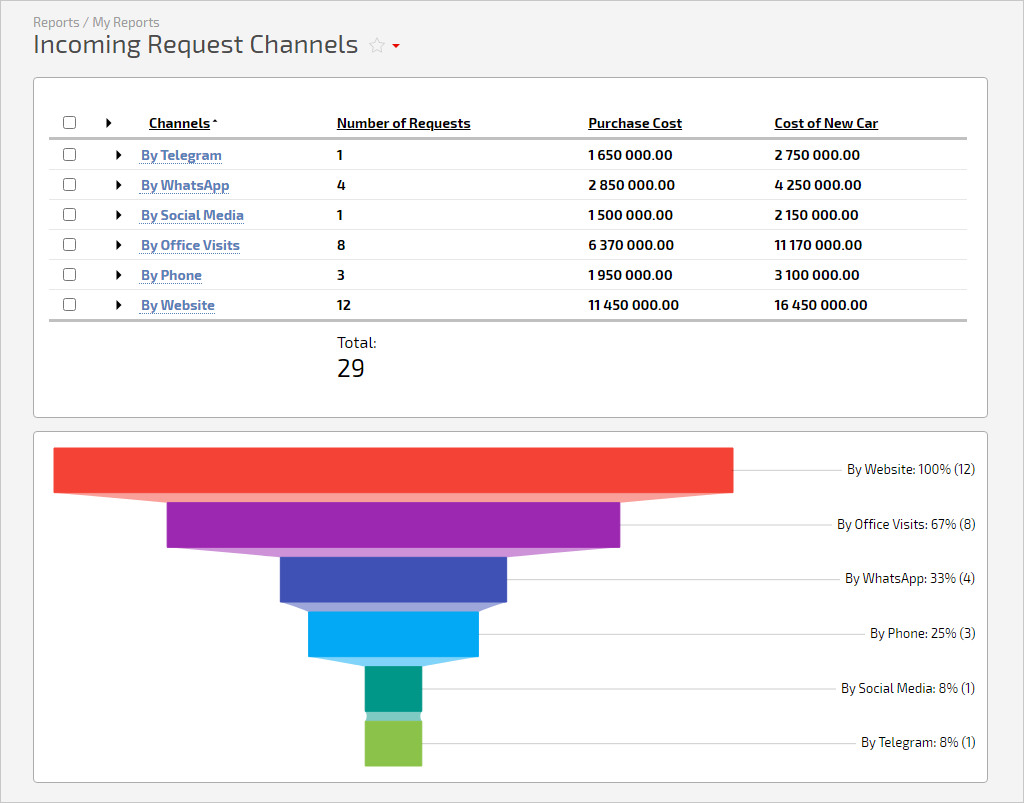
Charts make any Planfix report more transparent, so we've improved the "Funnel" chart. Now you can't only group values by a single column of the report but also sort…