Turn conversations into clear, actionable updates. Summarize threads, rewrite messages, translate comments, and extract next steps – all in one click, directly inside your workflow.
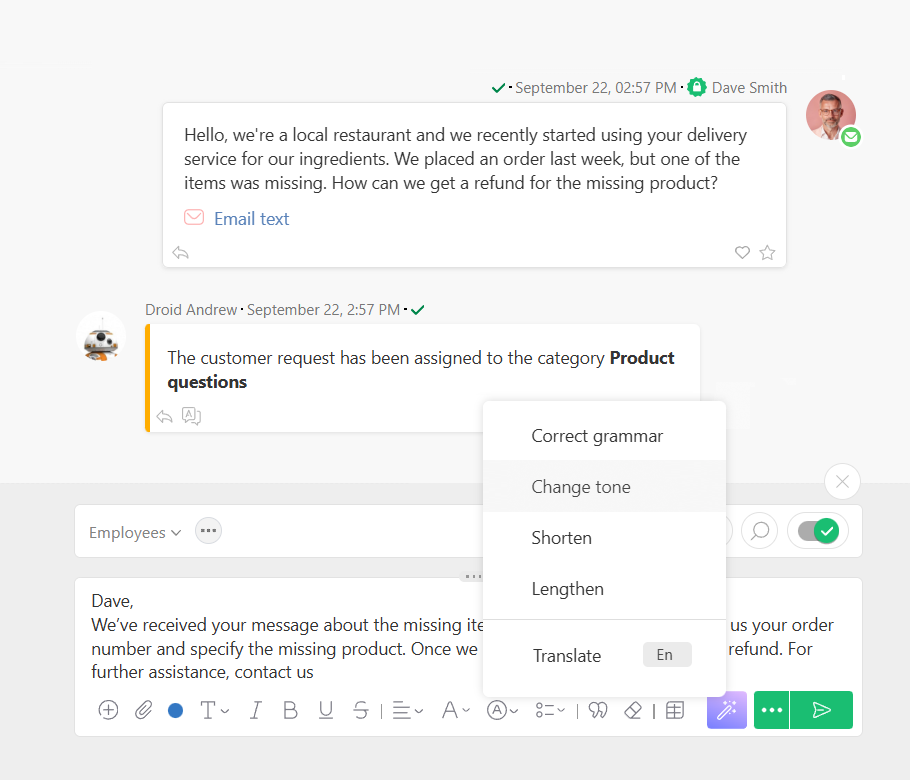
Adjust tone, style, and length for clearer communication.
Summarize Threads
Turn long discussions into concise, useful overviews.
Translate & Localize
Instantly translate with glossary and brand tone.
PLANFIX AI EDITOR
Smarter Comments, Less Effort
AI Comment Assistant works where you do — reading context, summarizing discussions, rewriting updates, and turning ideas into structured data. It keeps communication sharp, actionable, and aligned without manual editing or extra tools.
Extract Actions
Detect tasks and write them into structured fields.
Tailor Messaging
Adapt content for clients, managers, or teammates.
Boost Clarity
Fix grammar, simplify language, and remove confusion.
Administration & AI Credits
Set roles, control usage, and keep costs predictable. Admins manage permissions, monitor credit consumption, and scale AI power as needed with free monthly credits and on-demand top-ups.

Predictable spend with transparent per-feature pricing and monthly free credits.
Quick top-ups available directly in Subscription.
Detailed usage stats and balance tracking for full accountability.
Automate leads, follow-ups, and insights for better control with AI-powered CRM in Planfix.
AI-Driven Project Engine
Manage projects smarter with AI in Planfix. Automate workflows and stay on track – give it a try.
Smart Team Productivity
Empower your team with AI-driven tools in Planfix. Collaborate better and faster – try it now.
Adaptive Industry Solutions
Streamline workflows and adapt processes to your industry with tailored AI solutions in Planfix.
AI Comment Assistant FAQ
Planfix AI Comment Assistant is a built-in writing helper for tasks and discussions. It analyzes the current context (task fields, thread history, linked records) and instantly suggests improved wording, summaries, clarifications, translations, or next-step prompts. You choose an action – rewrite, shorten, expand, fix tone or grammar – and the result lands directly in the comment box. It keeps updates concise, on-brand, and actionable, so teams align faster without extra editing.
AI answers turn routine back-and-forth into quick, consistent updates. Set scenarios that pass a comment, email, or request to Planfix AI, then write structured results back to fields or threads. The assistant can summarize long exchanges, draft clear responses, and propose follow-ups, which triggers the next workflow step automatically. The effect is fewer clarifying pings, faster approvals, and cleaner handoffs – especially across busy projects or client accounts.
Absolutely. You can generate a ready-to-send reply or a draft comment from the current task context, templates, and your brand tone. Teams decide whether AI posts directly or saves a draft for review. Combined with rules and roles, comments can auto-assign owners, set deadlines, or update statuses once published. That means less typing, fewer edits, and consistent language across similar requests, tickets, and recurring project updates.
Certainly. In active threads, the assistant can analyze the latest message and produce an immediate response – clarifying details, answering questions, or proposing next steps. It works inline, so you can accept, tweak, or expand the suggestion without leaving the task. When speed matters (support, sales, internal approvals), real-time suggestions keep momentum high while preserving context and history inside the same workspace.
You get one-click rewrites (shorter, clearer, more formal), tone control (friendly, neutral, formal), grammar/spell fixes, summaries, expansions, and instant translations with a custom glossary. It can extract action items, assignables, and deadlines, then write them back to fields for reporting. With templates and variables, teams standardize frequent updates – status changes, stakeholder notes, meeting outcomes – so messages stay consistent, auditable, and easy to reuse across similar tasks.
Definitely. Use role-aware context (owner, approver, client) plus templates and variables to tailor voice, level of detail, and next steps for each audience. The assistant can adjust tone for executives vs. specialists, include only relevant fields, and incorporate preferred phrases from your glossary. You keep control: set guidelines once, then let AI apply them per recipient – so every reply feels personal, on-brand, and immediately useful.
Use all of Planfix's features for 14 days, completely free of charge