

- Why Relying on Manual Lead Processes Leads to Missed Opportunities
- How TikTok Lead Generation Can Maximize Your Customer Acquisition
- How Planfix TikTok CRM Integration Works
- TikTok Lead Generation Integration Setup: Step-by-Step Setup Guide
- Advanced TikTok Automation Tools
- Tracking Performance: TikTok Reports & Analytics
- Use Cases: Companies Using TikTok for Marketing
- Best Practices for TikTok Lead Generation
- Unlock the Power of TikTok Leads with Planfix
- FAQ
TikTok has become one of the fastest-growing lead generation channels for modern businesses. Ads perform well, forms convert instantly, and potential clients can leave their details in seconds. But for many teams, the real challenge starts after the lead is submitted. This could be due to data getting copied manually, messages waiting too long for a response, and promising prospects getting lost between TikTok, messengers, spreadsheets, and CRM systems.
Whatever the case, the gap between advertising and sales follow-up costs businesses real revenue. Every extra minute before the first contact lowers conversion rates, while manual data entry increases the risk of mistakes, missed leads, and broken processes.
Nothing is more frustrating than when a great lead disappears between a message and a spreadsheet. However, with the TikTok Lead Generation integration in Planfix, you can finally erase this problem for good. Planfix solves this issue by turning TikTok Lead Generation into a fully automated CRM workflow. This means that leads from TikTok ads are instantly transferred into Planfix, where they are converted into structured tasks and contact cards in real time. No manual data entry, no delays, and, most importantly, no leads left behind.
With Planfix, teams can respond faster, work from a single system, and ensure they always know who is responsible for the next step. This integration helps businesses move from “lead captured” to “deal in progress” automatically, while client interest is still at its peak.
Why Relying on Manual Lead Processes Leads to Missed Opportunities
Running TikTok lead campaigns without automation results in a highly fragile project management process. Though ads generate interest quickly, manual lead handling slows everything down while introducing risk at every step.
Lost Leads
Many teams still export leads from TikTok Lead Center and manually transfer them into spreadsheets or CRM systems. This “copy-paste workflow” is unreliable by nature. At scale, leads get skipped, files are overwritten, notifications are missed, and human error becomes unavoidable. Even a small delay or forgotten entry can blow a deal before it happens.
Delayed Response Time Kills Conversions
Speed matters. Studies consistently show that leads contacted within the first hour are up to 7 times more likely to convert than those contacted later. However, manual processes rarely meet this window. When leads wait hours – or days – before receiving a response, interest fades, and competitors step in.
Data Entry Errors and Inconsistency
Manual input leads to typos, missing fields, incorrect phone numbers, and inconsistent formatting. This forces sales managers to waste time clarifying details instead of selling, while also frustrating clients. Over time, this degrades CRM data quality and weakens the entire sales process.
Impossible Performance Tracking
When TikTok data lives in one system, contacts are stored in another, and deals are placed in a third, measuring ROI devolves into guesswork. Teams struggle to identify which ads, audiences, or campaigns actually generate revenue. Without centralized tracking, optimization is slow, and marketing budgets are spent blindly.
How TikTok Lead Generation Can Maximize Your Customer Acquisition
TikTok is no longer just an entertainment platform. It has become a powerful lead generation channel for businesses across industries. With over 1.59 billion active users worldwide, TikTok offers massive reach combined with highly detailed targeting capabilities. Its audience spans multiple age groups, with especially strong engagement among users aged 18–44, a key demographic for both B2C and B2B decision-making.
What makes TikTok Lead Generation especially effective is how naturally ads fit into the user experience. Lead ads appear directly in the feed and look like native content rather than intrusive promotions. Since users don’t feel interrupted, they engage more willingly. As a result, lead ads on TikTok often show higher completion rates compared to traditional landing-page-based campaigns.
Another major advantage is the simplified lead form experience. TikTok automatically pre-fills user data such as name, email, or phone number, reducing friction to a minimum. Fewer fields and fewer clicks mean more completed forms and lower cost per lead.
This makes TikTok Lead Generation particularly valuable for:
- B2B companies targeting founders, managers, and decision-makers through interest- and behavior-based targeting.
- B2C brands focused on younger, mobile-first audiences.
- Small and mid-sized businesses looking for cost-effective lead acquisition.
- Startups that need fast traction and predictable lead flow.
Industries like real estate, online education, financial services, professional consulting, and e-commerce consistently demonstrate strong performance on TikTok lead campaigns. The platform’s combination of scale, speed, and precision is exactly what modern sales funnels require.
How Planfix TikTok CRM Integration Works
Let’s say someone sees your ad on TikTok and fills out the form. Immediately, a new task will appear in Planfix with all the details you need. This includes their name, phone, email, and any other information on the form. Next, the system automatically assigns a supervisor, so the client doesn’t have to wait for a reply. It’s 100% automated and incredibly convenient. You save time, your team stays organized, and the clients know right away that they’re in good hands.
Now let’s take a look at how this works inside Planfix.
Automatic Lead Import
As soon as a user submits a lead form in TikTok, the data is automatically sent via the TikTok API to Planfix. There’s no need to export files, copy data, or check dashboards. Every lead arrives in the system the moment it’s created.
Moreover, all form fields are transferred correctly, including name, phone number, email address, and any custom questions you’ve added to the TikTok form. This ensures your sales team always receives complete and accurate information, allowing them to initiate an immediate follow-up.
Instant Contact Card Creation
Planfix automatically creates a structured contact card for each new lead. This means that all received data is neatly organized into predefined fields, making it easy for managers to quickly understand who the client is and what they’re interested in.
If the lead already exists in your CRM, Planfix can detect duplicates and link new data to the existing contact instead of creating more clutter. This keeps your contact database clean, up to date, and reliable, even when you’re running multiple campaigns at once.
TikTok Task Generation and Assignment
Each new TikTok lead also triggers the automatic creation of a task in Planfix. This TikTok task becomes the central workspace for interacting with the lead, so that communication, comments, files, and next steps all live in one place.
TikTok tasks can be assigned automatically based on your business settings, such as round-robin distribution, geographic region, product interest, or a specific team or manager. This removes manual coordination and ensures every lead immediately has a clear owner who is responsible for follow-up.
Real-Time Synchronization
With Planfix, all actions occur in real time. Sales teams see new leads appear instantly, so they can start working with them while interest is still high. There are no sync delays or waiting periods between TikTok and your CRM.
With mobile notifications enabled, managers and sales representatives can respond to new leads even when they’re away from their desks. This speed and visibility help teams stay proactive, reduce response time, and increase conversion rates.
TikTok Lead Generation Integration Setup: Step-by-Step Setup Guide
Getting started with Planfix TikTok Lead Generation is fast and straightforward. In most cases, the entire setup takes around 15 minutes. You don’t need developers, custom scripts, or external tools – everything is configured directly in Planfix and TikTok. Below is a step-by-step overview of the process. If you need additional details, you can visit our Help Center.
Step 1: Connecting Your TikTok Business Account
First, you need to connect your TikTok Business Account to Planfix.
In Planfix, navigate to Account Management → Integrations → Social Media → TikTok. Once there, enter your TikTok business account credentials and authorize the connection. During this step, TikTok will ask you to confirm access permissions required for lead synchronization.
Once authentication is complete, Planfix will confirm that the account is connected successfully. Now your TikTok account is ready to exchange lead data with your CRM.
Step 2: Creating a TikTok Lead Form
Next, create a lead capture form inside TikTok.
To do this, open TikTok Lead Center and choose the option to create a new TikTok lead form. You can select either an instant form or a customizable form, depending on your campaign goals. For higher conversion rates, it’s recommended to keep forms short and request only essential information.
Standard fields such as name, phone number, and email work best, but you can also add custom questions if needed. Don’t forget to include a privacy policy link. This is essential for lead forms to function correctly.
TikTok provides detailed documentation in its Help Center, including best practices and technical requirements. Once the TikTok contact form is saved and linked to your ad campaign, it’s ready for integration with Planfix.
Step 3: Configuring Integration Settings in Planfix
After creating the form, return to Planfix to fine-tune how incoming leads will be processed.
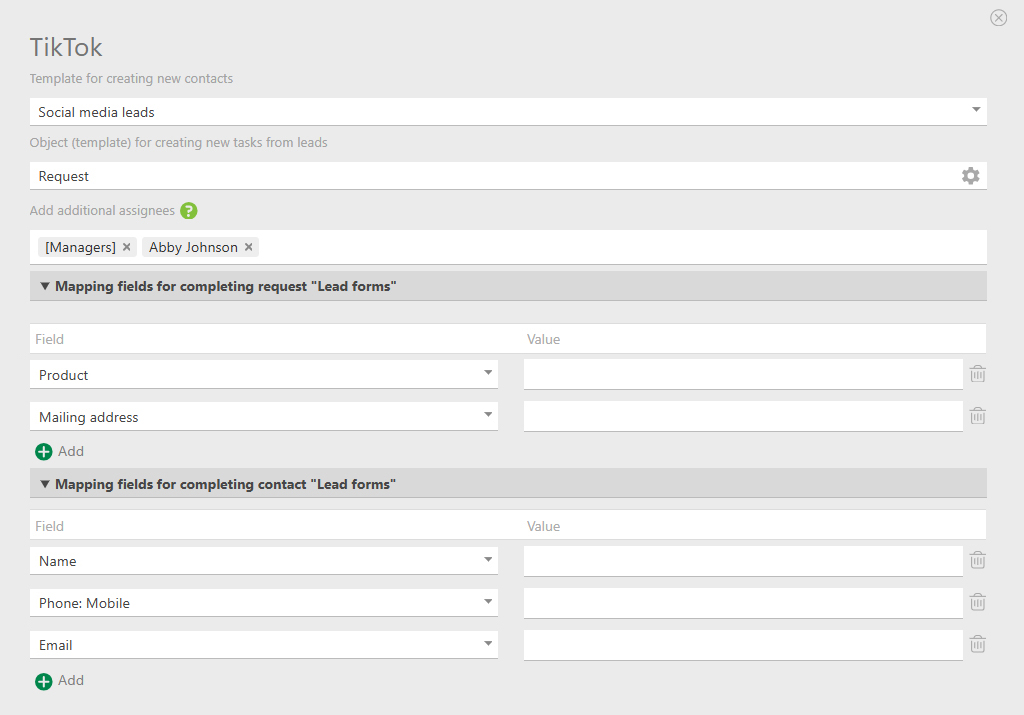
In the TikTok Lead Generation integration settings, you can:
- Choose or create a contact card template that defines how lead information is stored in the CRM.
- Select the task object where all TikTok form data will be saved and processed.
- Set up automatic assignment rules, such as allocating leads to a specific employee, team, or rotating queue.
- Map TikTok form fields (name, phone, email, custom questions) to the corresponding fields in Planfix.
- Optionally configure statuses, tags, or custom fields to better fit your sales process.
This step ensures that every lead arrives in Planfix already structured and ready for action.
Step 4: Testing Your Integration
Before launching real campaigns, it’s important to test the integration.
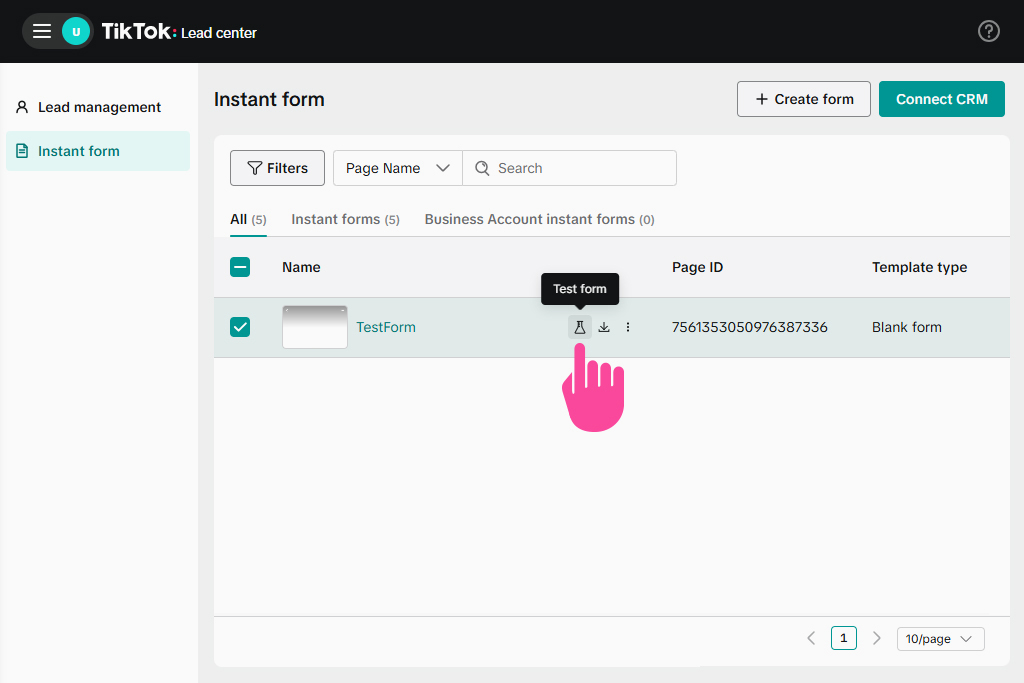
To do this, navigate to TikTok’s Lead Generation settings and click the flask icon to send test data. TikTok will then generate a sample lead and transmit it to Planfix.
If everything is configured correctly, you’ll see:
- A test contact created in Planfix.
- A linked task containing all form fields, assigned to the correct employee or team.
Be sure to carefully review the test results to make sure all data is mapped properly, and assignments work as expected. Once the test passes, your integration is fully operational and you can now launch your TikTok lead campaigns with confidence.
Advanced TikTok Automation Tools
TikTok lead generation only becomes truly scalable when automation goes beyond basic data transfer. Planfix provides a full set of TikTok automation tools that help teams respond faster, qualify leads better, and manage high volumes without losing control. With this level of TikTok ads automation, you caneliminate routine work and turn TikTok into a predictable sales channel.
Intelligent Lead Assignment
Planfix supports advanced TikTok automation scenarios for lead distribution. Once again, new leads can be assigned automatically using round-robin rotation, geographic location, product interest, company size, or any custom criteria.
Workload balancing ensures that no single sales representative is overloaded, while fallback rules allow for reassignment if the primary manager is unavailable. This approach keeps response times low and guarantees that every TikTok lead has a clear owner right off the bat.
Lead Qualification and Scoring
With built-in TikTok automation tools, Planfix can automatically score and qualify leads based on form answers, demographics, or interaction history. As a result, high-priority leads are flagged and routed for immediate action, while lower-priority leads enter nurturing workflows.
This automation allows teams to focus on the most valuable opportunities first, improving conversion rates and shortening sales cycles.
Automated TikTok Notifications and Reminders
Planfix replaces fragmented TikTok notifications with a unified notification system. This means that sales teams receive instant alerts via mobile app, email, or desktop notifications when new TikTok leads arrive.
Automated reminders ensure timely follow-ups after 1 hour, 24 hours, or several days. If a lead is ignored, the task can be escalated to a manager. Meanwhile, daily digests provide a clear overview of new and unprocessed leads, preventing information overload while ensuring nothing is missed.
Custom Workflows and Scripts
Using Planfix’s no-code automation builder, teams can create custom workflows without programming. Scripts can send personalized welcome emails, create follow-up task chains, notify managers about high-value leads, or update deal stages automatically.
This flexibility allows companies to build powerful TikTok automation tools tailored to their exact sales process.
Multi-Account Management
For agencies and growing companies, Planfix supports the management of multiple TikTok accounts simultaneously. Each account can have its own workflows, teams, and rules, while management retains a centralized view.
This makes Planfix CRM an effective TikTok automation tool for agencies handling multiple brands, regions, or markets.
Tracking Performance: TikTok Reports & Analytics
Automation without analytics only ends up limiting growth. Planfix transforms all of that lead data into actionable TikTok reports that help teams understand what actually drives revenue.
Task TikTok Planner and Scheduling
Planfix includes a built-in TikTok planner that helps organize lead processing. Follow-up calls, meetings, and outreach sequences are scheduled automatically and can be easily visualized on team calendars.
The Planner balances ongoing work with incoming TikTok leads, preventing overload and ensuring every lead is handled on time.
TikTok Document Management for Lead Files
All documents related to TikTok leads, from proposals to contracts to presentations, are stored directly in Planfix. This means files are attached to tasks and contacts, generated from templates, versioned, and searchable.
This centralized TikTok document management ensures sales teams are always working with the latest materials and can share files with leads while also tracking engagement.
Built-in Analytics Dashboard
Planfix dashboards provide real-time TikTok analytics reports with customizable metrics and visual charts. Teams can filter data by campaign, time period, manager, or lead source to gain instant insights.
Lead-to-Deal Conversion Tracking
Planfix tracks the full journey from a TikTok lead to a closed deal. From a single place, you can view conversion rates at each funnel stage, average time to conversion, and lead quality by campaign.
This makes it easy to identify bottlenecks and optimize sales processes based on real data.
Campaign Effectiveness Reports
Detailed TikTok ads reporting shows cost per lead, lead quality by creative, audience segment performance, and A/B test results. This way, teams can quickly identify what works and scale it.
ROI Tracking and Attribution
Planfix connects advertising spend with actual revenue, allowing for true ROI calculation. As a result, businesses can compare TikTok performance against other channels and forecast results using historical data.
Use Cases: Companies Using TikTok for Marketing
In this section, we’ll explore how different types of businesses use Planfix to maximize their TikTok lead generation, from small startups to large agencies and B2B companies.
Startups & Small Businesses on TikTok
For TikTok small business users, the biggest benefit comes from allowing automation to replace manual work. Small teams can scale lead generation without hiring extra staff, respond faster than larger competitors, and maintain professional customer communication. For example, a local fitness studio might integrate TikTok lead generation and automatically schedule follow-up calls within minutes.
Digital Marketing Agencies
Agencies use Planfix as a central TikTok marketing tool to manage multiple client campaigns. This ensures that each client gets transparent reporting, while agencies maintain centralized control and access to measurable ROI.
E-commerce and Online Retailers
Online stores use TikTok as a direct sales channel to capture interest before purchase. Planfix easily integrates TikTok leads into email automation, abandoned-cart workflows, and seasonal campaigns.
Service Providers and B2B Companies on TikTok
For B2B companies on TikTok, Planfix supports longer sales cycles, multi-step follow-ups, and detailed account history. This means that every interaction is tracked, helping marketing teams manage complex deals with confidence.
Best Practices for TikTok Lead Generation
To maximize the effectiveness of your TikTok lead generation, it’s important to follow best practices for optimizing engagement and conversion rates. By streamlining your lead forms, ensuring speedy follow-ups, automating document management, and personalizing your communication, you can significantly boost your results. In this section, we’ll outline proven strategies and actionable steps that can help you make the most out of every TikTok lead.
Lead Forms Optimization
Simplicity is key to maximizing conversion when creating lead forms on TikTok. Each additional field can reduce completion rates by around 5%, so always prioritize essential information only. Start with name and phone number or email, as these are the most crucial fields for establishing initial contact. As your business scales or requires more qualifications, you can gradually add extra fields.
It’s good practice to use Planfix’s customizable contact card templates to define what data is essential to your process. For instance, by creating templates that focus on name, email, and phone number, you ensure that your sales team is only dealing with critical data right away while reducing clutter. You can adjust the template as needed to accommodate more fields for advanced lead qualification down the road.
Keep the form user-friendly and mobile-optimized. With TikTok’s user base being largely mobile, you want to ensure that your forms are responsive and quick to fill out on any device.
Speed Is Everything: The First Hour Rule
The “First Hour Rule” is crucial for boosting lead conversions. As previously stated, studies show that leads contacted within the first hour of submission are seven times more likely to convert. To leverage this, automate notifications and task assignments within Planfix to immediately notify your sales team of new TikTok leads.
You can use Planfix’s notifications system to trigger an alert when a new lead is captured from TikTok. You can even customize it to notify specific sales representatives based on geographic location, product interest, or availability. This helps ensure no time is wasted. Finally, Planfix also allows for mobile notifications, so your team can respond even when away from their desk.
Finally, use Service Level Agreements (SLAs) to set internal benchmarks for how quickly a lead should be contacted. Planfix can even help you monitor SLA performance and escalate tasks if the response time exceeds the target.
Follow-Up Personalization
Personalizing your follow-up messages is a powerful way to build trust and engage leads more effectively. When you follow up with TikTok leads, reference their responses on the form, mention specific interests indicated by the lead, and make sure to highlight the TikTok ad they interacted with.
You should use Planfix’s workflow automation to set up follow-up tasks that automatically reference lead details. For example, you can create a workflow that pulls in information from the TikTok form (such as the product they showed interest in) and then uses that data to personalize the follow-up message. This can include dynamic fields like the lead’s name, product interests, or specific actions taken during lead submission.
Planfix’s email automation features also allow you to send personalized emails. You can easily create email templates that are pre-populated with lead-specific data and automatically trigger them to ensure you reach out to leads within minutes, which helps keep the conversation fresh and relevant.
Implement A/B Testing
A/B testing is essential for optimizing your lead generation strategy. By experimenting with different form structures, assignment strategies, and response templates, you can determine what works best for your target audience. It’s a good idea to one variable at a time to get clear insights on what influences your lead conversion rates the most.
Planfix can help streamline A/B testing by allowing you to create multiple templates for tasks, follow-ups, and contact cards. You can then test variations in the lead capture forms by running A/B campaigns with different types of questions or workflows. Once data is collected, you can use Planfix’s reporting and analytics tools to evaluate which version performs best.
You can also track the performance of each form version through Planfix’s task and pipeline reports. For example, you can monitor which form leads generate the fastest follow-up and highest conversion, then apply this insight to refine future TikTok campaigns.
By integrating these best practices with Planfix’s automation tools, you can optimize TikTok lead generation campaigns, ensure faster follow-ups, and create a more personalized experience for each lead. This comprehensive approach helps turn leads into long-term customers while maintaining an efficient sales pipeline.
Unlock the Power of TikTok Leads with Planfix
With Planfix’s TikTok integration, you can eliminate missed leads, respond instantly to potential clients, and create a fully automated, optimized, and seamless sales process. With Planfix, speed, efficiency, and scalability are at your fingertips. Not only will you gain real-time insights into your ROI, but you’ll also experience accelerated growth with the ability to easily scale your lead generation efforts.
Start your free trial of Planfix today, and see how effortlessly you can integrate TikTok Lead Generation into your workflow. There’s no credit card required – just sign up, and you’re good to go. In just 15 minutes, you’ll be set up and ready to drive new leads to your business.
FAQ
How can I use TikTok for my small business?
You can use TikTok to promote your small business by creating engaging videos and using the platform’s lead generation features. TikTok’s vast user base provides great potential to reach new customers. By integrating with Planfix, you can automatically capture leads from your TikTok ads and streamline follow-ups, turning engagement into sales.
How do I promote my small business on TikTok?
The best way to promote your small business on TikTok is by creating creative content that aligns with your brand. Use relevant hashtags, TikTok ads, and lead forms to attract and capture potential customers. With Planfix, you can automate the follow-up process, ensuring leads are contacted promptly and sales are tracked efficiently.
How can I grow my small business on TikTok?
To grow your small business on TikTok, focus on creating shareable, authentic content that connects with your target audience. You can also use TikTok’s advertising tools to further boost your reach. By integrating TikTok with Planfix, you can automate lead capture and follow-ups, helping you scale your business without additional effort.
How do I make sales on TikTok?
Making sales on TikTok involves engaging your audience with compelling content and directing them to lead capture forms. Once leads are captured, Planfix can automatically assign follow-up tasks to your team, ensuring timely responses and turning those leads into paying customers. The more automation you integrate, the more it can help streamline your sales process.

