
- Quick Start: How to Create Task Dependencies (5 Simple Steps)
- Understanding Project Dependencies: The Foundation
- Step-by-Step: Creating Dependencies in Popular Tools
- Common Examples That Bring Dependencies to Life
- Best Practices That Separate Good from Great Project Managers
- Common Mistakes in Project Management Dependencies
- Advanced Tips for Dependency Management
- Your Next Steps: From Planning to Action
Your project is behind schedule, team members are waiting on each other, and you’re not sure what’s blocking progress. Sound familiar? You’re watching deadlines slip by while tasks pile up in a confusing mess of “who’s waiting for what.”
Here’s the thing: most project delays aren’t caused by lazy team members or impossible deadlines. They’re caused by poor task sequencing and unclear dependencies. The good news? Once you learn how to create task dependencies in project management tools, you’ll have a clear roadmap that keeps everyone moving in the right direction.
Quick Start: How to Create Task Dependencies (5 Simple Steps)
Before we dive into the details, here’s the straightforward process that works in most project management tools:
- Choose your project management software: Asana, Planfix, Monday.com, Microsoft Project, ClickUp, etc.
- Identify which tasks must happen before others: We call these “dependencies”.
- Link the tasks: Using your tool’s dependency feature, usually drag-and-drop or clicking a “link” button.
- Set the dependency type: most common. Task A must finish before Task B starts.
- Review your timeline: Ensure the sequence makes logical sense.
That’s it! Task dependencies in project management are simply rules that determine the order tasks must be completed. When you create these connections in your software, the tool automatically adjusts schedules when things change, saving you hours of manual timeline updates.
What you’ll learn in this article:
- The 4 main types of dependencies and when to use each one.
- Step-by-step instructions for popular project management tools.
- Real examples from successful projects that will inspire your approach.
- Common mistakes that derail projects (and how to avoid them).
Let’s start with the fundamentals that every project manager should understand.
Understanding Project Dependencies: The Foundation
Think of dependencies like a recipe for chocolate chip cookies. You can’t bake the cookies before mixing the dough, and you can’t add chocolate chips before you have the base ingredients ready. In project management, some tasks naturally depend on others being completed first.
Dependencies in project management are the logical relationships between tasks that determine their sequence. They’re the invisible threads that hold your project timeline together and ensure work flows smoothly from start to finish.
The 4 Main Types of Dependencies in Project Management
Understanding these four types will solve 95% of your project sequencing challenges:
1. Finish-to-Start (Most Common – 80% of dependencies) Task A must finish completely before Task B can begin.
- Example: “Write blog post” finishes → “Edit blog post” starts.
- Why it works: You can’t edit content that doesn’t exist yet.
2. Start-to-Start (Great for parallel work) Task A starts, which allows Task B to start (but B doesn’t have to wait for A to finish).
- Example: “Create wireframes” starts → “Write website copy” can start.
- Why it works: The copywriter can begin once they understand the basic layout structure.
3. Finish-to-Finish (Perfect for coordinated endings) Task A finishes when Task B finishes (they end together).
- Example: “Software testing” finishes when “Software development” finishes.
- Why it works: Testing continues throughout development and ends when the final code is complete.
4. Start-to-Finish (Rare but important for transitions) Task A starts, which triggers Task B to finish.
- Example: “New system goes live” starts → “Old system maintenance” finishes.
- Why it works: You stop maintaining the old system once the new one is operational.
Internal and External Dependencies in Project Management: Know the Difference
Internal dependencies in project management are within your team’s control. If your designer needs to finish mockups before your developer can start coding, that’s internal. You can manage timing, communicate directly, and adjust as needed.
External dependencies in project management involve waiting on people or organizations outside your direct control. Maybe you’re waiting for client approval, vendor deliveries, or legal reviews. These are trickier because you can influence but not control the timeline.
The key insight? Plan extra buffer time for external dependencies, because they’re the most common source of project delays.
Step-by-Step: Creating Dependencies in Popular Tools
Now for the practical stuff. Here’s exactly how to set up task dependencies in the most popular project management tools.
Planfix: The Business Process Powerhouse
Best for: Complex business processes, CRM integration, and teams who need customizable workflows.
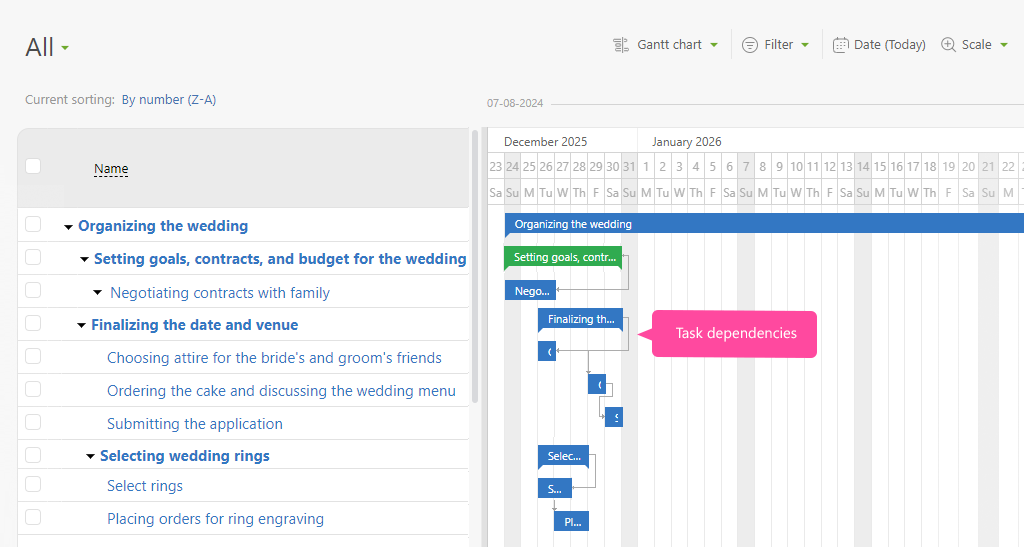
Step-by-step process:
- Navigate to your project in Planfix and open the Gantt chart view.
- Select the task that needs to happen first (predecessor task).
- Click on the “Dependencies” tab in the task details panel.
- Choose “Add Dependency” and select the task that should follow.
- Set the dependency type (Finish-to-Start, Start-to-Start, etc.) from the dropdown menu.
- Optionally add lag time if there should be a delay between tasks.
Pro tip: Planfix’s strength lies in its ability to handle complex business workflows. Use the dependency automation features to automatically trigger tasks based on previous task completion, and leverage the CRM integration to create dependencies based on client interactions.
Planfix excels: When you need to manage both projects and ongoing business processes, require deep customization options, and want to integrate project dependencies with customer relationship management.
Microsoft Project: The Powerhouse Choice
Best for: Complex projects with detailed scheduling needs and resource management.

Step-by-step process:
- Open your project file and navigate to the Gantt Chart view.
- Click on the first task (this will be your “predecessor” – the task that happens first).
- Hold the Ctrl key and click on the second task (the “successor” – the task that depends on the first).
- Click the “Link Tasks” button in the ribbon menu, or simply press Ctrl+F2.
- If you need a different dependency type, double-click the arrow line connecting the tasks and choose from the dropdown menu.
Pro tip: Use the “Predecessors” column in your task list to see all dependencies at a glance. You can also type dependency relationships directly (like “3FS” for “task 3, finish-to-start relationship”).
Microsoft Project shines when: You’re managing complex projects with resource constraints, multiple dependency types, and need detailed reporting capabilities.
Asana: The Team Collaboration Favorite
Best for: Creative teams, marketing campaigns, and collaborative projects.
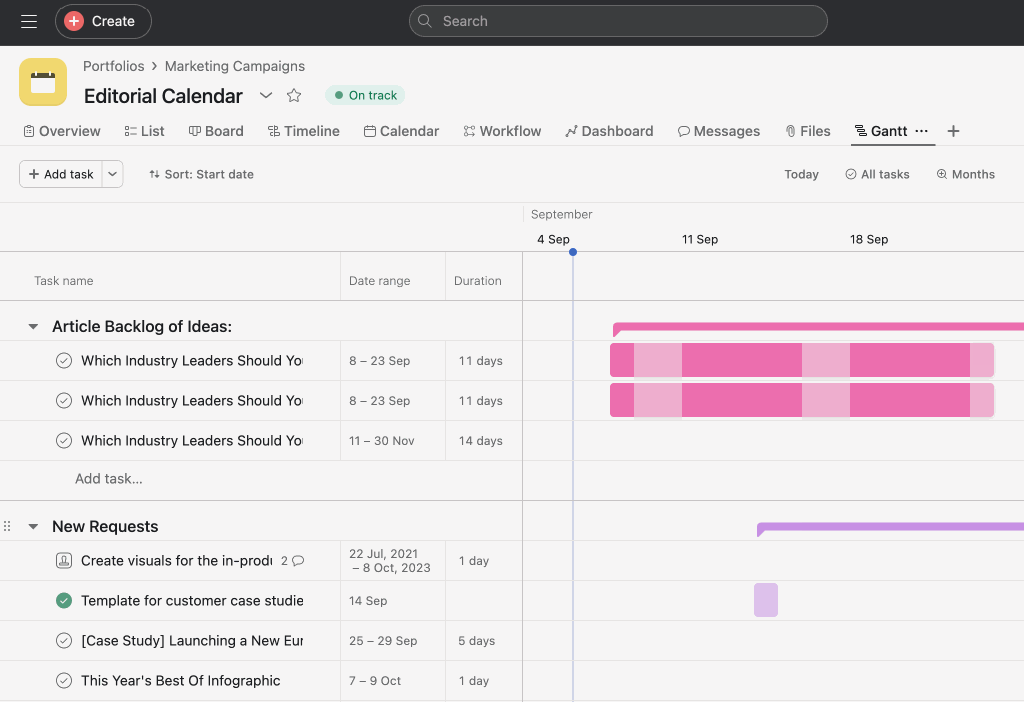
Step-by-step process:
- Navigate to your project and switch to Timeline view (this gives you the visual Gantt chart).
- Hover over the taskbar that needs to happen first.
- Look for the small circular “dependency dot” that appears on the right side of the task.
- Click and drag from that dot to the task that depends on it.
- A pop-up will appear asking you to choose the dependency type – select the appropriate option.
Pro tip: Turn on dependency notifications in your project settings. This way, team members get automatically notified when their predecessor tasks are complete and they can start their work.
Asana works best when: Your team values visual collaboration, you need strong commenting and proofing features, and you want dependencies without overwhelming complexity.
Monday.com: The Visual Workflow Champion
Best for: Marketing teams, event planning, and process-driven work.
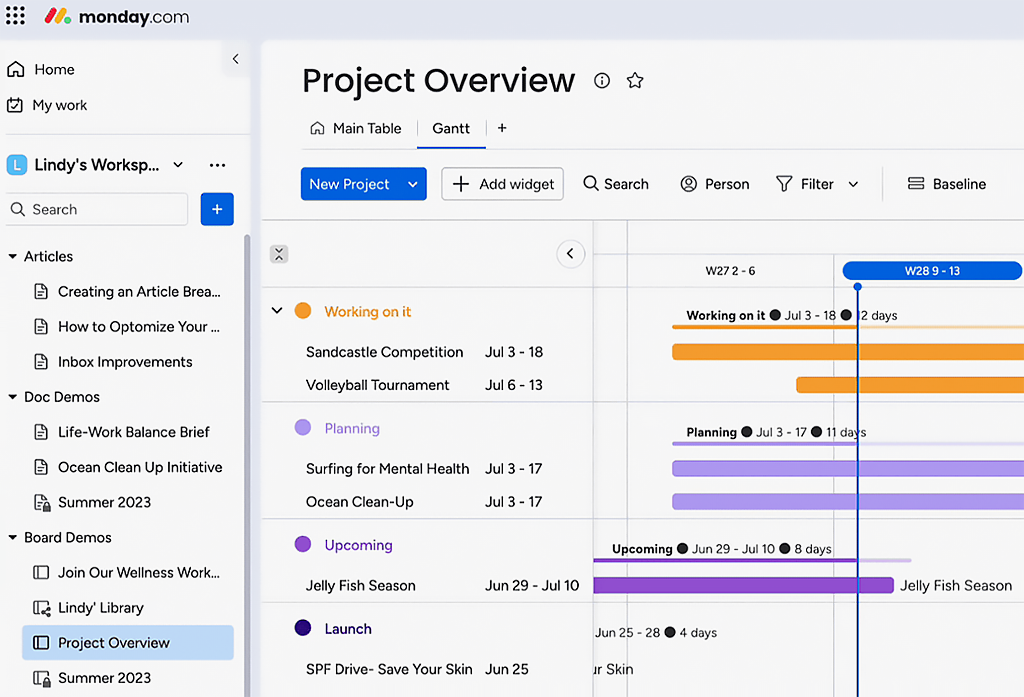
Step-by-step process:
- Add the “Timeline” widget to your board (this creates your Gantt chart view).
- Click directly on the taskbar you want to create a dependency from.
- Look for the small circle that appears on the right edge of the taskbar.
- Drag from that circle to the task that should happen next.
- The connection line will appear, and you can click it to adjust dependency settings.
Pro tip: Set up Monday’s automation features to automatically move tasks to “In Progress” when their predecessors are complete. This reduces manual project management overhead.
Monday.com excels when: You want colorful, intuitive interfaces, need powerful automation capabilities, and work with teams who prefer visual over text-based project management.
Smartsheet: The Spreadsheet-Style Solution
Best for: Teams comfortable with Excel who want more project management features.
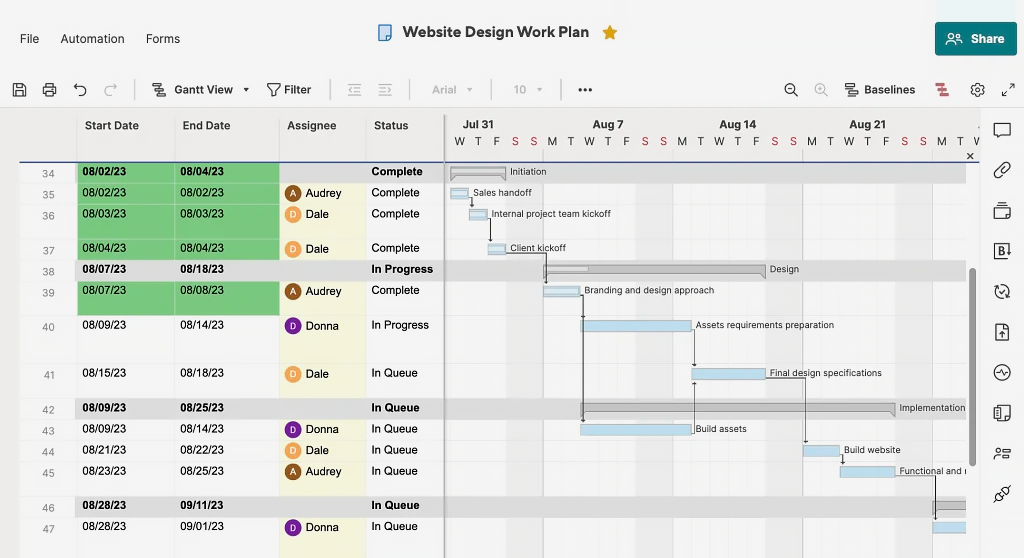
Step-by-step process:
- Add a “Predecessors” column to your project sheet.
- In the row of the task that depends on another, click in the Predecessors cell.
- Type the row number of the task that must happen first.
- Add the dependency type if needed (example: “3FS” means row 3, finish-to-start).
- Enable the Gantt chart view to visualize all your dependencies.
Pro tip: You can create multiple dependencies for one task by separating them with commas (like “2FS, 5SS” for dependencies on both tasks 2 and 5).
Smartsheet works well when: Your team loves spreadsheets, you need robust reporting features, and you want the flexibility to customize your project structure extensively.
Other Popular Tools
- ClickUp: Use the Gantt chart view with intuitive drag-and-drop linking between tasks. Great for teams who want multiple project views in one tool.
- Wrike: Create dependencies in either the Gantt chart or Table view. Excellent for creative teams who need proofing and approval workflows.
- Jira: Perfect for software development teams – use “blocks” and “is blocked by” relationships to manage code dependencies and sprint planning.
Common Examples That Bring Dependencies to Life
Let me share three examples of dependencies in project management from actual projects that show how smart dependency management makes the difference between success and chaos.
Example 1: Website Redesign Project (Marketing Team)
The Challenge: Sarah’s marketing team had 6 weeks to redesign their company website before a major product launch.
Initial Timeline Problems:
- The copywriter started writing before seeing the wireframes, leading to content that didn’t fit the layout.
- The developer began coding while designs were still changing, causing rework.
- No one knew when the client review would happen, creating uncertainty throughout.
How Dependencies Solved It: Sarah mapped out the logical sequence:
- Wireframes → Design mockups → Content creation → Development → Testing → Launch.
- External dependency identified: Client approval needed before development could start.
The Result: When the client delayed their approval by 2 weeks, the project management software automatically pushed back all dependent tasks. Instead of scrambling to figure out new deadlines, the team had accurate delivery dates immediately. They used the delay to refine the content and designs, ultimately delivering a better product.
Key Lesson: External dependencies need buffer time, and automatic schedule adjustments save significant project management effort.
Example 2: Product Launch Campaign (Cross-Functional Team)
The Challenge: Coordinating marketing materials, PR outreach, and product development for a software product launch.
The Dependency Web:
- Product specifications → Marketing copy → Design assets → Website updates.
- PR strategy → Media kit creation → Press release → Launch event planning.
- Beta testing feedback → Final product adjustments → Marketing message refinement.
The Discovery: During dependency mapping, the team realized they had created a bottleneck around their external design agency. Nearly everything depended on design assets, but the agency could only work on one thing at a time.
The Solution: They restructured dependencies to allow parallel work:
- Marketing copy and PR strategy could start with basic product information.
- The internal team created simple placeholder designs for early development.
- External agency focused only on final polish and key marketing materials.
The Result: Launch happened on schedule, and the team learned valuable lessons about resource dependencies for future projects.
Example 3: Office Move Project (Operations Team)
The Challenge: Relocating 200 employees across town without disrupting business operations.
Critical Dependencies Identified:
- Lease signing → Space planning → IT infrastructure design → Furniture procurement → Installation → Employee communication → Move execution.
External Dependencies Managed:
- Building management approval for infrastructure changes.
- IT vendor scheduling for network installation.
- Furniture delivery coordination.
- Moving company booking.
Success Factor: The operations manager created a detailed external dependency tracking system. She scheduled weekly check-ins with each vendor and built 2-week buffers around external dependencies.
The Result: The move was completed on schedule with minimal business disruption. Employees showed up Monday morning to fully functional workspaces.
Key Insight: Complex projects with many external dependencies require dedicated tracking and proactive communication.
Best Practices That Separate Good from Great Project Managers
Start Simple, Add Complexity Gradually
Begin with obvious dependencies: Can’t test software that hasn’t been built yet. Can’t write a press release about a product that doesn’t exist. These are no-brainers that everyone understands.
Add detailed dependencies as your team gets comfortable: Once people understand the basics, you can introduce more nuanced relationships like start-to-start dependencies for parallel work.
Don’t create dependencies for every single task: If everything depends on everything else, you’ve created complexity without value. Focus on dependencies that actually impact timing and sequencing.
Regular Dependency Reviews Keep Projects on Track
- Weekly check-ins on critical dependencies: During your team standup, specifically ask: “Are there any dependency blockers this week?” Make it a standard agenda item.
- Monthly reviews of overall dependency structure: Step back and look at the big picture. Are there dependency patterns that create bottlenecks? Can you restructure work to reduce critical path dependencies?
- Quarterly assessments of external dependencies: Which outside vendors, clients, or partners consistently cause delays? How can you build better relationships or create alternatives?
Communication Makes Dependencies Work
- Set up automatic notifications: When Task A completes, the Task B owner should know immediately. Don’t rely on people to check project management tools constantly.
- Create shared dependency maps for complex projects: A visual diagram showing how all pieces connect helps everyone understand their role in the bigger picture.
- Regular stakeholder updates on external dependencies: Keep clients and vendors informed about when you’ll need their input. Give them advance notice rather than last-minute requests.
How to Manage Project Dependencies Across Teams
This is where many projects fall apart – when marketing depends on product development, or when multiple departments need to coordinate for a company initiative.Use a central project management tool everyone can access: Don’t make people jump between different systems to understand dependencies.
- Create clear handoff procedures between teams: What exactly gets delivered? In what format? Who confirms completion? Define these details upfront.
- Establish regular cross-team dependency review meetings: Bring together representatives from each team to discuss upcoming dependencies and potential conflicts.
Common Mistakes in Project Management Dependencies
Mistake 1: Creating Too Many Dependencies
What it looks like: Every task depends on three other tasks, creating a web of complexity that’s impossible to follow.
Why it happens: Project managers think that more dependencies = better control. Actually, excessive dependencies create fragility.
The fix: Focus on true dependencies where one task genuinely cannot start without another being completed. If Task B could start with 80% of Task A done, consider a start-to-start dependency instead of finish-to-start.
Mistake 2: Ignoring External Dependencies
What it looks like: Your timeline assumes client feedback happens instantly, vendors deliver on time, and approvals come back immediately.
Why it’s dangerous: External dependencies are the #1 cause of project delays, yet many project managers plan as if they don’t exist.
The fix:
- Map external dependencies explicitly during project planning.
- Build buffer time around each external dependency.
- Have backup plans for critical external dependencies.
- Communicate early and often with external stakeholders.
Mistake 3: Not Updating Dependencies When Plans Change
What it looks like: Your dependency map reflects the original plan, but your actual project has evolved significantly. The map becomes misleading instead of helpful.
Why it happens: Updating dependencies feels like administrative overhead when you’re busy managing the actual work.
The fix: Make dependency reviews part of your regular project updates. When scope changes, ask: “How does this affect our task dependencies?” Treat dependency maintenance as essential, not optional.
Mistake 4: Creating Circular Dependencies
What it looks like: Task A depends on Task B, which depends on Task C, which depends on Task A. Nothing can start because everything is waiting for something else.
Why it happens: Complex projects can create logical loops that aren’t obvious when you’re focused on individual task relationships.
The fix: Use dependency mapping tools to visualize your entire project structure. Most project management software will flag circular dependencies automatically, but visual inspection catches problems early.
Advanced Tips for Dependency Management
Using Lag and Lead Times Effectively
Lag time means waiting a specific period after the predecessor completes before starting the successor task. Example: Wait 2 days after painting before installing fixtures (drying time).
Lead time allows starting the dependent task before the predecessor is fully completed. Example: Start editing a document when it’s 80% written instead of waiting for the final draft.
Both techniques give you more realistic scheduling than basic finish-to-start dependencies.
Resource Dependencies: The Hidden Project Killer
Sometimes tasks could run in parallel logically, but the same person or equipment is needed for both. This creates resource dependencies that traditional task dependencies don’t capture.
Solution: Note resource conflicts in your project plan and sequence tasks to avoid overloading key resources, even if the work could theoretically happen simultaneously.
Cross-Project Dependencies: Managing the Big Picture
When your project depends on deliverables from another team’s project, you need cross-project dependency tracking.
Best practices:
- Create placeholder tasks for external deliverables.
- Schedule regular check-ins with other project managers.
- Escalate cross-project dependency conflicts early.
- Document assumptions about external project timelines.
Your Next Steps: From Planning to Action
Key takeaways to remember:
- Dependencies create order from chaos – they’re your project’s logical backbone.
- Start with obvious dependencies and add complexity gradually.
- External dependencies need extra attention and buffer time.
- Regular reviews keep dependency maps accurate and useful.
- Communication around dependencies prevents most project conflicts.
Your immediate action plan:
- Audit your current project for missing dependencies: Look at your task list and ask: “What really can’t start until something else finishes?”
- Choose one tool and learn it well: Don’t try to master every project management platform. Pick one that fits your team’s style and become proficient.
- Start with your most critical project: Apply dependency thinking to your highest-stakes project first, where the benefits will be most obvious.
- Schedule regular dependency review meetings: Add “dependency check” as a standing agenda item in your team meetings.
Remember the goal: You’re not trying to create the perfect dependency map immediately. Start simple, learn what works for your team, and gradually improve your approach. The best dependency system is the one your team actually uses consistently.
Dependencies might seem like extra administrative work at first, but they’re actually a time-saving investment. When your next project faces unexpected changes (and it will), you’ll have a logical framework that automatically adjusts timelines and keeps everyone moving forward.
What’s your biggest challenge with project dependencies right now? Start there, apply these principles, and watch your project management stress decrease while your delivery success increases.
Want to see how this works in a real system? Register in Planfix and set up your first task dependencies in minutes — no code, no complexity.


Thank you for the helpful information.