- What Is Service Level Management and How It Works
- The Objectives of the Process
- Core Concepts of Service Level Management: SLI, SLO, SLA, and SLM
- Implementation of Service Level Management Step by Step
- How Planfix Helps You Scale Support Without Losing Quality
- Controlling Response Time: Catching Issues Before You Break the SLA
- Controlling Resolution Time: Tracking the Ticket All the Way Through
- Working Hours and Time Zones: Measuring Response Time Fairly
- Waiting for Client Data and Restarting the Clock
- How to Design SLA Workflows for Different Clients and Requests
- Why Businesses Need SLAs and Service Quality Control Tools
- FAQ
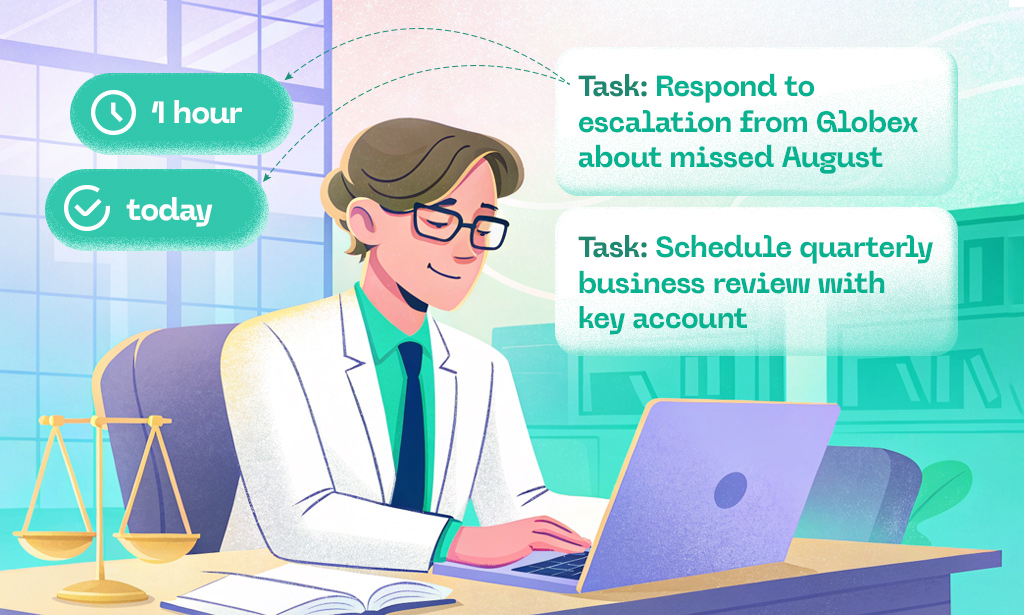
Imagine a client contacts support, only to wait for 20 minutes with no reply. Before long, they start duplicating requests, trying other channels, and naturally getting annoyed. Meanwhile, the account manager is sure the request is already in progress, the agent thinks there’s still plenty of time, and the manager only finds out there’s a problem after a formal complaint.
The end result? Poor client experience, wasted time, and, eventually, lower profits.
This is what service looks like when there are no rules for handling requests or clear response times in a project management workflow. An SLA (Service Level Agreement) helps define those rules, while Planfix helps you actually stick to them (while keeping an eye on support response times and ticket resolution).
Let’s see how this works and explore how to turn Planfix into a full-fledged service management system.
What Is Service Level Management and How It Works
Understanding the SLA meaning is the first step toward predictable service: it’s not just a promise to the client, but a framework that turns expectations into measurable, enforceable rules. Service Level Management (SLM) is the discipline that turns “good service” from a vague promise into a measurable, controllable process. It defines:
- what level of service the client can expect,
- how this level is measured,
- and what happens when it’s not met.
In practice, SLM connects business expectations with operational reality. It ensures that every request has:
- a clear deadline,
- a responsible owner,
- and a transparent path from intake to resolution.
Without SLM, service quality depends on individual effort. With SLM, it becomes a system.
The Objectives of the Process
The main goals of Service Level Management are:
- to align client expectations with real operational capabilities,
- to make service performance transparent and measurable,
to detect risks before they turn into incidents, - and to give managers control over service quality, not just visibility after the fact.
SLM is not about punishing employees. It’s about building a predictable service model where everyone understands priorities and boundaries.
Core Concepts of Service Level Management: SLI, SLO, SLA, and SLM
For many teams, the SLA meaning is reduced to “response time in a contract,” but in practice it defines how your entire service operation behaves under pressure – who reacts first, what gets escalated, and how chaos is contained.
Service level management starts with understanding the core terminology. It mainly revolves around four abbreviations: SLI, SLO, SLA, and SLM. To avoid confusion, let’s unpack each of them.
SLI (Service Level Indicator) – A factual, measurable metric that describes how the service is performing.
For example, let’s assume your monitoring system records that the average response time of your support team is 18 minutes. That’s your service level indicator, also known as the speed at which you respond to client requests.
SLO (Service Level Objective) – A target value for a chosen SLI, or the level your service aims to maintain.
Assume a company decides that the first response from support must be sent within 15 minutes after the request is received. This would be the SLO.
It’s important to note that an SLO itself does not legally bind either party to take action. It’s more of an internal goal that the team uses as a benchmark.
SLA (Service Level Agreement) – A service level agreement that formally defines the service level as a commitment, including how it’s measured and what happens if it’s not met.
For example, perhaps a contract with a client includes a clearly defined response time stating that the first reply must be sent within 15 minutes and that a critical incident must be resolved within 2 hours.
SLM (Service Level Management) – Service level management is the process and the toolset that helps you deliver services to clients and ensure they meet the level defined in the SLA.
For example, let’s imagine a client sends a message to support. The SLM tool will alert the manager when the wait time for a response is about to exceed a critical threshold.
Now that we’ve sorted out the terminology, let’s look at some new features in Planfix that allow you to use it as a complete SLM tool.
<H3> The Benefits of Service Level Management
When implemented properly, SLM changes how service is perceived inside the company:
- Clients know what to expect and trust the process.
- Employees understand priorities and stop working in “firefighting mode.”
- Managers see bottlenecks before they turn into complaints.
- The business can scale support without losing quality.
SLM replaces emotional reactions (“Support is slow today”) with facts (“We breached response time in 12% of critical cases last week”).
Implementation of Service Level Management Step by Step
SLM is not a switch you turn on. It’s a process that grows with your service.
Gather Data and Build a Strategy
Start with reality, not assumptions:
- How fast do you actually respond today?
- How long do incidents take to resolve?
- Which types of requests consume most time?
This baseline lets you define realistic SLOs and avoid promises you can’t keep.
Identify Stakeholders and Communicate with Them Regularly
SLM always involves multiple roles:
- support agents,
- team leads,
- account managers,
- operations and product teams.
Everyone must understand what “on time” means and who owns each stage. Otherwise, automation will only expose chaos.
Execute the Plan and Set Up Monitoring
Once targets are defined, they must be enforced automatically:
- start timers on incoming requests,
- track time in each status,
- trigger warnings before breaches occur,
- escalate when thresholds are exceeded.
Manual control does not scale. Automation does.
Review Performance and Improve Continuously
SLM is never “done.”
You should regularly review:
- which SLAs are breached,
- where delays accumulate,
- which rules no longer reflect reality.
Service evolves. Your rules must evolve with it.
How Planfix Helps You Scale Support Without Losing Quality
Planfix combines workflow automation, time tracking, and flexible scripting – which makes it suitable not just for task management, but for full-scale Service Level Management.
You define:
- what counts as a request,
- how time is measured,
- which events trigger actions,
- who gets notified and when.
The system then enforces these rules automatically – across channels, teams, and time zones.
Controlling Response Time: Catching Issues Before You Break the SLA
In most SLAs, one of the key parameters is response time. This refers to how many minutes or hours pass between a client’s request and the first reply from your team.
For example, if a cloud storage client reports they can’t log in to their account, the SLA might require the service operator to respond within 20 minutes.
To help users maintain their SLAs, Planfix scripts now include a new event: “Customer wait time exceeded.”
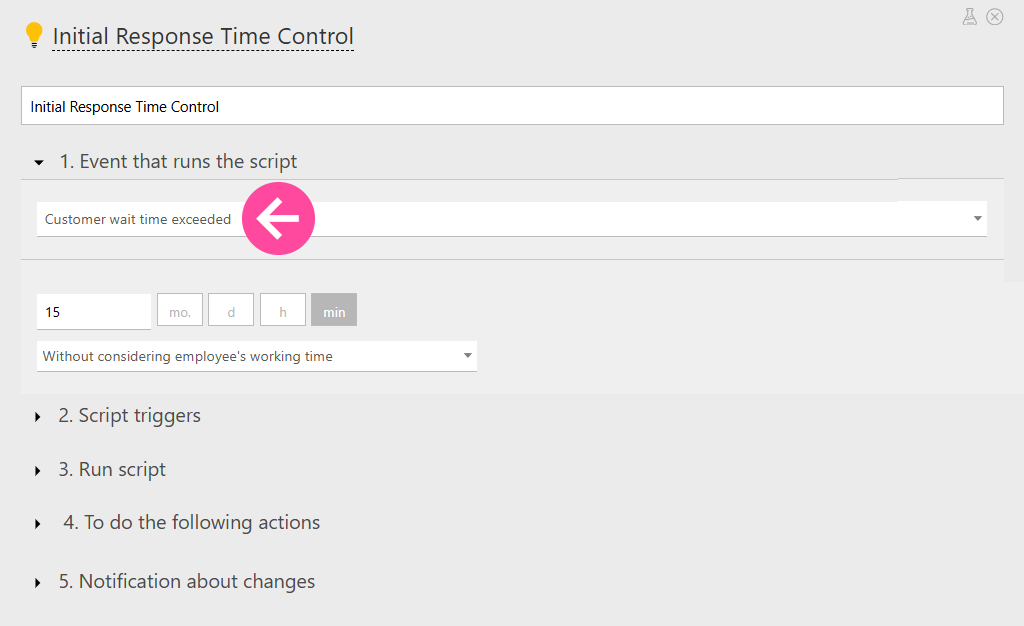
If more time has passed since the request came in than you allowed, the script triggers predefined actions. For example, Planfix can:
- Send a reminder to the support employee.
- Notify the manager responsible for support performance.
- Raise the priority of the request.
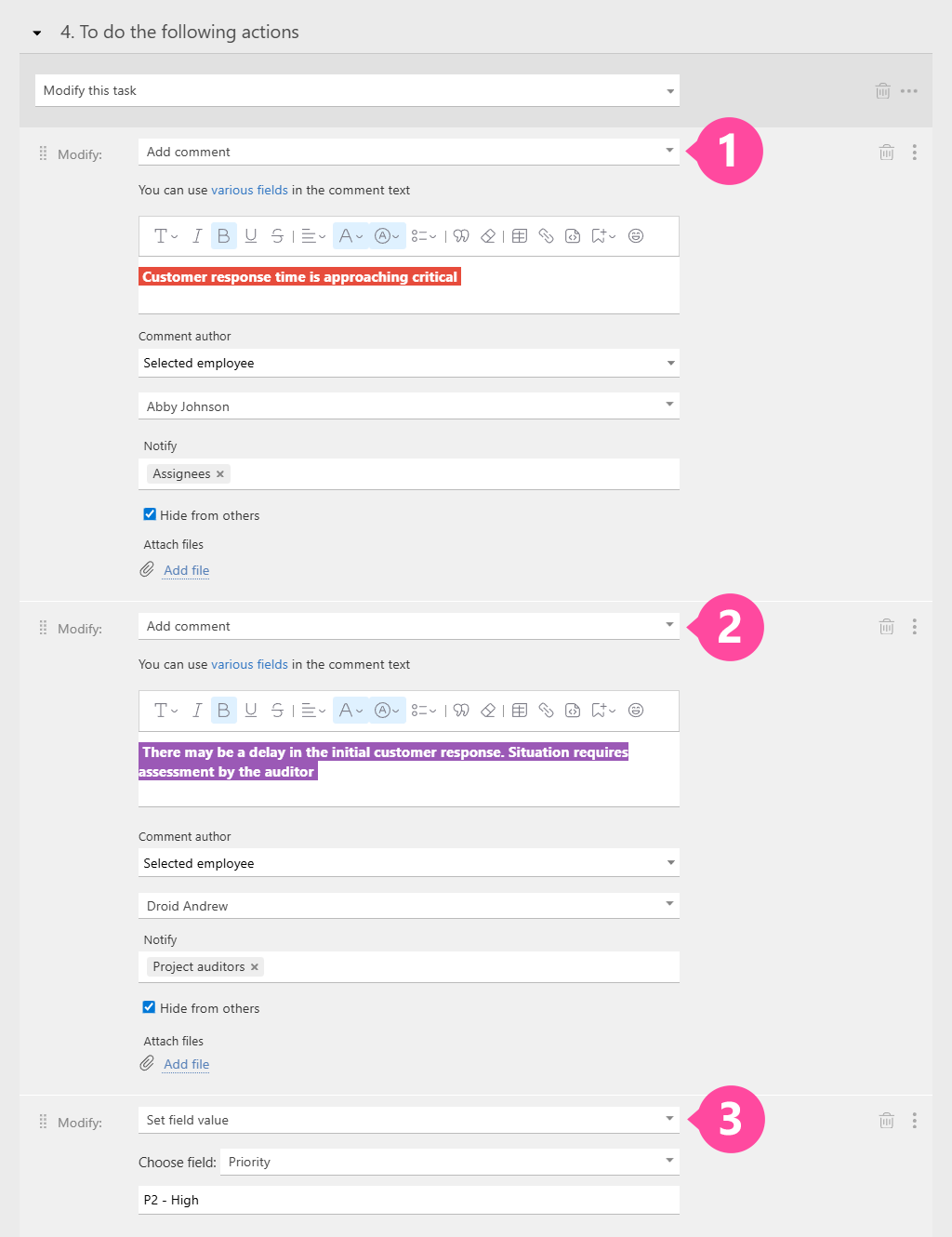
NOTE: It’s better to set the timer with a bit of a buffer so that notifications work as early warnings, not just as a record that the SLA has already been breached.
Controlling Resolution Time: Tracking the Ticket All the Way Through
Another key SLA metric is ticket resolution time. That’s why we’ve added a “Time in status exceeded” event to scripts as well.
For example, if a problem requires developer involvement, Planfix will move the “Technical work” status. The script will then notify the manager or the responsible specialist if the work is dragging on and the deadline is getting close to critical.
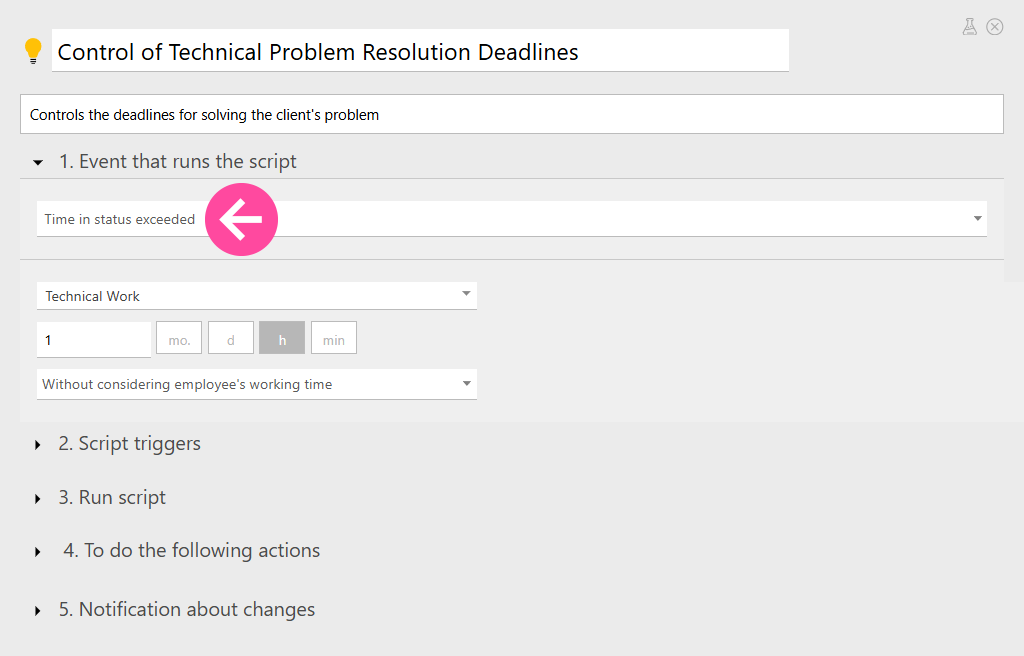
This approach lets you not only track team efficiency and time of responding to incidents, but how long it takes to fully resolve the client’s issue.
Working Hours and Time Zones: Measuring Response Time Fairly
Clear response and resolution times in your SLA are great, but what if a ticket comes in at 2 A.M.? Or on the morning of January 1?
To avoid questions like these, SLAs usually specify exactly how response time is measured. This can be based on support’s working hours or by pure calendar time.
You can define the same logic when configuring scripts in Planfix.
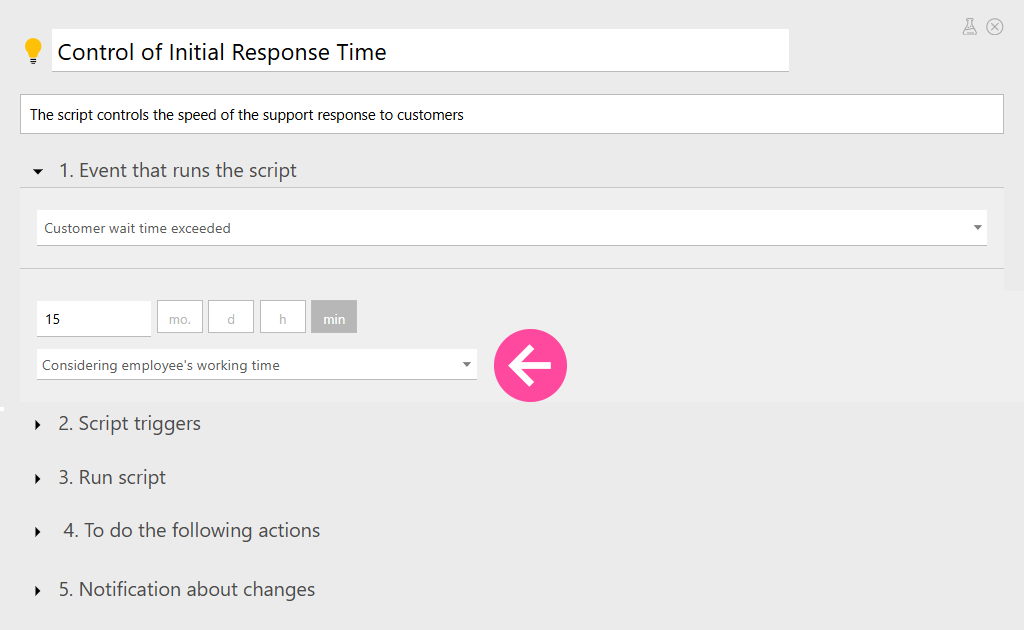
You can also assign different time zones and working schedules to different employees. This is especially useful if your company provides services across multiple regions.
Waiting for Client Data and Restarting the Clock
Let’s say you need additional details from the client. In that case, you can set the task to a status such as “Waiting for response.”
Once the client provides the information, the ticket is moved back to “In progress,” and the incident-resolution timer restarts.
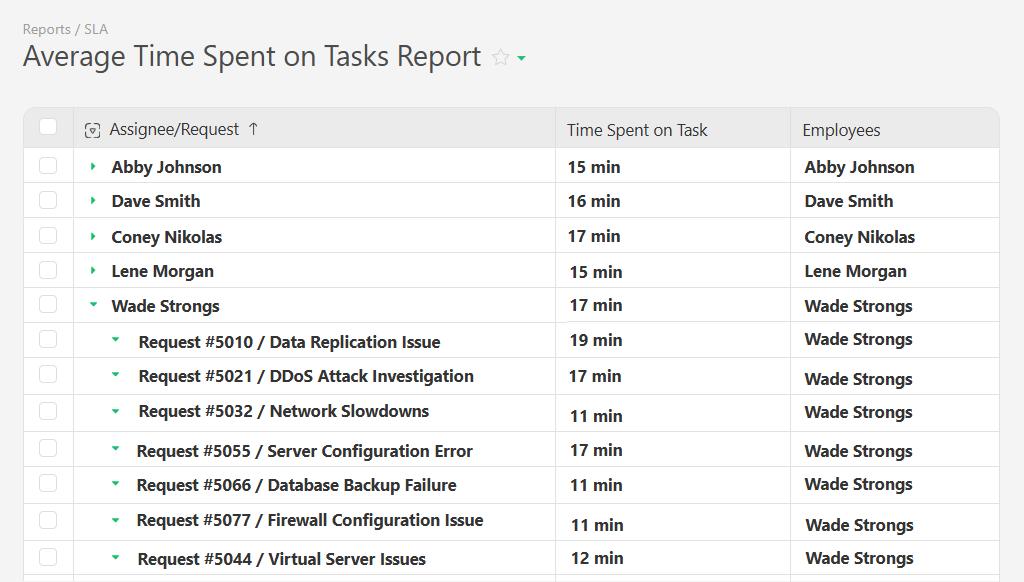
To keep track of the total resolution time, you can create a dedicated report. You can also group the data by project, request type, assignee, or even display the average time it takes to process requests:
How to Design SLA Workflows for Different Clients and Requests
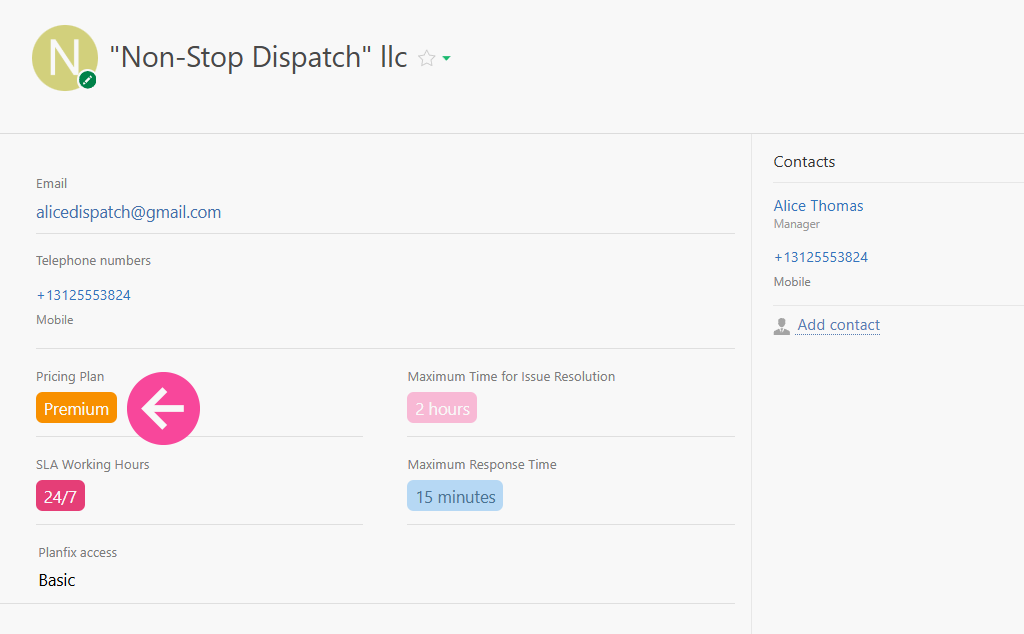
The service level defined in an SLA can vary depending on the client’s importance, subscription plan, history of cooperation, and other factors.
You can achieve this same type of client segmentation in Planfix using different client templates or label fields that trigger separate automations. All of these can have their own support response times, incident resolution times, and notification and escalation rules.
For example:
- Clients on the “Premium” plan may have a required support response time of 15 minutes and an incident resolution time of no more than 2 hours.
- For “Standard” clients, the limits might be 30 minutes and 3 hours, respectively.
This way, the system supports multiple SLA tiers, all of which perfectly match your client agreements.
Different Workflows for Different Types of Incidents
While segmenting the client base is critical, it’s just as important to distinguish between different types of requests.
Critical incidents should always be handled first.
Lower-priority tickets, such as documentation questions or non-urgent clarifications, may take longer, but they shouldn’t be ignored.
In Planfix, you can set the incident type in two ways:
- Manually – This means that a support agent selects the type in a custom field.
- Automatically using Planfix AI – In this case, the request text is sent to the AI assistant, which analyzes it and determines the most likely category.
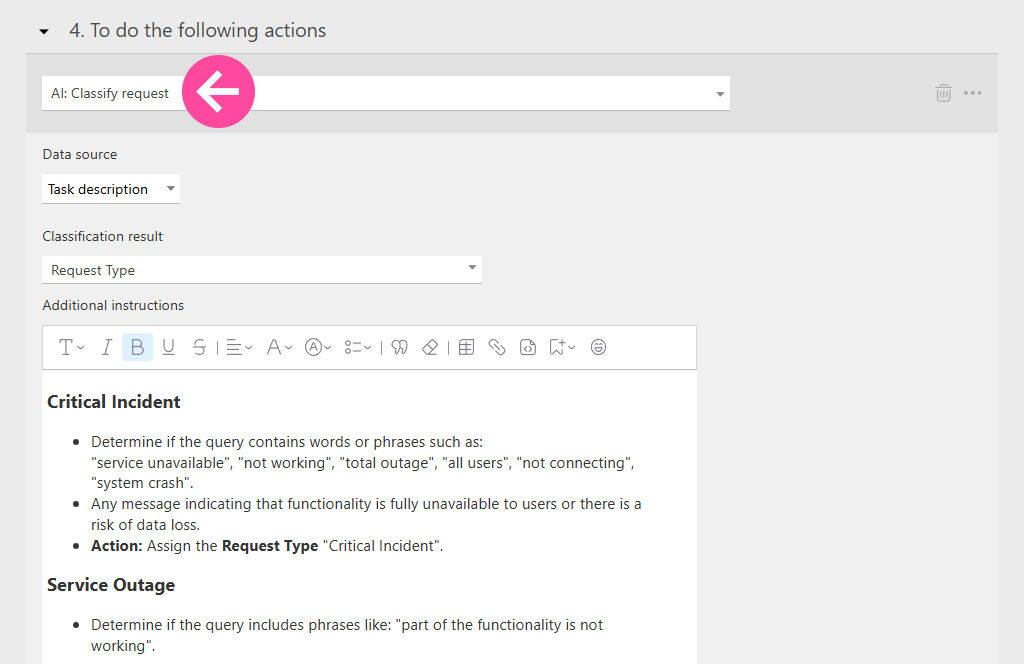
Depending on the incident type, different handling scripts will be triggered. Technical errors can have one set of deadlines and steps, training-related questions another, while critical outages can be immediately escalated to a senior specialist.
Why Businesses Need SLAs and Service Quality Control Tools
When teams clearly understand the SLA meaning, service stops being reactive and emotional and becomes a managed business process with transparent goals and accountability. SLAs help empower businesses to formalize client expectations and get away from subjective judgments about service quality. At the same time, the clear targets and benchmarks help the team work towards understandable standards. Clients know what to expect from the service, employees understand what’s required of them, and managers can see both performance and weak spots in the process.
While we’ve walked through the basic scenarios for SLA control and service quality management, this is only the starting point.
In Planfix CRM, you can build much more advanced automation with:
- Multi-level escalation.
- Automated notification chains.
- Custom statuses.
- Flexible rules for restarting timers.
In the end, you define your quality standards, and Planfix makes sure they’re followed. You only need to configure the system once, and Planfix can help you instantly turn service management into a predictable, transparent, and controllable process.
FAQ
How does Planfix support SLA automation?
Planfix automates SLA control by turning response and resolution rules into system behavior. You define time limits, working hours, priorities, and escalation logic, and Planfix enforces them automatically.
Timers start when a request arrives, pause when waiting for a client, and resume when work continues. Scripts trigger reminders, escalate issues, or change priorities before a breach happens. This removes manual tracking and guesswork, ensuring that SLAs are followed consistently across teams, channels, and time zones.
What reports and metrics does Planfix monitor for better SLM?
Planfix tracks every key SLA metric in real time. You can monitor first response time, resolution time, time in each status, breach rates, and average handling time.
Reports can be grouped by client, request type, assignee, project, or SLA tier. This lets managers see where delays occur, which teams are overloaded, and which clients require special attention. Instead of reacting to complaints, you get a clear operational picture and can improve service proactively.
Who can use Planfix for SLA management?
Planfix is suitable for any business that handles client requests at scale. Support teams, SaaS providers, IT departments, agencies, logistics companies, healthcare services, and B2B vendors all benefit from automated SLA control.
It works equally well for SMB teams and enterprise environments because rules are flexible and no-code. You can start with a simple setup for one team and gradually expand it across departments, regions, and service tiers without changing your core process.
How does Planfix prioritize client requests?
Planfix prioritizes requests based on rules you define. Priority can depend on client tier, incident type, channel, or content of the request.
You can set it manually or let Planfix AI classify incoming messages automatically. Critical incidents can be escalated instantly, while low-priority questions follow a slower track. Each category triggers its own SLA timers, workflows, and notifications. This ensures urgent issues are handled first, without letting routine requests disappear in the queue.
How accurate is SLA tracking in Planfix?
SLA tracking in Planfix is precise because it is event-driven, not manual. Timers start, pause, and resume automatically based on task status, client replies, and working schedules.
You can account for time zones, business hours, and exceptions such as “waiting for a client.” Every second is recorded, and every breach is logged. This removes human error and subjective interpretation. Managers see real performance, not estimates, and clients receive service that matches what was promised.
