


- What “Automatic Order Creation” Actually Includes
- Integration Options: From Fast to Flexible
- Recommended Architecture for Reliable Auto-Creation
- Marketplace-Specific Considerations (Often Overlooked)
- What to Automate Beyond Order Creation
- Where Planfix Fits (and Competitors)
- Feature Comparison Table (Practical View)
- Step-by-Step: Implement Automatic Order Creation (Checklist)
- FAQ
If you run deliveries at scale, manual order entry is one of the fastest ways to lose money: dispatchers retype addresses, miss phone numbers, misread COD amounts, and waste time reconciling “what was sold” vs “what was delivered.” The goal of integrating software for courier management with online stores and marketplaces is simple: every paid (or confirmed) order becomes a delivery task automatically, with correct customer data, service level, and status updates flowing back.
Below is a practical, implementation-focused guide to what “automatic order creation” really means, how integrations are built, what can break, and how to design a reliable workflow.
What “Automatic Order Creation” Actually Includes
Automatic order creation is more than “send order data to the courier system”. In a working setup, you typically need:
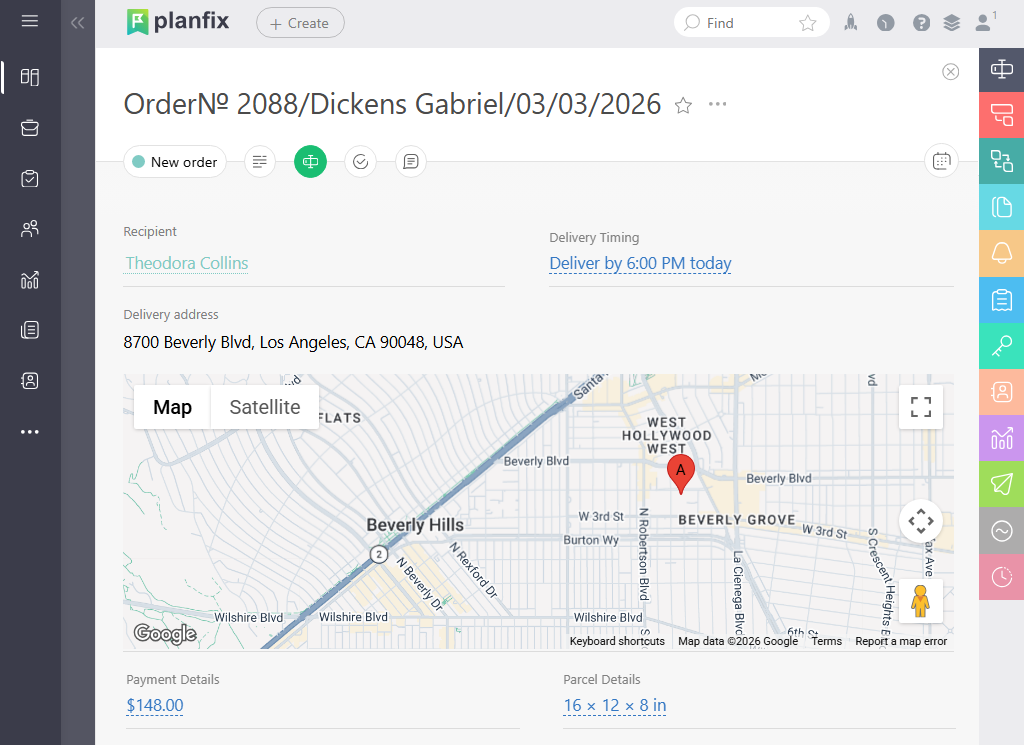
Data Mapping (Store → Courier Task)
- Recipient name, phone, email
- Full address (including apartment, entrance, floor)
- Delivery window / promised SLA
- Parcel details (weight, dimensions, number of pieces)
- Payment details (COD amount, prepaid, insurance)
- Notes (intercom code, fragile, call before arrival)
Event Logic (When to Create a Delivery)
Common triggers:
- Payment captured (prepaid orders)
- Order confirmed (COD or manual confirmation)
- Order marked “Ready to ship” (warehouse-controlled)
- Partial shipments (create multiple deliveries per order)
Two-Way Sync (Courier → Store)
- Tracking number returned to store
- Status updates (picked up, out for delivery, delivered, failed)
- Proof of delivery (signature/photo), if supported
- Delivery cost and COD reconciliation
Integration Options: From Fast to Flexible
1) Native Connectors (Fastest)
Many courier platforms offer built-in integrations with popular ecommerce systems. Pros: quick setup, lower maintenance. Cons: limited customization (fields, branching logic, exceptions).
2) Middleware (Zapier/Make, iPaaS)
Good when you need to connect multiple sources (Shopify + marketplace + ERP) or do transformations (split address fields, compute shipping method). Pros: speed + flexibility. Cons: can become fragile if not monitored; costs scale with volume.
3) Direct API Integration (Most Control)
Best for high volume, strict SLAs, or complex routing/warehouse logic. Pros: maximum reliability and custom workflows. Cons: requires engineering time, versioning, monitoring, retries.
Recommended Architecture for Reliable Auto-Creation
The “Golden Path” Flow
- Order created in store/marketplace.
- The validation layer checks mandatory fields (phone, address, payment type).
- Delivery task created in courier management system.
- Courier system returns task ID / tracking number.
- Store receives tracking and shows it to the customer.
- Courier statuses sync back to store + customer notifications.
Key Reliability Mechanisms You Must Implement
- Idempotency: the same order must not create duplicates if a webhook fires twice.
- Retries with backoff: temporary API failures should not drop orders.
- Dead-letter queue / error inbox: failed orders go to a “needs review” list.
- Audit trail: log which payload created which task and when.
Marketplace-Specific Considerations (Often Overlooked)
Marketplaces frequently impose their own constraints:
- Limited address formats (or masked phone numbers);
- Strict shipping confirmation deadlines;
- Mandatory label generation inside marketplace UI;
- Split shipments and returns managed by marketplace rules.
In practice, you may need a middle step: “marketplace order → internal shipment object → courier task,” so you can normalize data and keep your courier workflow consistent.
What to Automate Beyond Order Creation
Once the pipeline is stable, the biggest gains come from extending automation:
Auto-Assignment and Routing
- Assign courier based on zone, distance, capacity, vehicle type.
- Batch by pickup point and delivery window.
- Auto-generate routes for same-day deliveries.
Customer Communications
- SMS/WhatsApp/email with ETA link
- “Courier on the way” trigger
- Failure reasons and rescheduling link
COD and Reconciliation
- COD expected vs collected.
- Daily courier cashout tasks.
- Exceptions: underpaid/overpaid, returns, canceled orders.
Where Planfix Fits (and Competitors)
If your goal is “orders become delivery tasks automatically”, you need both integration and workflow control (validation, approvals, exceptions, and reporting). Tools differ in how configurable and operationally strict they are.
Common Solutions Teams Compare
- Planfix – flexible workflow automation + task-based operations, suitable for building an end-to-end “order → delivery → proof → reconciliation” process with integrations.
- Onfleet – strong last-mile execution, driver app, tracking; often used for dispatch and route optimization.
- Bringg – enterprise delivery orchestration with broader carrier networks and complex setups.
- ShipStation – shipping/label focus, strong for carriers; less about courier workforce management.
Feature Comparison Table (Practical View)
| Criterion | Planfix | Onfleet | Bringg | ShipStation |
| Automatic order creation via integrations | Yes (API / integrations + workflow rules) | Yes (API, webhooks) | Yes (enterprise integrations) | Yes (store connectors) |
| Workflow validation (missing phone / address, approvals) | Strong (custom states, rules, checkpoints) | Basic / limited | Strong (enterprise-grade) | Limited (shipping-centric) |
| Courier / driver app + proof of delivery | Via process design + integrations (depends on setup) | Strong native | Strong native | Not a courier workforce tool |
| Routing / dispatch optimization | Configurable via workflows / integrations | Strong native | Strong native | Not core |
| COD handling and reconciliation workflows | Strong (custom processes & reporting) | Limited | Available but complex | Mostly shipping billing |
| Best fit | Ops-heavy teams needing tailored processes | Last-mile fleets needing fast rollout | Large enterprise orchestration | Ecommerce shipping labels / carriers |
Step-by-Step: Implement Automatic Order Creation (Checklist)
1) Define Creation Triggers
- Paid vs confirmed vs ready-to-ship.
- How to handle cancellations and edits after creation.
2) Standardize Delivery “Service Types”
Example:
- Same-day, Next-day, Scheduled, Pickup-point, Oversized.
3) Map Fields and Normalize Addresses
- Enforce format (street, house, building, apt).
- Validate phone and postal codes.
- Store geocoding results if you route by coordinates.
4) Implement Statuses and Ownership
Minimum statuses:
- Created → Assigned → Picked up → Out for delivery → Delivered / Failed / Returned.
Define who can change each status (system, dispatcher, courier).
5) Add Exception Handling
- Missing data → “Needs clarification” queue.
- Address not found → auto-request customer clarification.
- Marketplace masked phone → enforce alternate contact channel
6) Monitor and Report
Track:
- Integration failures per day
- Duplicate creation attempts
- Time from order paid → courier task created
- Delivery SLA adherence by channel (store vs marketplace)
FAQ
What is the main benefit of integrating courier management software with online stores?
It eliminates manual data entry, reduces delivery errors (address/COD/phone), and speeds up dispatch because orders become delivery tasks automatically.
Should order creation happen at “payment captured” or “order created”?
Usually at payment captured for prepaid and order confirmed/ready-to-ship for COD. Creating too early increases cancellations and duplicate edits; creating too late delays dispatch.
How do we prevent duplicate delivery tasks if webhooks fire twice?
Use idempotency keys (order ID + shipment ID), store the last processed event, and ensure the courier task creation endpoint is safe to retry.
Can marketplaces break automatic order creation?
Yes. Marketplaces may provide incomplete addresses, masked contacts, split shipments, or strict confirmation rules. A normalization layer (middleware or internal service) often becomes necessary.
Is Planfix a courier management tool or a workflow platform?
Planfix is a workflow/operations platform that can be configured for courier operations and integrated with stores/marketplaces to automate “order → delivery task → tracking → reconciliation” flows.
What metrics prove the integration is working?
Track integration error rate, time-to-create-delivery after payment, duplicate rate, delivery SLA by channel, and reconciliation accuracy for COD.
