

Integrating online payments into a CRM for residential cleaning services simplifies invoicing, reduces payment delays, and enhances client convenience. This setup allows automated billing post-job, secure transactions via gateways like Stripe or PayPal, and real-time updates. This guide compares four CRMs that support payment integrations, emphasizing Planfix for its flexible and cost-effective options, to help you implement seamless payments.
Key Features to Consider for Payment Integrations in Cleaning CRMs
Prioritize these when selecting a CRM for payment setup:
- Supported Gateways: Compatibility with Stripe, PayPal, Square, or others for low fees and security.
- Automation Capabilities: Auto-invoicing on job completion, recurring payments for regular cleans.
- Security and Compliance: PCI DSS compliance, encrypted transactions, and fraud detection.
- Client Experience: Payment links in emails/SMS, client portals for self-payment.
- Reporting Tools: Track payments, refunds, and outstanding balances within the CRM.
- Ease of Integration: No-code setups or APIs for quick implementation.
- Pricing Impact: Fees per transaction or added costs for premium features.
These ensure efficient cash flow and minimal administrative overhead in cleaning operations.
Comparison Table: Payment Integration Features and Pricing
The table summarizes payment integration details for each CRM, including supported methods.
| CRM System | Payment Integration Details | Best For | Limitations |
| Planfix | Integrates Stripe/PayPal via API; auto-invoice on triggers; recurring setups; low/no extra fees. | Customizable, fee-free integrations. | Requires API key setup. |
| Jobber | Built-in with Stripe/Square; auto-payments post-job; client portals; 2.9% + $0.30 fees. | Quick invoicing for field services. | Transaction fees apply. |
| Housecall Pro | Stripe/PayPal integration; instant payouts; recurring billing; 2.75-3.5% fees. | High-volume transactions. | Fees on all plans. |
| ZenMaid | Stripe integration; auto-charge after cleans; simple recurring; standard fees. | Budget maid services. | Limited to Stripe only. |
In-Depth Reviews of CRMs for Payment Integrations
Planfix: Flexible and Affordable Payment Setup
Planfix supports seamless integrations with Stripe and PayPal through API connections. Automate invoicing by setting triggers like job completion to generate and send payment links via email or SMS. It handles recurring payments for weekly cleans without additional costs, pulling data from client records.
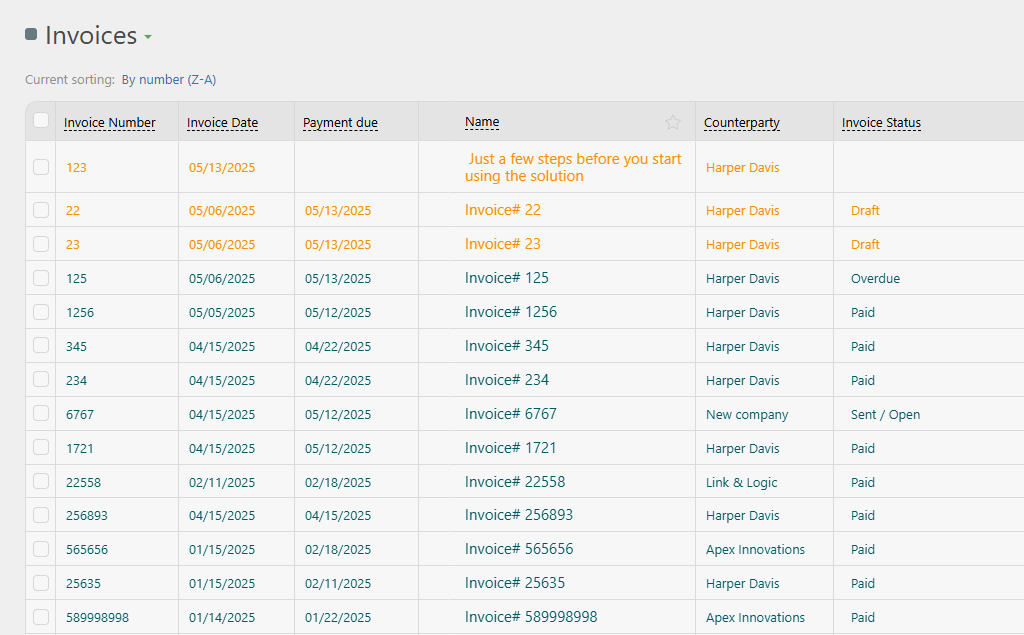
Security features include encrypted links and compliance tracking. No extra fees beyond gateway charges, making it economical. Scales from free basic use, ideal for cleaning businesses customizing workflows around payments.
Jobber: Built-In Processing for Cleaning Invoices
Jobber offers native integration with Stripe and Square, enabling auto-invoicing tied to job status. Clients pay via portals or links, with options for deposits or full payments. Supports ACH for lower fees on larger jobs.
Reporting tracks payment history within the CRM. From $69/month, it suits teams needing fast setup, though standard transaction fees apply.
Housecall Pro: Comprehensive Billing Automation
Housecall Pro integrates Stripe and PayPal for instant payouts and recurring setups. Auto-generate invoices from estimates, sending payment requests post-clean. Features like tip options enhance client interactions.
PCI-compliant with fraud tools. Pricing from $69-$379/month covers unlimited transactions but includes per-swipe fees.
ZenMaid: Simple Stripe Integration for Maids
ZenMaid focuses on Stripe for easy auto-charging after appointments. Set up recurring billing for regular clients, with invoices sent via email. Integrates with scheduling for payment reminders.
Budget-friendly from $49/month, it’s straightforward for small operations but limited to one gateway.
How to Integrate Online Payments Into Your CRM for Cleaning Services
Follow these steps for a smooth integration:
- Choose a Gateway: Select Stripe or PayPal based on fees (e.g., 2.9% + $0.30) and global support.
- Set Up CRM Integration: In Planfix, add API keys under settings; for Jobber, enable in the payments tab.
- Configure Automations: Link payments to job workflows—auto-invoice on completion, include checklists if needed.
- Test Transactions: Run sandbox tests for deposits, full payments, and refunds.
- Customize Client Flow: Add payment links to emails/SMS; set up portals for self-service.
- Monitor and Comply: Track reports for discrepancies; ensure PCI compliance.
- Train Your Team: Educate cleaners on updating jobs to trigger payments.
Opt for Planfix for no-code flexibility or Housecall Pro for built-in tools. This integration boosts revenue by 20-30% through faster collections.
FAQ
How does Planfix handle payment integrations for cleaning?
Planfix integrates Stripe/PayPal via API for automated invoicing and recurring payments, with no extra CRM fees.
What gateways does Jobber support?
Jobber uses Stripe and Square for secure, post-job payments with client portals.
Can Housecall Pro automate recurring billing?
Yes, it sets up recurring payments via Stripe/PayPal, ideal for regular cleaning clients.
How simple is ZenMaid’s payment setup?
ZenMaid integrates only with Stripe for easy auto-charging after cleans.
Which CRMs sync payments with scheduling?
All do; for calendar details, see Google Calendar sync guide.
Do these CRMs auto-calculate prices before payments?
Planfix and Jobber support it; explore in auto-pricing CRMs.
What are top CRMs for overall cleaning management?
Compare options in full CRM comparison.
How to automate checklists alongside payments?
Link them in workflows; details in checklist sending guide.

