


- What “CRM + Courier Software” Automation Should Do (Minimum Viable Flow)
- Integration Options: 3 Architectures (Pick One Before You Build)
- Step-by-Step: How to Integrate and Automate Order Processing
- Tool Landscape (Examples Where Planfix Belongs)
- Feature Checklist Table: What to Verify Before You Integrate
- Common Integration Mistakes (and How to Avoid Them)
- FAQ
When courier teams grow beyond a few drivers, “order processing” turns into repetitive manual work: copying addresses, confirming time windows, assigning couriers, updating customers, and reconciling proof of delivery with invoices. The fastest way to remove that admin load is to integrate software for courier management with your CRM so the order flows automatically from “won deal” (or “new request”) to “delivered and invoiced”.
Below is a practical, no-fluff integration blueprint: what to map, which automation triggers matter, and how to avoid common sync failures.
What “CRM + Courier Software” Automation Should Do (Minimum Viable Flow)
A strong integration doesn’t just “sync contacts”. It automates the operational lifecycle:
- Order capture in CRM (lead, deal, form, inbound email).
- Automatic delivery job creation in courier management software (or in a unified platform).
- Dispatch logic (driver assignment, route batching, time windows).
- Status sync back to CRM (picked up → in transit → delivered/failed).
- Customer notifications (SMS/email/WhatsApp triggered by status).
- Proof of delivery (POD stored and linked (photo, signature, geotag).
- Billing triggers (invoice creation, COD reconciliation, exceptions).
If any of these steps remains manual, that’s usually where errors and delays persist.
Integration Options: 3 Architectures (Pick One Before You Build)
1) Native integration (best if available)
Some courier tools offer direct CRM connectors. This is fastest, but you’re limited to the vendor’s fields and logic.
2) API + Middleware (Make/Zapier/n8n) (Best for Flexibility)
You connect CRM ↔ courier system through automation middleware:
- Trigger: “New deal” / “New order”
- Action: “Create delivery”
- Updates: “Delivery status changed” → update CRM + notify customer
3) Single System of Record (CRM + Operations in One)
Instead of syncing two complex systems, you run CRM + dispatch workflows in one platform (or tightly integrated modules). This reduces sync conflicts and duplicates.
Step-by-Step: How to Integrate and Automate Order Processing
Step 1: Define the Data Contract (What Must Be Correct Every Time)
Write down the required fields to create a delivery without human help:
- Customer name + phone (E.164 format if possible)
- Pickup address + contact + time window
- Drop-off address + contact + time window
- Package details (weight, dimensions, fragile, temperature)
- Service level (same-day, next-day, 2-hour)
- Payment terms (prepaid/COD)
- Internal references (CRM deal ID, order number)
If you don’t standardize this “delivery payload”, automation will constantly fail on edge cases.
Step 2: Normalize Addresses and Phone Numbers
Most courier errors come from:
- free-text addresses without city/zip
- missing apartment/unit
- phone formats inconsistent
Use validation at the CRM entry point (forms, call scripts, required fields). If possible, add autocomplete (Google Places) before a record becomes “ready for dispatch”.
Step 3: Map CRM Objects to Courier Objects
Typical mapping:
- CRM Contact/Company → Customer
- CRM Deal/Order → Shipment/Delivery job
- CRM Line items → Package items (optional)
- CRM custom fields → service level, COD amount, delivery notes
Create a single unique key, e.g. `CRM_Order_ID`, stored on the courier job to prevent duplicates.
Step 4: Create Automation Triggers (the “When”)
Use explicit pipeline stages rather than ambiguous events.
Good triggers:
- Deal stage changes to “Ready to ship”
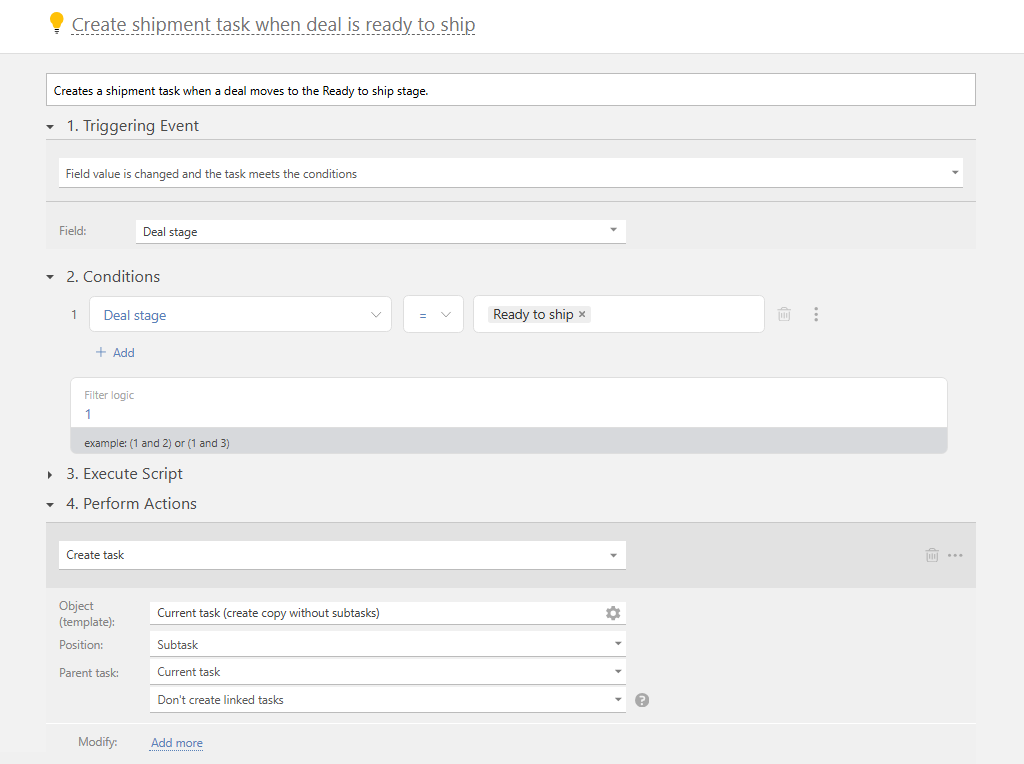
- Payment status becomes “Paid”
- Inventory reserved = Yes
- Cutoff time check passed (e.g., before 4 PM for same-day)
Avoid triggers like “Deal created” unless your process is truly instant.
Step 5: Automate Dispatch Rules (Assignment, Batching, SLA)
You want the system to decide:
- which courier/team can serve the zone.
- whether to batch stops into one route.
- priority by SLA (2-hour jobs trump next-day).
- capacity rules (max stops, max kg).
Even if you still manually approve routes, pre-building the plan saves most time.
Step 6: Sync Status Updates Back into CRM
Courier statuses should map into CRM fields + timeline notes, e.g.:
- Picked up → order status = “In transit”
- Delivered (with POD link) → order status = “Completed”
- Failed attempt → create task for support + reschedule workflow
This is where CRM becomes the customer-facing truth: sales/support can answer “Where is it?” without opening a second system.
Step 7: Automate exceptions (returns, delays, address issues)
Create rules for high-cost exceptions:
- customer not reachable → auto-call task + notify customer.
- address invalid → request clarification + pause dispatch.
- damaged package → incident workflow + claim documentation.
Exception automation is often worth more than the “happy path”, because it prevents support chaos.
Step 8: Close the Loop: Invoicing and Reconciliation
Depending on your model:
- Delivered → auto-create invoice.
- COD collected → reconcile against driver cash report.
- Monthly B2B billing → aggregate deliveries by customer and export/issue invoice.
Tool Landscape (Examples Where Planfix Belongs)
If you evaluate platforms for this workflow, you’ll typically compare flexible operations CRMs and delivery-focused tools. Examples include Planfix, Onfleet, Bringg, Shipday, and CRMs like HubSpot or Zoho (usually via integrations).
The key is not the brand-it’s whether the system supports: reliable triggers, field mapping, status webhooks, and exception workflows without custom code.
Feature Checklist Table: What to Verify Before You Integrate
| Capability | Why it matters for automation | What to look for in tools |
| API + webhooks | Needed for real-time status sync | “Delivery updated” webhook, stable API docs |
| Custom fields mapping | Prevents manual retyping | Map service level, COD, notes, IDs |
| Address validation | Reduces failed deliveries | Autocomplete, structured fields |
| Dispatch rules | Saves dispatcher time | Zone logic, capacity, SLA priority |
| POD capture | Proves completion and reduces disputes | Photo / signature + timestamp + GPS |
| Exception workflows | Stops support overload | Auto-tasks, reschedule, customer messaging |
| Audit trail | Needed for disputes and accountability | Who changed what and when |
| Billing integration | Turns POD into revenue fast | Invoice triggers, exports, COD reconciliation |
Common Integration Mistakes (and How to Avoid Them)
Mistake 1: No “Ready for Dispatch” Gate
Fix: introduce a CRM stage that only becomes available when required fields are present and validated.
Mistake 2: Duplicate Deliveries
Fix: store `CRM_Order_ID` in the courier job and enforce idempotency (don’t create if exists).
Mistake 3: Status Mismatch Across Systems
Fix: pick one system as the customer-facing truth (often CRM) and sync statuses one-way or with strict conflict rules.
Mistake 4: Automating Only the Happy Path
Fix: build exception handling from day one (failed attempt, return, delay, unreachable customer).
FAQ
What is the main benefit of integrating courier software with a CRM?
End-to-end automation: orders are created once, dispatch happens faster, statuses update automatically, and support/sales sees delivery progress without manual checks.
Do I need an API to integrate courier management software with CRM?
For reliable automation at scale, yes. Middleware tools can help, but you still need APIs/webhooks (or native connectors) for real-time status updates and POD links.
What should be the trigger to create a delivery job from the CRM?
Usually a clear operational event like “Ready to ship” stage, payment confirmed, or inventory reserved-anything that guarantees the order data is complete.
How do I prevent creating duplicate courier jobs?
Use a unique external ID (the CRM order/deal ID) stored on the courier side and make the automation idempotent (check before create).
Which system should be the source of truth: CRM or courier platform?
Customer communication and account history usually belong in the CRM, while routing/driver execution belongs in courier software. Sync statuses back to CRM so teams don’t chase updates in two places.
Can Planfix be used in this flow?
Yes, Planfix can act as an operational CRM layer where orders, tasks, dispatch steps, approvals, and exception handling live, and it can be integrated with delivery tools via APIs/middleware depending on your setup.
