
Moving Beyond the Morning Meeting
On a traditional farm, the “plan for the day” is set at 6:00 AM. By 10:00 AM, machinery breaks, weather shifts, or supplies run out, and the plan is obsolete. The farm manager spends the rest of the day chasing people via phone calls to understand what is actually happening.
Real-time monitoring changes this dynamic. By using modern task management software, farm managers can see exactly what is happening across thousands of acres without leaving the office—or from the cab of their own truck. It shifts management from reactive (putting out fires) to proactive (optimizing flow).
How Task Management Software Works on a Farm
Unlike standard office project management, agricultural task management is geo-spatial and mobile. It involves three key components:
- The Task: “Repair Fence Line B” or “Harvest Field 4.”
- The Asset: The specific tractor, tool, or chemical needed.
- The Feedback: Photos, GPS coordinates, and completion time logged by the worker.
When a worker completes a task in the app, the manager’s dashboard updates instantly. There is no need for end-of-day paperwork.
Top Tools for Real-Time Ag Project Monitoring
1. Planfix
Best For: Custom operational workflows and automated reporting.
Planfix stands out because it allows you to turn a smartphone into a powerful data collection tool. It is not just a checklist; it is a live feed of farm operations.
- Photo Verification: Workers can be required to snap a photo of a completed repair or a crop issue before closing a task. This provides indisputable proof of work and visual records for future reference.
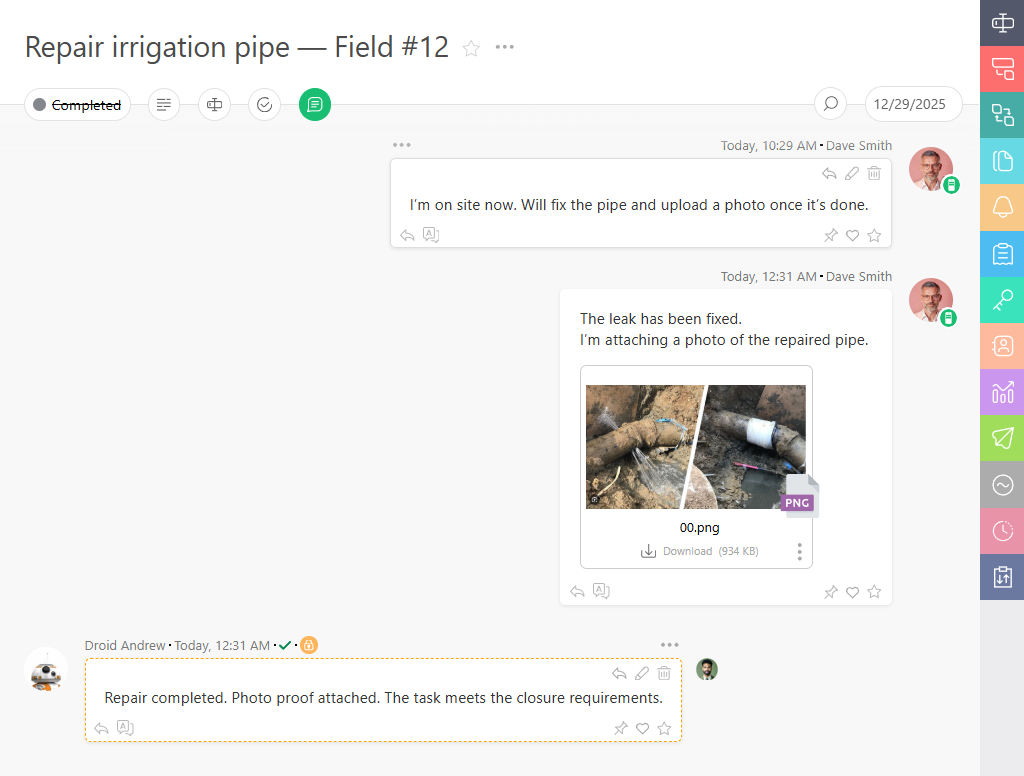
- GPS Tagging: Tasks can capture the location where they were completed. A manager can look at a map and see exactly where the scouts were when they reported a pest infestation.
- Status Automations: If a tractor breaks down, the driver changes the status to “Repair Needed.” Planfix can instantly notify the mechanic and creating a high-priority ticket, reducing downtime.
2. Fieldwire
Best For: Construction-heavy farm projects and infrastructure.
While originally built for construction, Fieldwire is excellent for farms managing heavy infrastructure projects like building new barns, irrigation systems, or fencing.
- Blueprints: Users can view plans and schematics directly on their phones/tablets offline.
- Issue Tracking: Pin issues (e.g., “Broken Pipe”) directly onto a map or blueprint for precise location.
3. Asana
Best For: General administrative and high-level planning.
Asana is a visual tool that is great for the “office” side of the farm—planning the season, marketing, and compliance.
- Timeline View: Great for visualizing the planting schedule across the season.
- Simplicity: Very easy for office staff to use, though it lacks the deep offline/GPS capabilities needed for remote field work compared to specialized tools.
Feature Comparison: Real-Time Capabilities
| Feature | Planfix | Fieldwire | Asana |
| Mobile Offline Mode | Excellent | Excellent | Good |
| Photo/GPS Evidence | Native & Customizable | Native (Blueprints) | Basic Attachments |
| Custom Workflows | High (If-This-Then-That rules) | Medium | Medium |
| Map Integration | Yes (Via API/Custom fields) | Yes (Blueprints) | Limited |
| Best Use Case | Daily Operations & Field Work | Infrastructure & Building | Office & Season Planning |
The “Digital Twin” of Your Farm
Implementing software like Planfix essentially creates a “Digital Twin” of your farm’s operations.
- Instant Visibility: A manager can open the “Harvest” project and see that 3 out of 5 fields are marked “Done,” and the 4th is “In Progress.”
- Accountability: Every task has an owner and a timestamp. There is no ambiguity about who was responsible for checking the irrigation pumps.
- History: Next year, you don’t have to guess when you planted. You simply look at the “Planting Project” archive to see the exact dates, weather notes, and worker comments from last season.
Implementing Real-Time Monitoring: Best Practices
- Keep it Simple for the Field: The worker’s interface should have big buttons and require minimal typing. Use dropdown menus and photo uploads.
- Automate Notifications: Don’t spam everyone. Only notify the mechanic when a machine breaks. Only notify the agronomist when a pest is found. Planfix’s flexible notification rules make this easy to configure.
- Focus on “Exceptions”: A manager shouldn’t watch every task. They should watch for exceptions—tasks that are overdue, stalled, or flagged with issues.
FAQ
Do my workers need expensive smartphones?
No.
Most task management apps (including Planfix) run efficiently on mid-range Android devices or older iPhones. Rugged cases are recommended.
What if there is no cell service in the field?
This is critical. You must choose software with “Offline Mode.”
The worker logs the data, and the app syncs it automatically once they drive back into range or return to the farm office Wi-Fi.
Will workers feel like they are being spied on?
It’s about framing. The goal isn’t to track them; it’s to track the work so they don’t have to do paperwork later.
Emphasize that snapping a photo in the app saves them from writing a report at the end of a long day.
Can I monitor fuel usage with these tools?
Yes. You can create a “Refuel” task type in Planfix.
The driver enters the liters added and the engine hours. This gives you real-time fuel consumption data without needing expensive sensor hardware on every old tractor.
How does this help with safety?
Real-time monitoring improves lone-worker safety.
If a worker hasn’t checked in or completed a task in 4 hours, the software can alert the manager to check on them.

