
The Problem of “Data Silos” in Agriculture
A modern farm typically runs on three distinct engines:
- The Field (Operations): What is happening on the ground (planting, harvesting, maintenance).
- The Warehouse (Inventory): What resources are available (seeds, fuel, fertilizer).
- The Office (Accounting): The financial health of the business (cash flow, profit margins, taxes).
The problem is that these three engines often speak different languages. The field manager logs a harvest in a notebook app, the warehouse manager updates an Excel spreadsheet, and the accountant waits for paper invoices. This disconnection leads to “data silos” resulting in lost inventory, inaccurate financial forecasting, and delayed decision-making.
Integration is the solution. Connecting your Farm CRM with accounting and inventory systems creates a single source of truth, allowing data to flow automatically between the tractor cab and the accountant’s desk.
Key Integration Points
To streamline operations, your Farm CRM should serve as the central “hub” connecting to other specialized tools via API or direct integration.
1. CRM + Accounting (The Financial Link)
Goal: To automate invoicing and expense tracking.
- Scenario: A farm manager orders spare parts for a combine.
- Without Integration: The manager buys the part, loses the receipt, and the accountant chases them for details weeks later.
- With Integration: The manager creates a “Purchase Request” task in the CRM (e.g., Planfix). Once approved, the CRM pushes this data to the accounting software (like Xero or QuickBooks) as a pending bill. When the invoice arrives, it is matched instantly.
2. CRM + Inventory (The Resource Link)
Goal: Real-time visibility of stock levels.
- Scenario: Application of fertilizer to Field B.
- Without Integration: The operator applies the chemical but forgets to tell the warehouse. The farm runs out of fertilizer mid-season.
- With Integration: The operator completes the “Spray Field” task in the CRM app. The CRM automatically deducts the specific quantity of chemical from the connected Inventory system (or its own internal inventory module), triggering a re-order alert if levels get low.
Top Tools for Integrated Farm Management
1. Planfix (The Central Hub)
Best For: Orchestrating workflows between different systems.
Planfix is unique because it acts as a “glue” for operations. It has robust API capabilities and native integrations that allow it to talk to almost any external system.
- Accounting Integration: Planfix can be configured to send task data (e.g., “Harvest Hours”) directly to payroll or accounting systems. It allows you to attach invoices to supplier profiles, keeping the financial team and operational team in sync without giving everyone access to sensitive bank data.
- Internal Inventory: Unlike many CRMs that require external inventory software, Planfix allows you to build internal inventory databases. You can track “Assets” (tractors, tools) and “Consumables” (fuel, seeds) directly within the tasks.
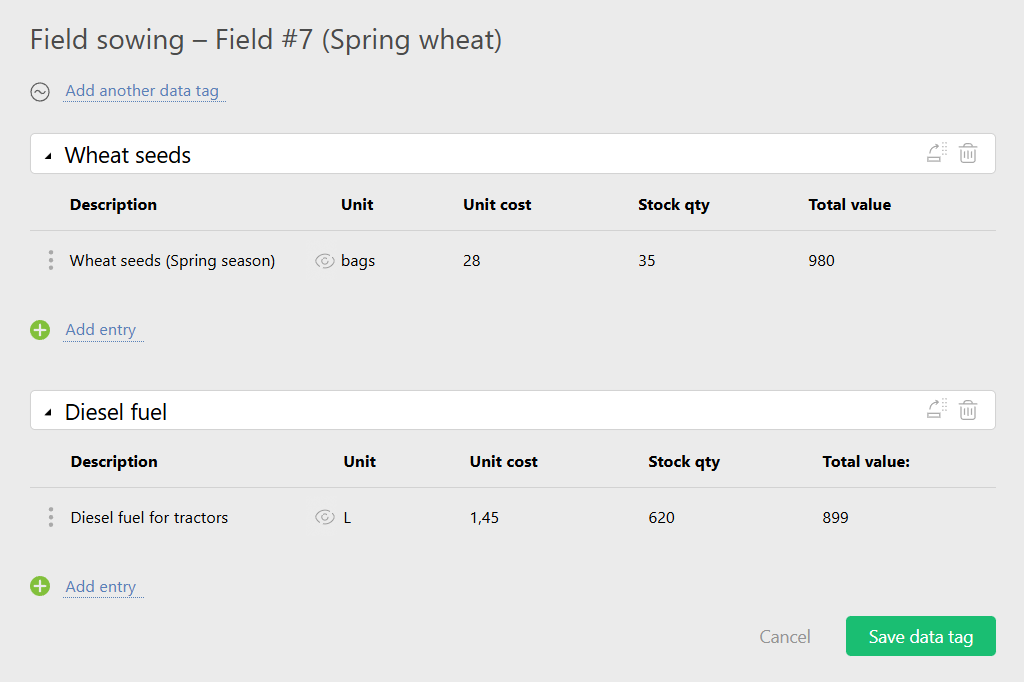
- Webhooks: For advanced farms, Planfix can receive data from IoT sensors (e.g., a fuel tank level sensor) and automatically create a “Refuel” task when the tank hits 10%.
2. Xero / QuickBooks (The Financial Specialists)
Best For: Pure accounting and tax compliance.
Xero / QuickBooks are not farm management tools, but they are essential standards. The best Farm CRMs must push data to them.
- Role: They handle the tax compliance, bank feeds, and P&L statements.
- Integration: They rely on the CRM (like Planfix or Farmbrite) to tell them what the operational expenses were for.
3. Conservis (The Enterprise Integrator)
Best For: Large-scale financial and operational integration.
Conservis is built specifically to merge the gap between the field and the bank.
- Role: It excels at giving lenders and bankers visibility into the farm’s inventory value and crop progress.
- Integration: Deep integration with John Deere and Climate FieldView to pull operational data and convert it into financial reporting.
Integration Capabilities Table
| Feature | Planfix | Conservis | Farmbrite | Standard Excel/Paper |
| Role in Ecosystem | Orchestrator (Connects Ops, People & Data) | Financial Bridge (Field to Finance) | All-in-One (Closed Ecosystem) | Siloed Data |
| Inventory Mgmt | Customizable Internal DB | Built-in Ag Inventory | Built-in Ag Inventory | Manual Updates |
| API / Webhooks | Excellent (High Connectivity) | Good (Partner Focus) | Limited | None |
| Accounting Link | via API / Export / Integrators | Native Financial Reports | Native Integrations | Manual Data Entry |
| Flexibility | High (Build custom links) | Low (Fixed processes) | Medium | High but Error-Prone |
Why “All-in-One” Isn’t Always the Answer
Many farmers look for a single software that does CRM, Accounting, and Inventory. While tempting, these “unicorns” often do everything brilliantly—or everything mediocrely.
A better approach is the “Best of Breed” strategy:
- Use Xero/QuickBooks for accounting (because they are the best at it).
- Use Planfix for CRM/Operations (because it is the most flexible for managing work).
- Connect them.
This allows you to change your accounting software without losing your operational history, or change your CRM without losing your financial history. Planfix’s ability to act as a flexible interface means you can enter data once (in the field) and have it populate everywhere else.
FAQ
Do I need a developer to integrate my Farm CRM?
For complex API integrations, yes.
However, tools like Planfix offer “no-code” setup for many internal inventory processes. Simple connections can often be handled via tools like Zapier or Make.com.
Is it safe to link my CRM to my bank/accounting software?
Yes, if you use reputable software. Integration typically uses “Tokens” or restricted API access.
This is actually safer than emailing spreadsheets back and forth, as the data pipe is encrypted.
Can Planfix track inventory without external software?
Yes.
For most small-to-mid-sized farms, Planfix’s internal “Directories” feature is powerful enough to track stock levels, equipment locations, and usage history without needing a separate inventory app.
What happens if the internet goes down?
Modern CRMs like Planfix and Farmbrite have offline modes.
Data is stored locally on the device and syncs to the accounting/inventory cloud once the connection is restored.
Why not just use Excel for everything?
Excel is static.
It doesn’t send alerts when stock is low, it doesn’t prevent two people from editing the same file, and it doesn’t integrate automatically with your bank feed. Excel creates work; integrated CRMs automate it.
