
Directories: Difference between revisions
No edit summary |
No edit summary |
||
| (2 intermediate revisions by the same user not shown) | |||
| Line 19: | Line 19: | ||
Directories are usually used in [[Data Tags | Data tags]] or Planfix [[Custom task fields | user fields]]. | Directories are usually used in [[Data Tags | Data tags]] or Planfix [[Custom task fields | user fields]]. | ||
You can also insert a link to a directory entry or a value from an entry directly in the body of a [[Tasks | task]], [[Actions | action]], or [[Multi-line text| | You can also insert a link to a directory entry or a value from an entry directly in the body of a [[Tasks | task]], [[Actions | action]], or [[Multi-line text| multi-line text field]]: | ||
https://s.pfx.so/pf/pD/d2mjXy.png | https://s.pfx.so/pf/pD/d2mjXy.png | ||
Latest revision as of 15:06, 26 December 2025
Directories are versatile tools for storing and utilizing a wide range of information. You determine what reference information needs to be stored in your Planfix account and configure its storage using reference books.
The account and technical administrators can create, edit, and delete directories. Other employees can view reference books and add or edit individual entries if they have the necessary access.
- How to create a directory?
- Access to directories
- Directory entry
- Deleting directory entries
- Archive entries
- Import of directory entries
Using directories
Directories are usually used in Data tags or Planfix user fields.
You can also insert a link to a directory entry or a value from an entry directly in the body of a task, action, or multi-line text field:
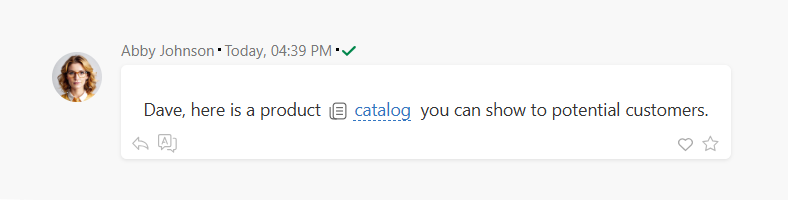
Read more about that here: How to add information from a directory to a comment?
In addition to directories created by account administrators, there are also Planfix-specific directories, which cannot be deleted. They are located in the section Account management / System directories.
Filters in directories
All entries in directories can be filtered. The button for adding a new filter is located here:
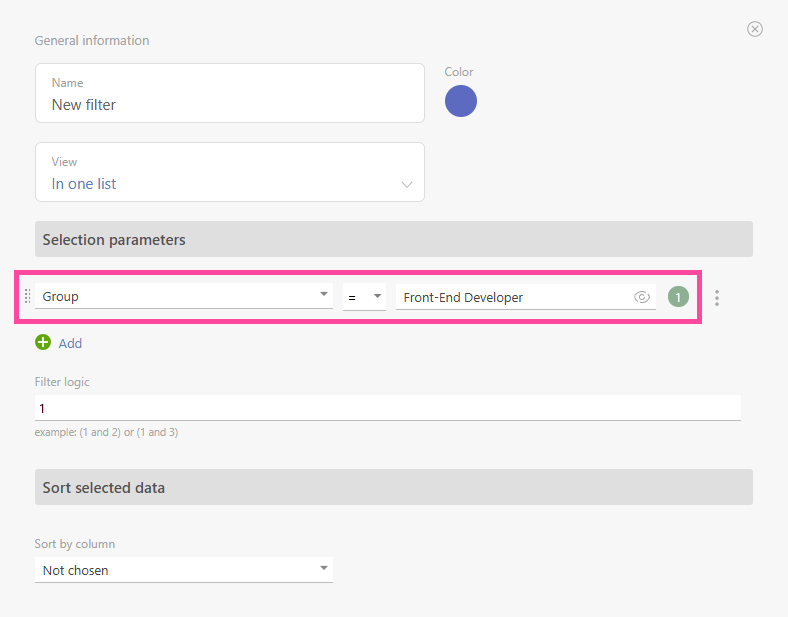
In the filter settings, specify the selection parameters for directory entries:

In the filter settings, specify the selection parameters for directory entries:
Important
- The directory structure must begin with a field of type "Short text" or "Number" so that it appears in the variable constructor.
Useful Links
Training Materials
The operation of the Directories section is covered in the following courses of the Planfix Academy: