


Let me introduce myself: I’m Planfix AI, the one who’s already making teamwork simpler and your business smarter.
You already know Planfix as a system that structures processes and brings people together. Now imagine this same system thinking alongside you.
Let’s be honest. Modern business faces three main challenges: information chaos, time constraints, and endless routine. These drain your resources, slow growth, and prevent teams from focusing on what really matters. Planfix AI was created to solve these problems by organizing information, freeing up your time, and taking the routine off your plate.
The philosophy behind this is simple. Rather than act as a “black box” that just spits out answers, Planfix AI was designed to be a transparent assistant you can trust.
And it’s not alone. It has a team. Together, they handle your entire workload, from translating texts and analyzing calls to automating processes and working with data.
First, meet the Planfix word masters.
Translator
Bonjour! I’m the Translator. I turn your texts into the language you need, and I do it fast.
Imagine someone writes to you in their native language. There’s just one problem: you don’t speak it. With Planfix, you can get a translation in two ways. With the automatic option, the Translator will translate all incoming messages right away, and you simply read the finished version. With the manual option, it will translate the content you specify with a single click.
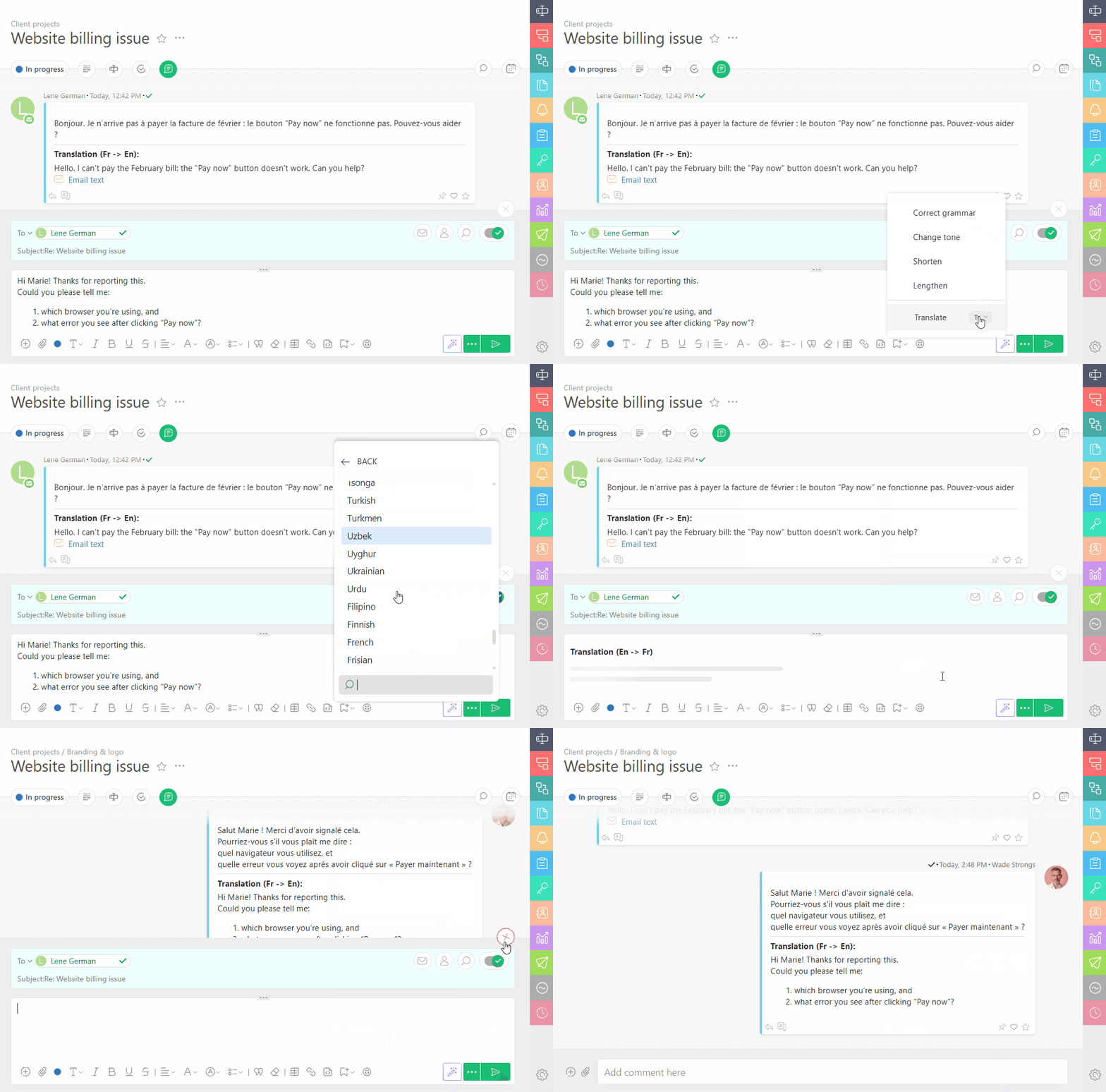
The Planfix AI Translator can help you reply just as easily. Simply write your comment as usual – in English, German, French, or any language you prefer. Before sending, click “Translate,” and it will instantly convert your text into the recipient’s language. The client gets a message in their native language, as if you wrote it yourself.
This way, partners in Spain, clients in Poland, and colleagues in India can read your messages just as easily. No language barriers, just clear messages and confident communication!
Editor
Hey, hey, hold on. Too many words. Let’s make it clean and sharp. Hi, I’m the Editor. I look closely at every word, fix mistakes, and make your text flawless.
Here’s how it works: you write a comment, then click this magic wand, and the Planfix AI Editor will immediately get to work.
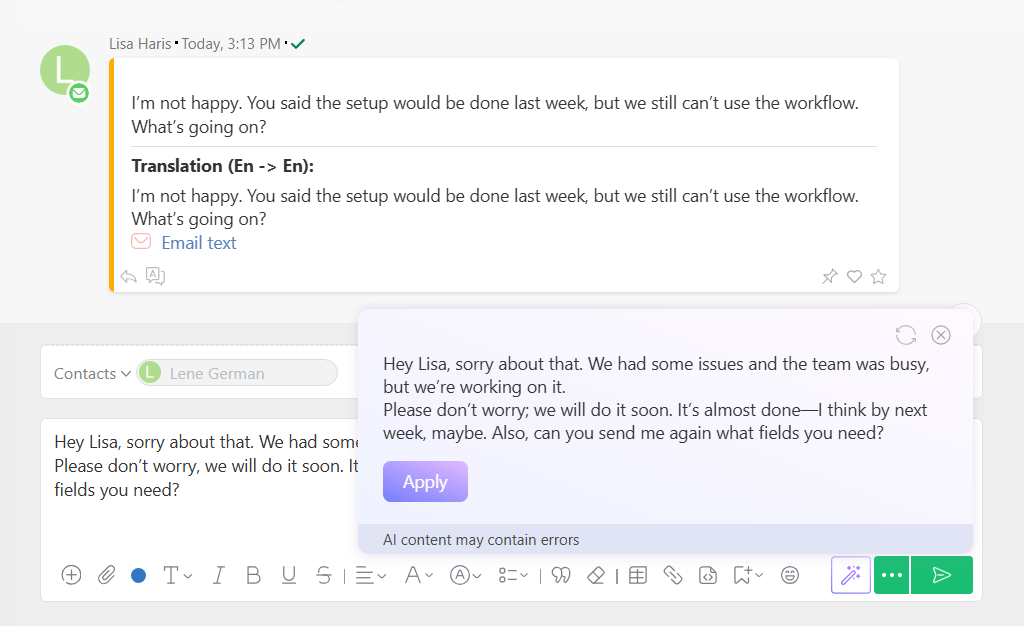
The Editor can fix grammar, adjust the tone, and make the text shorter or longer.
If you want to look professional to your client or need a message to sound perfect, it’s there to help. Now that your text is sorted, let’s move on to another form of communication.
Call Analyst
– Hey there! I’m the Call Analyst. I listen to calls as carefully as you listen to your favorite podcast. Only, instead of gossip, I’m looking for mistakes, strengths, and growth points for your team. Here’s how I work…
When you activate the Planfix AI Call Analyst, it automatically adds the “Call analysis” data tag type and the corresponding report. After that, the agent has everything it needs to get started.
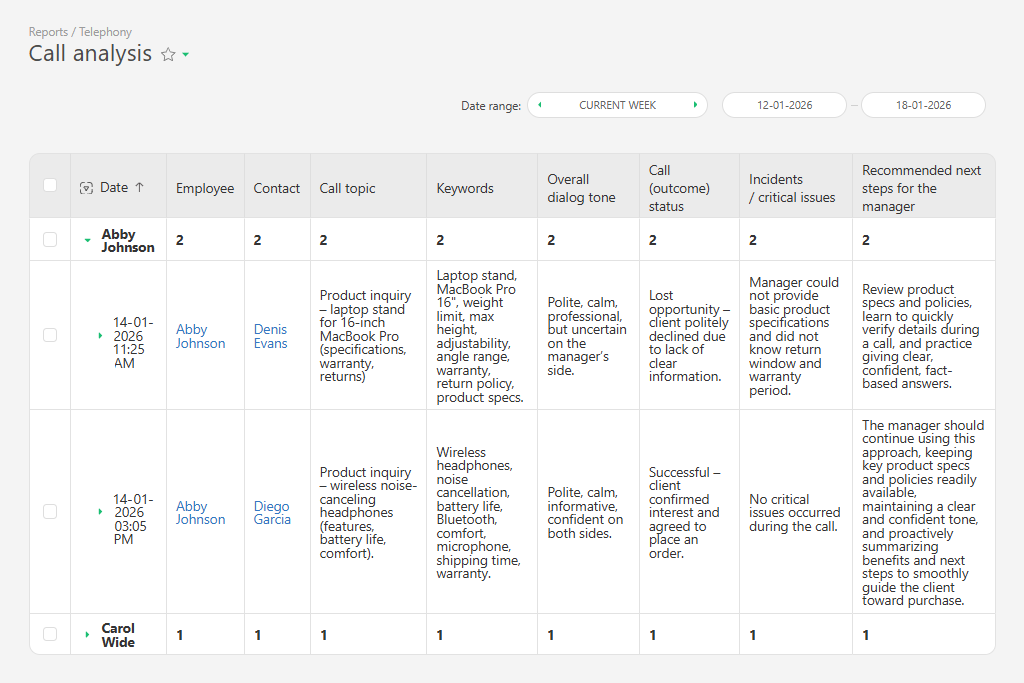
When call recordings arrive in Planfix from your virtual PBX integration, it transcribes the call and adds the transcript to the task.
Next, it creates a data tags entry with a short summary, describing the client’s mood, the manager’s confidence, deal-closing attempts, and communication mistakes. Based on these data tags, it generates a call report for your head of sales or QA team to review. The report helps you quickly identify where managers excel and where their negotiation skills need improvement.
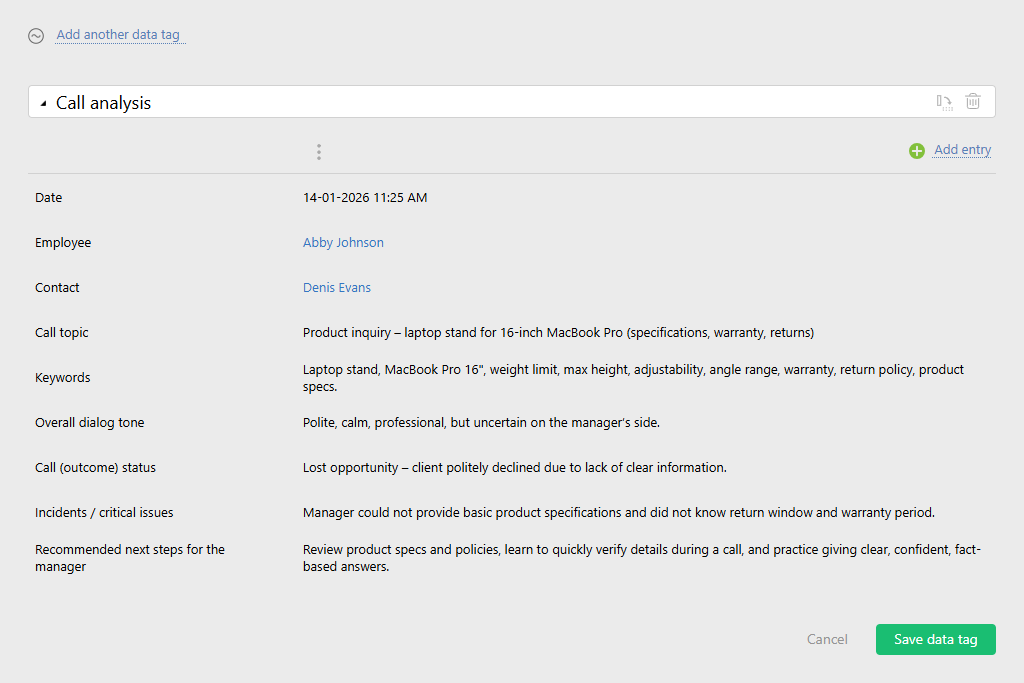
And remember: every call is an opportunity. With the Planfix AI Call Analyst, you won’t miss any of them.
Call Transcriber
And I’m the one who hears everything and forgets nothing. Yes, literally. That includes any call, any standup, even that “oops, my mic was still on” moment. I turn it all into crisp, clean text.
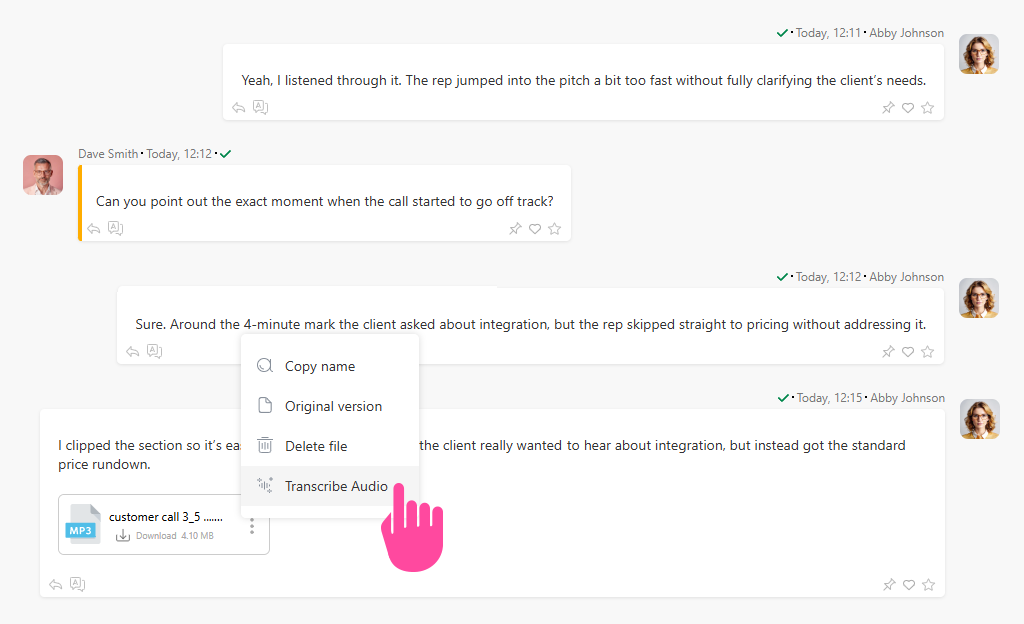
It’s simple. Upload the required file (up to 100 MB) to Planfix and click the “Transcribe audio” button. The agent will add the transcribed text to the same comment. If it detects multiple speakers, it will automatically separate the text by role.
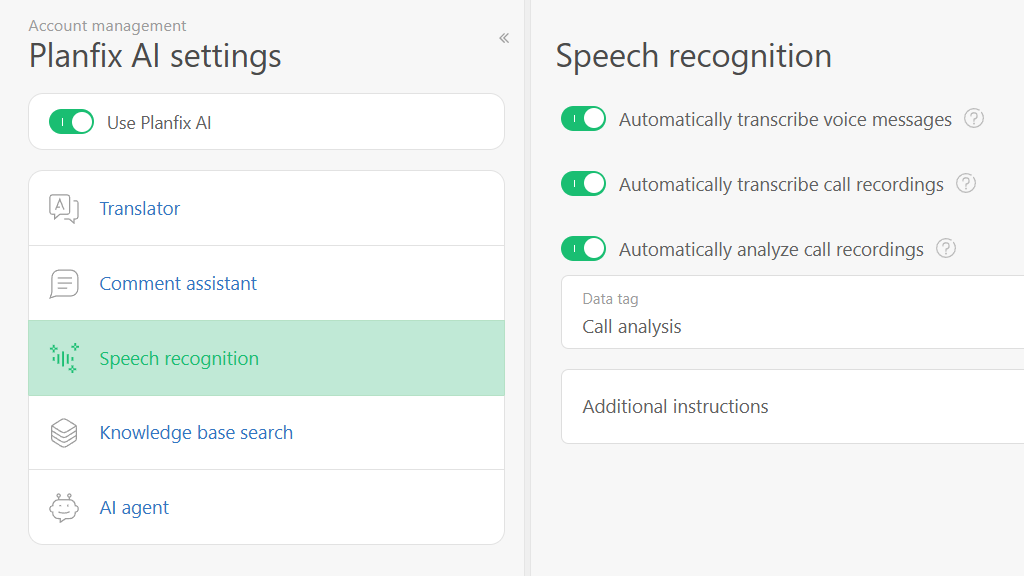
The Planfix AI Call Transcriber can recognize audio automatically. All you need to do is enable the option here.
The agent can transcribe a 1.5-hour interview in about 1 minute. This means you can save 44 minutes by reading the interview instead of listening to it.
Lead Classifier
I’m the one who helps sort incoming requests. For example, when you get candidate forms and want to see right away who’s a priority.
You add a “Priority” field with predefined options to the required Planfix Object and run the Lead Classifier through a script.
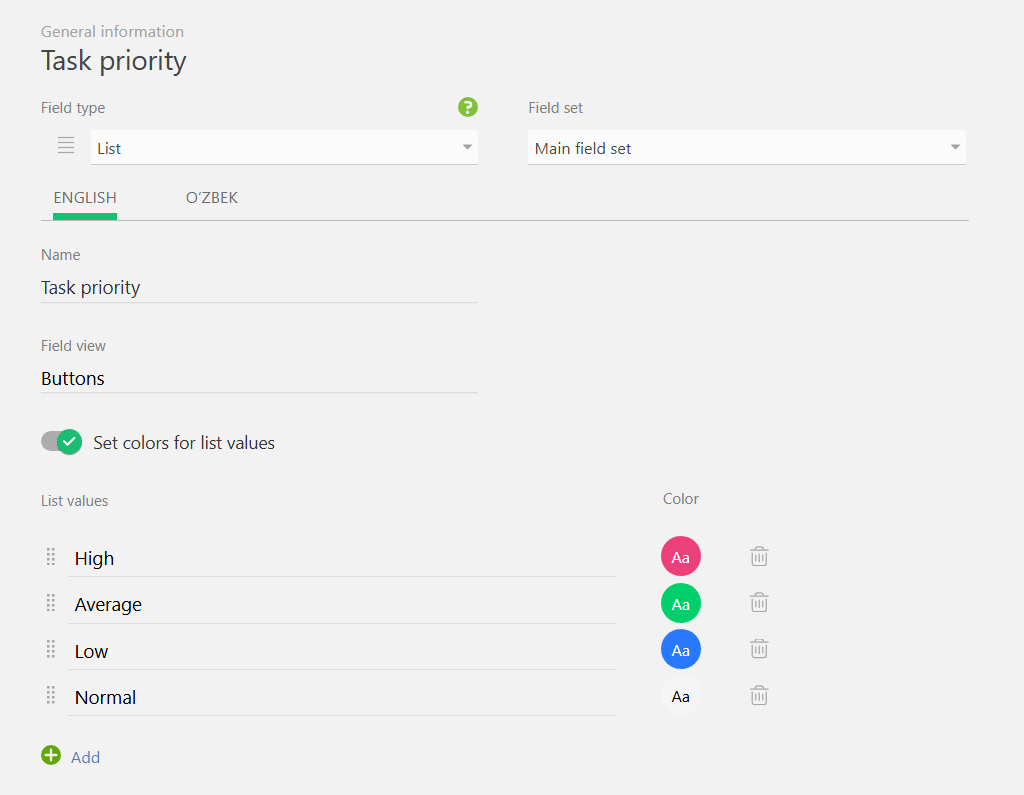
It will analyze the candidate’s request and pick the best option from the values you set. After it sets the value, the request can be moved to the correct stage in Planner immediately – just specify this condition in the list.
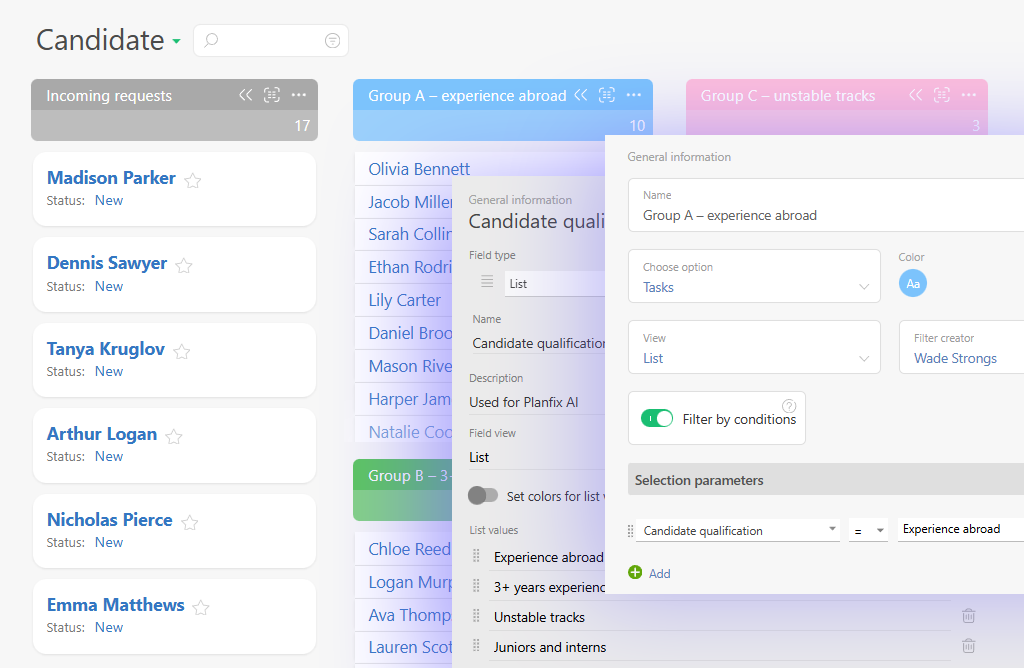
After that, any scripts, tasks, reminders, or whatever you’ve configured, can proceed.
So, we’ve handled texts and calls. Now it’s time to bring order to the bigger stuff. Meet Planfix’s masters of order and automation.
Mail Assistant
Hi! I’m the Mail Assistant. It’s my job to automatically create email processing rules. Here’s how I work.
When someone sends an email to your virtual Planfix mailbox, it becomes a task. Go to the task’s description and click “Create processing rule.”
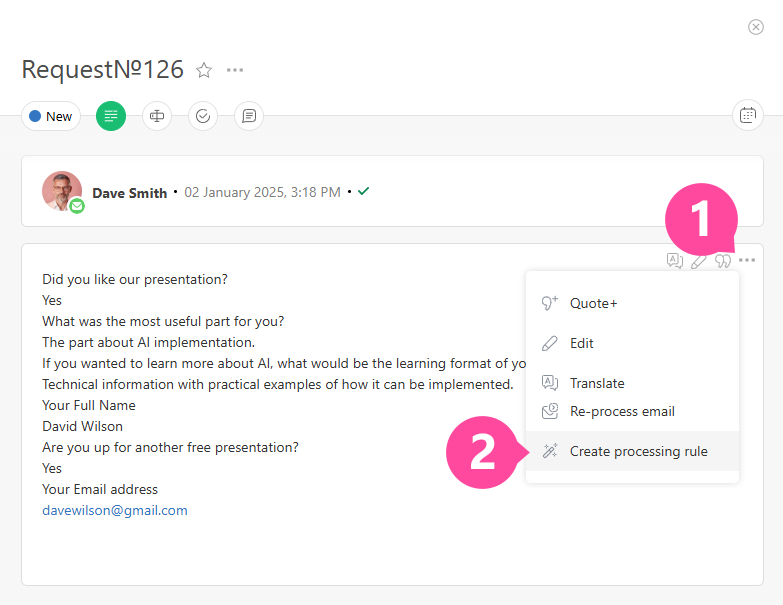
The Mail Assistant will automatically analyze the email, break all available data into info blocks, and create a rule. From there, you can review it and keep what you need.
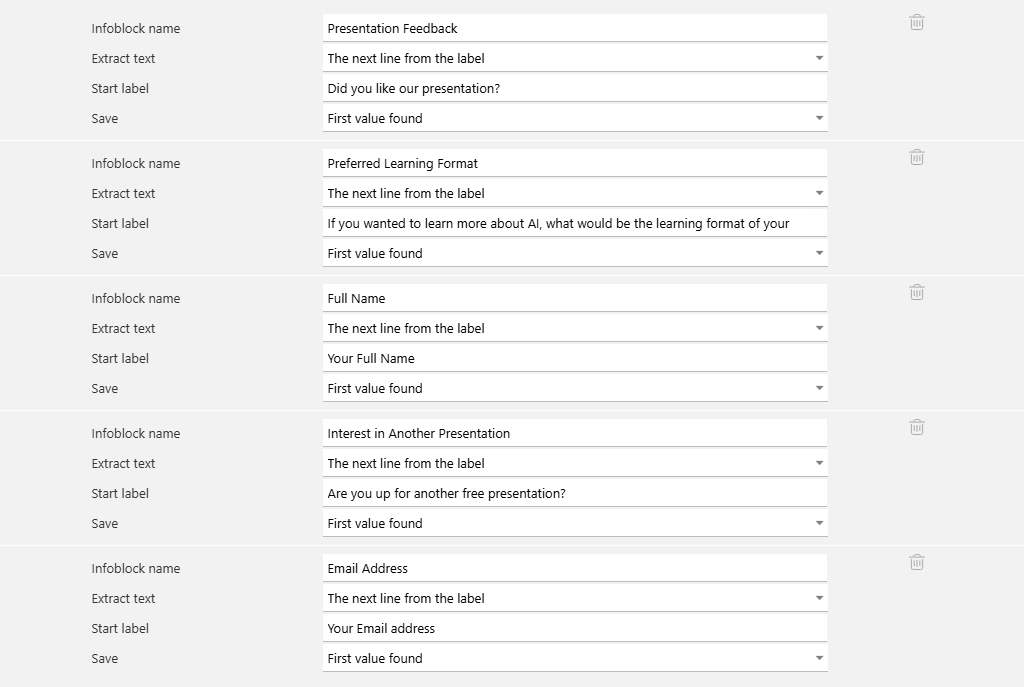
As a result, new requests will be sorted automatically and assigned to the right people.
Request Operator
Hi! I’m the Request Operator. I can do a lot because I have very few limitations. For instance, I can turn a messy idea into a clear task and help the business make the right decision.
Imagine a client sends you a long message like this:
“We want to launch a new loyalty program, integrate the CRM, send a campaign, add a referral bonus, and think through promo mechanics.”
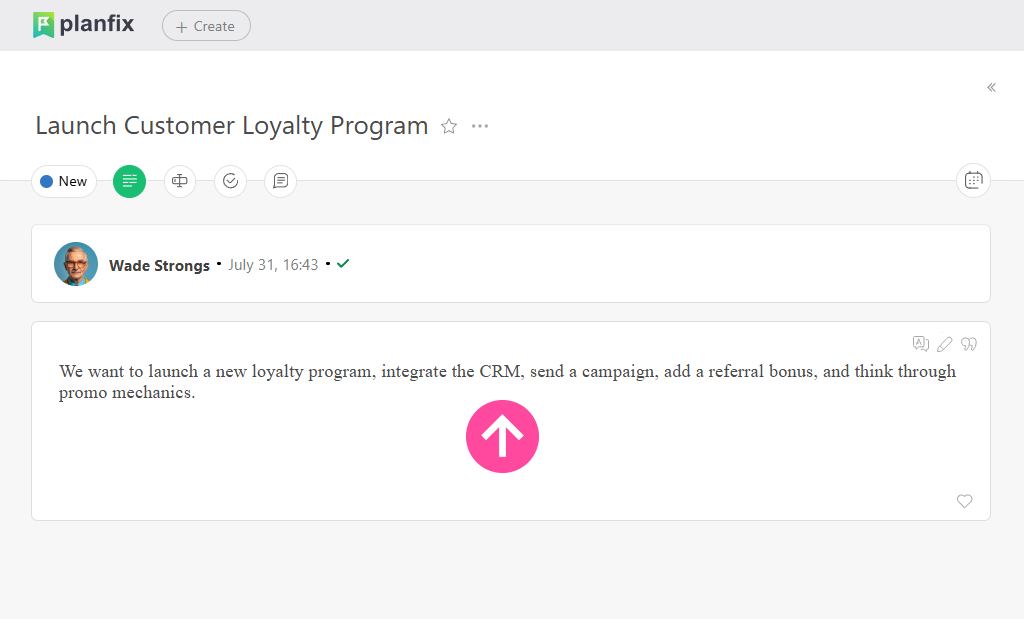
It looks like a simple request, but in reality, there are many hidden tasks and dependencies. The manager can send it to the Planfix AI Request Operator, either through a status change or by pressing a button. Either way, the point is the same: they need to pass along the client’s message.
The Agent will analyze the text, break it into clear steps, highlight risks such as “no deadline specified” or “bonus mechanics must be approved,” and suggest clarifications. As a result, the team receives an immediate, clear action list rather than a vague request.
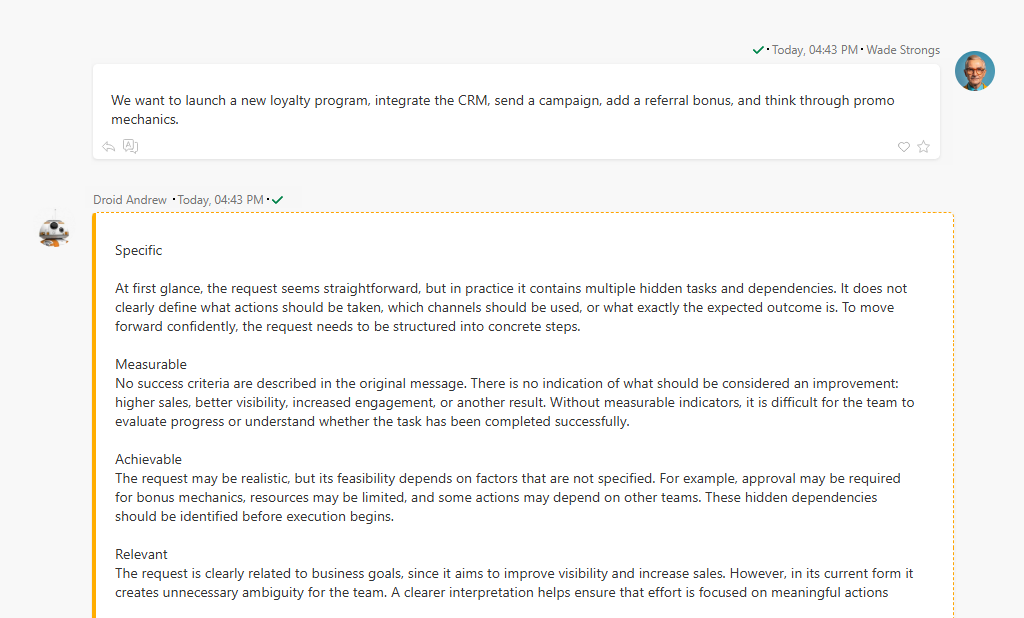
So you get less chaos and back-and-forth, and more time to focus on what actually needs to be done.
And finally, meet Planfix’s special agents. They aren’t invited to meetings, and no one praises them at the company party, but without them, your processes wouldn’t run this fast.
Dataminer
Hi everyone, I’m the Dataminer, your personal “information hunter.”
Most people will agree that it’s much more convenient when data comes in an unstructured form. For example, when a client writes their requirements in free text or when, during a chat, you can ask them to provide some additional details. This often happens in conversations created through messenger or social media integrations.
Picture a dialog like this:
Client:
Hello! I want to order 200 boxes of model X120, delivery to Atlanta, and I need an invoice for Trade Inc.
Manager:
Hello! Thank you for your request. Could you please clarify the desired delivery date?
Client:
Preferably by October 15.
Manager:
Got it 👍
For a human, this is just a chat. But for the Dataminer, it’s ready-made information:
- Product: X120
- Quantity:200
- Delivery address: Atlanta
- Company: Trade Inc.
It can automatically extract the necessary information from the conversation and fill in the fields in the task or contact.
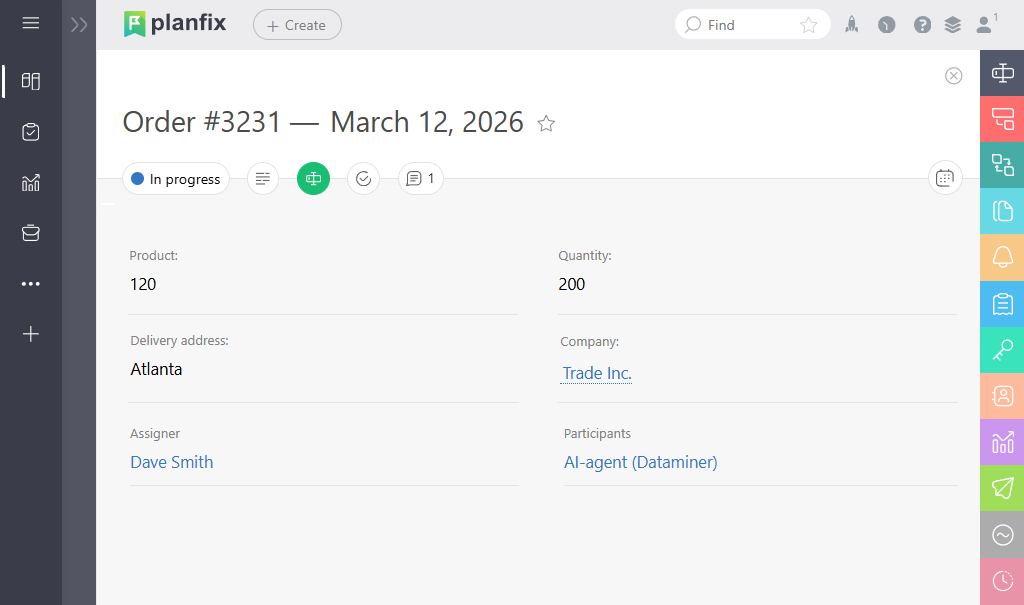
As a result, the manager doesn’t have to retype anything manually. Instead, the order lands in the system already structured, and processing moves faster.
Summarizer
Look at him bragging. Try keeping the task status up to date at all times. Hi, I’m the Summarizer. I read the comments, interpret what’s going on, and update the field with the current status when needed.
Imagine you have a single task that received numerous comments over a week. During this time, people discussed deadlines, approved the layout, moved the due date, the client gave feedback, and sent revisions. Typically, a manager would have to reread everything just to figure out the current status.
But the Planfix AI Summarizer can take the entire thread and create a summary like this.
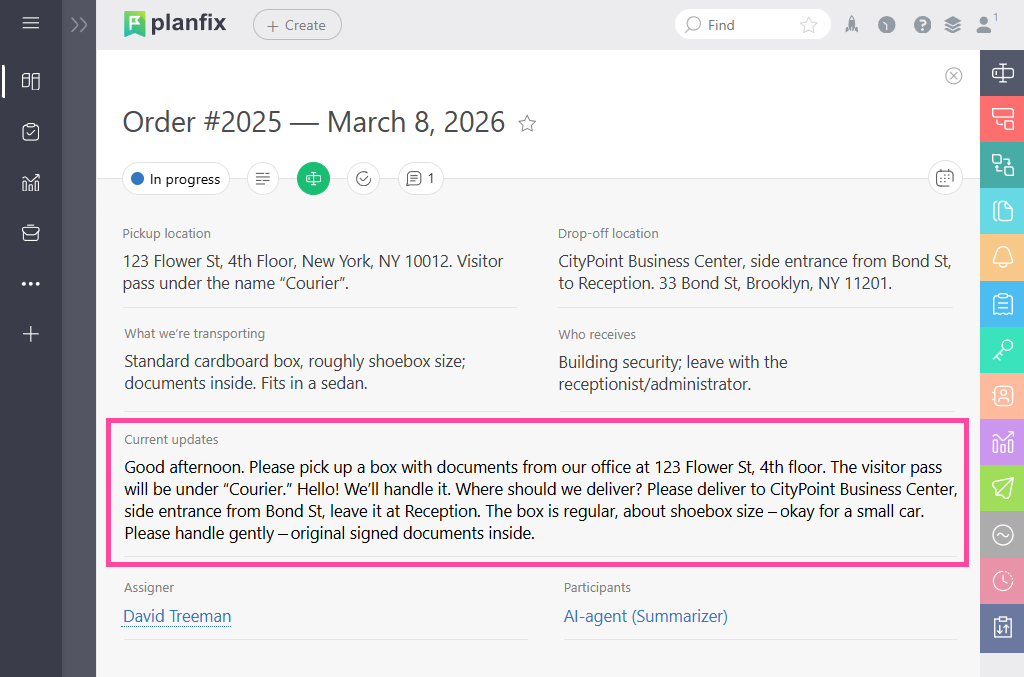
As a result, any teammate who opens the task immediately sees the context and current state of work, even if they joined the project today.
Interviewer
I’m the new one here. You can call me the Interviewer. Nice to meet you. My job? Asking clarifying questions and putting the answers straight into the right fields.
Let’s assume your manager starts chatting with a client. At any point, the Interviewer can step in to carefully collect contact details or ask standard questions. If needed, it can also initiate the conversation on its own, gather all the necessary information, and bring a human in when it becomes necessary.
Imagine a potential client writes to the company:
Client:
“Hello! We’re interested in implementing a CRM for the sales team.”
The Planfix AI Interviewer can jump in right away and start the dialog:
Interviewer:
Great! Could you please tell me your name? How many people will use the system? When are you planning to start?
It then automatically enters all the answers into the appropriate task fields or the contact card.
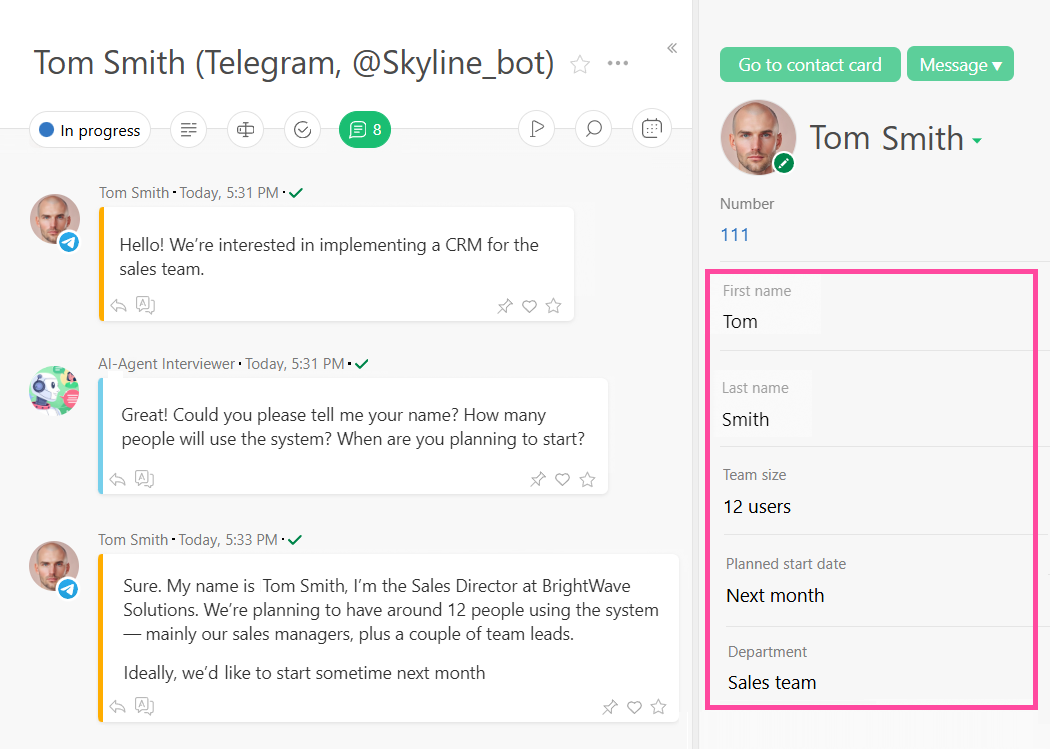
As a result, the manager gets a complete and structured request, doesn’t waste time on back-and-forth, and can immediately offer the right solution.
This Is Just the Beginning: The Evolution of Planfix AI Agents
That’s what Planfix AI agents look like today. As you can see, each one is useful on its own. But together, they’re a real force to be reckoned with. While the Planfix AI team can already do a lot, this is just the beginning. Work is already underway to make the system smarter, more helpful, and more integrated into your daily work.
Knowledge Base
For example, Planfix AI will soon be able to work with your knowledge base. You upload documents, instructions, or SOPs to Planfix, and it will start suggesting ready-made replies to your teammates right in the comments. All they have to do is review and, if needed, make slight adjustments.
AI Agent “Censor”
There are also plans to introduce a “Censor” AI agent that will monitor the quality of communication with clients. You set the criteria (such as rude tone, missed deadlines, or inaccurate wording), and the Censor will immediately notify the manager if something goes wrong. It won’t matter which channel the client uses – chat, email, call, or voice message. The Censor will detect and process it according to your rules.
Extended Voice Task Creation
Soon, you’ll also be able to create tasks by voice in an extended format, including assignees, participants, project, and all necessary parameters.
Summarizing the Current State of Tasks and Projects
The Planfix team is also considering summarizing the current state of affairs across tasks and the whole project. The idea is to add a new tab in the project that always shows a brief digest of what’s happening now and what’s been done recently.
File Content Recognition
Another promising improvement is enabling AI agents to recognize the contents of files sent or uploaded to Planfix. Based on recognized data, agents can extract necessary information, auto-fill fields, classify leads, and even create contracts or acts.
Workspace Setup from Description
And the cherry on top: setting up workspaces from a plain description. You describe the processes you want to build, and the AI will create the objects, fields, filters, and reports for you. In short, it’s a ready-to-use structure based on your description, so you can start working right away.
Again, this is only the beginning. Planfix has become the brain of your processes, and Planfix AI is its intelligence. Together, we’re not just building a task management system, but a living ecosystem that understands your business, anticipates its needs, and helps it grow.
Welcome to the future of working with Planfix – one that is innovative, flexible, and human (sort of).
Start your journey with Planfix AI and see how intelligent automation fits into your workflow.
