
Access to directories
Access to directories and their subsections is configured by account administrators or authorized employees. It is configured in the Directories section:
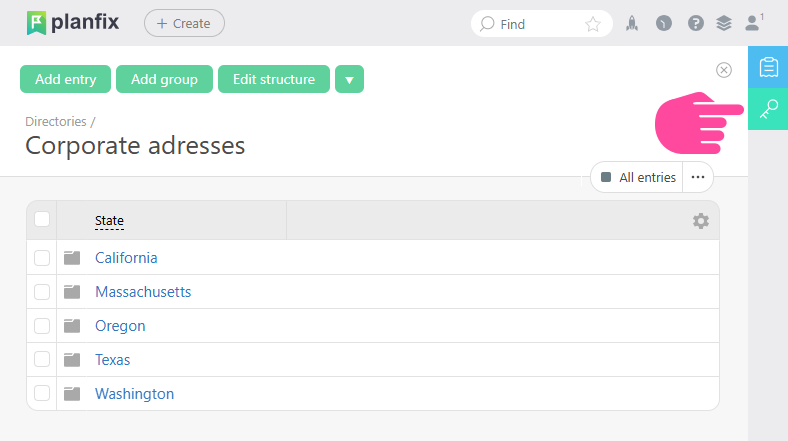
Here you can view and open more detailed access settings for the directory:
- In the left panel, you can see who has access to the directory entries.
- In the right panel, you can see which directory entries are available to the selected employee, group, or contact:
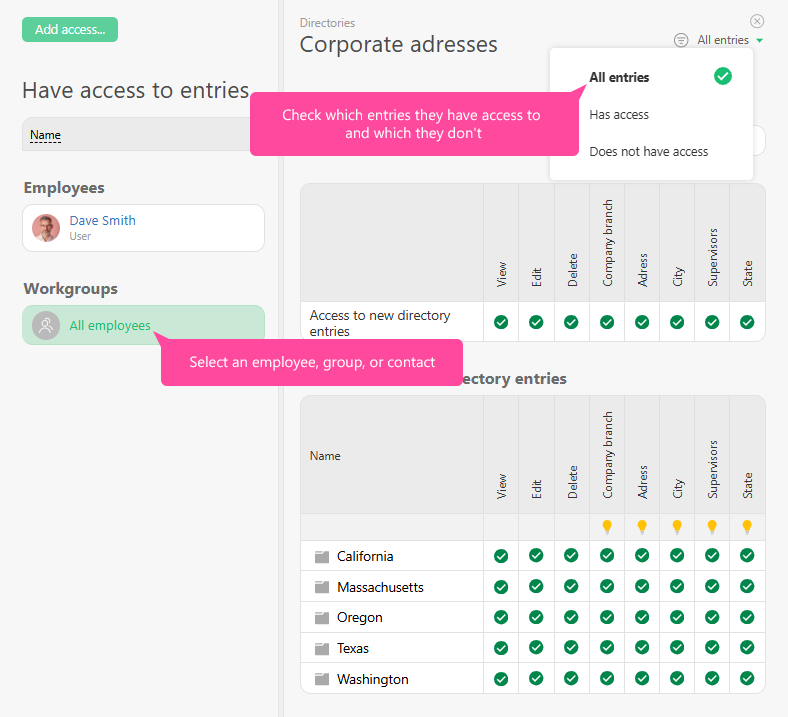
Access is added using the "Add access" button. In the window that opens, you can select a work group, employee, or contact to configure their access in more detail later. Access is removed by clicking the "Remove access" next to the employee or group name. To edit access, select a group, employee, or contact by clicking the row for that person. After the row is highlighted in green, you can configure their permissions by granting access to view, edit, or delete records and record groups.
Click on the Permissions tab (the key button):
and you can view and edit access to a Directory.
Or you can go to the more detailed access settings:
You can see who has access to directory entries by looking at the Has access to entries section. In this same interface, you can view directory entries that the selected employee/group/contact can or cannot access:
Grant access by clicking the Add access button:
In the window that opens, you can select a workgroup, employee, or contact and configure their access in greater detail:
Access is deleted by clicking the Remove access button (the key) next to the person or group's name:
To edit access, click the row with the group/employee/contact to select it:
Once the row has been selected (highlighted in gray) you can grant viewing, editing, or deleting access to entries and groups of entries.