
Display as hyperlink: Difference between revisions
From Planfix
(→Go To) |
No edit summary |
||
| Line 6: | Line 6: | ||
}} | }} | ||
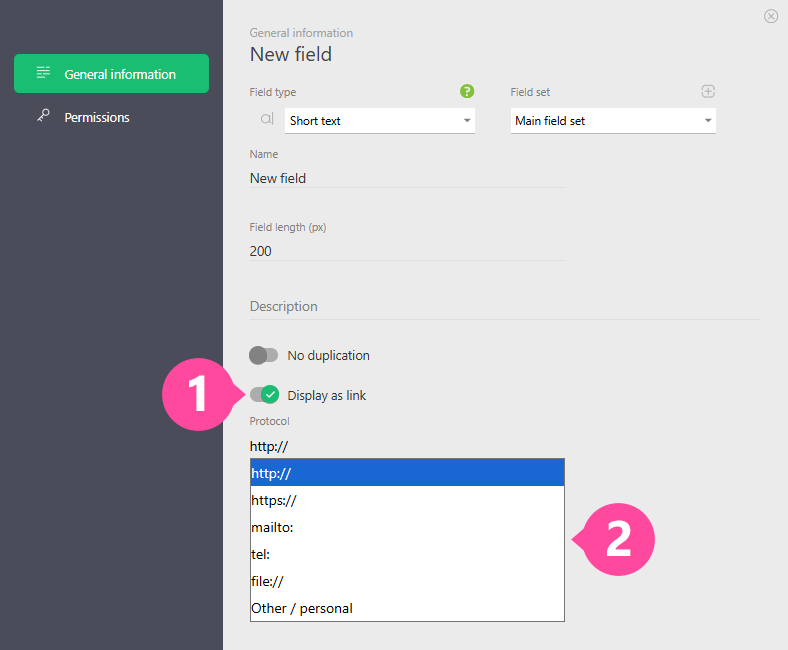
There is a setting '''Display as hyperlink''' available for [[ | There is a setting '''Display as hyperlink''' available for [[Short text]] custom fields. Using this setting turns the value entered in the field into an active hyperlink. You can also select the protocol to use to open the link: | ||
https://s.pfx.so/pf/XA/peyItB.png | https://s.pfx.so/pf/XA/peyItB.png | ||
Revision as of 13:52, 26 December 2025
There is a setting Display as hyperlink available for Short text custom fields. Using this setting turns the value entered in the field into an active hyperlink. You can also select the protocol to use to open the link:
Important
- The file:// protocol lets you store a link in Planfix to files on your local computer or on a local network.
- The file:// protocol only operates correctly with certain browsers, and you will need to install an additional browser extension. Browser and extension combinations:
- Google Chrome with the extension Enable local file links