
Setting up directory access: Difference between revisions
From Planfix
| Line 11: | Line 11: | ||
https://s.pfx.so/pf/mG/ehSTLT.png | https://s.pfx.so/pf/mG/ehSTLT.png | ||
This interface gives you flexibility when it comes to configuring access. You can grant [[Workgroups | employee groups]], [[employees]], or [[contacts]] access to existing entries, future entries, groups of entries, or directory fields. | This interface gives you flexibility when it comes to configuring access. You can grant [[Workgroups | employee groups]], [[employees]], or [[contacts]] access to existing entries, future entries, groups of entries, or directory fields. | ||
You can grant [[Setting up viewing access to entries or groups of entries | viewing]], adding, or [[Setting up edit/delete access to entries or groups of entries | editing/deleting]] access to directory entries. | You can grant [[Setting up viewing access to entries or groups of entries | viewing]], adding, or [[Setting up edit/delete access to entries or groups of entries | editing/deleting]] access to directory entries. | ||
==Go To== | ==Go To== | ||
Revision as of 15:55, 8 December 2025
You can view or configure general access settings for a directory in the Permissions tab (the key button):
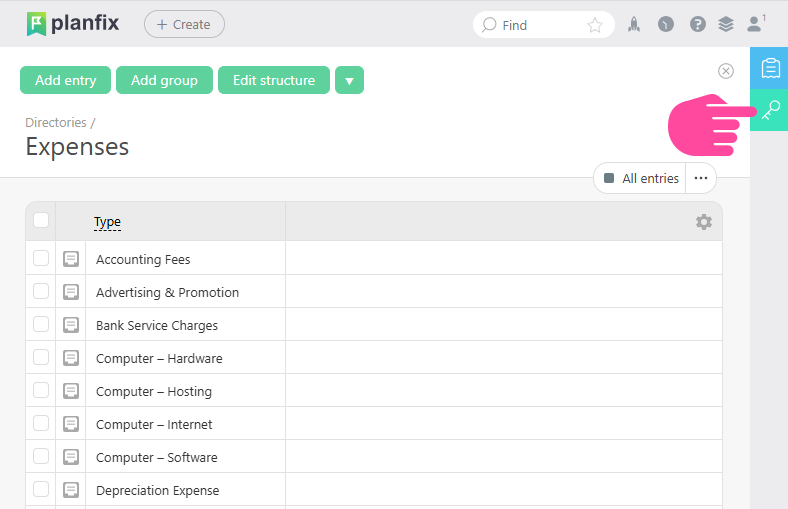
Interface for setting up permissions
You can configure access:
- By clicking employee or group names
- By using the "Manage" button
Access permissions settings:
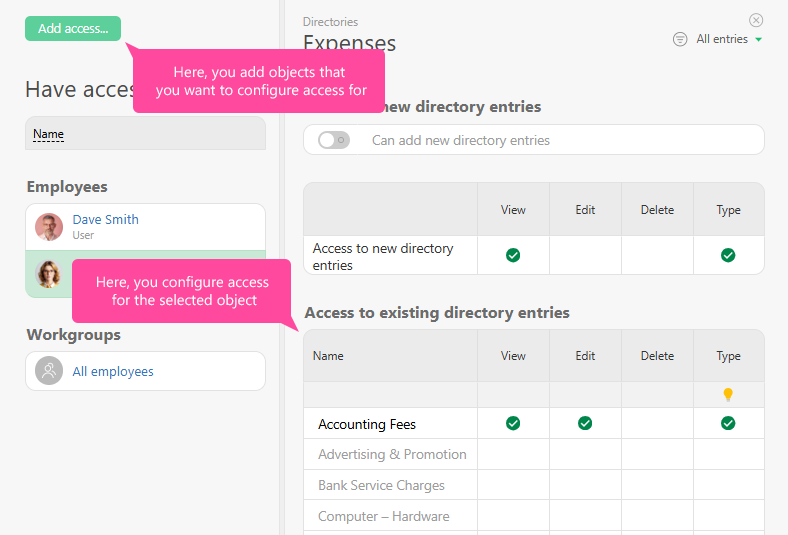
This interface gives you flexibility when it comes to configuring access. You can grant employee groups, employees, or contacts access to existing entries, future entries, groups of entries, or directory fields.
You can grant viewing, adding, or editing/deleting access to directory entries.