
Bulk report actions: Difference between revisions
From Planfix
No edit summary |
|||
| Line 5: | Line 5: | ||
|description=bulk report actions | |description=bulk report actions | ||
}} | }} | ||
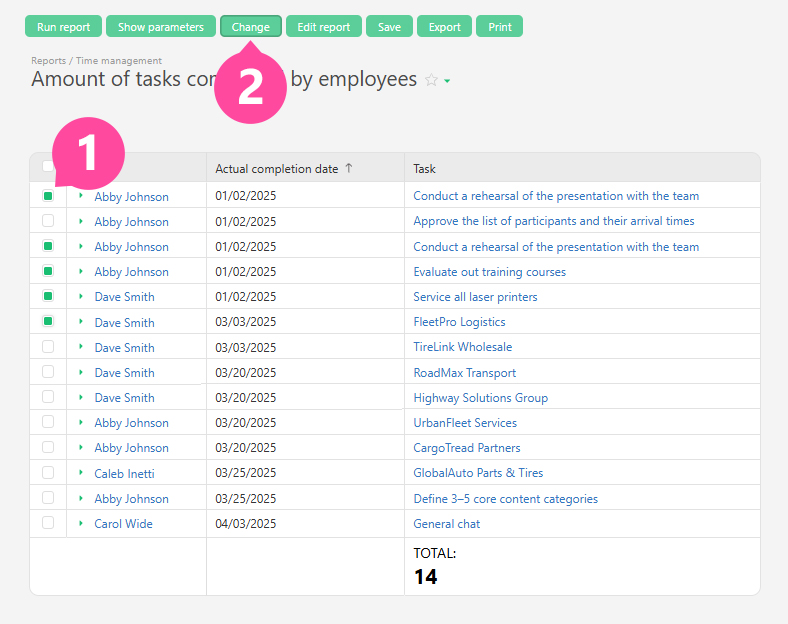
In [[reports]], you can select the desired tasks and make changes to them in bulk. To do this, run a report, click the checkbox next to the desired tasks, and click the ''' | In [[reports]], you can select the desired tasks and make changes to them in bulk. To do this, run a report, click the checkbox next to the desired tasks, and click the '''Change''' button: | ||
https://s.pfx.so/pf/Rc/OOLdjR.jpg | https://s.pfx.so/pf/Rc/OOLdjR.jpg | ||
Latest revision as of 08:01, 29 October 2025
In reports, you can select the desired tasks and make changes to them in bulk. To do this, run a report, click the checkbox next to the desired tasks, and click the Change button:
This allows you to perform operations on tasks appearing in a report as a result of some complex combination of conditions and/or data stored in different objects. For simpler scenarios, you can use bulk task actions.
Important
- Contacts can also be modified in bulk in reports.