
Archive directory entries: Difference between revisions
From Planfix
No edit summary Tag: Manual revert |
No edit summary |
||
| Line 8: | Line 8: | ||
To display the "Archived" column in the directory: | To display the "Archived" column in the directory: | ||
*Click on the gear icon: | *Click on the gear icon (1). | ||
*Add the column(2,3) and save(4): | |||
https://s.pfx.so/pf/ | https://s.pfx.so/pf/dj/Y3U4q1.png | ||
Archived entries: | Archived entries: | ||
| Line 20: | Line 17: | ||
*are displayed in gray in the list of entries when viewing the directory: | *are displayed in gray in the list of entries when viewing the directory: | ||
https://s.pfx.so/pf/ | https://s.pfx.so/pf/47/ma1NAP.png | ||
If a field contains a link to a directory entry that has been archived, it will be displayed like a normal entry and will work in reports, as well as in the Planfix interface. | If a field contains a link to a directory entry that has been archived, it will be displayed like a normal entry and will work in reports, as well as in the Planfix interface. | ||
==Go To== | == Go To == | ||
*[[Directories]] | *[[Directories]] | ||
*[[Feature Description]] | *[[Feature Description]] | ||
Revision as of 13:09, 26 December 2025
If you don't plan to use a directory entry anymore but can't delete it because there are links to it in Planfix objects, you can archive it instead.
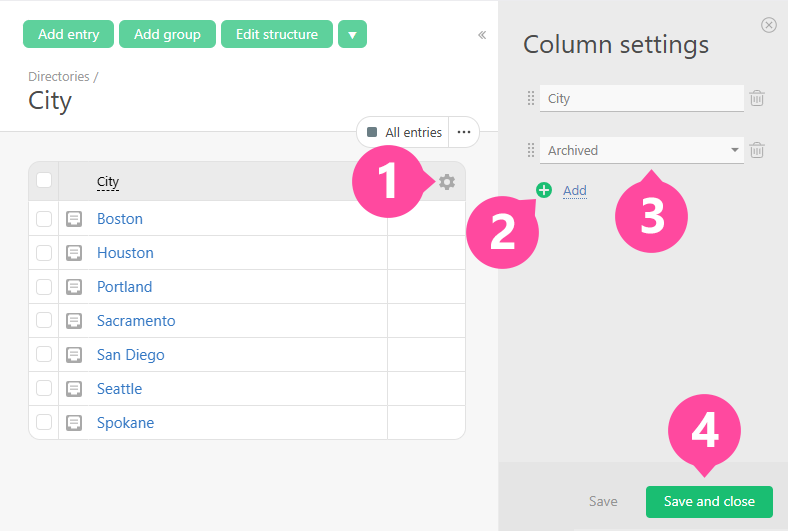
To display the "Archived" column in the directory:
- Click on the gear icon (1).
- Add the column(2,3) and save(4):
Archived entries:
- don't display in lists for selecting Directory entries or Sets of directory values;
- are displayed in gray in the list of entries when viewing the directory:
If a field contains a link to a directory entry that has been archived, it will be displayed like a normal entry and will work in reports, as well as in the Planfix interface.