
The Instagram integration lets you reply to comments under posts and direct messages (DMs) from contacts right from Planfix.
Contents
- Features
- Integration preferences
- Setup
- How to use the integration
- Possible issues
- Rules for replying to direct messages
- Rules for replying to post comments
- Technical limitations
- Note
- Additionally
- Useful
- Important
Features
- Receive and process customer inquiries from Instagram in Planfix.
- Build a database of potential leads.
- Collaborate as a team on customer requests.
Integration preferences
The settings will be displayed after integration with Planfix:
- Do not create a task if the comment only contains emojis.
- Do not create a task if the direct message or story reaction only contains emojis.
- Create tasks for story mentions.
- Use the full template form when sending direct messages.
Setting up the integration
The integration can work in two different ways, depending on how your accounts are set up in the Meta ecosystem:
- Option 1: Integration via Facebook. Use this option if:
- you have a Facebook business Page,
- and an Instagram professional account is connected to that page.
With this configuration, Planfix connects both integrations—Facebook and Instagram—at once because they use the same Meta API. Make sure you have an Instagram professional account connected to a verified Facebook page.
- Option 2: Instagram integration (Instagram Login). This option works if:
- you don't have a Facebook business Page,
- and your Instagram uses a professional account but is not connected to Facebook.
In this case, Planfix uses separate Instagram Login authorization, which lets you connect to Instagram only (without Facebook).
To set up the integration, go to Account management — Integrations — Social media, then connect the page you need. In the integration settings, specify the template for creating contacts and Objects for tasks created from direct messages or comments.
How to use the integration
Direct messages
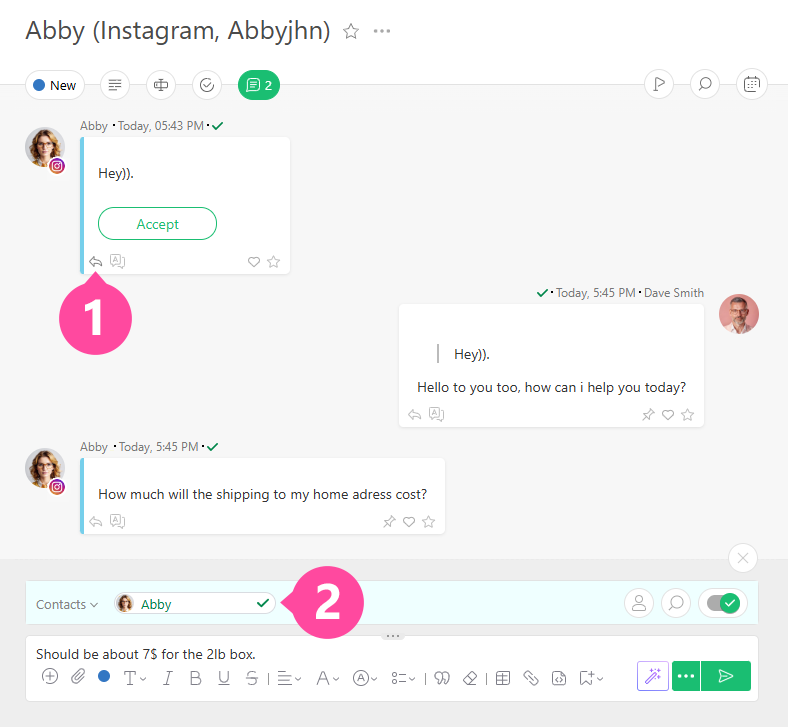
When a user sends you a direct message, Planfix creates a task with their message. To reply, click the arrow under the customer's message, or notify them when you send your reply:
Important
- You can reply to a customer’s message within 24 hours.
- If the contact deletes a direct message in Instagram, it will be automatically deleted in Planfix as well. The comment will show: "Message deleted by Instagram user."
Comments under posts
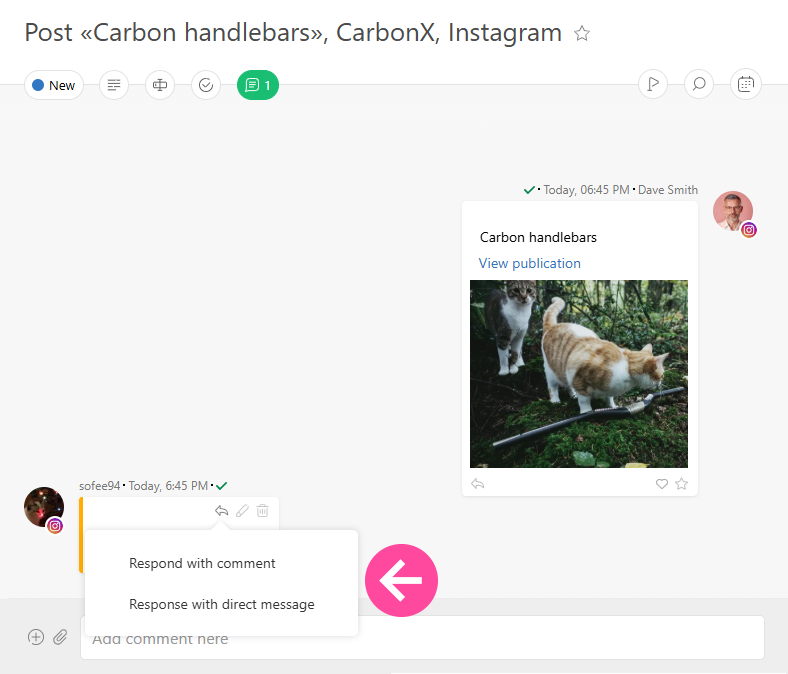
If a customer leaves a comment under your post, Planfix automatically creates a task. In the task, you can see which post the comment was left on and choose how to respond:
- Respond with comment
- Respond with direct message
Important
- You can reply to a customer’s comment via a direct message within 7 days of when it was posted.
- Sending may fail if the contact’s Instagram profile is private.
Possible issues
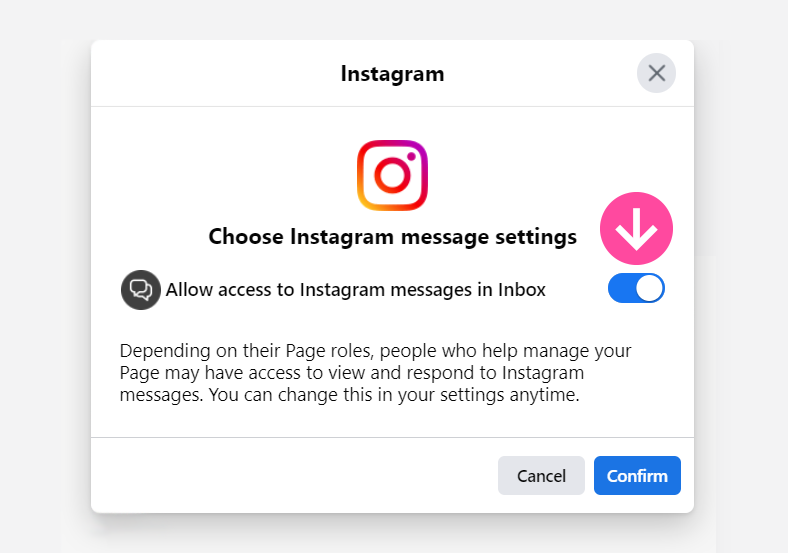
- If direct messages from your Instagram page do not appear on Planfix after setting up the integration, check the settings for Instagram messages in Facebook Business Suite. You must allow access to messages from Instagram under the Inbox:
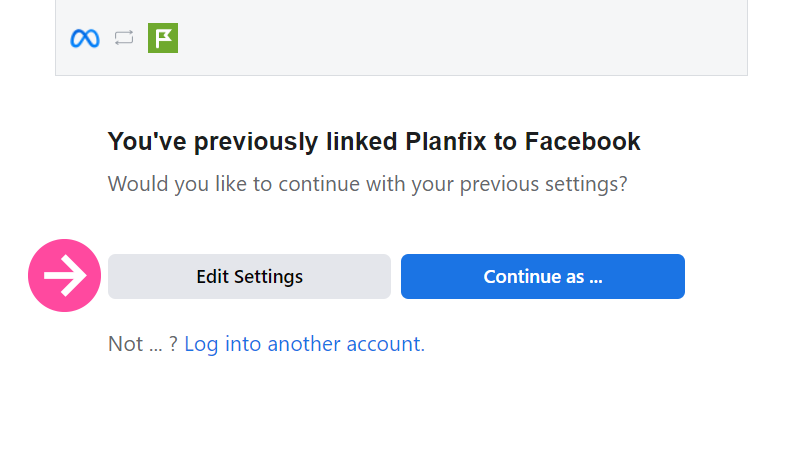
- If you have previously connected to Facebook or Instagram and see the following window, click "Edit settings" and choose the new Facebook or Instagram page.
- If the integration is set up but no messages from Instagram are coming through, you'll need to enable the toggle switch for linked tools in the Instagram message management settings:

- If you get an error when trying to send a DM reply to a comment under a post, it may be because the page is not connected to the Instagram account, or the connected Instagram account is not a professional account. To resolve this, see the Meta Business Suite instructions for connecting Instagram to a business portfolio.
Rules for replying to direct messages
- Sending images. The image you send must be between 256 px and 6144 px on each side. Max file size is 8 MB.
- Character limit. A reply sent from Planfix can be up to 1000 characters.
- Broadcast detection. In Planfix, messages are treated as a bulk broadcast if more than three identical messages are sent within 5 minutes. Such messages are stored in the Planfix database for one month and are added to the task only after the customer replies. This reduces load on Planfix servers and prevents task timelines from being cluttered.
- Reply template form. To capture orders properly, enable Use the full template form when sending direct messages so you can see and fill additional fields. For regular chat, you can leave this option turned off.
Rules for replying to post comments
- Character limit. A reply from Planfix to an Instagram post comment can be up to 265 characters.
- Handling FAQs. When chatting with customers, you can use quick replies for common questions.
Use the full template form when sending direct messages
In the integration preferences, you can enable this option:
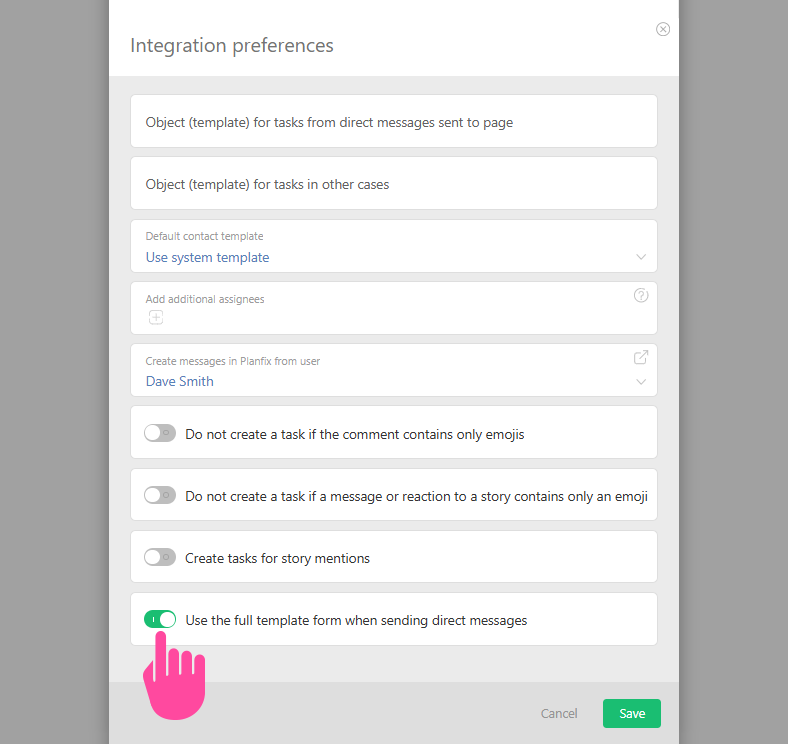
Depending on your goals, you can use the short or full form of direct message replies:
- For regular messages with customers, use the short form of the template — the option in the settings is inactive.
- For receiving orders, it is better to use the full form of the template, as orders usually have additional fields that you can see and fill in — the option in the settings is active.
Technical limitations
- Instagram IGTV and Reels are currently not supported by the integration.
- The official Instagram API does not allow forwarding messages in DMs and does not support call handling via the integration, so we recommend disabling calls using the instructions.
Note
Instagram’s API does not support all content types. If a direct message or comment contains content that is not supported by the official API at the moment, Planfix will receive empty data along with an indicator that the content is currently unsupported. When Planfix receives such a response, it automatically adds a comment to the task: Content not supported by official Instagram API.
Currently, the official API does not support:
- Photo galleries sent in direct messages.
- Forwarding Reels in direct messages.
- Forwarding Stories in direct messages.
Additionally
- Information about conversations inside Instagram — see Facebook Help Center.
- Available integrations — see the list of services in the Help Center.
Useful
- When communicating with customers , you can utilize the quick reply feature to address frequently asked questions.
Important
Planfix has a special mechanism for working with mass messages from Instagram and WhatsApp. This currently works as follows: If the system detects more than three identical messages within five minutes, they are classified as mass mailings.
Planfix stores these messages in its database, but they are not added to tasks until it receives a customer's response.
When a response is received, Planfix checks whether the message is in the database; if so, it adds the message to the task, along with the customer's reply.
This mechanism was implemented so that the notification feeds of people involved in a task are less likely to be overloaded with irrelevant messages, and so that the Planfix servers are not overloaded. Otherwise, such overload could severely delay the processing of other messages.